

August 24, 2026
Time Management for ADHD That Actually Works in 2026
Practical time management for ADHD strategies that stick — routines, visual timers, batching, and widget setups that turn good intentions into finished work.
You sit down to answer one email and look up later with no clear idea where the time went. The deadline that felt safely distant is suddenly urgent, your next meeting is close, and the task you planned to finish still hasn’t started. You’re not lacking a planner. You’re trying to manage time with a brain that doesn’t reliably make time feel present.
Table of Contents
- Why Time Management Breaks Differently With ADHD
- Build Anchor Routines That Start and End Your Day
- Chunk, Batch, and Bridge the Gaps Between Tasks
- Make Time Visible to Beat the Classic ADHD Time Traps
- Set Up Pretty Progress Widgets That Carry the Load
- Match the System to Your Brain Instead of Forcing a Fit
- Your First Seven Days and When to Ask for Backup
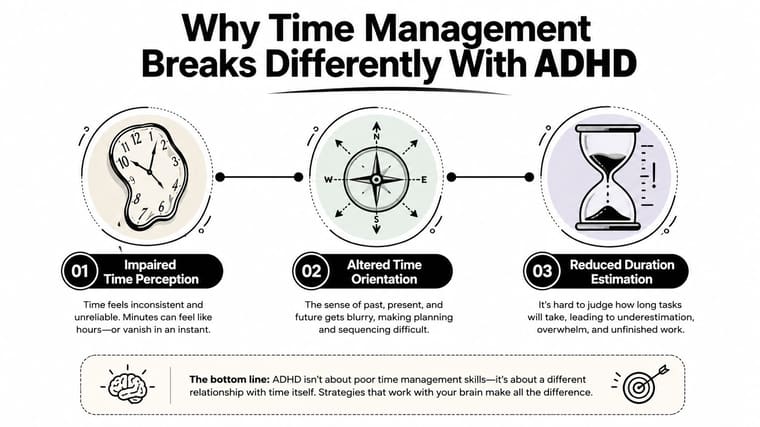
Why Time Management Breaks Differently With ADHD
“Just plan better” is weak advice for ADHD. Planning can tell you what should happen, but it doesn’t automatically help you estimate duration, feel time passing, sequence future steps, or move from intention into action.
A 2023 review of adult ADHD research found a consistent pattern across three time-related skills: estimating time intervals, reproducing time intervals, and managing time in daily life. That matters because ADHD timing problems aren’t limited to forgetting appointments. They can affect how time feels and how you act on it, including deadlines, pacing, and scheduling.
The four supports that work better than willpower
The practical response is to stop demanding that your internal clock do a job it handles inconsistently. Build external supports around four pillars:
- Anchor routines: Attach short routines to events that already happen, such as coffee, lunch, or closing your laptop.
- Chunking and batching: Turn vague work into bounded blocks, then group similar tasks so every transition doesn’t require a fresh decision.
- Visible time: Use countdowns, progress bars, alarms, and other cues that show what “now” means.
- Personal fit: Match the amount and format of structure to your actual brain, work, energy, and environment.
If you want a broader introduction to practical planning, the Tinymoose time management guide is a useful companion, especially for students balancing assignments and routines. For ADHD-specific focus support, see this guide on how to focus with ADHD.
The core rule: Don’t make motivation responsible for creating time awareness. Put time where you can see it.
The rest of this system translates those pillars into routines and widget setups you can use immediately.
Build Anchor Routines That Start and End Your Day
Anchors work because they reduce decisions. You don’t need to ask, “What should I do first?” every morning or reconstruct your entire day after lunch. You follow a short script tied to a reliable cue.
Keep each anchor under ten minutes. The routine should be short enough to complete on a bad day, not just on your most organized day.
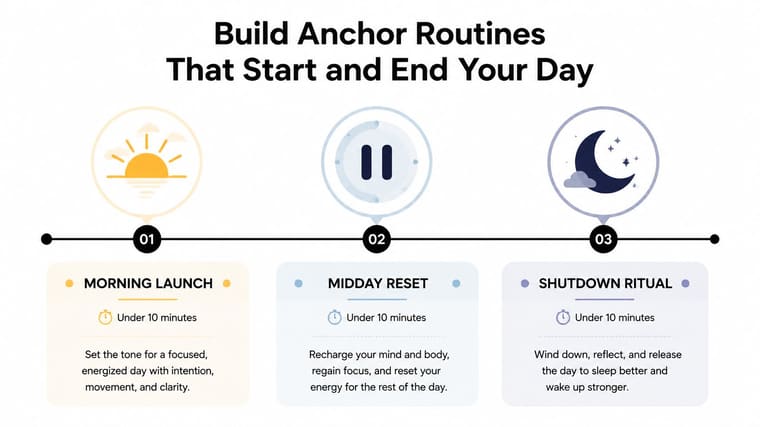
Morning launch
Cue: Your first coffee, tea, or glass of water.
Script:
- Drink water and take prescribed medication as directed.
- Read your top priority for the day.
- Scan the calendar for fixed commitments.
- Choose the first visible action, such as “open the project brief.”
- Start that action before checking unrelated messages.
The important part is the final beat. “Work on the report” is too large to start cleanly. “Open the report and write the heading for the next section” gives your brain a physical entry point.
Midday reset
Cue: Lunch or your first substantial break.
Use this compact block:
- Check what’s complete.
- Move unfinished work to a specific later block.
- Identify the next task’s first action.
- Refill water and clear one distraction from your workspace.
Don’t use the reset to redesign your whole life. Its job is to reconnect you with the day after attention has drifted.
Shutdown ritual
Cue: Your last laptop action or the moment you finish work.
Try this sequence:
- Brain-dump open loops.
- Choose tomorrow’s first action.
- Put essential materials where you’ll see them.
- Check the first calendar commitment.
- Close screens and leave the workspace.
A shutdown routine protects tomorrow’s launch. Without it, the next morning begins with retrieval, sorting, and uncertainty, which creates unnecessary friction before the first task.
A routine that feels almost too simple is often the one you’ll repeat.
Put each anchor on a small checklist, calendar reminder, or home-screen note. The cue starts the routine. The fixed beats prevent the routine from turning into another open-ended project.
Chunk, Batch, and Bridge the Gaps Between Tasks
Most ADHD work plans account for the task and ignore the handoff. That’s where the plan breaks. You finish one activity, lose the thread, search for what comes next, and discover that the next block has already dissolved.
Use chunking, batching, and bridging as one loop.
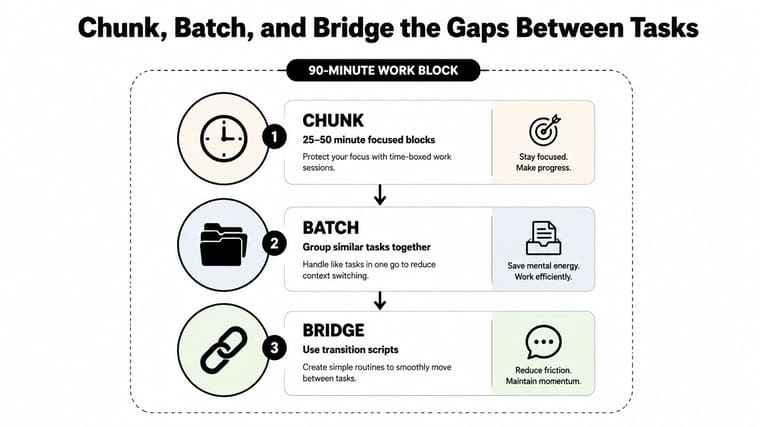
One realistic work block
Suppose you have a ninety-minute window and need to write a client proposal, answer related messages, and record the next action for tomorrow.
Start with the first cue: “Open laptop, open proposal document, start visible timer.”
Then use this flow:
- Chunk: Work on the proposal in a bounded block. Choose a block between twenty-five and fifty minutes based on task novelty and attention. A new or resistant task may need the shorter option. Familiar work may support the longer option.
- Bridge: Stop before you drift into an unplanned activity. Stand up, drink water, read the next cue, and name the first action of the following block.
- Batch: Handle proposal-related email together rather than checking messages between sentences. Similar tasks share one window, which reduces context switching.
- Close the loop: Write a short note such as “Next: add pricing assumptions under section three.” This turns tomorrow’s start into a continuation, not a reconstruction.
The transition bridge is the part many people skip. Give it a fixed script:
- Stand.
- Take water.
- Read the next task.
- Open the required file.
- Do the first action immediately.
Don’t fill the gap with social media. A transition needs enough movement to reset your attention, but not enough novelty to pull you into a different world.
Adjust the block without abandoning it
If the proposal takes longer, stop at the planned boundary and record the next action. If you finish early, use the remaining time for a related task from the same batch. The structure survives either outcome.
For more guidance on turning a calendar into visible work periods, use this time-blocking guide. The method works best when breaks and handoffs receive their own space instead of being treated as imaginary.
The video below can also help you visualize a simple focus-and-transition loop.
Make Time Visible to Beat the Classic ADHD Time Traps
Internal time awareness is not a dependable control panel for many people with ADHD. The adult ADHD review linked above found difficulties with estimating, reproducing, and managing time, while a 2024 intervention study in children with ADHD found that time perception itself can improve through training, with benefits extending to hot executive functions and behavioral symptoms, though not to working memory, inhibitory control, or cognitive flexibility. The study is useful because it treats time perception as a modifiable target, not a permanent verdict. Read the intervention study for the research details.
The practical conclusion is straightforward. Don’t wait to notice time internally. Externalize it.
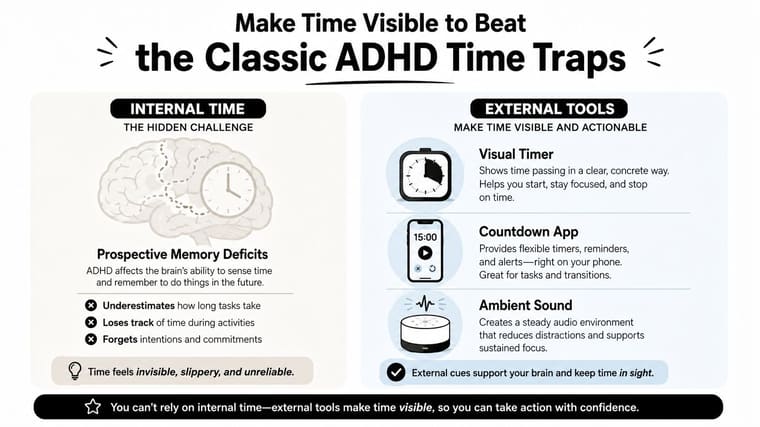
Match each trap with a visible cue
| ADHD time trap | External cue that helps |
|---|---|
| Underestimating duration | A visual countdown that shows the remaining time |
| Losing track during a task | A progress bar that marks movement through the block |
| Ignoring a future deadline | A multi-day countdown displayed where you work |
| Overshooting during hyperfocus | An audible time-box alert that signals the exit |
| Delaying task initiation | A physical start trigger, such as opening one named file |
| Losing the transition | A handoff card with the next action already written |
A visual countdown answers, “How much time is left?” A progress bar answers, “Am I moving?” Those questions are different, and ADHD systems often need both.
The future-deadline cue matters because a date that isn’t visible can remain abstract until urgency becomes painful. A countdown makes the deadline part of the environment before it becomes an emergency. The handoff card serves a similar purpose at the task level. It preserves the thread when your attention shifts.
Make the cue hard to miss
Place the cue at the point of action. Put the countdown on the screen you already use, the timer beside the keyboard, or the progress display on the lock screen. A reminder buried in an app you rarely open isn’t external support. It’s another task to remember.
The 2026 study on time processing and daily time management in children with ADHD reinforces why generic productivity advice can miss the mark. Time-processing ability and daily time management can require direct assessment, and a single system won’t suit every profile.
Your goal isn’t to make time feel natural. Your goal is to make time inescapably observable.
Set Up Pretty Progress Widgets That Carry the Load
Use one widget for one job. If a single display tries to track every project, habit, meeting, and life goal, it becomes visual noise. Set up the highest-friction cue first, then add another only if it solves a different problem.
Case one, the deadline tracker
Use this configuration for a project, exam, launch, or application deadline:
- Widget size: Medium
- Label text: “Proposal deadline” or another specific outcome
- Start value: The date and time you began the project or milestone period
- End value: The actual deadline
- Update trigger: Update the progress when a milestone is completed
- Color choice: A high-contrast color that remains readable against your home-screen background
The countdown keeps the endpoint visible. The progress fill gives you a second signal, showing whether the project is moving rather than merely approaching its due date. Break the project into milestone updates such as research, outline, draft, review, and submission.
Case two, daily focus blocks
Use small widgets to display the shape of today:
- Widget size: Small
- Label text: “Today’s focus”
- Start value: The beginning of your workday
- End value: The end of your shutdown ritual
- Update trigger: Update when each block ends
- Color choice: Use distinct colors for morning launch, deep work, admin, and shutdown
The stacked progress bar should answer one question at a glance: “Which part of the day am I in, and am I moving through it?” If admin expands and consumes the afternoon, the visual makes that drift easier to notice.
For a focused session rather than a full day, a home-screen timer setup can provide a more immediate cue.
Case three, longer goals
A large lock-screen widget works well for a course, habit, or launch that needs steady attention:
- Widget size: Large
- Label text: “Finish course” or “Launch portfolio”
- Start value: The date you commit to the goal
- End value: Your chosen completion date
- Update trigger: Update after each meaningful milestone
- Color choice: A calm color that encourages repeated glances without feeling urgent
The fill should rise gradually. That slow movement matters because long goals can disappear into “later.” A visible line from start to finish turns a distant intention into something you can revisit.
Pretty Progress supports countdown and progress widgets through its existing widget catalog, so you can select a prepared design from the widget gallery instead of rebuilding the display from scratch. Keep the first setup small. One deadline widget and one daily structure widget are enough to test whether the cues reach you.
Match the System to Your Brain Instead of Forcing a Fit
A 2026 pragmatic randomized trial found that group-based time-management training improved skills but wasn’t superior to individual occupational therapy. The useful lesson isn’t that one format wins. It’s that personalization and implementation support matter more than the label on the program. See the pragmatic trial and related review.
Start by rating your current structure:
| Structure Score (0-4) | Recommended Starting Setup |
|---|---|
| 0 | Add one morning anchor and one visible deadline |
| 1 | Add morning and shutdown anchors, plus a countdown |
| 2 | Add one chunked work block and a transition bridge |
| 3 | Keep your calendar, but add progress cues and flexible buffers |
| 4 | Remove unnecessary reminders and keep only high-value nudges |
A low score calls for heavier scaffolding. A high score usually calls for fewer, sharper cues, not another elaborate planning system.
Consider two different users. A knowledge worker may thrive with visual timers and progress bars but abandon checklists because they interrupt momentum. A creative may need morning and shutdown anchors but feel trapped by rigid time blocking. Give the first person visible time with minimal written steps. Give the second person flexible blocks with strong launch and exit rituals.
Fit beats elegance. The system you repeat will outperform the system you admire.
The four pillars are modular. Keep the pieces that solve your actual failure points and drop the rest. If your work involves research and information capture, resources on PKM tools for lasting notes can help you build a supporting knowledge workflow without forcing it into your time-management system.
Treat the seven-day plan below as a starting template, not a test you can fail.
Your First Seven Days and When to Ask for Backup
Use the sequence exactly once before you judge it. The first week is for finding friction, not proving perfect consistency.
- Day one: Install one Pretty Progress deadline widget and write a five-step morning anchor.
- Day two: Add the shutdown ritual, including tomorrow’s first action.
- Day three: Run one ninety-minute chunked work block with a visible timer and transition bridge.
- Day four: Batch similar tasks into named blocks, such as email, admin, or creative work.
- Day five: Identify the time traps that hit hardest and assign one external cue to each.
- Day six: Adjust widget size, placement, colors, and labels to match your structure score.
- Day seven: Review what worked, remove what stalled, and set the next week’s version.
A randomized trial in emerging adults found greater reliable improvement with immediate treatment than delayed treatment across daily functioning, test-strategy use, and time management, with a medium effect on time-management change, d = 0.48. The same report also found that time-management ratings can relate to inattention and occupational outcomes, which is why repeated failures deserve more than another productivity app. Review the trial report.
Ask for professional backup when the consequences exceed what a self-guided system can reasonably contain. Warning signs include:
- Missing prescribed medications for more than two weeks.
- Spiraling financial or relationship consequences.
- Panic-level avoidance that blocks essential tasks.
- Sleep collapse that continues despite using a workable system.
At that point, contact an ADHD coach for implementation support, a therapist for avoidance and emotional distress, or a psychiatrist for assessment and treatment options. Don’t keep buying tools when the problem needs clinical or human support.
Pretty Progress gives you customizable countdown and progress widgets for home and lock screens, so deadlines, focus blocks, and longer goals can stay visible instead of relying on memory. Visit Pretty Progress and install one deadline widget today, then pair it with the smallest anchor routine you’ll repeat.





