

August 21, 2026
How to Use Time Blocking: A Complete 2026 Guide
Learn how to use time blocking to master your calendar, reduce stress, and finish priority tasks with practical steps and ADHD-friendly tips.
It’s 4 PM. You’ve answered messages, filed forms, and checked off several easy tasks, but the important project you meant to advance is still untouched. Your to-do list looks active, yet your highest-value work has no clear place in the day.
That’s the problem time blocking solves. Instead of asking what you might do next, you decide when you’ll do it, protect that window, and leave enough space for the workday to behave like a real workday. The method isn’t about creating a perfect calendar. It’s about making priorities visible, workable, and easier to start.
Table of Contents
- Why Time Blocking Works Better Than To-Do Lists
- Setting Up Your First Time Blocked Week
- Sample Schedules for Different Workstyles and ADHD
- Common Time Blocking Mistakes and How to Fix Them
- Using Pretty Progress Widgets to Reinforce Your Blocks
- Building a Sustainable Weekly Time Blocking Rhythm
Why Time Blocking Works Better Than To-Do Lists
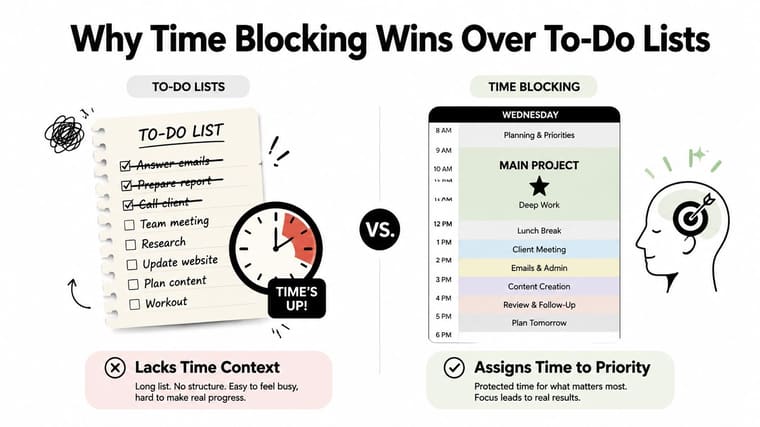
A traditional list tells you what exists. It doesn’t tell you what deserves your attention first, how long it might take, or what will happen when meetings and interruptions consume the afternoon. That ambiguity makes it easy to choose quick wins over meaningful work. By late afternoon, you may feel productive because several boxes are checked, even though the project with the greatest consequence hasn’t moved.
Time blocking assigns a task, project, or category of work to a defined calendar slot. A list asks, “What could I do?” A block asks, “What will I work on at 10 AM?” That small change removes repeated decisions and turns an intention into a concrete appointment with yourself.
Practical rule: If a priority has no place on your calendar, it’s still only an intention.
The method improves visibility in three useful ways:
- It exposes workload limits: You can see whether the week contains enough usable time for the work you’ve accepted.
- It protects priorities: A scheduled focus period is harder to ignore than a task buried among minor errands.
- It limits scope creep: A defined window gives you a reason to clarify the next outcome instead of allowing one task to consume the entire day.
Time blocks also create a healthy constraint. Parkinson’s Law describes the tendency for work to expand to fill the time available. An open afternoon invites polishing, checking, and unnecessary expansion. A block with a clear finish gives the task boundaries, even when the work isn’t finished at the first attempt.
The strongest scientific support for time blocking is indirect. The method resembles an implementation intention, a plan that specifies when, where, and how you’ll act. Meta-analytic research on implementation intentions has found that this type of planning improves follow-through across different goals, as summarized in research on the science of time blocking. Independent productivity summaries also report operational gains when people move from list-only planning to calendar-based blocking, including 2.8 times more high-priority tasks completed per week, 60% fewer missed deadlines, and lower end-of-day stress in the cited productivity studies, as described in that same source.
Setting Up Your First Time Blocked Week
Start with the week, not with a beautifully color-coded Tuesday. A weekly view lets you compare available capacity with actual commitments before individual tasks begin competing for the same hours.
Build the plan before opening the calendar
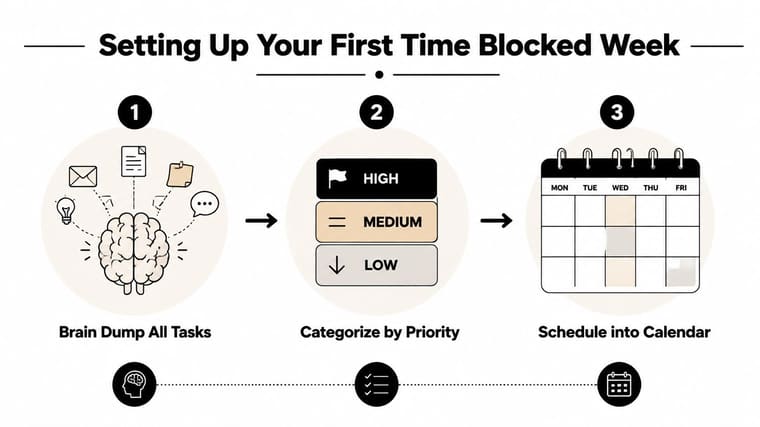
First, collect every commitment and task in one place. Include meetings, project work, follow-ups, administration, personal appointments, and recovery time. If a task feels vague, turn it into an observable outcome, such as “draft the introduction” instead of “work on report.”
Next, sort the list into high, medium, and low priority. You can also use an Eisenhower-style distinction between urgent and important work, but keep the system simple enough to use under pressure. High-priority work gets calendar space first. Low-priority work shouldn’t displace it merely because it’s easier to complete.
Estimate the duration of each item before scheduling it. People often plan from optimism, especially when a task is familiar or emotionally uncomfortable. Rather than treating your first estimate as truth, use it as a starting hypothesis and compare it with the time the task takes during your weekly review.
The guide to planning your week can help you turn that task inventory into a repeatable weekly process.
Place important work where your energy is strongest
Open your calendar and anchor demanding work to your peak concentration period. If your clearest thinking happens early, schedule writing, analysis, design, or development there. Put routine administration, email, and straightforward coordination in lower-energy periods.
Then add reactive blocks. Email, chat, support requests, and small administrative decisions should have a home, or they’ll leak into every other block. A widely cited time-blocking guide from Todoist recommends leaving about 30% of the calendar unblocked for reactive work and overflow. It also suggests short daily buffers of 15 to 30 minutes for email, urgent messages, and end-of-day planning.
Leave space between major commitments as well. A transition buffer gives you time to close one context, prepare the next file or conversation, and absorb a meeting that runs over. Without it, one delay can push every later block out of place.
A five-task day in practice
A realistic day might look like this:
- Morning focus: Draft the core proposal.
- Message block: Process email and urgent requests.
- Collaboration block: Review the proposal with a colleague.
- Administrative block: Update records and submit routine follow-ups.
- Open block: Finish overflow, reschedule unfinished work, or handle new issues.
Don’t expect the first week to feel natural. You’ll discover that some estimates are too short, certain meetings drain more energy than expected, and a supposedly small task needs clearer boundaries. Treat those observations as calibration data, then adjust the next week instead of abandoning the method.
Sample Schedules for Different Workstyles and ADHD
A useful schedule reflects the person doing the work. A developer who controls most of the morning needs a different structure from a student moving between lectures, or an employee whose attention changes sharply throughout the day.
| Time Slot | Deep-Work Professional | University Student | ADHD-Friendly |
|---|---|---|---|
| Morning opening | Planning and setup | Lecture or commute | Visual check-in and body-doubling |
| First focus period | Long project block | Study block with one defined subject | Short focus block |
| Midday | Admin and messages | Meal and reset | Break plus movement |
| Afternoon | Collaboration and review | Lecture, lab, or review | Short task blocks and transition buffers |
| Late day | Follow-ups and planning | Retrieval review and assignment work | Flex block for hyperfocus or low energy |
The deep-work professional
A writer, analyst, or developer might reserve the first part of the day for a substantial project block, followed by a second protected focus period before lunch or early afternoon. Administrative work can sit between those periods, while meetings and collaboration fit later when interaction is less disruptive to the main creative effort.
The important feature isn’t the exact template. It’s the pairing of demanding work with reliable energy, plus a clear endpoint that prevents endless refinement.
The university student
A student’s calendar already contains external anchors, so blocks should fit around lectures rather than pretend the day is fully flexible. Study sessions can use 45-minute focus periods, followed by a short break and a later review session that retrieves the material instead of rereading it.
For example, a student might schedule lecture notes immediately after class, a focused reading session later, and a separate review block before beginning an assignment. The separation helps reveal whether the student understands the material or has only highlighted it.
The ADHD-friendly version
People with ADHD often need more visible cues, shorter starts, and easier transitions. A workable schedule might use 30-minute blocks, frequent buffers, body-doubling sessions, and one flex block that can absorb hyperfocus, delayed starts, or a low-energy day.
Use a visual cue for each block, prepare the first action in advance, and make the transition explicit. “Open the document and write the next paragraph” is more actionable than “work on project.” More strategies appear in this guide to focusing with ADHD.
Rigid eight-hour templates fail because they describe an idealized worker, not a real person with changing energy, interruptions, and competing responsibilities. The better question is: What block length helps me begin, sustain attention, and stop cleanly?
Common Time Blocking Mistakes and How to Fix Them
Time blocking breaks down when the calendar becomes a wish list. The schedule may look organized while assuming perfect estimates, uninterrupted concentration, and identical energy from morning to evening.
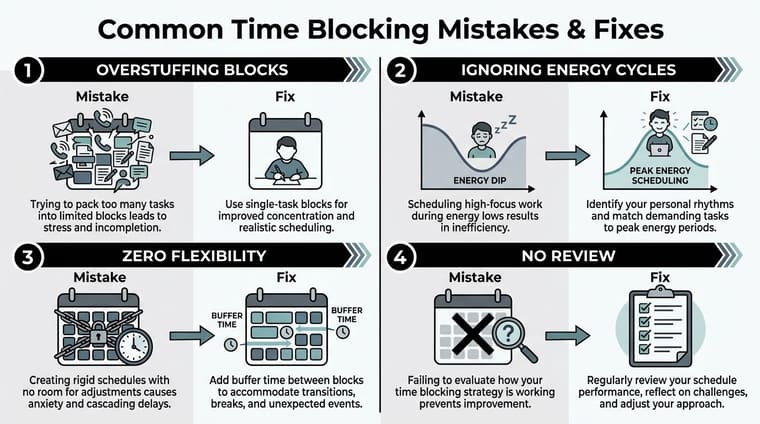
Overstuffing blocks
A block containing “write proposal, answer email, review analytics, and plan launch” has no single finish line. You can spend the entire period switching contexts and still feel behind.
Use the one-outcome-per-block rule. A focus block might produce an outline, a reviewed draft, or a decision list. Supporting actions can live inside that outcome, but unrelated tasks should move elsewhere.
Ignoring energy patterns
A calendar can be logically ordered and still feel impossible. If you place demanding analysis after a draining sequence of calls, you’re planning against your own attention.
Map your energy for several working days. Note when you feel alert, restless, social, or depleted, then schedule based on observed patterns rather than a generic productivity template. Put routine work in troughs and reserve clearer periods for work that requires judgment.
Making the plan too rigid
Reactive roles can’t protect every block. Customer support, operations, healthcare, leadership, and incident response all include legitimate interruptions. A rigid plan turns normal changes into perceived failure.
Use the 80% capacity principle for reactive work. Leave meaningful space for requests, escalation, and delays rather than scheduling every available minute. If an urgent issue displaces a block, move the task to the next suitable opening and record what changed.
Failing to track execution
A calendar that never gets reviewed can’t teach you anything. As you review, mark each block as completed, partially completed, moved, or abandoned. Look for patterns, not moral judgments.
ADHD users may struggle with time blindness, task initiation, and losing sight of the next transition. A conventional planner may struggle more with overconfidence and excessive rigidity. Both benefit from visible progress cues. A progress bar, completed block marker, or glanceable countdown makes the difference between an intention that disappears and a plan you can re-enter.
Using Pretty Progress Widgets to Reinforce Your Blocks
A calendar notification tells you that something is starting. A persistent widget can keep the current block visible while you work. Pretty Progress widgets display countdowns and progress bars on Apple and Android home screens, so the passage of time stays in your visual field instead of remaining hidden inside an app.
Create a tracker for one deep-work session. Set its start and end times, name the outcome, choose a simple visual style, and place the widget somewhere you’ll see it without opening a calendar. The placement matters. Put it near the screen where you usually begin distraction scrolling, or on the home screen you reach between tasks.
Two configurations work particularly well:
- Single-priority block: Track one important session, such as “finish proposal outline,” with a defined start and end. Use the bar as a gentle boundary, not a demand to work faster.
- Full-day sequence: Create a visible sequence for focus, communication, collaboration, and shutdown. The changing display becomes a visual map of the day.
Use the widget during transitions. When one block ends, glance at the next label before opening email or chat. That brief cue answers the question, “What am I doing now?” without forcing you to reconstruct the plan.
This is especially useful for ADHD users who experience time blindness. The bar externalizes elapsed time and makes the remaining window concrete. It won’t remove distraction or guarantee completion, but it can make starts, stops, and transitions easier to notice. The home-screen timer guide offers practical ideas for placing a countdown where you’ll see it.
Building a Sustainable Weekly Time Blocking Rhythm
A sustainable system needs recurring review points, not constant replanning. Use a simple three-touchpoint rhythm:
- Sunday planning: Reserve a 20-minute session to list commitments, identify high-priority outcomes, and place the first important blocks.
- Daily adjustment: Spend 5 minutes reviewing the day’s plan and moving blocks affected by new information.
- Friday retrospective: Use 10 minutes to compare planned work with completed work, then refine estimates and identify recurring interruptions.
Unfinished blocks are data. They may reveal an unrealistic estimate, a vague outcome, poor energy alignment, or a role with more reactivity than your template allows. Protect transition time, keep one open block for overflow, and reschedule deliberately instead of dragging every missed task into tomorrow.
The same principle applies outside work. If you’re developing building a fitness routine, recurring anchors and realistic recovery space make consistency easier than relying on motivation alone.
Time blocking works best as a living system. Your role changes, your energy changes, and your obligations change. Keep the structure, inspect the results, and modify the blocks until the calendar describes the way you work.
Pretty Progress gives your time blocks a persistent visual home through customizable countdowns and progress bars on Apple and Android devices. Create a tracker for your next priority session, add it to your screen, and visit Pretty Progress to make the plan visible enough to follow.





