

August 27, 2026
Physical Countdown Clock Guide to Setup, Uses, and Widgets
Discover what a physical countdown clock is, how it works, where it's used, and how to recreate the benefits with a beautiful widget app.
You’re heading out for a run, a glance at the wall, and there it is: a visible count of the days until race morning. Nothing has buzzed. No app has asked for your attention. The number sits in the room, making a distant goal feel closer and more concrete.
That’s the quiet power of a physical countdown clock. A calendar reminder can disappear into a crowded schedule, while a browser timer may remain buried in a laptop tab. A dedicated display turns time into part of your surroundings. It gives an approaching wedding, move, launch, exam, or personal milestone a steady visual presence.
The device itself can be mechanical, digital, handmade, or replaced by a phone widget designed to stay visible. The important question isn’t whether the countdown is technically advanced. It’s whether you’ll notice it often enough for the remaining time to influence what you do today.
Table of Contents
- Why a Physical Countdown Clock Still Matters in 2026
- What a Physical Countdown Clock Actually Is
- A Short History of Countdown Clocks and Countdown Culture
- Physical Countdown Clock vs Digital and Widget Alternatives
- Buying a Physical Countdown Clock and DIY Options
- Replicating the Feel With Pretty Progress Widgets
- Choosing the Right Setup for Your Goals
Why a Physical Countdown Clock Still Matters in 2026
A physical countdown clock earns its place by removing friction. You don’t need to open a calendar, search for an event, or scroll past notifications. If the display is positioned near your desk, kitchen, or bedroom door, the remaining time enters your awareness during ordinary routines.
That matters most for goals with a long horizon. “I need to prepare for the race” is vague. “The display says 42 days” gives the goal a shape. The number doesn’t complete the training plan, but it can prompt a small decision: run now, revise the schedule, or stop postponing the first step.
Visibility changes the relationship with time
A physical display also creates a shared reference point. A household can see the days until a holiday. A classroom can track a school milestone. A project team can place a launch date where everyone encounters it without needing another status meeting.
Practical rule: If a goal matters but rarely appears in your normal surroundings, it’s easy to treat it as a future problem.
The best placement is usually not the most decorative spot. It’s the place your eyes already visit, such as beside a coffee machine, above a work monitor, or near the front door. A clock in a low-traffic corner may be accurate and attractive, but it won’t perform its motivational job.
The physical form is part of the tool
A desk unit adds tactile weight and visual permanence. You set the target, position the clock, and allow it to become part of the room. That physical commitment can make a goal feel more deliberate than an event hidden inside an app.
The tradeoff is flexibility. A physical clock takes up space, may need a power source, and might focus on one target at a time. A phone-based alternative is easier to carry and update. The rest of the decision comes down to choosing which kind of presence your goal needs.
What a Physical Countdown Clock Actually Is
A useful analogy is this: a physical countdown clock relates to a stopwatch the way a calendar relates to a clock face. A stopwatch measures elapsed time after an activity begins. A countdown clock measures the approach of a chosen moment.
In practical terms, it’s a purpose-built timepiece with one primary job: show how much time remains before a named target date or deadline. The display may use electronic digits, flip cards, mechanical hands, or another visible mechanism, but the user should be able to understand the remaining time at a glance.
Four traits define the category
A user-set target. You choose the event, such as “wedding day,” “product launch,” or “first day of vacation.” The clock calculates the remaining interval from that target rather than just showing the current time.
A dominant remaining-time display. Days often serve as the headline unit for long-range events, while hours, minutes, and seconds may appear in smaller fields. A kitchen timer usually leads with a short duration, not a calendar destination.
Continuous visibility. The display remains available in the room. It doesn’t depend on opening a screen or remembering which app contains the event.
A single-purpose identity. A general wall clock may show time, date, temperature, or alarms. A physical countdown clock makes the approaching event the main subject.
What it isn’t
A stopwatch counts upward from an activity’s start. A kitchen timer usually counts down from a duration you enter, such as a cooking interval. A calendar display may show an event date, but it doesn’t necessarily convert that date into a prominent remaining-time figure.
Product listings can blur these categories. Look for phrases such as target date, days remaining, event countdown, or count to date. If the product only offers an alarm duration, it may be a timer rather than a long-horizon countdown clock.
The distinction affects setup. A timer asks, “How long should this task run?” A countdown clock asks, “How long until this meaningful moment arrives?” Those are similar calculations, but they support different habits.
A Short History of Countdown Clocks and Countdown Culture
Public countdowns began by making precise time visible. At the Royal Greenwich Observatory, a time ball introduced in 1833 dropped to broadcast a time signal to ships, helping crews synchronize their chronometers. The falling object turned an invisible measurement into a shared public event, much like a signal everyone could see at once. (Historical background on time balls and countdown culture)
The ritual gradually gathered new meanings. Times Square’s ball-drop tradition dates to 1907, while the familiar crowd-led backward count from 10 through 1 appeared much later, in the late 1970s. Televised atomic bomb tests in the 1950s also used countdowns before detonation. The same structure could therefore create celebration, suspense, or fear, depending on the event. (The changing cultural meaning of countdowns)
NASA gave the physical countdown clock its most recognizable modern setting. Kennedy Space Center installed its launch countdown clock in 1969, in time for Apollo 12. It later served Apollo missions after Apollo 12, the Apollo-Soyuz Test Project, Skylab, Space Shuttle launches, and four SpaceX Commercial Resupply Service missions. Its final countdown took place in 2014 for SpaceX’s CRS-4 mission, after a 45-year operational span. (History of NASA’s iconic countdown clock)
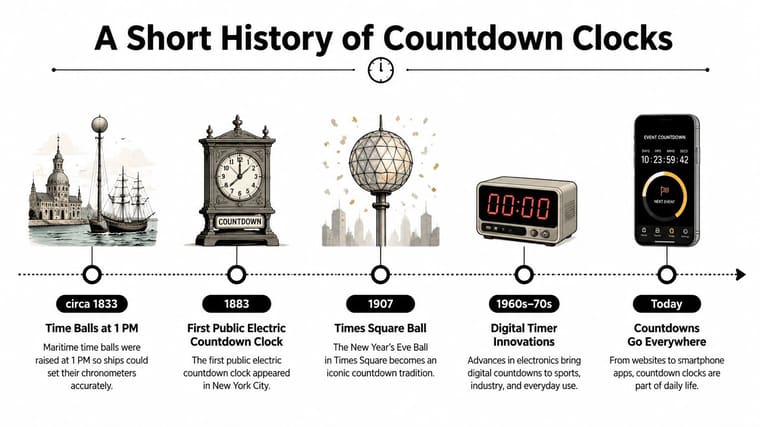
That visual language now works beyond launchpads. A wedding, move, or retirement countdown gives a future event a visible presence, which can support motivation across a long horizon rather than only timing a short task. A phone can recreate part of that always-visible effect with a flip clock screensaver, while a physical clock keeps the reminder rooted in the room.
Physical Countdown Clock vs Digital and Widget Alternatives
The right format depends on the job. A long-term event benefits from a persistent display that you’ll notice repeatedly. A short task usually benefits from quick setup, precise controls, and easy portability.
| Feature | Physical Countdown Clock | Digital Timer App | Home Screen Widget |
|---|---|---|---|
| Visibility | Always visible in its chosen room | Visible while the app is open | Visible on a selected phone screen |
| Setup effort | Moderate, with date and placement decisions | Fast for short durations | Fast after the widget is configured |
| Portability | Limited to its physical location | Travels with the phone | Travels with the phone |
| Customizability | Depends on the model | Often broad for timer controls | Strong for colors, layouts, and event types |
| Motivational impact | High tactile and environmental presence | Useful for immediate tasks | Persistent personal reminder without extra hardware |
Match the horizon to the format
A physical countdown clock works well beside a desk, in a shared kitchen, or at an event entrance. It becomes part of the environment, which makes it suitable for deadlines that should remain visible for days, weeks, or longer.
A digital timer app is better for focused activities where the countdown begins immediately. Cooking, stretching, study intervals, and meeting segments need convenience more than ceremony. The app can be accurate and portable, but it may vanish as soon as you switch tasks.
A home screen widget sits between those options. It doesn’t occupy a wall, yet it can remain visible every time you check your phone. A widget is especially useful when the target date changes, when you track several events, or when you want different visual styles for different goals.
For event planners exploring broader ways to keep schedules and experiences visible, Venue Finder NZ’s event technology resource offers useful context around digital and physical event tools. For date-focused display ideas, you can also explore digital clock and date layouts.
The core decision isn’t “physical versus digital” in the abstract. Ask how long the horizon is, where you’ll encounter the display, and whether the event needs a shared room-based reminder or a personal one.
Buying a Physical Countdown Clock and DIY Options
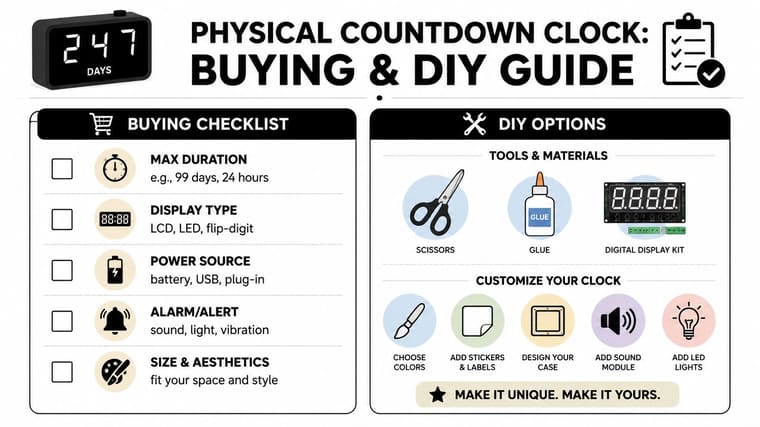
Start with the countdown span. Some products focus on hours and minutes, while others support days or longer date ranges. If you’re counting toward a retirement, relocation, or major project, a clock limited to a short kitchen-timer interval won’t fit the job.
Readability comes next. Check the digit height, contrast, viewing angle, and whether the display remains clear in the room where you’ll place it. A bright display may work well in a workplace, while a softer screen may suit a bedroom. Don’t choose based only on a product photo taken from close range.
A practical buying checklist
- Maximum duration: Confirm whether the clock supports days, months, or only short intervals.
- Power source: Battery operation simplifies placement, while USB or plug-in power may suit an always-on desk display.
- Alerts: Decide whether you need a sound, light, or silent visual finish.
- Controls: Look for straightforward date entry and an easy way to correct the target.
- Build and appearance: A clock that matches the room is more likely to stay visible rather than being stored away.
The right choice depends on the setting. A wedding display may need large digits and a decorative frame. A classroom unit may need strong contrast and simple controls. A product launch display may need a stable power connection and a format readable by people passing through the room.
Building the same habit yourself
A DIY version doesn’t need to reproduce every function of a commercial device. Printable daily countdown cards can make the remaining days visible on a wall. A mechanical flip-board kit can add movement and texture. A repurposed digital photo frame can display a simple countdown application while serving as a larger room-based screen.
The critical design choice is placement. Keep the display visible, make the target date easy to update, and avoid decorative complexity that slows down maintenance. A handmade board can create the same daily cue as a shop-bought unit if people see it during routines.
For a technical demonstration of a DIY approach, watch the video below.
A physical mechanism also has limits. Research on precision mechanical timekeepers links mechanical precision with energy dissipation and shows why friction, wear, and environmental noise affect stability. (Mechanical timing constraints and entropy production) For a long-range display, practical legibility and dependable date handling usually matter more than laboratory-level precision.
Replicating the Feel With Pretty Progress Widgets
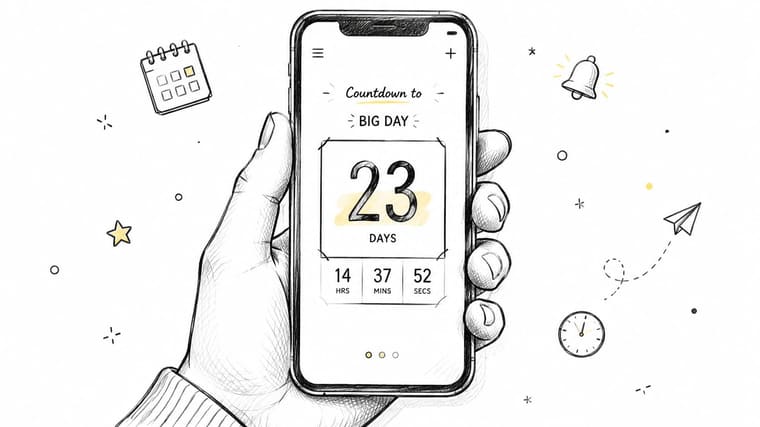
A phone widget can recreate the most useful part of a physical countdown clock, its constant visual availability, without requiring a separate object in the room. Pretty Progress lets you create a countdown by choosing an event name, setting start and end dates, selecting a visual treatment, and placing the result on a Home or Lock Screen.
Set up the countdown
- Install the app and create an event. Use a clear name such as “Book deadline,” “Flight,” or “Summer break.” A specific label helps the number carry meaning when you glance at it.
- Enter the target date. Check the date and time carefully, especially if the event depends on a particular location or scheduled start.
- Choose the display style. Use a large square layout when bold remaining days should dominate the screen. A smaller circular design can work for quick checks, while a stacked arrangement suits several separate horizons.
- Add the widget to a high-traffic screen. The first Home Screen page is usually more useful than a hidden utility page. On supported devices, a Lock Screen placement can make the countdown part of your ordinary phone-checking routine.
Design for recognition, not decoration
Choose a high-contrast color that connects naturally with the event. A calm tone may suit a wellness goal, while a stronger accent can distinguish a work deadline. The point isn’t to fill the screen with visual noise. It’s to make the event recognizable before you’ve fully read the number.
You can pair personal and professional countdowns, but keep the set intentional. Too many competing dates can turn every glance into a sorting task. A few clearly named widgets generally create a stronger cue than a crowded collection.
Pretty Progress is also relevant when you want a countdown or planning element to appear in a broader event experience. For that use case, you can browse our embeddable planner. If your priority is a visual asset for a project or announcement, see the guide to a countdown clock graphic.
A widget can’t provide the physical weight of a desk clock or become part of a shared room. It does offer instant portability, flexible styling, and the ability to update or carry several countdowns without buying more hardware. That makes it a practical substitute when the phone is already the screen you check most.
Choosing the Right Setup for Your Goals
A writer working toward a long manuscript deadline may benefit from a desk-mounted physical clock. It can sit beside the monitor and give the project a stable presence during each writing session. A traveler managing flights, visas, and arrival dates may prefer a phone widget because the information needs to travel with them.
A parent tracking school milestones could choose a wall-mounted display in the kitchen. The shared location turns the countdown into a household reference rather than a private reminder. A hybrid setup can also work, with one physical display for the main goal and a phone widget for personal sub-deadlines.
Ask three questions before choosing
How visible must the countdown be? If you want everyone in a room to see it, use a physical display. If only you need the reminder, a widget may be enough.
Will the target date change? A shifting date favors software because corrections are easier. A fixed event can suit either format.
What does your routine support? Choose the form you naturally encounter. A beautiful clock hidden on a shelf has less practical value than a simple widget on a screen you check every day.
| Reader Profile | Best Setup | Ideal Placement | Key Benefit |
|---|---|---|---|
| Writer with a long deadline | Desk physical countdown clock | Beside the monitor | Keeps the project present during work |
| Traveler managing several dates | Home or Lock Screen widget | Phone screen | Travels with the schedule |
| Parent tracking school milestones | Wall-mounted physical display | Kitchen or hallway | Gives the household a shared reminder |
| Event organizer | Mixed physical and digital setup | Venue plus personal devices | Serves both visitors and the working team |
| Student preparing for an exam | Widget or compact desk unit | Study area | Converts a distant date into a daily cue |
Avoid common placement mistakes
A physical clock can disappear into a low-traffic corner. A widget can become invisible if it’s too small or surrounded by unrelated icons. Either format can lose its value when you create overlapping countdowns for every minor milestone.
Countdown precision should also match the decision you’re making. NASA human-factors research on delay countdown timers found that displays rounded to 10 seconds or to the nearest minute supported better delivery accuracy than truncating to the minute, while more than 90% of aircraft in the tested conditions arrived within ±60 seconds. (NASA human-factors study of countdown resolution) For a long-range personal goal, days may be the clearest headline. For an immediate operational task, finer units may help.
Choose the display that fits your goal horizon and your surroundings. The best setup is the one you’ll see, understand, and act on before the target date arrives.
Pretty Progress turns your phone, tablet, watch, or computer into a customizable countdown and progress display for deadlines, events, and long-term goals. Create a date-based widget, place it where you’ll notice it, and visit Pretty Progress to build a more visible daily reminder without adding another physical device.





