
October 24, 2026
Habit Tracker Daily Guide for Flexible Progress
Build a habit tracker daily routine that survives missed days. Learn how to choose habits, log with less friction, review rolling progress, and set up
A daily tracker shouldn’t turn one missed day into a verdict. If your walk after lunch becomes a habit, a travel day doesn’t erase the walks you’ve already taken. Track repetition, context, and how you resume, not just whether an unbroken streak survived.
The most useful habit tracker daily view makes progress easy to see without demanding constant app visits. Choose one repeatable action, decide what counts on difficult days, and use a rolling record that lets you pause, skip, and start again.
Table of Contents
- Why a Perfect Daily Streak Misleads You
- Choose One Habit You Can Repeat
- Log the Habit on the Same Day
- Read Rolling Progress After Missed Days
- Compare Trackers You Can Actually See
- Set Up a Pretty Progress Habit Widget
- Resume Your Next 90 Days Today
Why a Perfect Daily Streak Misleads You
One missed day doesn’t erase a habit. Yet many streak-based trackers make it look as if all your previous effort has vanished the moment a chain breaks.
Consider a weekday routine: you log a walk after lunch for two weeks, then travel and miss a day. If your tracker resets to zero, it can make the walk feel like a failed project. Deleting the app may feel easier than facing that empty streak. But the record should help you recognize a pattern, not punish you for a disruption.
Pay attention to context
Habits often repeat in familiar surroundings. Experience-sampling diary studies of university students and community participants found that approximately 45% of everyday behaviors were repeated in the same location almost every day. That figure describes repetition in context. It doesn’t mean that 45% of behaviors were healthy or deliberately planned, and the research helped move habit science away from the idea that habits form after a fixed number of repetitions (research on habits and repeated performance).
That’s why a tracker should make it possible to notice where and when an action tends to happen. A walk after lunch, a stretch beside your desk, or reading before bed may be easier to repeat when connected to a familiar cue. A single heroic effort tells you less than a pattern that shows up across ordinary days.
A better measure: Look for a routine you can resume, not a record you’re afraid to break.
If traditional streaks make you abandon tracking after a lapse, consider a more flexible approach to habit tracking for ADHD. The right system should leave room for variable attention and disrupted days. Your tracker’s job is to show what tends to happen, what gets in the way, and how you can begin again.
Choose One Habit You Can Repeat
Don’t start by picking a widget or building a long list. Start with one action you can clearly recognize when you’ve done it. “Exercise” is too vague to log consistently. “Walk for ten minutes after lunch” gives you a behavior, a duration, and a cue.
A simple setup works better than an impressive-looking habit list. Write the behavior so another person could tell whether it happened, then attach it to a recurring moment in your day.

Write an intention you can act on
An implementation intention connects a specific action to a cue: After lunch, I’ll walk for ten minutes. The cue helps you identify when the action belongs, while the behavior tells you exactly what to do. If your schedule changes, use a stable context you can still recognize, such as finishing lunch rather than a fixed clock time.
Before choosing, rank possible habits by how readily they fit into your real routine. A daily action might be reading after breakfast. A weekly action might be planning meals on a day off. An event-based action might be stretching after a long drive. Don’t force a weekly or event-based behavior into a daily checkbox just to make your tracker look full. You can find more ways to match a routine to its cue in this guide to building a habit schedule.
Be realistic about the time it may take for a behavior to feel routine. A systematic review and meta-analysis of 20 studies and 2,601 participants found that health-related habits generally took about 2 to 5 months to develop, with a reported range of 4 to 335 days. In one included study, the median was 59 days, and 23% of participants reached the predefined habit-formation threshold (review of health-related habit formation). These findings don’t set a deadline for your habit. They’re a reason to avoid promising yourself that a fixed streak will make it automatic.
Shrink the target before you quit
If your target becomes hard to meet, lower the duration or intensity while keeping the cue and the daily record. A ten-minute walk might become a short walk to the end of the block on difficult days. Once the smaller version is steady enough to fit your routine, raise the target gradually.
Set a review horizon that gives you time to see a pattern, such as 60 to 90 days. Treat that period as an opportunity to learn, not a test you have to pass. The first habit should be small enough that you can practice it on ordinary days and adapt it when life gets in the way.
Log the Habit on the Same Day
A useful tracker records the behavior close to when it happens. If you wait until the end of the week, small details blur: did you take the walk, did you do the shorter version, or did the day get too busy? Keep the action and its record simple.

Use the same small routine each day:
- Define the action: Write what counts in observable terms, such as a walk after lunch.
- Keep the cue stable: Tie the behavior to a familiar moment or setting.
- Record it that day: Mark the full version, minimum version, or a skip while the details are fresh.
- Review later: Save interpretation for a weekly check rather than judging yourself after every entry.
For example, if you planned to walk after lunch at work, mark it as complete when you do it. If a crowded afternoon pushes the walk aside, use a minimum version you decided in advance, such as stepping outside briefly. On a travel day or during illness, you might mark the behavior as skipped or paused instead. The choice depends on your goal. Decide the rule before a disruption so you don’t have to negotiate with yourself in the moment.
Track the behavior, not the app visit
Opening your tracker and completing your habit are different things. A reminder tap can show that you interacted with the app, but it doesn’t prove you took the walk. Keep those signals separate: your habit record should reflect what you did, while app engagement can show whether you remembered to log it.
A 112-day micro-randomized trial found median completion of randomized commitment tasks on 51.5% of eligible days, rising to 60.5% among participants who completed the daily diary; 29% finished above the study midpoint for habit strength (trial of commitment tasks and habit tracking). The practical lesson isn’t to add more logging. It’s to keep entry light and make the record honest about completion.
If you’re choosing what to display, prioritize completed days, eligible days, a rolling seven-day rate, and how long it takes you to resume after a lapse. Those measures describe the routine more clearly than a reminder count or a streak alone.
Use the video as another example of the kind of simple daily process you can adapt to your own routine.
Read Rolling Progress After Missed Days
A missed day is useful information, not a reason to reset your progress. Look at the surrounding record: how often did you complete the behavior, were those days eligible, and did you return to the routine afterward?
A 2010 study followed 96 volunteers who chose an eating, drinking, or activity behavior and tried to perform it daily in a consistent context for 12 weeks. Of those volunteers, 82 provided enough data for analysis. The time to reach 95% of each person’s eventual automaticity ranged from 18 to 254 days, and a commonly reported average was about 66 days. A single missed day had little measurable impact on later automaticity gains (real-world habit-formation study).
The range matters more than any one average. Different behaviors and people didn’t follow one universal timeline, so don’t assume that reaching a particular day count means your habit is automatic. A 60-to-90-day view gives you time to see whether the cue still works and whether the target fits your life, without treating the review period as a fixed habit deadline.
Compare the questions your tracker answers
| Question | Streak-only view | Rolling view |
|---|---|---|
| Did I do it today? | Yes or no | Yes, no, minimum version, or not eligible |
| What happens after a miss? | The chain resets | The record shows a lapse and a return |
| How consistent am I? | A single current streak | Completed days compared with eligible days |
| What should I adjust? | Often unclear | Check the cue, target, and completion pattern |
At your weekly review, ask whether the cue still fits, whether the target feels too hard, and how many eligible days you completed. If you keep missing the same moment, change the cue. If the cue works but the full target doesn’t, shrink the behavior. If a day wasn’t a fair opportunity to do it, mark it as not eligible or use your planned skip rule instead of counting it as failure.
For a broader view of your habits over time, use a monthly habit tracker alongside your daily record. The point isn’t to excuse every lapse or demand perfect consistency. It’s to tell the difference between a routine that needs adjustment and one that is taking time to settle.
Compare Trackers You Can Actually See
Pick a tracking medium that fits the way you notice and record progress. A paper grid is visible on a desk and easy to mark by hand. A checkbox app can be convenient, but it asks you to open the app and make an entry. A glanceable progress bar can keep a cue in view without asking for another visit.

A paper grid works well if you like handwriting and your routine happens near the page. A checkbox app makes more sense if a quick digital entry is already part of your day. A shared chart can help when other people need to see a project or routine too. Each medium has a different visibility and logging trade-off, so choose based on where the cue should appear.
A 2025 digital self-monitoring study found average adherence of 55% with self-management, compared with 72% with personalized feedback and 83% with intensive support (digital self-monitoring study). These findings point to an important choice: more reminders aren’t automatically the answer. The kind of support matters, and repeating a notification that someone already ignores may only add noise.
Choose visibility over extra visits
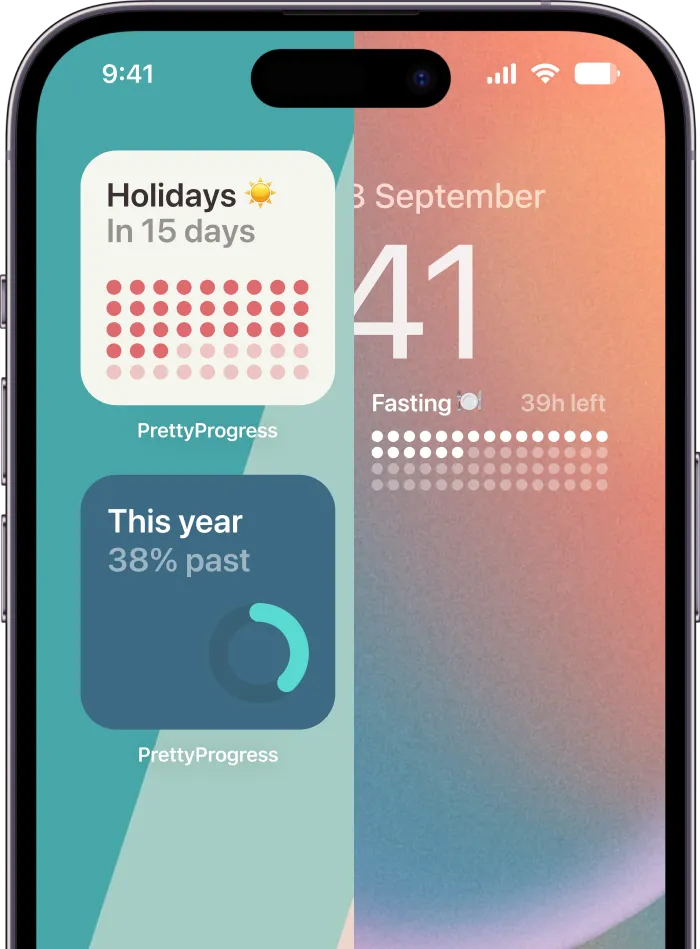
Pretty Progress is a countdown and progress-bar app for iPhone, iPad, Apple Watch, Mac, and Android. It offers customizable Home and Lock Screen widgets for deadlines, life goals, events, fasting windows, or time left in the year. That makes it an option for someone who wants a progress cue to stay visible rather than another notification that requires opening an app.
The app includes themes such as Swiss Style, Minimal, Aqua, and Retro OS, with controls for colors, gradients, bar size and shape, layout, and icons. Deeper styling controls are available through PRO. A glanceable bar can be a better fit when seeing a visual cue helps you remember what matters, while your habit completion still needs an honest record.
Use the simplest medium you’ll notice and maintain. A paper mark can work better than a polished app if the page stays in sight. A widget can work better than a checkbox app if you need the reminder to be visible before you remember to open anything.
Set Up a Pretty Progress Habit Widget
Build your widget around the behavior you already chose. Don’t turn setup into a second project, and don’t use an attractive progress bar to imply that a fixed number of days guarantees an automatic habit. Set a start and end date that match a practical review window, then use the display as a visual cue to keep the routine in view.
Create a clear visual cue
Download the app and create one progress item for your habit. Choose dates that match a 60-to-90-day review window, then select a theme that stays easy to read on the screen where you’ll see it. Adjust colors, gradients, bar size and shape, layout, and icons so the progress display is clear at a glance.
The design should serve the cue, not distract from it. If your habit is a walk after lunch, the bar might remind you that the routine matters when you reach that familiar time of day. It shouldn’t suggest that every day must count as a perfect win.
You can also use a progress display for a fasting window, a study block, or time remaining on a project. Those are different kinds of routines and goals, so don’t force a weekly behavior into a daily bar just because the app can show progress. Match the visual to what you want to notice.
Fix the common setup problems
- The widget doesn’t appear: Configuring an item in the app and adding a widget to a screen are separate steps. After setup, add the widget to the Home or Lock Screen you want to use.
- The bar looks finished too soon: Check that the start and end dates match the period you meant to display. A date range that doesn’t fit your review plan can make the visual misleading.
- The colors disappear: Choose a simpler color combination if a busy wallpaper makes the bar hard to read. Legibility matters more than decoration.
- The habit happens weekly: Don’t relabel it as daily to fill a calendar. Use a schedule that reflects when the behavior is due.
If you want more styling control, PRO provides deeper design options. Date, business-day, exact-age, and intermittent-fasting calculators can also help with setup. Treat them as helpers for configuring dates and windows, not as measures of whether a habit is becoming automatic.
Resume Your Next 90 Days Today
Your tracker should make it easier to return after a lapse, especially if attention, time perception, or energy varies from day to day. A 2025 systematic review of ADHD mobile apps found moderate overall app quality and notably low engagement; the reviewed apps tended to focus on organization and education rather than interactivity (review of ADHD mobile apps). That’s a reason to keep the interaction light rather than assume another badge or notification will solve the problem.
Use a passive progress bar as a visual cue, a simple completion state for the habit, and a minimum version for difficult days. When you return after a lapse, resume where you left off instead of restarting the whole plan. That rule supports people with ADHD and anyone whose work, caregiving, health, or schedule disrupts a tidy routine.
Make one small decision today: choose a cue-based habit and write down what counts on an ordinary day and on a hard day. Create a progress widget for your review window, then check your rolling completion at 7, 30, and 90 days. Those checkpoints can show whether the cue fits, whether the target needs adjustment, and whether you’re coming back after a miss.
Don’t wait for the perfect schedule or a long list of goals. Download the app, set the dates, add the widget, and treat the first missed day as a planned recovery rather than a reset.
Pretty Progress offers customizable progress bars and countdown widgets for goals, deadlines, and routines on your Home or Lock Screen. If you want a visible cue for a habit that can survive missed days, visit Pretty Progress and set up a progress display that fits your routine.