

September 30, 2026
Exam Release Date: What It Means and How to Track It
Learn what an exam release date really means, where to check official schedules, and how to track your wait with glanceable countdowns that keep you on track.
You’ve checked the results portal before breakfast, during class, and again just before bed. Each refresh raises your expectations for a moment, then leaves you staring at the same message: results aren’t available yet. The closer the expected day gets, the harder it becomes to think about anything else.
An exam release date gives that uncertainty a boundary, but it doesn’t always explain what will happen inside the boundary. Some boards publish every result on a fixed date, while others use a release window, staged access, or separate dates for students and institutions. Understanding the system can make the waiting feel less personal and give you a calmer way to prepare.
Table of Contents
- What an Exam Release Date Actually Means
- How Release Schedules Work Behind the Scenes
- Where to Check Official Release Dates
- Why Results Sometimes Arrive at Different Times
- Common Misconceptions About Delayed Results
- Tracking Your Exam Release Date With Pretty Progress
- Your Pre-Release Day Checklist
What an Exam Release Date Actually Means
An exam release date is the official point at which an exam board, university, or credentialing body makes results available to the intended audience. Depending on the system, that result might be a score, grade, transcript, certificate outcome, or report for a particular subject.
The date doesn’t describe when you sat the exam. It describes when the organization expects to finish the work needed to publish the outcome. Before that happens, examiners may need to mark scripts, review unusual results, apply moderation rules, complete quality checks, and approve the final data.
Three dates can sound similar but mean different things:
- Public candidate release: The point when students or test takers can view their results through a portal, email, school, or other approved channel.
- Institutional release: The point when a school, college, district, or admissions office receives results for administration and support.
- Embargoed access: A controlled period in which authorized staff see results before candidates, usually so they can prepare guidance and respond appropriately.
These stages don’t always happen together. In the United Kingdom, schools and colleges may receive some qualification results before public candidate access, while some vocational and technical qualifications are released on a rolling basis. The UK government’s guidance on post-exam results arrangements describes this difference between institutional preparation and public release.
Practical rule: Treat the official candidate access time as the date that matters most to you, unless your school has given you a different instruction.
The meaning can also vary by exam provider. If you’re preparing students through a centre, a resource such as Tutorbase for test prep centers can help organize preparation around milestones, but the awarding body remains the authority for the final release date.
A results date is therefore a logistics promise, not a prediction about your individual performance. A delay within the published window usually says more about distribution than about your paper.
How Release Schedules Work Behind the Scenes
Exam boards can distribute results in several ways. The method they choose depends on the exam format, the number of candidates, the institutions involved, and the safeguards required before publication.
Fixed dates
A fixed-date release gives candidates a stated day when results are expected to become available. The SAT calendar provides a clear example. For the 2026 to 2027 testing year, weekend scores are released two to four weeks after test day, rather than immediately, and the fall schedule separates student access from K–12 reporting portal access by three days. The College Board SAT score release calendar lists the dates for each administration.
A fixed date makes planning easier, but it doesn’t mean every technical event happens at the same instant. The board may prepare files in advance, activate different portals separately, and release access according to audience, region, or account type.
Release windows
A release window gives the provider a permitted period rather than one universal moment. Cambridge English explains that candidates can receive results at different times within a results release window. Its guidance says paper-based exam results typically begin releasing four to six weeks after the exam, while digital exam results can begin about five working days after the exam. The final date should appear on the Confirmation of Entry.
That difference reflects the work required by each delivery mode. Digital responses may enter an electronic scoring workflow sooner, while paper materials require additional handling and processing. A window allows the provider to publish verified results as they clear the required checks.
Institutional previews
Some systems give institutions access before students. In California’s CAASPP system, districts receive individual student reports within a service-level period tied to when schools or districts complete summative assessments. The California Department of Education’s CAASPP guidance explains that results may be supplied through a continuing pipeline, allowing earlier-completing schools to use reports while later schools remain in the same process.
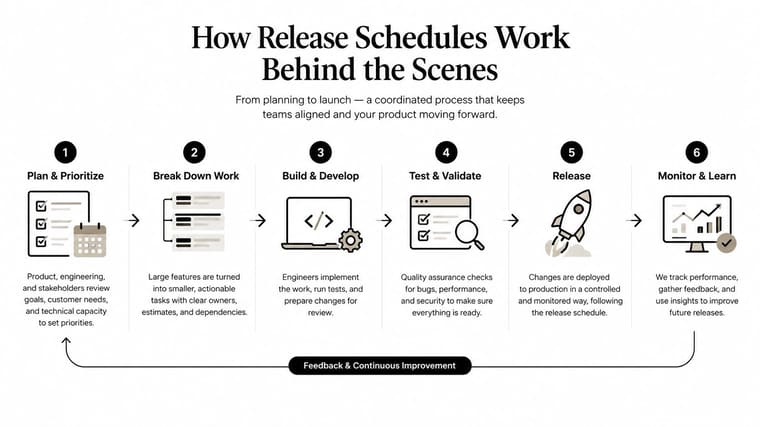
Behind any of these models sits a chain of tasks: planning, collecting responses, scanning or importing records, scoring, moderation, senior review, quality sampling, and distribution. Each task can add calendar time. That’s why an exam release date should be understood as the end of a controlled process, not just the moment someone presses “publish.”
Where to Check Official Release Dates
Start with the organization that owns the exam. Search results, student forums, and social media posts can help you find the right page, but they shouldn’t be your final authority. Unofficial pages often reuse dates from an earlier exam series, confuse school access with candidate access, or omit the relevant time zone.
Use this order of checks:
- Open the awarding body’s schedule. Look for the exam series, qualification, delivery mode, and candidate group that apply to you.
- Read the access instructions. Confirm whether results arrive through a student portal, school, email, or another approved channel.
- Check your school or centre notice. Your institution may give you a local collection time, especially when staff receive results before candidates.
- Record the time zone. A date displayed by an international provider may not match your local calendar day.
- Save the confirmation. Keep the official page, Confirmation of Entry, or school message where you can find it without searching again.
| Exam System | Primary Release Date Source |
|---|---|
| SAT | College Board’s SAT score release calendar and student account |
| UK GCSE, AS, A level, and T Level | Your awarding organisation and your school or college |
| Cambridge English | Cambridge English results release guidance, Confirmation of Entry, and centre |
| CAASPP | California Department of Education guidance and your district or parent portal |
| IELTS | IELTS provider or test centre instructions for your test date and delivery mode |
For Cambridge English, the official results availability guidance is especially useful because it explains why candidates in the same broad cohort may not receive results simultaneously. Your Confirmation of Entry remains important because it gives the final date associated with your entry.
You can also calculate the interval between today and a confirmed date with a date countdown calculator. Use it after checking the board, not instead of checking the board. A calculator can count down to the date you enter, but it can’t correct an outdated timetable.
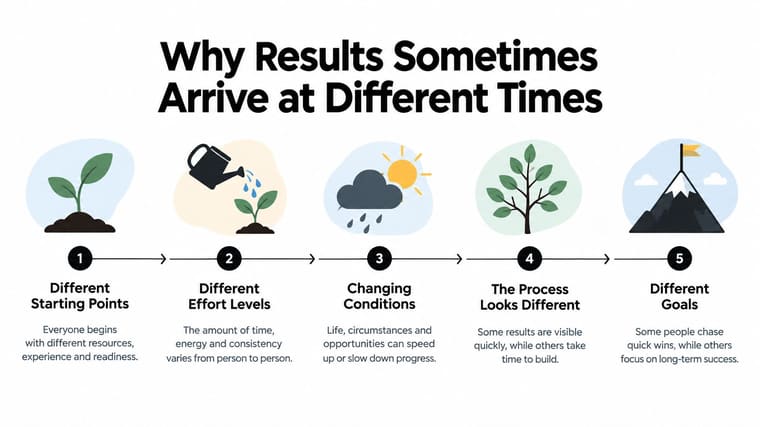
Why Results Sometimes Arrive at Different Times
Maya finishes a Cambridge International A Level Chemistry paper with her classmates. Everyone sat the same examination, on the same morning, in the same room. Later, Maya sees her result before a friend at another centre, and the difference feels alarming because the students assume that one exam must produce one shared notification moment.
That assumption is too simple. Cambridge English’s published guidance explains that results can arrive at different points within a release window, and that delivery mode affects when processing can begin. A paper-based exam and a digital exam don’t necessarily enter the same workflow at the same time, even when candidates are preparing for a similar qualification.
A useful way to understand the difference is to follow the record rather than the student. The centre submits the completed work, the provider processes the material, examiners and quality teams complete their checks, and the system releases the result when the relevant record is ready. Each centre, format, paper, and verification step can create a different queue.
A similar pattern appears in large assessment systems. CAASPP guidance describes results moving through a continuing release pipeline tied to when schools and districts complete assessment activity. One district may therefore be ready to distribute reports while another is still completing its own part of the process.
That doesn’t mean one student is being judged more harshly. It means release timing is a system property, not a personal signal. Comparing notifications with classmates can provide company, but it rarely predicts your own access time.
A result that hasn’t appeared yet is not the same as a result that has gone wrong.
If your official date is a window, wait for the window to close before treating the absence of a result as an administrative issue. If the provider gives an exact date and access still hasn’t appeared after that date, check the official status page and contact your school, centre, or awarding body through its stated support route.
Common Misconceptions About Delayed Results
Waiting encourages the mind to turn missing information into a story. A quiet inbox becomes “my paper has a problem,” and a classmate’s notification becomes “something is wrong with mine.” Large assessment systems rarely work in such a personal, synchronized way.
Everyone receives results at the same minute
A shared exam date doesn’t guarantee identical delivery. Providers may separate candidate access from institutional access, use a release window, or process records through different channels. Cambridge English explicitly notes that some candidates receive results earlier than others.
A late email means a re-mark is underway
An absent email doesn’t prove that your script is being reviewed again. The provider may still be completing routine processing, your centre may distribute results separately, or the portal may be waiting for the scheduled release event. Don’t infer a re-mark, investigation, or error without an official message that says so.
Boards delay results to create suspense
Release schedules exist because marking, moderation, quality assurance, and distribution take time. A provider’s use of a window is an administrative choice that gives it room to complete those steps safely. It isn’t evidence that staff are holding results back for dramatic effect.
Use a simple decision rule:
- Inside the published window: Assume the timing is procedural.
- At the stated date but before the stated time: Check the time zone and access instructions.
- After the confirmed window or date: Contact the official provider, school, or centre.
- After an official service notice: Follow the provider’s updated instructions rather than relying on peer reports.
Repeatedly contacting support before the window closes usually won’t accelerate access. It can, however, keep your attention locked on the portal. A visible countdown gives you a different choice, you can check the remaining time at a planned moment instead of repeatedly asking whether the result has arrived.
Tracking Your Exam Release Date With Pretty Progress
A confirmed date is easier to manage when it becomes a visible countdown rather than a thought you have to retrieve from memory. Pretty Progress can display a countdown widget on supported Apple devices and Android, giving you a glanceable way to see the time remaining without opening the results portal.
Begin with the official information. Open the app, tap the plus button, choose the Countdown style, and enter the exam name and release date exactly as shown by the board. If the provider gives a release time, include it. If it gives only a date, don’t invent a time to make the counter appear more precise.
You can then choose a subject-related wallpaper or a simple colour palette. A clear design matters more than decoration here. The point is to recognize the tile quickly and understand what it measures.
Place the counter where you’ll actually see it
Use different surfaces for different kinds of attention:
- Lock Screen: Add a small widget beneath the date so the remaining time is available during the school day without opening another app.
- Home Screen: Place a medium widget near your study or calendar app. This keeps the release date visible while leaving room for practical preparation.
- Mac menu bar: Use a menu bar counter during focused work sessions, when you want a quiet reminder without switching away from your task.

Set notifications with restraint. A single morning reminder can help you orient yourself, while hourly alerts may turn the countdown into another source of pressure. You can also share a read-only link with a parent or tutor, allowing them to understand the timeline without asking you for constant updates.
The psychological benefit comes from changing the checking pattern. Instead of refreshing a portal to ask, “Is it there yet?”, you glance at a known counter and return to your day. The result remains uncertain, but the waiting becomes scheduled, visible, and easier to contain.
Your Pre-Release Day Checklist
The morning results arrive, and you don’t want your first task to be searching for a password or discovering that the result portal uses a different time zone. Prepare the practical details the night before so the release moment contains fewer surprises.
Confirm the official timing
Read the latest message from the exam board, school, or centre. Write down the date, exact time, time zone, and access method. If the board gives a window rather than a single moment, record the opening and closing information instead of converting it into an invented deadline.
Test your access
Open the official portal before results day. Check that your username works, verify your password, and complete a reset while you still have time to receive any required email. Try access on both your phone and laptop, since one device may handle a busy portal more reliably than another.
Gather the details you may need
Put your candidate number, seat number, centre identifier, school code, or other reference information in one secure place. Don’t post these details in a public group or send them through an unverified message.
Choose the viewing plan
Decide whether you’ll view the result alone, with a parent, with a tutor, or with a trusted friend. Choose a quiet place and decide what you’ll do immediately afterward, whether that means contacting an adviser, reviewing next steps, or taking a break before making decisions.
Keep the final hours calm
Pin your countdown to the Lock Screen and use it as the visual reference for the remaining time. The guide to managing exam stress can also help you build a plan for the emotional side of waiting, especially if checking has become difficult to control.
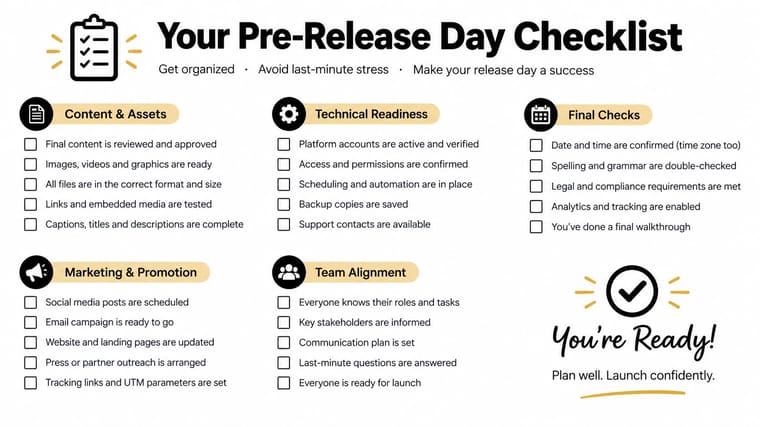
Preparation doesn’t change the grade, but it changes the experience of receiving it. You’ll know where to go, what information to have ready, and who can support you. That makes the release date a defined event rather than an unexpected interruption.
Pretty Progress lets you create a customizable exam countdown and place it on your Lock Screen, Home Screen, Apple Watch, Mac, or Android device. Set up your confirmed release date, choose a readable design, and use the persistent visual reminder to reduce repeated portal checking. Visit Pretty Progress to create your countdown.





