

September 6, 2026
Best Event Countdown App iPhone: 10 Top Picks
Compare the best event countdown app iPhone options for widgets, Apple Watch, sync, customization, pricing, and productivity needs.
You want an exam deadline, flight, product launch, birthday, fasting window, or personal goal visible every time you check your iPhone. But the right countdown app isn’t the one that displays a number. It needs to fit the way you plan: perhaps you need a Home Screen or Lock Screen widget, Apple Watch access, Mac sync, recurring events, shared planning, time-zone accuracy, or a privacy-friendly setup without unnecessary accounts and ads. Pricing matters too. Some apps offer a free tier, some use subscriptions, and others provide features with a one-time purchase. This comparison evaluates ten strong options by those practical criteria, with Pretty Progress as the design-forward choice for people who want a countdown to remain visible, motivating, and personal.
Table of Contents
- 1. Pretty Progress
- 2. Countdowns by Shayes Apps
- 3. Days, Countdown & Widgets
- 4. Event Countdown, Countdown Calendar App & Widgets
- 5. Countdown by timeanddate.com
- 6. Countdown Star
- 7. DayCount, Days Since or Until & Streak Counter
- 8. Kounts
- 9. Countdown, Day Counter by Find Appiness LLC
- 10. Countdown, Upcoming Events by FiscalMetric LLC
- Top 10 iPhone Event Countdown Apps, Feature Comparison
- Match the App to the Moment You Track
1. Pretty Progress
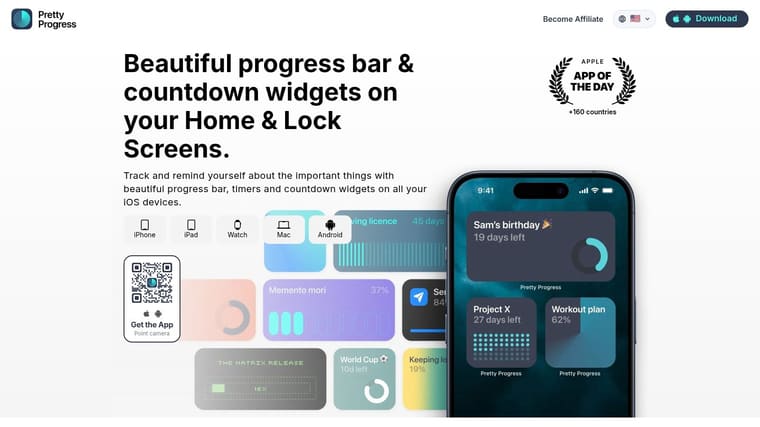
Pretty Progress is the strongest choice when the countdown needs to do more than sit inside an app. It turns an iPhone, iPad, Apple Watch, Mac, or Android device into a persistent visual reminder for deadlines, milestones, trips, habits, and goals. You can create a countdown, count-up, timer, or progress bar, choose the start and end dates, and place the result on a Home Screen or Lock Screen widget.
The design system is its biggest advantage. Themes such as Swiss Style, Minimal, Aqua, and Retro OS give you a starting point, while color, gradients, bar size, shape, layout, and icons let you tune the widget to your screen. That matters for motivation. A widget you enjoy seeing is more likely to remain in your daily setup than a generic timer you quickly ignore.
Best for visual deadlines and goals
Pretty Progress can sync with Calendar and Reminders, import tasks, and use built-in calculators for dates, business days, exact age, intermittent fasting, pregnancy due dates, and loan payoff planning. Students can keep an exam date visible, professionals can track a launch, and people with ADHD can use a progress bar as a low-friction cue instead of relying on a notification that disappears.
The app is free to download and ad-free. A PRO upgrade provides deeper styling controls, though the site doesn’t list the current price, so check the in-app purchase screen in your region. The platform experience can also vary by operating system version, particularly for Lock Screen widgets and integrations.
Pretty Progress is associated with 2M+ users and a 4.8 rating, as listed in the product brief. It’s available in 160+ countries, with support for multiple languages. Those figures come from the supplied product information, while the Pretty Progress website provides the app’s feature, privacy, and FAQ details.
Best fit: Choose Pretty Progress when you want a polished, customizable reminder that stays visible without turning into a noisy task manager.
2. Countdowns by Shayes Apps
Countdowns by Shayes Apps is the best established Apple-focused option for people managing many events. It supports countdowns and count-ups, repeat schedules, custom time units, notifications, event lists, archives, and imports from Calendar, Contacts, and Reminders. That combination works well for birthdays, anniversaries, travel dates, project milestones, and recurring personal events.
Its widget support covers both the Home Screen and Lock Screen, while Apple Watch support puts event information on your wrist. iCloud sync connects the experience across iPhone, iPad, Mac, and Apple Watch, which is useful if your planning shifts between devices throughout the day. Organizational and compact list modes also help when you’re tracking more than one upcoming event.
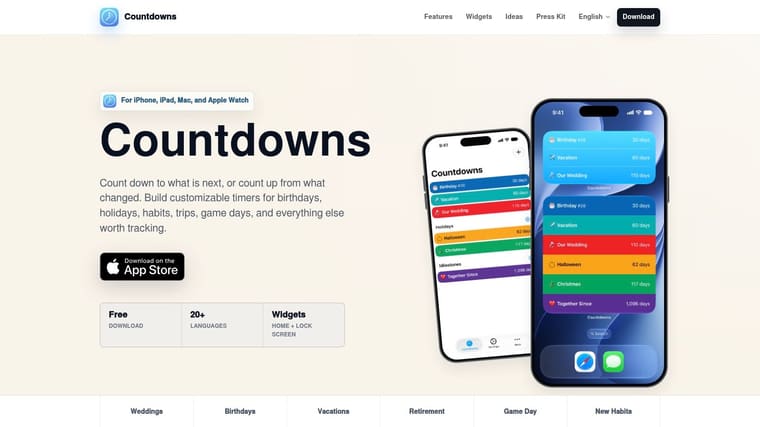
The trade-off is the paid upgrade. Full iCloud sync and some list and compact-view conveniences require payment, and the App Store listing requires iOS 17 or later. That operating-system requirement makes it less suitable for older devices.
The interface favors organization over visual experimentation. If you want a mature event list with deep Apple integration, it’s a dependable pick. If you want a countdown to function as a personalized progress display, customizable widget apps for iPhone offer a more design-led direction.
3. Days, Countdown & Widgets
Days, Countdown & Widgets is aimed at users who want attractive event reminders with a social and recurring angle. It supports Home Screen and Lock Screen widgets, repeating events, notes, ticket or checklist information, and sharing. That makes it especially useful for birthdays, anniversaries, holidays, weddings, and trips that involve other people.
The recurring-event support is the main practical strength. Set up a yearly birthday or anniversary once, then keep it in your event system rather than rebuilding it each year. Notes and ticket details can keep related information close to the countdown, which is helpful when the event involves reservations, travel documents, or a short preparation list.
The app’s visual presentation suits people who want a decorative widget as part of their Home Screen. It also has a large user base and ongoing updates, according to the supplied product information. The main drawback is pricing clarity. The site doesn’t surface the full pricing structure prominently, and advanced options may require an in-app purchase or subscription.
Days is a good choice for recurring personal milestones and shared anticipation. It’s less compelling if you need Apple Watch or Mac support to be the center of your workflow, or if privacy and local-only storage are your primary decision criteria. For a quick setup guide, see how to add a countdown widget on your iPhone.
4. Event Countdown, Countdown Calendar App & Widgets
Event Countdown is the best pick for people who want a countdown app with a calendar-style overview. Alongside live countdowns, it offers Home Screen, Lock Screen, and StandBy widgets, a month-grid calendar, Live Activities, Dynamic Island support, cloud backup and sync, repeating or copied events, and animated icons.
The calendar view changes how you use the app. Instead of focusing on one number, you can scan upcoming events across a month and understand how deadlines, trips, and personal milestones sit together. The live second-ticking option is useful for short-term anticipation, while Dynamic Island and Live Activities keep an event visible without requiring a full app launch.
The pricing model is flexible. The app offers a subscription and a one-time lifetime purchase, so users who avoid recurring payments have a clear alternative. The limitation is that the full feature set, including Live Countdown, calendar view, and an ad-free experience, requires Premium.
Its interface leans heavily into visual presentation. That’s a strength for event-focused users, but power users may need time to configure the right views and widgets. Choose it for calendar visibility and live event presentation, not for a minimalist, bare-bones countdown.
5. Countdown by timeanddate.com
Countdown by timeanddate.com is the clear choice for international events and deadlines affected by location. It supports count-down and count-up timers, notifications, shareable countdowns, themes, and automatic time-zone and daylight-saving adjustments. That last feature matters when an event involves another city, country, or seasonal clock change.
A countdown can look correct while still representing the wrong moment if the app treats the event as a fixed local time. This app’s focus on time-zone handling makes it better suited to international launches, remote meetings, trips, exams held in another location, and events watched across regions.
The design is more utilitarian than Pretty Progress or Days. You’ll get a reliable setup and familiar timekeeping rather than a highly art-directed widget system. That’s a fair trade if accuracy matters more than visual customization.
Some extras, including ad removal and custom photos, require in-app purchases. The app also doesn’t focus as heavily on cross-device widget presentation as several of the other choices in this list.
Choose this app when the event’s location is part of the deadline. A beautiful widget is less useful than a correct countdown when time zones and daylight-saving changes can affect your plans.
6. Countdown Star
Countdown Star is a straightforward option for casual users who want to create an event, add a widget, and leave the system alone. It supports iCloud sync across iPhone, iPad, and Apple Watch, Home Screen widgets, repeating events, time-zone support, custom wallpapers, favorites, and notifications.
The app’s practical defaults keep the learning curve low. You can use it for a vacation, birthday, appointment, or personal milestone without building a complex event structure. Repeating events also make it suitable for annual occasions that you don’t want to recreate manually.
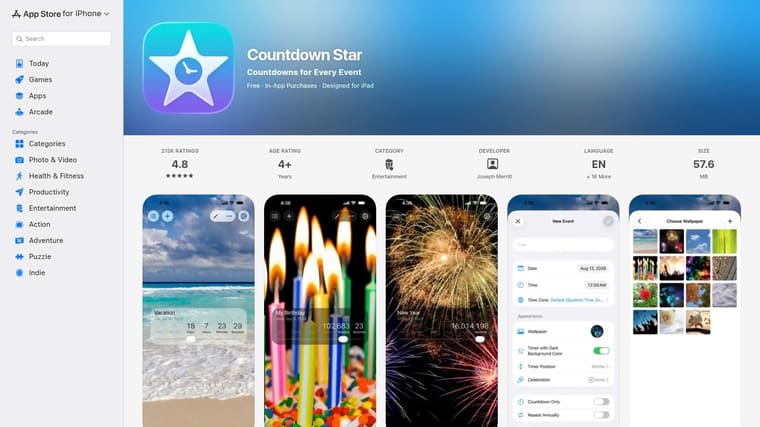
Countdown Star offers a pay-once option to remove ads, which gives it an advantage over apps that push users toward subscriptions. However, its feature list doesn’t identify Lock Screen widgets, so it’s a weaker choice if you want the countdown visible before accessing your iPhone. Its design is functional, with less styling depth than Pretty Progress or other design-led alternatives.
Use Countdown Star for simple, set-and-forget event tracking. If you want to turn a deadline into a progress graphic, a countdown clock graphic will give you more control over how the remaining time appears.
7. DayCount, Days Since or Until & Streak Counter
DayCount is the strongest option for people who want countdowns and habit streaks in the same app. It handles days until an event, days since an event, streak tracking, calendar imports, categories, notes, backups, sync, and time-zone controls. It also supports Lock Screen widgets with configurable fonts, textures, and borders.
That combination makes DayCount useful for both future and past milestones. You can count down to an exam or trip, then switch to a count-up view for time since a personal achievement. Habit tracking adds another layer, allowing the same app to support routines and streak-based motivation.
More capable, but not lighter
DayCount offers Face ID and Touch ID protection, which is useful for private milestones or personal tracking. It can also import calendar events, reducing setup for users who already keep deadlines in Apple Calendar. The widget editor is more configurable than a basic countdown app, although it may take longer to set up.
Most premium features require a subscription. That makes DayCount less appealing for someone who only wants one birthday or vacation countdown. It’s better suited to users who will actively use the habit and streak features, especially people who want a daily progress cue rather than a single event timer.
Choose DayCount for habit builders, streak tracking, and since-or-until views. Choose Pretty Progress when visual polish and broad design control matter more than habit-system depth.
8. Kounts
Kounts is the best choice for shared countdowns. It supports Home Screen and Lock Screen widgets, Apple Watch and Mac apps, multi-day events, a “Happening now” state, Dynamic Island support, holiday templates, Apple Calendar and iCloud sync, and a Shared Space for collaboration.
Shared Space can include up to five people, according to the supplied product information. That makes Kounts suitable for households, small teams, wedding planning, group trips, and family events where everyone benefits from seeing the same milestone.
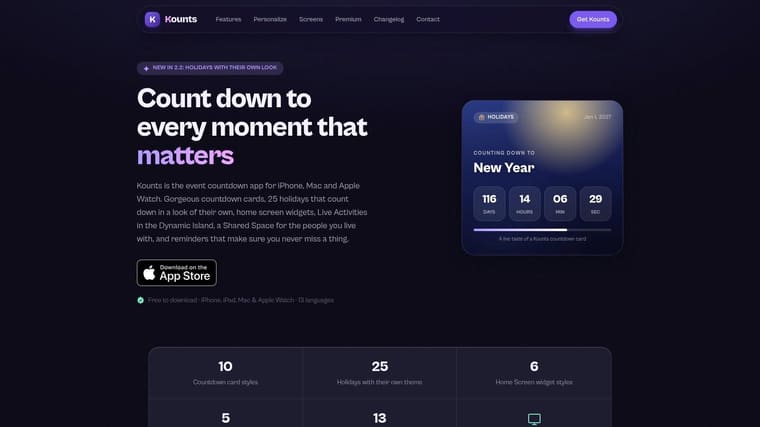
The free tier covers the essentials, which makes it easy to test without committing immediately. Unlimited events and additional customization require Premium, so users with many countdowns may reach that boundary quickly. Holiday templates with region-aware dates are a useful convenience for families and groups in different locations.
Kounts is newer than some long-running alternatives and has a smaller community. Still, its combination of collaboration, attractive presentation, and Apple-device coverage gives it a clear identity.
Pick Kounts when the countdown belongs to a group rather than one person. For an individual student, professional, or goal-setter, Pretty Progress provides deeper personal styling and progress-focused presentation.
9. Countdown, Day Counter by Find Appiness LLC
Countdown, Day Counter is a strong option for users who want unlimited free countdowns and dislike subscriptions. It supports iCloud sync, Apple Watch, free Home Screen widgets, calendar imports, sharing by link, and a browser web app that stores data locally. Premium adds Lock Screen and StandBy widgets, along with additional widget types.
The browser app is its most distinctive feature. You can access your countdowns from a work computer or another non-iOS device without relying entirely on an iPhone. That makes the app more practical for students and professionals who move between personal and work screens.
The payment model is straightforward. Premium uses a one-time purchase rather than a subscription, which suits users who prefer to pay once and keep the app. The exact price isn’t listed on the supplied site, so check the App Store listing for your region before buying.
The trade-off is that some of the most useful widget formats require Premium. The free Home Screen experience is helpful, but Lock Screen, StandBy, and expanded widget choices sit behind a paywall.
Choose it for simple cross-device access and a no-subscription upgrade. If you need advanced visual styling rather than additional access points, Pretty Progress is the better fit.
10. Countdown, Upcoming Events by FiscalMetric LLC
Countdown, Upcoming Events is the best budget-oriented choice for users who want a pay-once model and local data handling. It supports Home Screen and Lock Screen widgets, an Apple Watch app, count-up views for past events, Siri, image sharing, local photo backgrounds, notifications, and time-zone support.
The app’s privacy position is unusually clear. The supplied product information describes an emphasis on no external data storage and no tracking, making it a practical option for users who want to keep personal milestones away from profiling and ad-tech. That may matter when tracking sensitive events such as health goals, fertility, fasting, exams, or relationship milestones.
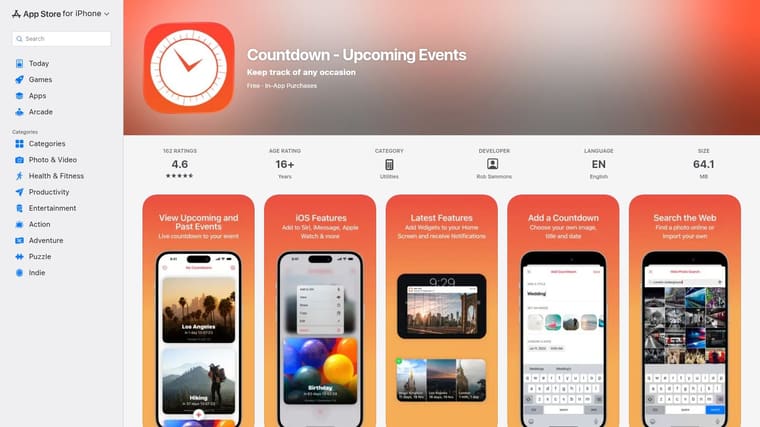
The Countdown Pro version is pay-once, with no subscription. It adds essentials such as multiple countdowns and full widget access, while the free version offers a simpler starting point. Custom photos can come from local storage or Flickr, and Siri support makes event creation more convenient.
Its styling controls are more practical than art-directed. You won’t get the same depth of themes, gradients, bar shapes, and layouts offered by Pretty Progress. Choose this app when privacy and one-time payment matter more than design flexibility.
Top 10 iPhone Event Countdown Apps, Feature Comparison
| App | Core features ✨ | UX / Quality ★ | Price / Value 💰 | Target audience 👥 | Unique selling points ✨ |
|---|---|---|---|---|---|
| 🏆 Pretty Progress | ✨ Customizable countdowns & progress bars; Home/Lock/Watch widgets; calendar/reminders sync; built‑in calculators | ★ 4.8 · 2M+ users · polished, ad‑free | 💰 Free to download · PRO for advanced styling | 👥 Goal setters, designers, habit builders | ✨ Deep visual styling, cross‑device, glanceable widgets |
| Countdowns (Shayes Apps) | ✨ Home/Lock widgets, Watch support, repeats, lists, iCloud import | ★ Polished iOS integration; mature feature set | 💰 Free + paid unlock for premium features | 👥 Users needing strong Apple/iCloud integration | ✨ Robust organization and compact list modes |
| Days, Countdown & Widgets | ✨ Beautiful Home/Lock widgets, repeating events, notes, sharing | ★ Visually rich; mainstream appeal | 💰 Free + in‑app purchases/subscription likely | 👥 Users who want attractive, recurring widgets | ✨ Sharing countdowns & event notes/tickets |
| Event Countdown, Calendar App | ✨ Live Home/Lock/StandBy widgets, calendar month view, Live Activities | ★ Broad widget coverage; animated visuals | 💰 Subscription or one‑time lifetime unlock | 👥 Users wanting calendar overview + live widgets | ✨ StandBy & second‑ticking, calendar grid |
| Countdown by timeanddate.com | ✨ Count up/down, themes, automatic time‑zone & DST handling | ★ Very reliable; utilitarian UI | 💰 Free + IAPs (remove ads/customize) | 👥 International/multi‑timezone events | ✨ Time‑zone/DST accuracy from a trusted source |
| Countdown Star | ✨ iCloud sync, Home widgets, repeating events, celebratory animations | ★ Simple, low learning curve | 💰 Free + pay‑once ad removal option | 👥 Casual users who want set‑and‑forget timers | ✨ Pay‑once model & celebratory animations |
| DayCount, Days Since/Until & Streak Counter | ✨ Countdowns + streaks, highly configurable widgets, Lock Screen support | ★ Powerful but feature‑heavy | 💰 Free with subscription for premium features | 👥 Habit trackers & power users | ✨ Combines streak/habit tracking with countdowns |
| Kounts | ✨ Home/Lock/Watch apps, shared spaces, holiday templates, Dynamic Island | ★ Modern, design‑forward; clear free tier | 💰 Free tier; Premium for unlimited/customization | 👥 Families, small teams, visual-first users | ✨ Shared Spaces for collaborative countdowns |
| Countdown, Day Counter (Find Appiness) | ✨ Unlimited countdowns, iCloud sync, Apple Watch, browser web app | ★ Clean cross‑device experience | 💰 One‑time Premium unlock (no subscription) | 👥 Users who prefer no‑subscription & web access | ✨ Web app + one‑time payment model |
| Countdown (Upcoming Events) by FiscalMetric | ✨ Home/Lock widgets, Watch app, Siri, local photos, past count‑ups | ★ Privacy‑focused, straightforward UI | 💰 Pay‑once “Pro” unlock · budget‑friendly | 👥 Privacy‑minded & budget users | ✨ Local data emphasis & one‑time purchase |
Match the App to the Moment You Track
The best event countdown app for iPhone depends on what you need to remember and how you respond to reminders. If a deadline disappears from your attention after one notification, choose Pretty Progress. Its Home Screen and Lock Screen widgets, progress bars, themes, and cross-device support make it the strongest option for polished, always-visible motivation. It fits students tracking exams, professionals managing launches, people with ADHD who benefit from visual cues, and anyone turning a long-term goal into a visible daily signal.
Choose Countdown by timeanddate.com when location and timing accuracy come first. Its time-zone and daylight-saving adjustments are more important than decorative styling for international trips, cross-border launches, and events watched from different regions. Choose DayCount if you want event countdowns alongside streaks, habits, and days-since tracking. It’s the better system for people who want one app to cover future milestones and ongoing routines.
For shared planning, choose Kounts. Its Shared Space, group-oriented event design, Apple Calendar connection, and support across Apple devices make it suitable for families, trips, celebrations, and small teams. If avoiding subscriptions is your priority, look at Countdown Star, Countdown, Day Counter, or Countdown, Upcoming Events. Their pay-once approaches suit users who want a clear purchase model, although their widget styling and platform coverage differ.
Before you commit, verify the current regional pricing, supported iOS version, and the exact widget features available on your device. App Store pricing can vary by country, and operating-system requirements can change. Also check whether a feature you need, such as Lock Screen support, Apple Watch access, iCloud sync, or cloud backup, is included in the free tier or requires an upgrade.
A good setup beats a large collection of countdowns. Start with one event that genuinely matters, such as your next exam, trip, launch, birthday, or fasting window.
Create that event with the correct date, time, and time zone. Add one Home Screen or Lock Screen widget, then configure notifications or calendar sync only if they support the way you already plan. Use the setup for a week before adding more events. During that week, notice whether you look at the widget, act on the remaining time, and trust the countdown to stay current.
If the widget becomes part of your normal screen checks, add a second event. If you ignore it, change the design, move it to a more visible position, or choose an app that better matches your planning style. The goal isn’t to collect timers. It’s to make the important event hard to forget without making your iPhone feel crowded.
Pretty Progress gives you customizable countdowns, timers, and progress bars across iPhone, iPad, Apple Watch, Mac, and Android, with themes, calendar and reminder connections, and an ad-free experience. Visit Pretty Progress to turn your next deadline, trip, goal, or milestone into a clear visual reminder.





