

July 30, 2026
Best App for Motivation in 2026: Top Picks
Discover the best app for motivation in 2026. Our expert picks help you stay inspired and achieve your goals every day.
You’ve got a goal, a deadline, and a phone that keeps pulling your attention in the wrong direction. That’s why a best app for motivation search gets so crowded. You don’t need more inspiration, you need a tool that makes progress visible, repeatable, and hard to ignore. If you’ve been opening apps, liking the idea, then drifting off after a few days, this guide is built for that exact problem. It focuses on what changes behavior, not just what looks good in a screenshot.
The strongest motivation tools usually do one of three things well. They make progress glanceable, they make effort feel like a game, or they add real stakes when you miss. That’s why products like Habitica keep showing up in expert roundups of motivation software, while app-market coverage of self-improvement tools keeps emphasizing streaks, goals, reminders, and progress visualization as the features that keep people coming back (worldmetrics roundup on motivation software, self-improvement app review framework). The best fit depends on your motivation style, not just your operating system or budget.
If you want a mindset layer too, this is a useful complement to app choice. John Assaraf on mindset training is a good reminder that tools work best when the system around them is simple.
Table of Contents
- 1. Pretty Progress
- 2. Streaks
- 3. Strides
- 4. Forest
- 5. Habitica
- 6. Beeminder
- 7. stickK
- 8. Coach.me
- 9. Motivation, Daily Quotes
- 10. I Am, Daily Affirmations
- Top 10 Motivation Apps, Quick Feature Comparison
- How to Choose Your Perfect Motivation App
1. Pretty Progress
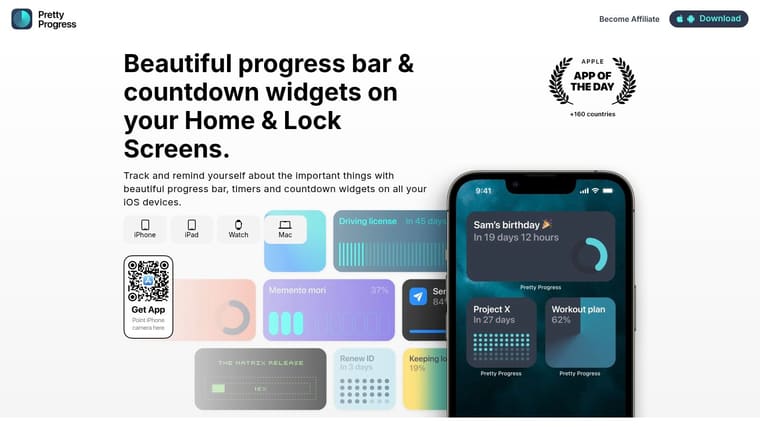
Pretty Progress is the easiest recommendation when your motivation drops because the goal disappears from view. It turns a deadline, countdown, or milestone into a persistent visual reminder on your Home Screen and Lock Screen, so your phone stops being only a distraction and starts acting like a cue. That matters because independent app-market coverage keeps pointing to progress visualization and daily reminders as the features that support sustained engagement in motivation apps (Play Store listing context).
Why glanceable widgets work
The app’s real strength is that it asks for almost no mental effort once it’s set up. You pick a start date, an end date, a design, and then place the widget where you’ll see it all day. That makes it a strong choice for students, professionals, ADHD-friendly routines, and anyone who wants motivation without another noisy dashboard.
Pretty Progress also supports a broad device mix, including iPhone, iPad, Apple Watch, Mac, and Android, which is a practical sign that motivation tools are now a durable cross-platform category rather than a niche experiment (motivation software roundup). The built-in calculators for date math, business days, exact age, and intermittent fasting are useful because they reduce setup friction. You don’t have to leave the app to do the planning that keeps the goal real.
Practical rule: Put the widget where your thumb naturally lands, not where it looks prettiest. If it sits on your primary Home Screen or Lock Screen, it becomes a repeated reminder instead of decoration.
The theme library is another plus if you care about aesthetics. Swiss Style, Minimal, Aqua, Retro OS, and other curated looks make it easier to build a screen you’ll keep visible. For people who enjoy a clean, low-noise system, that polish is part of the motivation.
Best for: visual thinkers, deadline-driven users, people who want a glanceable habit or countdown system
Trade-off: deeper styling is tied to PRO, and very customizable widgets can take a little time to tune
Website: Pretty Progress
2. Streaks
Streaks is the app for people who want a clean habit system that doesn’t get in the way. It’s Apple-only, which is a limitation, but it also means the experience stays tight across iPhone, iPad, Apple Watch, Mac, and Apple Vision Pro. If your motivation rises when you can see a streak every day and keep the interface simple, this is a strong fit.
The biggest practical advantage is the one-time purchase model. That makes it appealing to users who don’t want another subscription sitting in the background. It also integrates with Apple Health, so some health-related habits can auto-track instead of relying on manual logging. That reduces friction, and friction is usually what kills habit apps after the first burst of enthusiasm.
Where Streaks fits best
Use Streaks when you want a small set of habits, clear reminders, and a polished Apple-native experience. It’s especially useful if you’ve already tried heavier trackers and found the analytics more distracting than helpful. The app supports widgets, complications, reminders, negative habits, and flexible schedules, so it covers the basics without turning your routine into a project management board.
The trade-off is depth. If you want lots of charts, pacing projections, or a sprawling goal system, this can feel too lean. That said, many people don’t need more complexity. They need an app they’ll open every morning because it takes almost no effort to understand.
For Apple users, that’s a very real advantage.
Best for: Apple loyalists, minimalists, streak-focused users
Trade-off: no Android or web version, lighter analytics than heavier trackers
Website: Streaks
3. Strides
Strides is the app for people who want motivation through measurement, not just reminders. It gives you several ways to define success, including habit tracking, targets, averages, and milestones. That flexibility matters because not every goal is a daily streak. Some goals are about pace, consistency, or reaching a number by a certain point.
Where Strides stands out is the way it makes progress feel legible. Clear charts, streaks, pace projection, widgets, reminders, and iCloud sync make it easier to answer a question many motivation apps leave vague, “Am I moving?” For students and professionals, that clarity can be more motivating than a streak counter alone.
When data helps more than hype
Some people lose motivation because they can’t tell whether their effort is working. Strides solves that by putting the shape of progress in front of you. If you’re studying for exams, building a writing habit, or trying to hit a quota, the visual pacing can be more useful than a generic inspiration feed.
The main limitation is that it stays in the iOS and watchOS world, and the most advanced features sit behind a subscription. Still, if you’re the kind of person who likes dashboards and clear pacing, the app gives you more structure than a quote widget and less clutter than a full project manager.
Useful test: If you can explain your goal in one number, Strides will probably feel natural. If your goal is mostly emotional, social, or identity-based, another tool may fit better.
That’s why Strides works well for users who want accountability without financial stakes or gamification. It’s a calmer kind of motivation, and for many people, that’s exactly what lasts.
Best for: students, professionals, number-driven goal setters
Trade-off: iOS-only, subscription needed for advanced use
Website: Strides
4. Forest
Forest is a strong fit when distraction is the core motivation problem. You start a focus timer, and while you stay off your phone, a virtual tree grows. If you leave the session, the tree dies. The loop works because it turns not using your phone into a visible action with immediate feedback.
It also belongs in a motivation roundup because focus and motivation often overlap. The person who cannot finish a task may not be lazy, they may be stuck in a phone loop. Forest gives them one clear job, stay put, and that can be more useful than a broad productivity suite for students and people with ADHD. The app also includes an Allow List for blocking distracting apps and sites on supported iOS versions, plus shared sessions and co-plant features for accountability.
Motivation through focus, not pep talks
Forest is not a full habit tracker, and that is fine. It works for sessions, not life dashboards. If you need more data or broader goal tracking, you will outgrow it quickly. If you need a way to start work without negotiating with yourself, it does the job well.
The social hooks help too. Shared sessions and rewards add a bit of pressure without feeling heavy. Some users like the environmental angle as well, since the app links focus behavior to real-world tree planting in optional ways. That is a concrete reward, not just another badge.
For readers comparing focus tools alongside motivation tools, the internal comparison at Pretty Progress’s focus app guide is worth a look because it shows the difference between a visual reminder system and a distraction blocker. If you want a closer look at progress that you can see at a glance, the visual habit tracker guide is useful context. For another angle on structure and accountability, see how streak apps compare to flexible trackers.
Best for: deep work, ADHD-friendly focus, students who need phone resistance
Trade-off: limited analytics, plus features require subscription
Website: Forest
5. Habitica
Habitica is the best app for motivation if game mechanics are what keep you moving. It turns habits, dailies, and to-dos into a role-playing game, complete with leveling, gear, pets, parties, quests, and community challenges. That structure can be powerful for people who don’t respond to sterile checklists but do respond to progress bars, loot, and social pressure.
This is also where the app-market coverage lines up with the product reality. Independent roundups keep placing Habitica at the center of motivation software discussions because it translates abstract goals into repeatable daily actions (2026 motivation software roundup). That said, the right audience matters. The app is best when the game layer feels energizing, not childish or overwhelming.
Who should use Habitica
Gamers, group projects, and people who need external accountability often do well here. The free core is generous, the community is active, and the events give the app a sense of life. If you like the idea of turning chores into quests, this will probably feel fun from day one.
The downside is the interface. It can feel busy, and if you’re not used to RPG-style systems, there’s a learning curve. You also need to remember that Habitica gives you the container, not the content. It won’t tell you what your goals should be, it will just make them feel more engaging once you know them.
Plain truth: Habitica works best when you already know what you need to do. It won’t rescue a vague plan, but it can make a boring one much easier to repeat.
For users who want to compare gamified habit apps with more flexible trackers, how streak apps compare to flexible trackers is a useful companion read.
Best for: gamers, social motivation, chore-to-quest thinkers
Trade-off: busy interface, best perks may require subscription or currency
Website: Habitica
6. Beeminder
Beeminder is for people who need consequences, not encouragement. It tracks your goal on a bright red line, and if you fall behind, the pledge is triggered. That financial edge changes the emotional math. You’re not just trying to feel productive, you’re trying to avoid paying for failure.
This is a stronger tool than many people expect because it matches a very specific motivational style. Some users don’t need more reminders, they need a reason to respect the commitment. Beeminder gives them that, along with detailed graphs, safety buffers, scheduling breaks, and a wide set of autodata integrations. It even supports API, IFTTT, and Zapier, which makes it useful for people who want their goals tied into real systems instead of manual logging.
Why stakes can work, and when they backfire
The upside is obvious. If you’re accountability-driven, Beeminder can make a goal feel very real very quickly. It’s especially effective for quantitative goals where the data is clear and the boundary is concrete. The downside is also obvious. Financial penalties can be stressful, and the setup takes care because a sloppy goal definition can create accidental derails.
That means Beeminder is not a casual app. It’s a commitment device. If you want a gentle motivational nudge, it may feel too intense. If you want a system that makes backing out costly, it can be one of the strongest options on the list.
For readers who like the accountability angle but want a different framing, how to build accountability is a useful match.
Best for: high-accountability users, quantifiable goals, people who respond to consequences
Trade-off: can feel stressful, setup needs care
Website: Beeminder
7. stickK
stickK uses commitment contracts to make goals more serious. You set an outcome, choose the stakes, and assign a referee who verifies whether you followed through. That combination of social pressure and financial consequence is useful when a goal needs a firmer edge than a reminder app can provide.
The platform also gives you flexibility in how you frame the stakes, including charity and anti-charity options. That matters because motivation is often emotional, not logical. Some people care more about where the money goes than the amount itself. stickK lets you use that reaction instead of fighting it.
Best for single outcomes
This is not the app for daily habit logging or broad self-improvement dashboards. It’s best for one clear goal at a time, especially when success can be verified. If you’re trying to stop one behavior, finish one project, or hit one specific outcome, the structure is clean and direct.
The key trade-off is honesty. You need a diligent referee or a strong enough personal system to keep the contract meaningful. Without that, the whole setup loses force. But when used well, it’s simple, memorable, and hard to ignore.
For a clear example of a commitment platform built around one goal, this is one of the most direct tools on the market.
Best for: single goal commitments, social accountability, loss-aversion users
Trade-off: not a day-to-day habit tracker, depends on honest verification
Website: stickK
8. Coach.me
Coach.me is the best fit when your motivation improves with a real person in the loop. The app gives you free habit tracking and reminders, then lets you add paid one-on-one coaching if you need it. That makes it useful for people who want to start light and only pay for human support when the app alone isn’t enough.
The practical value here is simple. Some users don’t need more automation, they need nudges, feedback, and scheduled check-ins. A coach can do that in a way a notification never will. That makes Coach.me different from the heavier trackers and the gamified tools on this list.
When human support matters
This option works best when your problem is not understanding the goal, but staying consistent with it. The tracker keeps the routine visible, and the coach adds the outside accountability. That mix can be especially helpful for personal and professional goals where motivation tends to wobble after the first week.
The downside is variability. Coaching quality and pricing differ by coach, so the experience depends on who you choose. The tracker itself is also simpler than analytics-heavy alternatives, which is either a strength or a limitation depending on how much data you want.
If you’ve already tried apps that only nudge you with streaks, Coach.me gives you the next layer up.
Best for: people who want coaching, accountability, and a light tracker
Trade-off: coach quality varies, tracking features are fairly simple
Website: Coach.me
9. Motivation, Daily Quotes
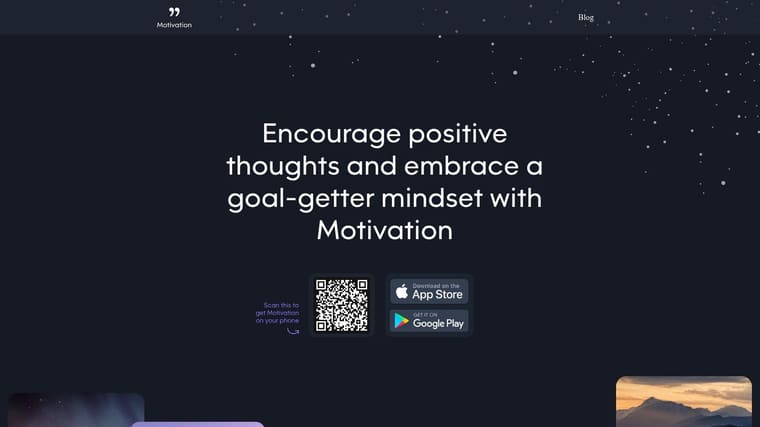
Motivation, Daily Quotes is for people who want a small spark, not a whole system. It delivers quotes through notifications and widgets, so you can keep a little inspiration on screen without setting up goals, streaks, or trackers. That makes it one of the lowest-friction options in the category.
The category coverage around self-improvement apps makes a useful distinction here. Some people want habit systems, while others want affirmations or quote widgets, and those are different jobs even if they get bundled together in “motivation” roundups (motivation app style gap). This app speaks to the quote-first group.
Lightweight, but limited
The upside is speed. You can install it, set it up, and get value almost immediately. The widgets are attractive, and the reminders can serve as a tiny reset during a busy day. For users who want a gentle prompt at the top of the screen, that’s enough.
The limitation is just as clear. This is not a habit tracker, a goal planner, or an accountability system. It won’t measure progress or help you execute a plan. It’s purely inspirational content, so it works best as a supplement rather than a primary motivation tool.
If you’re the type of person who likes to see a short message before diving back into work, it can fit nicely into a broader setup.
Best for: quote lovers, low-effort inspiration, widget-based reminders
Trade-off: not a task or habit system, most content and themes need a subscription
Website: Motivation, Daily Quotes
10. I Am, Daily Affirmations

I Am, Daily Affirmations works best as a mindset primer. It gives you curated affirmations, reminders, and widgets across themes like confidence and focus, which can be useful when you want positive prompts visible throughout the day. It’s especially helpful when paired with a stronger habit or goal tracker.
That pairing matters. A lot of motivation apps try to do everything, but affirmation apps are strongest when they stay narrow. They help with tone, not structure. That makes them useful for people who need encouragement before they can tackle the actual work.
A mindset layer, not a planning tool
The main advantage is how easy it is to keep visible. The widgets and reminder system make it simple to keep the app on your screen without adding another task list to manage. If you like starting the day with a quick mental reset, it fits that habit well.
The trade-off is obvious. It doesn’t include task tracking or analytics, so it won’t replace a goal app. Most of the deeper content and customization sit behind a subscription, which means the free layer is more of a taste than a full system.
For users who want a softer form of motivation, this can be a good companion app rather than the center of the setup.
Best for: affirmations, confidence-building, mindset support
Trade-off: no task tracking, most content needs a subscription
Website: I Am, Daily Affirmations
Top 10 Motivation Apps, Quick Feature Comparison
| App | Core features ✨ | UX / Quality ★ | Price / Value 💰 | Target audience 👥 | Unique selling points 🏆 |
|---|---|---|---|---|---|
| Pretty Progress 🏆 | Customizable countdowns & progress widgets; date, business‑day & fasting calculators | ★★★★★ Polished, zero‑ad, glanceable | 💰 Free + PRO unlock for advanced styling | 👥 Students, professionals, habit builders, ADHD, productivity fans | ✨ Beautiful themes, deep widget styling, cross‑device always‑on reminders |
| Streaks | Daily streak tracker; Apple Health sync; widgets & Watch complications | ★★★★ Polished Apple‑native | 💰 One‑time purchase (no subscription) | 👥 Apple users focused on daily habits | ✨ Deep Health integration; simple low‑noise UX |
| Strides | Habit/Target/Average/Milestone trackers; charts & pace projection | ★★★★ Data‑focused dashboards | 💰 Free tier + subscription for pro features | 👥 Students & professionals who want metrics | ✨ Flexible tracker types and clear visual pacing |
| Forest | Pomodoro focus timer that grows virtual trees; social co‑planting | ★★★★ Fun, simple, motivating | 💰 Paid app + subscription for extra features | 👥 Students, distraction‑prone users, ADHD | ✨ Gamified focus with social & real‑tree options |
| Habitica | RPG‑style tasks, Dailies, rewards, parties & guilds | ★★★ Engaging but steeper learning curve | 💰 Free core; optional subscriptions/in‑app purchases | 👥 Gamers & social accountability groups | ✨ Game mechanics drive motivation and community events |
| Beeminder | Pledge‑backed goals with payments; many autodata integrations | ★★★★ Strong visual graphs; high accountability | 💰 Subscription + pledge payments if you derail | 👥 Users motivated by financial consequences | ✨ Commitment contracts + automated data integrations |
| stickK | Commitment contracts with financial stakes, referees & supporters | ★★★ Simple, clear accountability framework | 💰 Platform fees + stakes chosen by user | 👥 People wanting high‑stakes commitment for single outcomes | ✨ Referee verification & flexible beneficiary options |
| Coach.me | Free habit tracker + marketplace for one‑on‑one coaches | ★★★★ Lightweight tracker; human coaching available | 💰 Free tracker; paid coaching per coach | 👥 Users who benefit from expert guidance & accountability | ✨ Easy to start free, scale to paid coaching when needed |
| Motivation, Daily Quotes | Large quote library, scheduled reminders, shareable widgets | ★★★★ Fast, inspirational nudges | 💰 Free + subscription for premium content | 👥 Users seeking quick daily motivation | ✨ Attractive widgets and curated quote categories |
| I Am, Daily Affirmations | Curated affirmations, reminders, Lock/Home widgets | ★★★★ Positive, low‑effort habit support | 💰 Free + subscription for full library | 👥 Mindset & positivity seekers | ✨ Personalized affirmation themes and extensive content library |
How to Choose Your Perfect Motivation App
If you want the shortest possible answer, start with the app that matches your motivation style. For pure visual motivation and aesthetic widgets, Pretty Progress is the strongest fit. For building habits on Apple devices with a clean, streak-driven system, Streaks is a smart choice. If you’re driven by game mechanics, Habitica will probably keep you more engaged than a plain checklist. If you need real stakes, Beeminder or stickK are the serious accountability tools. The best app for motivation is the one that fits how your brain already responds to progress, pressure, or praise.
The bigger mistake is choosing an app because it has the most features. Independent coverage of motivation and self-improvement tools keeps pointing back to retention and engagement as the benchmarks, not novelty, which is why reminders, streaks, goals, and progress visualization keep showing up across the strongest products (motivation app retention patterns, self-improvement app review framework). That also explains the biggest gap in a lot of roundups. They group motivation as one category, even though user intent is split across routines, calm, affirmations, quotes, and self-affirmations (motivation app category split). In practice, the best app is often the one that asks the least of you each day.
That’s especially true if your energy is low. Lightweight, glanceable reminders can be better than a feature-heavy coaching app when you’re tired, burned out, or juggling too much. If you need a clear visual cue, put a widget on your Home Screen or Lock Screen and let it do the reminding for you. If you need game mechanics, pick the app that rewards the act of showing up. If you need consequences, choose the tool that makes ignoring the goal uncomfortable.
For sleep-related routines, it can help to keep your goals visible in one place and separate from your phone’s usual distractions. Monitor your sleep habits if rest is part of the behavior you’re trying to improve.
If you want motivation that stays visible without adding noise, Pretty Progress is built for exactly that. It turns deadlines, goals, and routines into clean countdowns and progress widgets you’ll see throughout the day. Visit Pretty Progress and use it to keep your next goal in front of you every time you open your phone.





