

October 21, 2026
Project Timeline Management That Actually Works in 2026
Master project timeline management with a practical framework for scope, milestones, Gantt charts, and recovery playbooks that keep your projects on track.
You launch with a tidy kickoff deck, a launch date everyone nods at, and a shared belief that the plan is settled. A few weeks later, you’re answering the same question in three threads, “what’s due when,” while someone discovers a review step nobody scheduled. That’s the normal failure mode for Project Timeline Management, and it rarely starts with lazy execution. It starts with a timeline that was never built to support a decision.
Table of Contents
- Why Most Project Timelines Fail Before the Work Even Starts
- Defining Scope, Milestones, and Deliverables You Can Actually Hit
- Choosing Between Gantt Charts, Roadmaps, and Countdown Views
- Building the Timeline With Tools, Templates, and Business-Day Math
- Monitoring Progress, Reading SPI, and Updating Without Rewriting History
- Handling Delays, Dependencies, and Honest Replanning
- A 90-Day Project Timeline Plan You Can Run This Quarter
Why Most Project Timelines Fail Before the Work Even Starts
The meeting ends on time. Dates fill the last slide. Nobody in the room believes all of them, but nobody wants to be the person who says so in week one.
Two problems hide inside that politeness. First, the math is soft. Teams pick calendar dates before they’ve broken scope into activities, sequenced dependencies, or checked whether the people assigned to parallel work are the same people. Second, the communication is soft. A single green label says on track, even when scope has grown, a predecessor has slipped, and the finish date now depends on everything going right.
Those are different jobs. Mathematical scheduling answers when work can finish, given duration, logic, and capacity. Human-facing deadline communication answers what people see each day, when they should worry, and what they’ll do next. Most advice blends them into a pretty chart and calls it done.
What the Old Benchmark Still Teaches
Schedule trouble isn’t new. The 1994 CHAOS Report history classified only 16.2% of software projects as successful, meaning completed on time, within budget, and with all originally specified features, while 52.7% were challenged and 31.1% were impaired or canceled.
Read that carefully. A project can finish and still fail its original commitments because it cut features or spent more to protect the date. That’s why you shouldn’t judge a timeline by a single completion label. Track planned dates, actual dates, scope changes, and budget variance separately, or you’ll argue about success while looking at four different definitions.
The First Month Tells You the Truth
Vague scope shows up as big tasks like “build onboarding” that can’t be estimated. Calendar math shows up when a task estimated in working days loses weekends and holidays. Missing buffer logic shows up when the first surprise consumes the launch date itself, because no contingency was reserved anywhere deliberate.
A timeline isn’t a promise you defend. It’s a forecast you update, with the original baseline kept visible so everyone can see what changed and why.
Treat the timeline as a decision tool. When scope, date, and capacity conflict, it should force an explicit trade. Cut scope, add capacity, move the date, or accept more risk. If your plan can’t support that conversation in week two, it won’t save you in week ten.
Defining Scope, Milestones, and Deliverables You Can Actually Hit
Don’t start in a scheduling tool. Start on one page, with language tight enough that two people can’t read it differently.
The Afternoon Scope Sequence
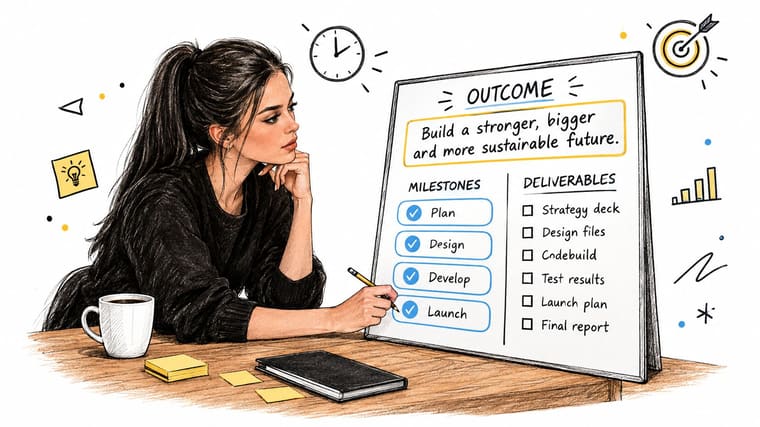
Write the outcome in one sentence first. Not activities, the result. “New users can sign up, pay, and invite a teammate without support help” beats “launch V2.” Then list the deliverables that prove that outcome exists, such as approved designs, a working checkout, help copy, and an app store listing. Only then break each deliverable into activities small enough to estimate in days, not vague weeks.
Preparation does more work than teams often credit it for. An analysis of 480 infrastructure projects across three continents found 43% had documented delays, and 60% of identified delay drivers came from weaknesses in the preparation phase rather than tendering or execution. Different industry, same lesson. Sloppy front-end definition becomes late-stage delay.
- Outcome: One sentence that describes the finished state, not the effort.
- Deliverables: Tangible outputs a reviewer can accept or reject.
- Activities: Verbs with owners, each short enough to estimate.
- Exclusions: Work you’re explicitly not doing in this phase.
That last item matters for client work especially. If you’re onboarding a new engagement, a structured checklist for remote-first freelancers can help you capture inputs, access, and approval owners before those gaps become schedule gaps.
Milestones Are Not Activities
Keep these separate or your reporting gets muddy. “Design v3 ready for review” is an activity with duration and an owner. “Design approved” is a milestone, a zero-duration decision point. Milestones should mark proof, money, approval, or a handover that enables downstream work.
For a thesis, the pattern holds. Deliverables are a literature review, a methods chapter, clean data, and a formatted submission file. “Supervisor approves methods” is the milestone. “Rewrite methods” is the activity you schedule and estimate.
For a mobile app launch, “store review submitted” is a milestone you don’t fully control, so you plan the activities before it tightly and leave room after it. If you can’t name the deliverable, the owner, and the acceptance test, you don’t have scope yet. You have a topic.
Choosing Between Gantt Charts, Roadmaps, and Countdown Views
Pick the format by the question you’re trying to answer, not by what your tool opens to by default. Two views are usually needed, because the person sequencing work and the person doing work today aren’t asking the same question.
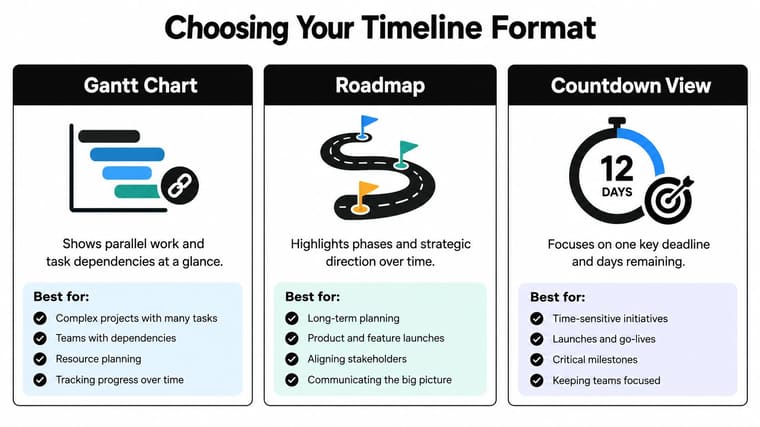
A Gantt chart shows duration, overlap, and dependencies. It’s where you spot that testing can’t start before the build, and that your designer is double-booked. It gets unwieldy when you load every small task into it and invite stakeholders to read detail they don’t need.
A roadmap shows phases and direction. It’s useful for leadership conversations about what’s next quarter versus now, and it’s weak at proving whether a specific date is feasible. Don’t let a roadmap’s clean bars impersonate a schedule.
A countdown view shows time remaining to one deadline that matters today. It creates focus, and it hides logic. Used alone, it can make a doomed date look calm until very late.
Timeline Formats and the Decisions They Support
| Format | Best For | Weakness | Typical Audience |
|---|---|---|---|
| Gantt chart | Dependencies, parallel work, critical path | Cluttered at high detail | Project lead, delivery team |
| Roadmap | Phases, priorities, strategic sequence | Weak on exact feasibility | Leadership, stakeholders |
| Countdown view | Daily focus on a fixed deadline | Hides blockers and logic | Individuals, small teams |
My default pairing is a Gantt chart for the lead and a countdown for the people doing the work. Tools that support visual boards and walls can help with the shared layer, and Walling’s features overview gives a sense of that style of organization. For the personal layer, Pretty Progress can put a project’s countdown and progress bar on a phone, watch, or desktop widget, set to your real baseline date. That only helps if the date behind it comes from the Gantt logic, not from hope.
Building the Timeline With Tools, Templates, and Business-Day Math
Build in this order. Tool first is a mistake I’ve made, and you end up shaping the plan to fit a template instead of your dependencies.
Start from your one-page scope sheet. Enter activities, owners, and durations in working days. Then add dependencies, then apply a calendar with weekends and holidays, then check capacity. Save that version as your baseline before execution starts, and don’t overwrite it later.
A quick look at how a visual countdown ties back to that baseline is useful here.

Work the Business Days, Not the Calendar
Say an activity needs 15 working days and starts on a Wednesday. Count Wednesday to Friday as three, the next full week as five more, and the week after as five more. That’s thirteen. You need Monday and Tuesday of the following week to reach fifteen, assuming no holidays. Add a long weekend in the middle and the finish moves again, even though the work estimate never changed.
That’s why a separate non-working day calendar matters. Use the business days calculator to check finish dates before you publish them, especially across public holidays, school breaks, or a client’s shutdown week. Publishing a date you derived by counting calendar squares is how a plan loses credibility in its first review.
Baseline quality is a bigger problem than teams admit. An analysis of more than 70,000 schedules reported that over 70% missed schedule targets with Schedule Performance Index below 0.90, only 12% of baseline schedules met stated quality standards, and fewer than 5% retained that quality by 75% project completion. A tidy template doesn’t fix weak logic.
Dependency Rules That Keep You Honest
Use finish-to-start by default. B starts when A finishes. Use start-to-start only when there’s a real reason, such as drafting help copy once design work has begun and stabilized, and write that reason down. Every loose dependency you add to make dates fit is risk you’re choosing not to name.
- Keep activities short: If you can’t estimate it, split it.
- Name external dependencies: Approvals, vendors, and data from another team get owners and due dates too.
- Check capacity last, then again: Parallel bars mean nothing if one person owns all of them.
The short walkthrough below shows the build sequence in a visual format.
End by setting your visible countdown to the baseline finish, not to an internal stretch target. If the team sees one date daily and manages to another in meetings, you’ll create confusion you’ll spend weeks untangling.
Monitoring Progress, Reading SPI, and Updating Without Rewriting History
Most timelines don’t die during planning. They die during updates, when actuals get edited without notice and remaining work stays optimistic because nobody wants to be first with bad news.
The Weekly Control Routine
Fix a data date, say Friday close of business. At each cut-off, record actual start and finish dates as they happened. Update remaining duration from evidence, such as completed screens, approved pages, or tested cases, not from a percentage someone offers in a meeting. Recalculate the critical path, then look at near-critical tasks whose float is shrinking.
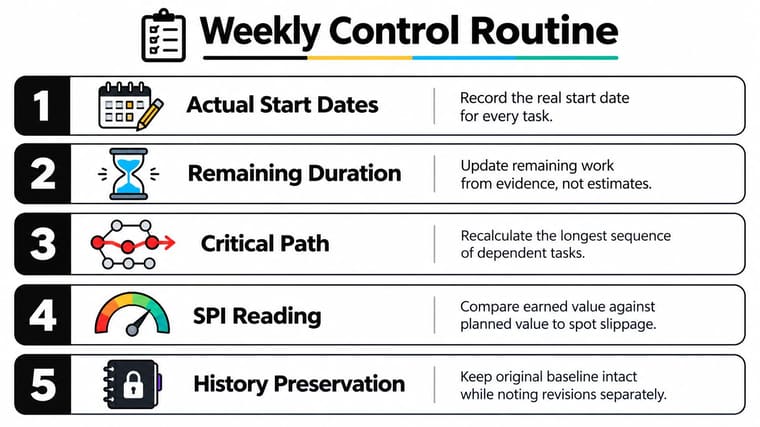
Schedule Performance Index, or SPI, is earned value divided by planned value. Below 1.0 means you’re behind the baseline. Don’t treat one reading as a verdict. Read the trend. A team drifting down over several weeks is telling you something before any milestone is missed, and that’s when recovery is still cheap.
Practical rule: Never change an actual date to make performance look healthier. Once history becomes editable, every forecast after it is fiction.
If you track broader goals alongside delivery dates, the discipline in tracking OKRs without admin burden pairs well with this. Keep the review light, but keep it fixed. The same habit helps if you’re keeping track of multiple projects at once, where one quiet slip steals capacity from another plan.
Buffers Based on Risk, Not Habit
Don’t pad every task by a flat percentage and don’t dump one blanket buffer at the end where nobody can see which risk consumed it. A stronger method, described in the U.S. Government Accountability Office schedule guide, estimates each activity with an explicit probability distribution, runs a Monte Carlo simulation, and reports P50 or P80 completion dates. You reserve the gap between your chosen percentile and the deterministic plan as schedule contingency.
You don’t need that full machinery for a small launch. You do need the principle. Name the risky activities, estimate a range instead of a single number, and place contingency where the risk sits.
Keep the dashboard compact. Baseline finish, current forecast, variance, critical tasks, near-critical tasks, dependencies at risk, and a named owner with a recovery action for each material variance. That’s a focused weekly review, not a status pageant.
Handling Delays, Dependencies, and Honest Replanning
Delays aren’t the enemy. Silent delays are, because they convert a manageable trade into a surprise.
Trust is the cost. In a 2025 survey of 1,000 U.S. consumers, only 13% believed construction projects finish on time, while respondents prioritized clear timelines with milestone updates at 34% and transparency about delays at 24% as trust-building measures. Your stakeholders aren’t that different from those respondents. They can handle a revised date earlier than they can handle a confident one that collapses late.
Match the Response to the Cause
For a dependency slip, contact the downstream owner the same day, recalculate the path, and check whether any successor work can start with partial input. For a scope addition, do not absorb it without acknowledgement. Price it in days and ask what moves out. For capacity loss, reassign the critical work first, not the work that’s easiest to move. For an external event, such as a vendor outage or a policy change, record the assumption that broke so the replan has a clean audit trail.
This is core project deadline management, not extra communication overhead.
When a Missed Milestone Changes the End Date
Use a rule before you’re under pressure. If the slipped task has float and the forecast finish hasn’t moved, draw down buffer and say so. If it’s on the critical path, or its slip pushes a near-critical task onto that path, revise the forecast finish. Don’t protect the original date with language.
Drop the single status label. Use three explicit states.
- On track: Forecast finish matches baseline, with contingency intact.
- At risk: Forecast still holds, but float or contingency is being consumed.
- Re-planning required: Forecast finish has moved, or scope and capacity no longer fit the date.
Show four things separately in every update. The original target, the current forecast, the next milestone, and the uncertainty around the forecast. That’s a trustworthy countdown. A worked case helps. A two-week slip on content production becomes a one-week project slip if you fast-track review by starting it on approved sections instead of waiting for the full set. You still report the slip. You don’t pretend fast-tracking is free, because overlapping review raises rework risk.
Then update the visible countdown to the new forecast date. Leaving it pointed at the old target trains people to ignore it, and a reminder people ignore is worse than none.
A 90-Day Project Timeline Plan You Can Run This Quarter
Run this as an operating cadence, not a one-time planning exercise. The artifacts stay small on purpose. You’re trying to build a rhythm a busy team will keep.
90-Day Timeline Operating Cadence
| Weeks | Phase | Key Artifact | Weekly Review Focus |
|---|---|---|---|
| 1 to 2 | Scope and baseline | One-page scope sheet, baselined schedule | Dependencies, capacity, holiday calendar |
| 3 to 6 | Early build | Updated forecast, risk list | Float loss, near-critical tasks |
| 7 to 10 | Main delivery | Recovery actions with owners | SPI trend, forecast variance |
| 11 to 12 | Closeout | Lessons learned, actuals archive | Estimate accuracy, buffer use |
In weeks one and two, resist starting production work to feel busy. Finish the scope sheet, agree on milestones, build the logic, and lock the baseline. Hold one session where the team attacks the plan. Ask what’s missing, who is overloaded, and which external dependency nobody owns.
From week three, run the same short forecast review every week. Update actuals, remaining duration, and the critical path. Decide on one or two recovery actions, assign them, and stop. Long meetings usually mean the dashboard isn’t doing its job.
Closeout is where your next estimate gets better. Compare planned and actual durations activity by activity. Note where buffer was consumed and whether the risk that caused it was on your list. Teams that skip this step keep making the same optimistic estimate with fresh confidence.
Between reviews, the deadline has to stay present without anyone chasing status. A persistent visual reminder on a phone or lock screen does that quiet work, as long as it points at the current forecast and not a date you’ve already abandoned.
Five lines to keep, if you keep nothing else. Define scope before dates. Separate milestones from activities. Build with working days and explicit dependencies. Preserve actuals and read trends, not single readings. Replan in the open, with the original target and the new forecast both visible.
If your next question is how detailed the activity list should be, use this test. If an owner can’t tell you whether it’s done, it’s too big. If your question is how often to update, weekly is the floor for active work. If your question is whether a countdown helps on its own, it doesn’t. It helps when it’s wired to a baseline you review and a forecast you’re willing to change.
Set your next project deadline up as a customizable countdown and progress widget with Pretty Progress, so the forecast you review each week stays visible on your Home Screen, Lock Screen, watch, or desktop between meetings. Pick your baseline finish, style the widget to fit your screen, and update it whenever your forecast changes.





