

August 28, 2026
Product Launch Timeline Guide from Idea to Release
Build a product launch timeline that actually ships on time. Learn phases, milestones, sample timelines, task owners, and how to track progress with widgets.
You’re three days from a launch review, and the plan still lives in three places. Product has one version of the scope, engineering is waiting on a QA sign-off nobody owns, and marketing just found out the release note copy hasn’t been approved. That’s the moment a product launch timeline stops being a planning artifact and starts being a control system.
A good timeline does three things at once. It aligns product, engineering, design, marketing, sales, support, and legal on the same critical path. It exposes dependencies before they become surprises. It makes progress visible enough that anyone can tell whether the launch is drifting or on track.
Table of Contents
- What a Product Launch Timeline Really Does
- The Six Phases Every Launch Walks Through
- Sample Timelines by Product Complexity
- Owners, Dependencies, and Risk Buffers
- Tracking Progress With Glanceable Widgets
- When Faster Is Slower
- Launch Checklist and What Comes After Go-Live
What a Product Launch Timeline Really Does
A launch timeline is not a decorated checklist. It’s the working agreement that tells every team what happens next, who owns it, and what “done” means. Without that shared view, teams drift into local optimization, where engineering ships code, marketing waits for screenshots, and support hears about the launch after customers do.
The timeline is the operating document
The job of the timeline is to translate a product decision into coordinated execution. It should show start dates, finish dates, and exit criteria for every milestone, not just a vague sequence of tasks. If copy review is delayed, the timeline should make it obvious which downstream assets, approvals, or channels move with it.
Practical rule: if a milestone can’t be verified by someone outside the owner’s team, it isn’t a milestone yet.
That’s also why timeline visibility matters so much. Teams can’t respond to slippage if they can’t see it, and a static spreadsheet usually hides the problem until it’s too late. For a cleaner way to make progress legible across teams, the logic in project timeline visualization is worth borrowing.
It has to coordinate more than one team
The timeline should map workstreams across product, engineering, design, marketing, sales, support, and legal onto one calendar. That doesn’t mean every team follows the same rhythm. It means handoffs are explicit, approvals are visible, and nobody assumes another group is magically ready.
If you need a practical way to capture early signal from your audience before the plan hardens, create a roadmap feedback survey and use the responses to challenge assumptions before launch scope is locked. That’s far cheaper than discovering the mismatch after release.
A timeline that’s doing its job also gives leadership a realistic read on risk. It shows when a launch is blocked by upstream work, when a date is still flexible, and when a trade-off has to be made. If it can’t do that, it’s just a prettier to-do list.
The Six Phases Every Launch Walks Through
Concept and development set the frame
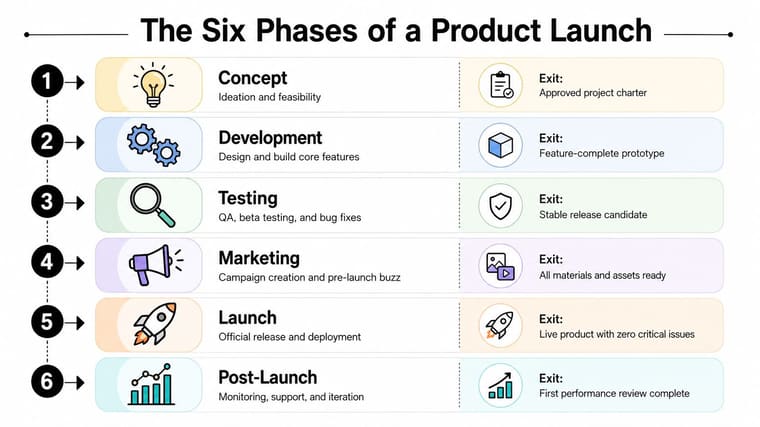
In Concept, product defines the problem, audience, and success metrics. The handoff that slips most often is the one between product and engineering, because the team has a direction but not a scope that can be built. Exit should mean a decision on what’s being launched, why it matters, and how the team will know it worked.
In Development, the roadmap turns into shipped code, design assets, and working flows. The usual failure is releasing something that technically works but was never validated with marketing on positioning or with support on customer expectations. A useful framework for keeping that work paced and reviewable is Uxia’s agile framework for UX teams, especially when design and engineering are moving in parallel.
Testing, marketing, and launch need separate exits
Testing covers QA, beta cohorts, accessibility, localization, and load. A green test run isn’t enough. Exit should mean a signed-off release candidate with known issues understood, not an optimistic belief that “it looked fine in staging.”
Marketing runs in parallel, and it’s often where timelines go to die. Messaging, creative, sales enablement, PR, internal comms, and the launch event all need their own runway. The handoff fails when marketing gets late creative, untested integrations, or a promise that never matched the product.
Launch is one day, but the work stretches on both sides of that day. The release needs final coordination, channel readiness, support coverage, and a rollback path. Then Post-Launch begins, where telemetry, onboarding, iteration, and the retro determine whether the launch becomes durable adoption or a short spike.
A launch is only “done” when the post-launch review says the team has enough signal to decide what happens next.
The clearest way to keep these phases honest is to treat each one as a gate with its own exit criteria. That stops teams from borrowing confidence from an earlier phase that hasn’t really finished.
Sample Timelines by Product Complexity
A product launch timeline changes with scope, and the trade-offs change with it. A small update can move quickly because it borrows trust from an existing market and an existing system. A Tier 1 launch takes more coordination because the team is building awareness, readiness, and distribution at the same time.
The benchmark is useful as a planning check. A Tier 1 new product entering a new market takes about 13 weeks, a major feature or new segment launch takes 6 to 8 weeks, and a minor update in an existing market takes 2 to 4 weeks (product launch timeline benchmark). Launch preparation usually consumes most of the schedule, so the biggest risk sits before release day, not after it.
| Phase | Simple Update (2-4 weeks) | Tier 1 Launch (13 weeks) |
|---|---|---|
| Concept | Week 1, spec and design are locked with one owner. | Weeks 1 to 3, problem framing, market validation, and success metrics are aligned. |
| Development | Week 2, build happens fast against a narrow scope. | Weeks 4 to 8, build runs with a design freeze around week 6. |
| Testing | Week 3, QA and asset prep happen together. | Weeks 9 to 10, beta, QA, accessibility, and localization are tested before release candidate sign-off. |
| Marketing | One week, usually one owner and a tightly scoped comms plan. | Weeks 11 to 12, PR, sales enablement, and the launch event are locked. |
| Launch | Week 4, ship, announce, and monitor. | Week 13, launch day lands inside a pre-built support and monitoring plan. |
| Post-Launch | Same week, initial check-in and issue triage. | Adoption window is already scheduled before the retro, so the team reviews usage and support signals on purpose. |
A simple update can often run with one primary owner and one backup. A Tier 1 launch cannot. More phases run in parallel, QA starts earlier, and marketing needs its own runway instead of borrowing time from engineering.
The mistake I see most often is not underestimating engineering, it’s underestimating how much calendar marketing needs to create a believable launch.
The comparison also explains why recurring launch calendars matter. Some teams are not planning one release, they are coordinating several across a year, so the timeline has to survive repeated use instead of collapsing after one event. A home renovation timeline is a useful mental model here, because the sequence matters, but the trades still overlap.
Owners, Dependencies, and Risk Buffers
A launch slips when nobody owns the gate, only the tasks under it. Every critical milestone needs one accountable owner who can approve completion, escalate blockers, and trade scope if the date moves. Shared responsibility feels collaborative until the deadline arrives and everyone thinks someone else was watching the clock.
Give each milestone a real owner
Use role clarity that maps to decisions, not just labor. The engineering lead owns the release-candidate gate. QA owns test coverage and sign-off. Product owns readiness approval. Marketing owns the campaign going live.
| Milestone | Accountable Owner | Key Dependency | Buffer Guidance |
|---|---|---|---|
| Release candidate ready | Engineering lead | Code freeze and bug triage | Add buffer around integration testing and rollback rehearsal |
| QA sign-off | QA lead | Stable build and test environment | Protect time for device coverage, accessibility, and fixes |
| Readiness approval | Product manager | Inputs from engineering, QA, and support | Hold a small buffer for scope trade-offs |
| Campaign live | Marketing lead | Approved messaging, screenshots, legal review, and sales enablement | Allow extra time for creative revisions and channel review |
Make dependencies visible, then protect the risky ones
“Launch marketing” usually depends on approved messaging, final screenshots, legal review, app-store approval, support documentation, and sales enablement. Put those links directly in the timeline so upstream work can’t hide behind a single due date. If app review or compliance sits outside your control, treat that as a real dependency, not background noise.
Buffers matter for unfamiliar or external work. A practical buffer for familiar work is usually smaller than the buffer needed for novel integrations, regulatory review, store approval, content revisions, or migration rehearsals. The point is not to pad the schedule until it looks safe, it’s to protect the places where uncertainty is real.
Buffers should be visible, owned, and discussed. If they disappear into the middle of the plan, they stop being buffers.
When a milestone slips, the response should be explicit. Remove scope, parallelize independent work, or move the date. A timeline without owners and buffers is only a list of intentions.
Tracking Progress With Glanceable Widgets

The launch looked calm in the weekly meeting, but the shared Gantt chart had already gone stale. One screenshot was showing a feature freeze that had moved twice. Another tab had the campaign checklist at “almost done,” which meant almost nothing. The team needed a signal they’d see every day, not just during status updates.
That’s where glanceable widgets change behavior. A Home Screen widget can show overall launch readiness, completed milestones, the current phase, and days remaining. A Lock Screen countdown can spotlight the next hard deadline, like store approval or release-candidate sign-off. A Watch complication can keep the signal tiny and constant, with something as simple as “12 days” or “72% ready.”
The important detail is logic, not decoration. The widget should pull from the same source of truth as the project tracker so the percentage reflects approved work, not just completed task checkboxes. Label the source and the last-updated time, because yesterday’s confidence can look very convincing on a small screen.
A clean visual language helps too. Green should mean the critical path is healthy. Amber should mean buffer consumption or an unresolved dependency. Red should mean the date is at risk. Don’t inflate the bar with low-priority work just because it’s easy to close tickets.
For teams that want that kind of daily visibility, project deadline tracker thinking belongs in the launch plan from the start, not after the first slip. The widget isn’t a replacement for the timeline. It’s the reminder that keeps the timeline alive.
The best launch teams use the widget as a communication layer. It tells the whole group when to act, and it makes slippage obvious early enough that the date, scope, or sequencing can still change.
When Faster Is Slower
Moving the launch date forward can feel decisive. In practice, it usually compresses the work that protects the release. Teams that chase speed without changing scope often pay for it later in support load, hotfixes, and reputation damage.
A complex launch commonly spends most of its time in development before it reaches a coordinated release calendar, and launch prep often takes the bulk of the timeline. That pattern is a warning sign. It means the front end of the launch carries most of the decision-making, review, and coordination risk.
The post-launch window is where rushed plans usually break. Compressed testing leaves less room for integration failures, device coverage, accessibility checks, migration rehearsals, and monitoring. Shortened marketing cycles push teams into unapproved claims or late support training. The result is not a faster launch, it is a hidden schedule made of incidents and remediation.
If you want speed, remove waiting. Don’t remove validation.
The safer ways to accelerate are narrower scope, simpler packaging, staged rollout, parallel reviews, and protected decision windows. Those moves cut wasted time without stripping out discovery or recovery. Making every task urgent and hoping the team will move faster usually backfires.
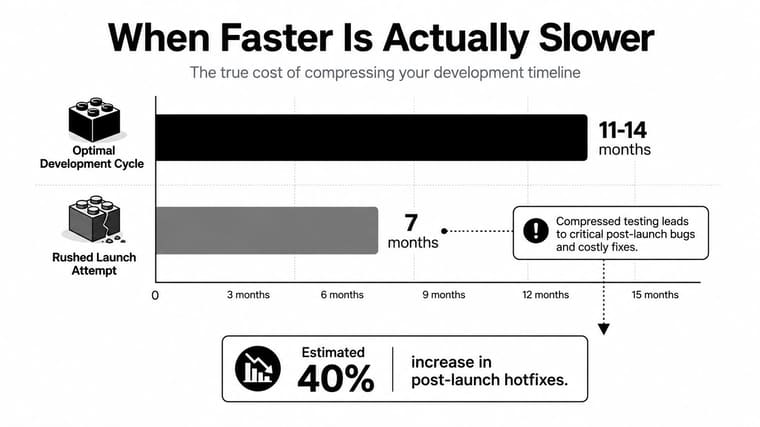
That is the trade-off. A faster timeline helps when it removes ambiguity and low-value ceremony. It becomes risky when it cuts the work that keeps the product stable after go-live.
Launch Checklist and What Comes After Go-Live
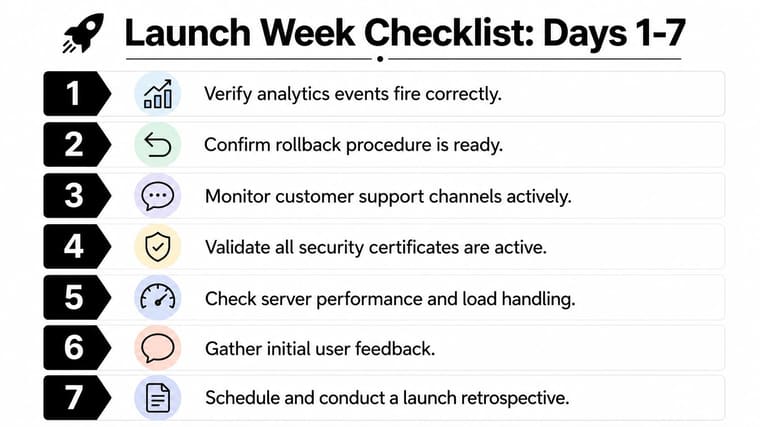
The first seven days decide whether launch day was a finish line or just a handoff. A practical week-one checklist should cover analytics validation, rollback readiness, on-call rotation, customer announcement, internal retro notes, adoption checkpoints, and a post-launch widget state that reflects the new phase. If you want a ready-made starting point, get a launch checklist template and adapt it to your team’s actual gates instead of inventing one from scratch.
Week one should be operational, not celebratory
The first pass after go-live should be blunt. Verify that analytics events fire. Confirm the rollback path still works. Brief the on-call rotation. Monitor support channels. Check security certificates and server behavior. Gather early feedback. Then schedule the retro while the launch is still fresh.
The real timeline continues into adoption
The launch doesn’t stop when the product is live. The next 4 to 8 weeks are the adoption window, where retention signals, support volume, and feature usage need weekly review. That’s where v1.1 hotfixes get triaged against the next quarterly release, and where the retro feeds directly into the next launch calendar entry.
Tool wiring matters here too. Notion can hold the launch brief and retro notes, Linear or Jira can track the milestone gates, Slack can carry the escalation path, and the widget stack can keep the countdown visible after the confetti is gone. Pretty Progress fits that last piece by turning deadlines and launch phases into always-on widgets for iPhone, iPad, Apple Watch, Mac, and Android.
A launch timeline earns its keep when it survives past release day. Keep the calendar alive, keep the progress visible, and treat the next launch as part of the same system, not a brand-new scramble.
If you want launch deadlines to stay visible without another spreadsheet buried in a drive folder, visit Pretty Progress and turn your next product launch timeline into a glanceable countdown on the devices your team already checks all day. It’s built for persistent progress tracking, so the plan keeps moving after go-live, not just before it.





