

August 17, 2026
Overcoming Executive Dysfunction: Proven Strategies That
Discover practical strategies for overcoming executive dysfunction. Learn task breakdown methods, visual tools, and routines to reduce overwhelm.
You’re staring at an important task. The deadline is close, the consequences are clear, and you may even want to do the work. Yet your body won’t move. You check a message, reread the instructions, open another tab, and feel the shame grow while the task remains untouched.
That experience can feel like a character flaw, but executive dysfunction isn’t laziness. It’s a difficulty with the mental processes that help you start, organize, remember, switch, regulate emotion, and finish. Overcoming executive dysfunction usually works better when you stop demanding more willpower and start building supports outside your brain.
Table of Contents
- Why Willpower Alone Fails
- Understanding What Executive Dysfunction Is
- Breaking Tasks Into Manageable Pieces
- Building External Support Systems
- Designing Your Environment for Success
- Managing Emotions and Knowing When to Seek Help
- Your Implementation Plan for Lasting Change
Why Willpower Alone Fails
A client once described executive dysfunction as “having the map, the deadline, and the destination, but no ignition.” They knew exactly what needed to happen. They’d already thought through the consequences of delay. Still, opening the document felt strangely impossible.
That freeze often appears when a task combines uncertainty, boredom, emotional risk, or too many steps. The brain has to hold instructions in working memory, choose a starting point, estimate time, suppress distractions, and tolerate discomfort. If one part of that chain fails, the entire task can feel blocked.
Executive functions include task initiation, working memory, planning, inhibition, cognitive flexibility, and emotional regulation. A person may be capable of deep concentration in one situation and unable to begin a routine task in another. That inconsistency confuses other people, and it often causes the person experiencing it to blame themselves.
Practical rule: If effort and urgency haven’t solved the problem, add structure instead of adding self-criticism.
This is why generic advice about “just getting started” often falls short. A useful approach makes the first action visible, reduces the number of decisions, and gives you an external cue to continue. Resources such as overcoming ADHD paralysis with Lumas can help you think about paralysis as a practical starting problem rather than a moral failure. You can also compare that approach with this guide on how to stop procrastinating, especially if delay has become a repeated cycle.
The central shift is simple: you’re not trying to repair a broken person. You’re designing conditions that make action easier. External reminders, visible progress, prepared materials, and predictable routines can carry part of the management load when your internal system is overloaded.
Understanding What Executive Dysfunction Is
You may understand a task, care about the result, and still fail to start, shift gears, or finish. Executive dysfunction affects several abilities, not concentration alone. A PubMed review found medium effects in verbal fluency, inhibition, and set shifting, including d = 0.62 for verbal fluency, d = 0.64 and d = 0.89 for inhibition, and d = 0.65 for set shifting. In daily life, that can mean difficulty generating ideas, stopping an impulse, or moving from one mental set to another.
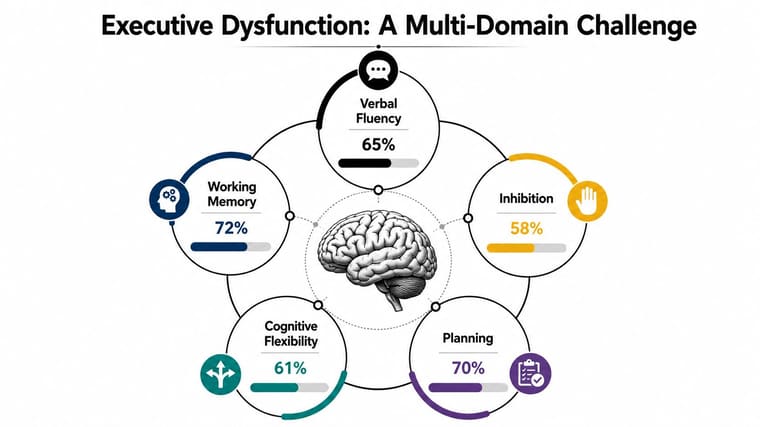
A high IQ does not automatically protect someone from these problems. Among adults with ADHD and IQ at least 120, 73% were significantly impaired on at least 5 of 8 executive-function markers. Understanding a task is different from initiating it, sequencing its steps, or completing it.
Find your dominant bottleneck
Notice what happens immediately before you stall. The main barrier may involve:
- Initiation: You know the first step but cannot begin.
- Working memory: Instructions, materials, or the task’s thread disappear.
- Inhibition: Notifications, ideas, or impulses pull you away.
- Flexibility: A change in plans makes the day difficult to reorganize.
- Emotion: Anxiety, shame, frustration, or boredom makes action feel unsafe.
Daily functioning can look very different from performance on an isolated test. In one adult ADHD cohort, 89% to 98% of participants fell in the clinically impaired range on daily-life executive-function ratings, compared with 7% to 11% of community controls. You may perform well during a short assessment and still struggle to manage an ordinary week.
Support works best when it matches the bottleneck. Use visible reminders for missed appointments, a defined first action for uncertainty, and emotional regulation tools before productivity tools when distress blocks action. If the pattern is persistent or affects work and relationships, resources that help you build executive function skills can provide structure while you test which supports create steady progress.
Breaking Tasks Into Manageable Pieces
A task feels impossible when your brain has to solve too many hidden questions at once. “Write the report” sounds like one item, but it may contain research, outlining, drafting, formatting, editing, and submission. Your first job is to expose those hidden steps.
Write the task as a sequence of next physical actions. A physical action describes something you can see yourself doing, not an outcome you hope to achieve.
| Vague task | Next physical actions |
|---|---|
| Write a report | Open the document, type the working title, write three bullets for the introduction |
| Clean the kitchen | Put three dishes in the dishwasher, wipe the counter, take out the trash |
| Prepare for a meeting | Open the calendar invite, copy the agenda into a note, write one question |
| Pay a bill | Find the email, open the payment page, enter the amount, save the confirmation |
If the first action still feels heavy, make it smaller. “Open the document” may become “find the document in Downloads.” “Find the document” may become “open Finder.” Keep reducing the step until resistance drops.
Use a short action ladder
A practical ladder has four levels:
- Outcome: Submit the report.
- Project step: Draft the introduction.
- Small action: Write three rough bullets.
- Physical start: Open the blank document.
You don’t need to plan every detail before beginning. You need enough detail to remove the first moment of uncertainty. Once you’ve started, the next action often becomes easier to identify.
The two-minute rule can help with tiny items. If a subtask takes less than two minutes, complete it immediately when doing so won’t interrupt a more important task. The point isn’t to turn every day into frantic reaction. It’s to prevent small, clearly defined actions from accumulating into a threatening pile.
Use decomposition to lower friction, not to create a more elaborate planning project.
For larger projects, keep the visible list short. Choose the next three actions rather than documenting every possible action. Put materials beside the place where you’ll use them, and write the first step before ending a work session. A calendar can hold deadlines and appointments, while a task list holds actions. A practical calendar organization guide from SyncThemCalendars can help separate those functions so your calendar doesn’t become an overloaded task dump.
When you stall, ask one question: “What would a camera see me do next?” If the answer is still abstract, the task needs another layer of decomposition.
Building External Support Systems
Your brain shouldn’t have to remember every transition, deadline, and unfinished thought. External supports work by moving information into the environment, where you can see or hear it at the moment it matters.
Start with three tools: a timer, a checklist, and a visual progress cue. Use the timer not only for deadlines but also for transitions. Set one reminder to stop scrolling, another to gather materials, and another to leave for an appointment. Mental time-tracking is unreliable when attention shifts, but an external alarm can interrupt the current activity without requiring you to monitor the clock.
Place the timer where you’ll notice it. A phone alarm hidden under a pillow or buried among notifications won’t help much. Use a distinctive label such as “open the document” rather than “work,” because the label should tell you what action to take.
Make progress visible
Checklists provide sequence. Progress bars provide feedback. Both reduce the need to hold an unfinished plan in working memory.
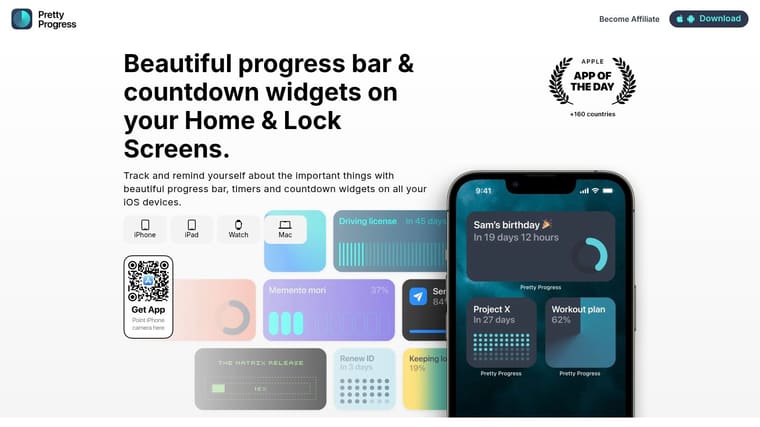
A tool such as Pretty Progress can display customizable countdowns and progress widgets on supported Home Screens and Lock Screens, giving deadlines or goals a persistent visual presence. Choose a display you’ll look at, whether that means a simple countdown, a progress bar, or a design that fits your existing screen. The visual cue shouldn’t become another complicated project to maintain.
A physical checklist may work better for household tasks because crossing off an item creates a clear stopping point. A digital list may be better for recurring work because you can duplicate the structure. Test the format against the task instead of assuming one system must serve everything.
Accountability adds another external layer. A colleague can sit on a video call, a friend can receive a “starting now” message, or a recurring check-in can confirm that the next action happened. For practical ideas, see how to build accountability.
A visual system works best when it answers three questions quickly: What matters, how much remains, and what do I do next?
You can combine a visible countdown with a small checklist. For example, the countdown marks the project deadline, while the checklist contains today’s three physical actions. That combination prevents a distant deadline from becoming invisible and prevents the day’s list from becoming vague.
Designing Your Environment for Success
A supportive environment reduces the number of choices you must make before acting. It doesn’t need to look perfect. It needs to make the desired action obvious and the distracting action less convenient.
Begin with a friction audit. Walk through the places where you usually get stuck and ask what creates delay. Is the charger in another room? Are work materials mixed with unrelated papers? Do you need to choose among too many apps, meals, or clothing options? Each decision consumes attention before the main task begins.
Change the physical setup
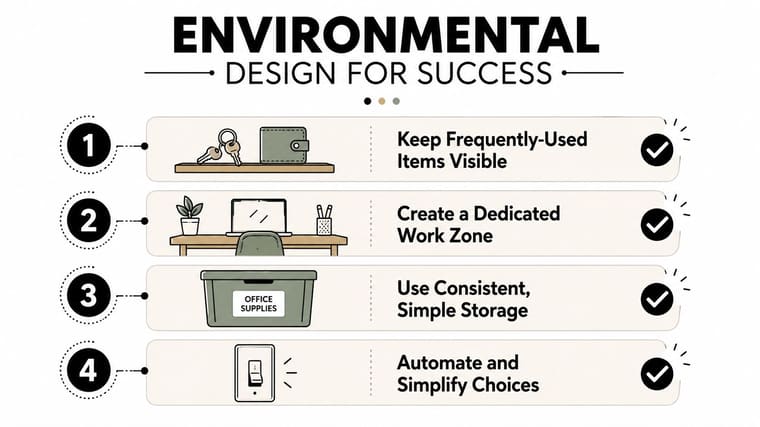
Keep frequently used items visible and easy to reach. Put keys in the same bowl, keep medication where an established routine makes it visible, and store cleaning supplies near the area where you use them. Consistent storage matters more than an elaborate organizing system because you need to know where an item belongs when you’re tired.
Create a dedicated work zone, even if it’s only one end of a table. Leave the basic materials there. Remove visual clutter that competes with the task, and use a labeled bin for objects that don’t belong in the zone.
Digital design deserves the same attention. Use a website blocker during focused work, create separate browser profiles for work and leisure, and put high-distraction apps into folders that aren’t immediately visible. These changes won’t remove every temptation, but they add enough friction to create a pause.
Remove repeat decisions
Standardize choices that don’t need daily creativity. Prepare a few reliable meals, lay out clothes the night before, and create reusable responses for common requests. Habit stacking can attach a new behavior to something already stable, such as checking your progress widget after morning coffee or reviewing tomorrow’s first action after brushing your teeth.
You can find further ideas for visual reminders for ADHD, particularly when a reminder needs to remain visible rather than appear once and disappear.
The test is practical: does this setup help you act on a difficult day? If maintaining the system takes more energy than the task itself, simplify it. Environmental design succeeds when it removes choices, not when it becomes another standard you can fail.
Managing Emotions and Knowing When to Seek Help
Executive dysfunction often has an emotional layer. A difficult task triggers anxiety, anxiety increases avoidance, avoidance creates shame, and shame makes the task feel even more threatening. Productivity advice that ignores this loop asks you to solve an attention problem while your nervous system is responding to perceived danger.
Start by naming what’s happening without arguing with it. “I’m overwhelmed,” “I’m afraid I’ll do this badly,” or “I’m ashamed that I delayed” gives the experience a shape. Then use a short grounding practice: notice five things you see, four things you feel, three things you hear, two things you smell, and one thing you taste. Slow box breathing can also create enough space to choose a next action.
The goal isn’t to become calm before doing anything. Waiting for perfect calm can become another form of avoidance. Aim for regulated enough to take one safe, small step.
Choose support based on impairment
Professional help becomes important when executive dysfunction repeatedly affects basic self-care, employment, education, finances, or relationships. Co-occurring anxiety and depression deserve attention too, especially when low mood or fear makes ordinary tasks feel impossible. A clinician can help assess whether ADHD, another condition, burnout, sleep problems, or several factors are contributing.
Structured support is different from vague encouragement. A 2022 multicenter randomized controlled trial of a dialectical behavior therapy based group program for adults with ADHD found a larger reduction in executive dysfunction than treatment as usual on the BRIEF-A, with mean changes of -12.8 versus -0.37, P = 0.005, and an effect size of 0.64. Gains persisted at 6 months follow-up, according to the published trial report.
Coaching can also be useful when it has clear targets and measurement. A 2026 prospective study of a 12-session ADHD coaching engagement reported significant pre-to-post improvements in executive functioning, ADHD symptoms, and functional impairment, with medium-to-large effect sizes and high goal-attainment satisfaction (study report). The useful lesson is not that one intervention fits everyone. It’s that structured practice, defined goals, follow-up, and objective measurement are more dependable than motivational slogans.
Seeking help isn’t failure. It’s an intentional decision to add capacity where the current system isn’t enough.
Your Implementation Plan for Lasting Change
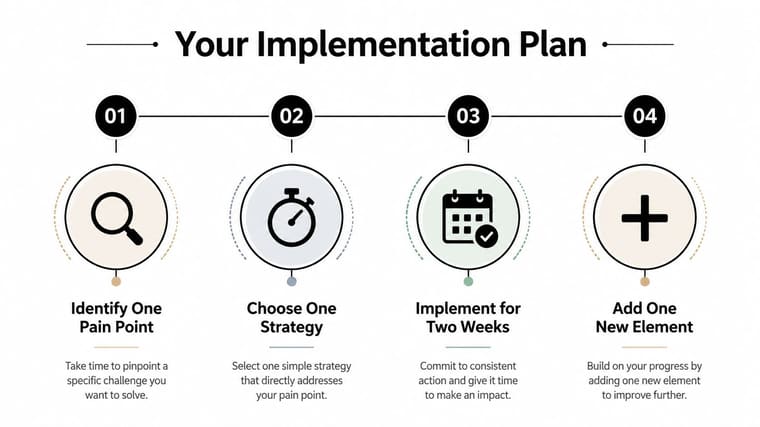
Start with the bottleneck that causes the most damage, not the system that looks most impressive. If you can’t begin, use next physical actions. If you lose track of time, add transition alarms. If deadlines disappear from awareness, use a visible countdown. If emotion blocks action, regulate first and then choose a smaller step.
Use this sequence:
- Days 1 and 2: Break down your three most important tasks into next physical actions.
- Days 3 and 4: Set up one visual progress tracker and one strategic timer.
- Days 5 through 7: Use the system, record where it helped, and remove anything that creates extra friction.
- After the first two weeks: Add only one new support if the existing system is stable.
Consistency matters more than a perfect streak. Every adjustment teaches you how your attention, emotions, space, and tools interact. Building support is itself an executive-function skill, and it gets easier when you practice it in small, observable steps.
Pretty Progress turns deadlines and goals into customizable countdown and progress widgets for your screens, giving you a persistent visual cue without adding noisy task management. If visible progress would help you stay oriented, visit Pretty Progress and set up one goal you’re working toward today.





