

July 18, 2026
Your Job Application Tracker: Organize and Get Hired
Stop losing track. Learn to build an effective job application tracker. Stay organized, follow up, and land more interviews with our comprehensive guide.
You’re probably in one of two places right now.
Either you’ve applied to enough jobs that they’re starting to blur together, or you’re trying to get organized before that happens. In both cases, the same problem shows up fast. You forget which resume you sent, which role deserved a follow-up, and whether that recruiter email came from the company you liked or the one you already ruled out.
That’s where a job application tracker stops being a nice idea and becomes part of the job search itself. The point isn’t to build a prettier spreadsheet just to feel productive. The point is to create a system that helps you make better decisions, protect your energy, and keep moving when the process gets quiet.
Table of Contents
- Why Your Job Search Needs a System
- Find the Right Tracker for You
- The Essential Fields for Your Tracker
- From Application to Offer A Proven Workflow
- Automate Follow-ups and Stay Motivated
- Job Application Tracker FAQs
Why Your Job Search Needs a System
A lot of job searches feel broken when they’re just unstructured.
Someone applies to ten roles one week, seven the next, then spends the third week waiting, refreshing email, and wondering whether anything is working. The problem isn’t always effort. It’s that random effort is hard to evaluate. You can’t improve what you didn’t track.
The hiring funnel is harsher than many applicants realize. The average application-to-interview rate is about 2 to 3%, which means many candidates need to send 30 to 50 applications to get one interview, with some data putting the ratio around 40:1 according to job search statistics from Max of Job. That doesn’t mean your search is hopeless. It means your search needs a process.
A tracker gives you something the job market usually doesn’t. Feedback you can actually use.
A good job application tracker becomes your command center. It tells you what you applied to, what happened next, which channels are worth your time, and where your pipeline is getting stuck. It also cuts down on the mental clutter that makes the search feel heavier than it already is.
If you need a practical companion resource on how to manage your job hunt, this guide from Underdog does a nice job reinforcing the organizational side of the process. The same principle shows up in other kinds of work too. If you’ve ever tried to juggle competing deadlines, the logic behind keeping track of multiple projects applies surprisingly well to a job search.
What changes when you use a system
Without a system, every application feels isolated. With one, patterns emerge.
- You spot weak channels: Maybe company sites lead to more replies than job boards for you.
- You catch missed follow-ups: A strong application doesn’t disappear just because you forgot to check back.
- You reduce duplicate effort: No more reopening a posting and wondering if you already applied.
- You make better emotional decisions: Silence feels less personal when you can see the whole pipeline.
That’s its key value. A job application tracker doesn’t just organize your search. It helps you stay steady enough to keep going.
Find the Right Tracker for You
The best tracker isn’t the most advanced one. It’s the one you’ll still be updating when motivation dips.
Some people need raw flexibility. Some need visual structure. Some want one place for notes, company research, and interview prep. That’s why most job seekers end up choosing between three formats: spreadsheets, Notion, and Trello.
Three tools people actually stick with
Spreadsheets work best for people who think in rows, filters, and formulas. Google Sheets and Excel are plain, reliable, and easy to customize. If you want to sort by status, date applied, or resume version, a spreadsheet is hard to beat. The downside is obvious. You have to build and maintain the structure yourself.
Notion is stronger when your search includes more than applications. It’s useful if you want each role to have its own page with research notes, interview prep, salary thoughts, and recruiter contacts. Notion can feel elegant once it’s set up, but some people spend too much time perfecting the workspace instead of applying.
Trello fits visual thinkers. A board with columns like Wishlist, Applied, Interviewing, Offer, and Closed makes the search feel tangible. Dragging cards forward is motivating, and the system is simple enough that you’ll probably keep using it. Trello is less ideal if you want deeper analysis without extra setup.
| Job Tracker Tool Comparison | Best For | Learning Curve | Flexibility |
|---|---|---|---|
| Spreadsheet | Data-minded job seekers who want full control | Low to medium | High |
| Notion | People who want notes, research, and tracking in one place | Medium | High |
| Trello | Visual thinkers who prefer a pipeline view | Low | Medium |
How to choose without overthinking it
Pick based on behavior, not features.
If you already live in spreadsheets, don’t switch just because Notion looks cleaner. If you avoid tables and respond better to movement, Trello is probably the better call. If you want one workspace for the whole search, Notion may be worth the extra setup.
Decision shortcut: If you won’t enjoy maintaining the tracker, simplify the tool before you simplify the job search.
There’s also a practical difference between tracking tools and resume tools. If you’re comparing platforms that blend both, this breakdown of Resumatic AI builder vs Teal is useful for understanding where resume optimization and tracking start to overlap. If your goal is simplicity first, this roundup on a simple goal tracking app is a helpful reminder that low-friction systems usually win.
Don’t chase the perfect setup. Choose the tool that makes updating your job application tracker feel boring in the best possible way.
The Essential Fields for Your Tracker
A lot of trackers fail because they collect information that looks useful but never changes a decision.
You don’t need a giant database. You need a short list of fields that help you act, follow up, and learn. If a column won’t influence what you do next, it probably doesn’t belong in your everyday view.
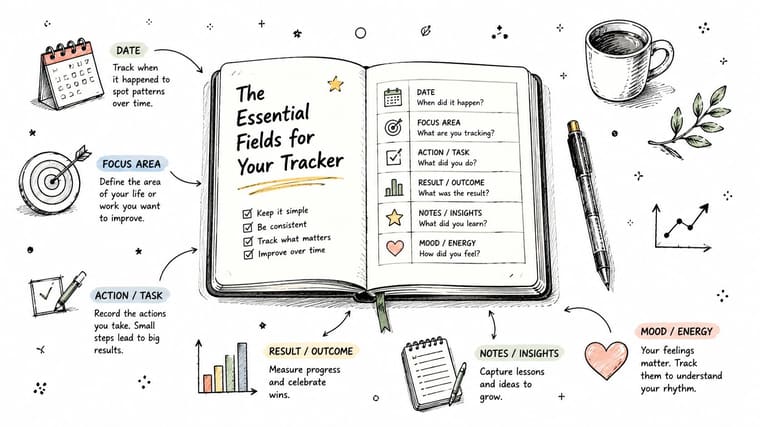
The minimum setup that works
Start with the basics. These are the fields that keep your tracker functional from day one.
- Company: The employer name. Keep naming consistent so sorting works.
- Job title: Use the exact title from the posting.
- Job link: Save the URL while it’s still live.
- Date applied: This is what makes follow-up timing possible.
- Status: Applied, Interviewing, Offer, Closed, or whatever stages you use.
- Next action date: The single best field for preventing drift.
Those six columns are enough to make a simple job application tracker useful.
Start here if you’re overwhelmed: Company, job title, status, date applied, and next action date will cover most of what you need in the first week.
The fields that turn a list into useful data
Once the basics are in place, add the fields that help you improve your search instead of just documenting it.
Resume version ID is the big one. With 98.8% of Fortune 500 companies using Applicant Tracking Systems as of 2026, tracking which resume version you sent matters because it lets you connect wording choices and keyword alignment to actual responses, as noted in these ATS statistics. Don’t label resumes with vague names like “final” or “updated.” Use something trackable such as “PM-A,” “Ops-B,” or “Marketing-Remote-1.”
Job description snapshot matters for a similar reason. Job posts change, and some disappear. Copy the core responsibilities and requirements into a notes field or linked doc so you can compare what the employer wanted with the document you sent.
Source tells you where the role came from. Company site, LinkedIn, referral, job board, recruiter outreach. Over time, this helps you see which channels deserve more attention.
Contact name becomes useful the moment a recruiter replies. Add the person’s name, role, and email if you have it. Then keep your communication history in the same record or linked note.
Outcome notes should stay short and factual. “Rejected after recruiter screen.” “No response after follow-up.” “Hiring manager focused on analytics experience.” Keep this field clean enough that you’ll use it.
A strong tracker often includes these fields:
| Field | Why it matters |
|---|---|
| Resume version ID | Lets you compare response quality across tailored resumes |
| Job description snapshot | Preserves the original role requirements |
| Source | Helps identify where better opportunities come from |
| Next action date | Creates a follow-up system instead of a memory test |
| Outcome notes | Captures patterns without relying on memory |
One warning. Don’t add every idea at once.
The best job application tracker starts lean, then earns complexity. If a field helps you answer a recurring question, keep it. If it becomes digital clutter, delete it.
From Application to Offer A Proven Workflow
A tracker without a workflow becomes an archive.
You want the opposite. Each entry should move through a clear path so your search has momentum, not just volume. That means using simple stages and defining what action moves a role from one stage to the next.
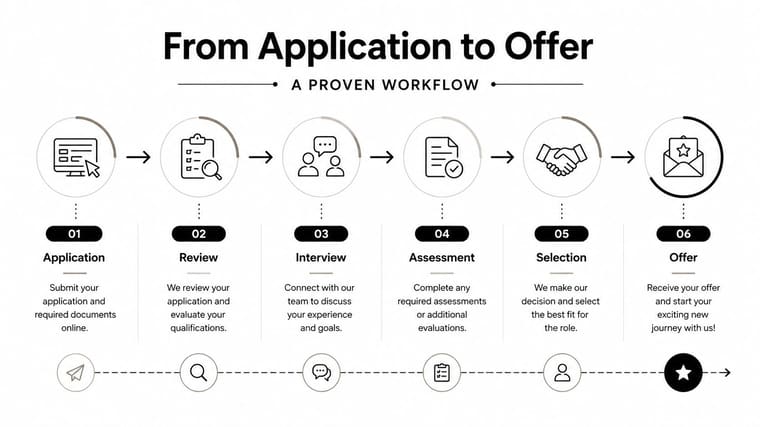
Use a simple pipeline
Five stages are often enough:
-
Wishlist
Roles you’ve saved but haven’t applied to yet. This keeps interesting jobs from getting lost in browser tabs. -
Applied
You submitted the application. Add the application date, resume version, and next review date immediately. -
Interviewing
Any live process goes here. Phone screen, recruiter call, assessment, panel, final round. Add interview dates and prep notes. -
Offer
Verbal or written offers. At this stage, notes become especially important because details start moving quickly. -
Closed
Rejected, withdrawn, expired, or accepted elsewhere. Closed doesn’t mean failed. It means complete.
This workflow keeps your tracker clean because every role has a home. It also prevents the common mess where old applications sit forever in “applied” even though they’re functionally done.
If a role has no clear next action, your tracker should force a decision. Follow up, close it, or move it forward.
Review the data every week
Improvement happens in the review, not the entry.
A data-driven approach means tracking conversion points such as Application→Interview and Interview→Offer, then checking them during a weekly 15-minute review. Applicants who use that review to filter applications older than 14 days and plan follow-ups reduce ghosting in a meaningful way, according to Litespace’s guide to tracking job application success with data analytics.
Use one weekly review block to answer a few blunt questions:
- What moved forward this week
- Which applications need a follow-up
- Which roles should be marked closed
- Which resume version led to replies
- Whether your source channels are producing interviews
You don’t need advanced formulas. Basic counts are enough.
- Application to response rate: responses divided by applications
- Application to interview rate: interviews divided by applications
- Interview to offer rate: offers divided by interviews
Those numbers won’t tell the whole story, but they will show where friction lives. If you’re getting interviews but no offers, your issue probably isn’t application volume. If you’re getting no responses, look first at role targeting, resume version, and source quality.
A job application tracker works best when it behaves like a pipeline review, not a diary.
Automate Follow-ups and Stay Motivated
You send three solid applications on Monday, mean to follow up next week, and then lose track because an interview prep session, a recruiter email, and plain fatigue crowd it out. That is how good opportunities go cold.
Manual follow-ups fail for predictable reasons. They ask you to remember a small task at the exact moment your attention is already stretched. Set up the reminder once, then let your tools carry the timing so you can focus on the message and the decision.
Build reminders that remove friction
Your tracker should feed a calendar, task app, or reminder system. The tool matters less than the rule. Every active application needs a next action before you close the tab. If you want a simple way to set that up, use this guide to creating a deadline reminder email.
A practical setup looks like this:
- Add a next action date: Set the follow-up date when you apply, not later.
- Use one clear label: Keep reminders easy to scan.
- Save short email templates: One for post-application follow-up and one for post-interview follow-up.
- Batch follow-ups: Send them in one block so the task stays contained.
A short message is enough:
Hi [Name], I wanted to follow up on my application for [Role]. I’m still very interested in the opportunity and would be glad to share anything else that would be helpful. Thanks for your time.
Clear beats clever.
Track silence so it stops draining you
Silence needs its own status. If you leave it as a vague maybe, every old application keeps taking up mental space.
Use separate labels or checkboxes for:
- No response
- Follow-up sent
- Closed due to silence
That one change improves judgment. You can see which roles still deserve effort, which ones got a fair follow-up, and which ones should leave your active pipeline. A tracker should reduce uncertainty, not preserve it.
Job hunting can wear people down in a slow, cumulative way. Insight Diagnostics Global’s guide to burnout is useful if the process is starting to feel heavier than the workload alone would explain.
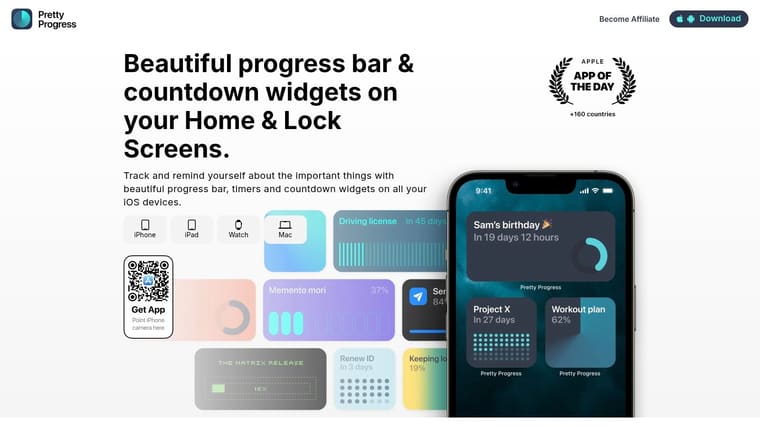
Motivation also gets easier when progress is visible. A plain spreadsheet records effort, but it rarely encourages it. A countdown to your next interview, a bar that fills as you hit your weekly target, or a widget showing pending follow-ups turns the search into something you can see moving. That visual feedback matters more than people expect. When results are delayed, visible progress helps you stay consistent long enough to improve the strategy behind the applications.
Job Application Tracker FAQs
How much detail is too much
Too much detail is anything you won’t maintain or use.
A tracker should help you make decisions fast. If a field does not help you choose where to apply, when to follow up, or what to change in your approach, cut it. The strongest setup is usually a small set of working fields plus a notes column for anything unusual.
That trade-off matters. A detailed tracker can feel satisfying on day one and become abandoned by week two.
How do I track rejections without feeling worse
Track outcomes in a neutral, factual way.
Use notes like “rejected after phone screen” or “position closed” instead of writing a story about what the company thought of you. That keeps the record useful when you review patterns later. It also protects your energy, because the tracker becomes a place for evidence, not self-criticism.
A good job application tracker creates distance between your effort and the market’s response. It reminds you that your job is to run the process well, not to control every outcome.
Rejections feel lighter when they become organized data you can learn from.
This is also where the visual side helps. A color-coded pipeline, a weekly application goal, or a progress widget can keep one rejection from defining the whole week. You need a record of outcomes, but you also need visible proof that you are still moving.
How often should I update my tracker
Update it right after each meaningful action.
Log the application when you send it. Update the status when you hear back. Add the interview date when it gets booked. Mark the follow-up when it is sent. Those quick updates keep the tracker reliable, which makes your weekly review far more useful.
Then review it once a week with a coach’s eye. Look for bottlenecks, not just volume. If you are getting applications out but no interviews, the problem may be targeting or resume fit. If interviews are happening but offers are not, interview prep may need more attention.
If you want your job search to stay visible instead of disappearing into a notes app, Pretty Progress can help you turn follow-up dates, interview countdowns, and weekly application goals into clear visual widgets on your devices. That kind of glanceable progress won’t replace a solid tracker, but it can make consistency much easier when the search starts to drag.





