

May 23, 2026
Deadline Reminder Email: How to Write One That Works
Learn how to write a deadline reminder email that gets results. Our guide covers timing, tone, and copy-ready templates for managers, students, and peers.
You’ve probably stared at a drafted reminder email for longer than you’d like to admit.
The deadline is real. The work still isn’t in. You need to follow up, but you don’t want to sound passive-aggressive, panicked, or like the office hall monitor. So you soften the wording, delete a sentence, add “just checking in,” then wonder if the message is now too vague to do any good.
That hesitation makes sense. A deadline reminder email sits in an awkward spot between courtesy and accountability. Send it too early, and people ignore it. Send it too late, and you’re managing fallout instead of progress. Send it poorly, and the recipient remembers the tone more than the task.
The good news is that reminder emails work when they’re written with intent. The better news is that the key skill isn’t sounding pushy. It’s reducing friction, lowering cognitive load, and making the next action obvious.
Table of Contents
- Why Sending a Good Reminder Matters
- The Anatomy of an Effective Reminder Email
- Perfecting Your Reminder Timing and Cadence
- Copy-Ready Reminder Templates for Any Situation
- How to Follow Up When a Deadline Is Missed
- Beyond Email The Power of Visual Deadline Tracking
- Your Final Checklist for a Perfect Reminder
Why Sending a Good Reminder Matters
Reminder emails are often seen as a necessary annoyance. In practice, they’re part of how competent teams protect deadlines without creating drama.
A project manager knows this feeling well. A report is due Friday. You mentioned it in the meeting. It’s on the shared plan. The owner is capable and busy. Thursday afternoon arrives, and nothing has moved. At that point, the reminder isn’t nagging. It’s risk control.
The strongest reason to take the message seriously is simple: reminders change behavior. In a clinical follow-up workflow, adding email reminders increased the collection of complete patient-reported outcome data by 25.8% overall and raised complete data sets from 34% to 60%, as reported in this clinical reminder study.
That matters because the basic mechanics carry over to deadline work. People often don’t miss deadlines because they’ve decided not to act. They miss them because the task slips behind newer messages, meetings, and mental clutter.
A good reminder doesn’t just repeat the deadline. It reduces the effort required to respond.
That’s the key reframing. The point of a deadline reminder email isn’t to express frustration in polished language. It’s to make action easier than delay.
What good reminders do
- Restore visibility so the task comes back into the recipient’s active attention.
- Clarify ownership so there’s no doubt about who needs to act.
- Reduce ambiguity by naming the exact deliverable and due time.
- Create a response path so the recipient can submit, ask for help, or flag a blocker.
What weak reminders do instead
- Hint without asking. The reader sees the note but doesn’t know what to do next.
- Over-explain the backstory. The message becomes longer than the task itself.
- Sound apologetic. The deadline starts to feel optional.
- Bundle multiple asks. The reader postpones all of them.
The most effective reminders are brief, respectful, and hard to misread. That combination preserves the relationship and still moves the work.
The Anatomy of an Effective Reminder Email
A strong deadline reminder email is built, not improvised. Once you know the parts, you can adapt the same structure for a coworker, a client, a student group, or a direct report.
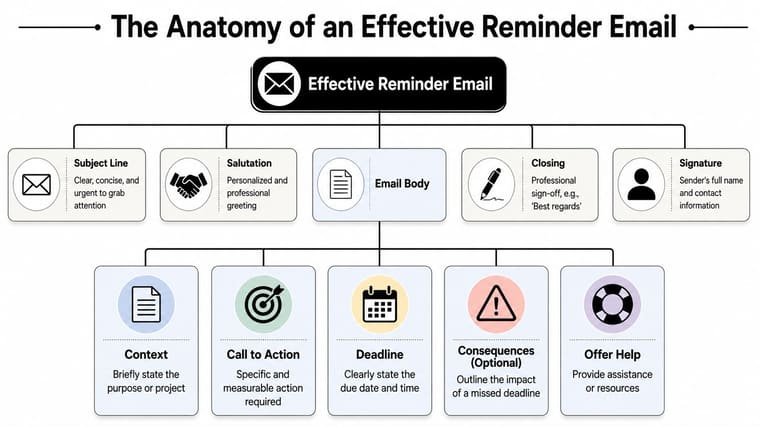
Start with a subject line that earns attention
The subject line has one job. Tell the reader what this is about before they open it.
Vague subjects get deferred. Specific subjects get processed. Include the task and the date if possible. That helps the recipient orient quickly, especially when they’re triaging a crowded inbox.
Good examples:
- Reminder: Q4 budget feedback due Friday
- Action needed today: approve homepage copy
- Client reminder: signed contract needed by 3 PM
Avoid subjects that force the recipient to guess, such as “Following up” or “Quick question.” They may sound polite, but they hide the action.
Keep the body short and specific
The message itself should answer four questions fast: what is due, when is it due, what needs to happen next, and what happens if it slips.
Research supports making the message more personal, not more elaborate. A controlled study found that personalized reminders increased on-time submissions by 14 percentage points, with 70% on-time for personalized reminders versus 56% for general reminders, according to this personalized reminder study.
That doesn’t mean writing a long custom note for every person. It means tailoring the message enough that the recipient immediately sees, “This applies to me, and this is my next step.”
Include:
- A direct opening that names the task
- A concrete deadline with date and time
- Relevant context only if it helps action
- One clear ask
Leave out the emotional padding. You don’t need three lines of apology before the reminder.
A quick visual breakdown helps when you’re building your own version:
Practical rule: If the recipient has to reread the email to find the due date or required action, the email is too busy.
End with one clear next step
The close should tell the recipient exactly how to complete the task or how to reply if there’s a blocker.
Here’s a simple framework that works in most situations:
| Part | What to write | Why it works |
|---|---|---|
| Opening | “Reminder that the draft summary is due today by 4 PM.” | Puts the task and time up front |
| Action | “Please send the final file in this thread.” | Removes ambiguity |
| Support | “If anything is blocked, reply with what you need.” | Opens a path other than silence |
| Close | “Thanks for jumping on this.” | Keeps the tone cooperative |
A reminder email works best when it feels easy to complete. Clarity does most of that work.
Perfecting Your Reminder Timing and Cadence
Bad timing ruins otherwise solid reminders. A single last-minute email often lands when the recipient has no room left to act. A sequence works better because it gives people multiple chances to notice, prioritize, and finish.
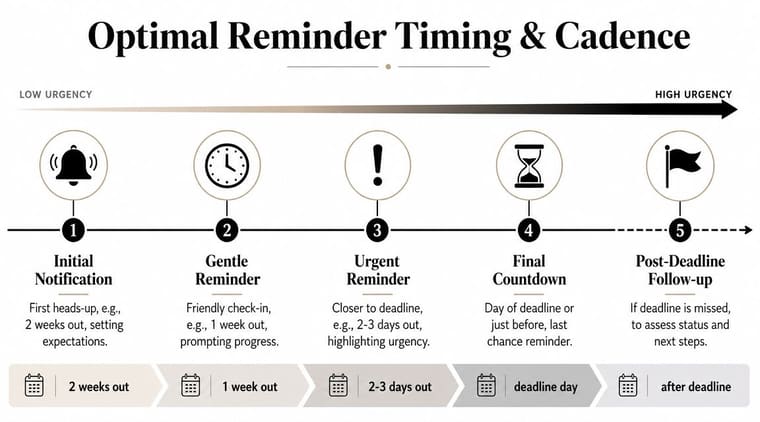
Use a sequence, not a single email
Published email guidance recommends a 3 to 5 email sequence for deadlines, starting with a soft reminder 5 to 7 days before and escalating with messages at 3 to 4 days, 24 hours, and 12 to 16 hours before the deadline, as outlined in Beehiiv’s deadline reminder timing guide.
That structure works because each message serves a different purpose.
The soft reminder
Send this when there’s still time to do quality work.
This message is low-pressure. It helps the recipient plan, not panic. Use it for assignments, approvals, forms, and deliverables that require more than a quick click.
Example:
Hi Sam, quick reminder that the revised deck is due Wednesday at 2 PM. Sending it by tomorrow morning would give us time for final comments before the client review.
The firm reminder
This one lands closer to the deadline, when procrastination starts turning into risk.
At this point, the email should feel more focused. Keep it short and restate the exact task. If the deadline matters to a broader workflow, say so plainly.
Match the tone to the distance from the deadline
A reminder schedule only works if the tone changes with the clock. If every message sounds equally urgent, the recipient tunes out. If every message sounds casual, the deadline loses force.
Here’s a practical cadence:
-
Five to seven days out
Use a planning tone. Emphasize preparation and lead time. -
Three to four days out
Shift to accountability. Name the task and confirm the owner. -
Twenty-four hours out
Make the ask unmistakable. Include the submission method or link. -
Twelve to sixteen hours out
Use concise urgency. This is the “please complete today” note.
What doesn’t work is trying to rescue a weak system with increasingly intense email copy. If the deadline matters repeatedly, visibility should exist outside the inbox too. That’s why spaced review systems and visible planning tools work so well in study and project settings. A useful example is MasteryMind for exam success, which shows how timing and repetition support follow-through before pressure peaks.
For team workflows, visual planning helps for the same reason. A progress view makes deadlines easier to notice before they become emergency reminders, allowing time management best practices for visual planning to complement email instead of forcing email to do all the work.
Send the earliest reminder when people can still do good work. Send the latest reminder when they can still take a clear final action.
That distinction matters. A reminder should create a useful decision point, not just document that time has run out.
Copy-Ready Reminder Templates for Any Situation
Templates save time, but only if they reflect the relationship. A message from a manager shouldn’t read like one from a peer. A client reminder needs more service language than an internal follow-up. The wording changes because the psychology changes.
Manager to direct report
This version works when you need clarity and accountability without sounding threatening.
Subject: Reminder: draft report due today by 4 PM
Hi [Name],
Reminder that the draft report is due today by 4 PM. Please send the latest version in this thread once it’s ready.
If anything is blocking completion, let me know as soon as possible so we can adjust or help.
Thanks, [Your Name]
Why it works: it states the deadline first, gives one submission path, and invites disclosure of blockers before the work goes missing.
Peer to peer
A peer reminder should feel collaborative. You’re not enforcing authority. You’re protecting a shared dependency.
Subject: Quick reminder on the slides for tomorrow
Hi [Name],
Just a reminder that I need your slides for tomorrow’s presentation by the end of today so I can combine everything into the final deck.
Please send them when ready. If you’re running behind, tell me what’s still open and I’ll adjust the order.
Thanks, [Your Name]
Why it works: it frames the deadline around the shared workflow, not around personal irritation.
Client reminder
With clients, the tone should stay professional and easy to act on. The goal is to reduce delay without sounding cold.
Subject: Reminder: approval needed by [day]
Hi [Client Name],
A quick reminder that we need your approval on [document/item] by [day and time] to keep the project on schedule.
You can review and reply directly to this email with approval, or send any requested changes before the deadline.
If it helps, I’m happy to clarify anything that may be holding up sign-off.
Best, [Your Name]
Why it works: it gives two simple response options and keeps the relationship intact.
Student group project reminder
This one needs firmness because group work often fails through silence, not open disagreement.
Subject: Reminder: your section for the group project is due tonight
Hi [Name],
Reminder that your section of the project is due tonight so we can compile the final version before submission.
Please send your part by [time]. If you can’t finish it by then, reply soon so we know how to divide the remaining work.
Thanks, [Your Name]
Why it works: it makes the consequence social and practical. The team needs to know whether to wait or reassign.
A few phrases that usually help
Some wording consistently performs better because it’s direct without being abrasive.
- “Reminder that…” works better than elaborate lead-ins.
- “Please send…” is clearer than “I was wondering if.”
- “If anything is blocked…” invites honest status updates.
- “To keep the project on schedule…” explains why the deadline matters.
- “Reply by [time] if you need more time.” gives a clear exception path.
A few phrases that usually hurt
These aren’t always wrong, but they often weaken the email.
- “Just checking in” can hide the actual ask.
- “When you get a chance” makes the deadline feel flexible.
- “Sorry to bother you” undercuts the legitimacy of the reminder.
- “ASAP” creates stress without precision.
Write the email so the recipient can decide in seconds whether to submit, ask for help, or renegotiate. Anything else adds drag.
If you use templates regularly, keep a few versions saved by relationship, not just by urgency. That small change makes reminders sound more human and usually gets better responses.
How to Follow Up When a Deadline Is Missed
When the deadline passes, the tone needs to change. Not dramatically, and not emotionally. You’re no longer reminding someone about an upcoming obligation. You’re now managing a missed commitment.
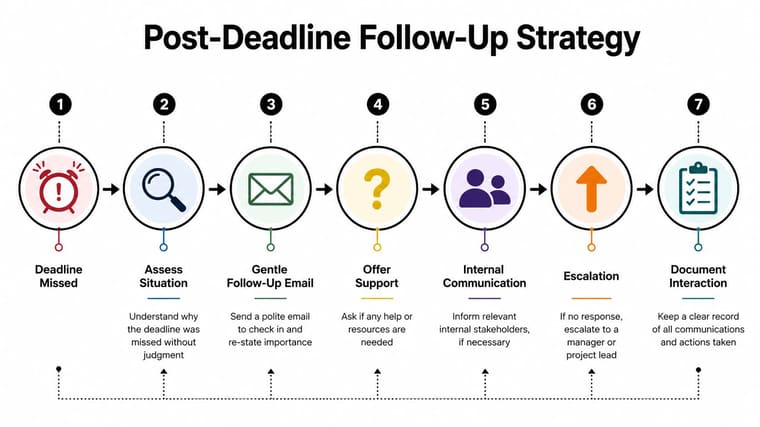
The first missed-deadline message
The first follow-up should assume there may be a reason you don’t yet know. Keep it calm, factual, and specific.
Subject: Follow-up on missed deadline for [task]
Hi [Name],
The deadline for [task] has passed, and I haven’t received the final version yet. Can you reply with a status update and your expected delivery time?
If something is blocked, let me know what’s needed so we can decide next steps.
Thanks, [Your Name]
This works because it asks for status and a revised commitment. It doesn’t invite a long apology. It asks for useful information.
When to escalate or switch channels
If the first email gets no reply, don’t keep sending increasingly frustrated notes into the void. Change the method.
A practical escalation path looks like this:
- Send the first post-deadline follow-up asking for status and revised timing.
- Offer support if there may be a real blocker.
- Set a response expectation in the next message.
- Switch channels to chat, phone, or a short meeting if silence continues.
- Loop in the project lead or manager when the missed task affects others.
- Document the exchange so the project record stays clear.
For distributed teams, timing gets trickier. Standard reminder advice often falls apart across regions, weekends, or local holidays. LiveAgent’s reminder guidance notes the importance of sending during the recipient’s business hours in global settings, which is a practical baseline in this global reminder template guide.
That still leaves a gap. If your team works asynchronously, email alone won’t keep everyone aligned. A visible timeline often does a better job because it doesn’t depend on a message arriving at the perfect local hour. Shared visual planning is especially useful when milestones hand off between time zones. A simple example is project timeline visualization for distributed work, where the date stays visible even when people log in hours apart.
What firmness sounds like
There’s a difference between firm and hostile.
Firm sounds like this:
- “Please confirm by 2 PM whether this will be delivered today.”
- “If I don’t hear back by noon, I’ll need to escalate so we can protect the timeline.”
- “This task affects the next review step, so I need a clear update today.”
Hostile usually sounds personal, vague, or performative. It may feel satisfying for a moment, but it rarely improves response quality.
The goal after a missed deadline is to restore predictability. That means getting a real status, making a decision, and preventing the next surprise.
Beyond Email The Power of Visual Deadline Tracking
Email is useful, but it’s also overloaded. That’s the deeper problem most reminder guides skip.
Microsoft found that workers spend 58% of their work time on email, chat, and meetings, according to Twilio’s discussion of reminder email challenges in this analysis of communication overload. In that environment, even a well-written deadline reminder email can disappear into a stack of other messages that also seem urgent.
Why inbox reminders fail good people
Most missed deadlines aren’t moral failures. They’re attention failures.
Someone sees the reminder while walking into a meeting, plans to return to it later, then loses it under newer messages. Someone else reads it on mobile, can’t act in the moment, and never re-finds it. People with ADHD or notification fatigue often feel this even more sharply. The problem isn’t understanding the deadline. It’s holding it in working memory across a noisy day.
What a visual cue does better
A persistent visual tool solves a different layer of the problem. Instead of asking the inbox to keep reintroducing the task, it keeps the deadline visible all day through a countdown, progress bar, or widget.
That matters because a glanceable cue creates low-friction awareness. You don’t have to search for the original email. You don’t have to remember which folder it’s in. The deadline sits on the screen and remains relevant.
One option in this category is Pretty Progress, which creates countdown and progress bar widgets for phones and other devices so deadlines stay visible outside email. The broader idea is what matters most: visible progress reduces the need for repeated textual nudges. If you want examples of how visual systems support consistency, visual goals and progress cues make the principle easy to see in practice.
Email remains useful for ownership, documentation, and formal asks. Visual tracking handles the part email is bad at. Ongoing, low-stress visibility.
Your Final Checklist for a Perfect Reminder
Most reminder mistakes come from rushing. You know the task, so you assume the email is clear. The recipient doesn’t have that advantage. A short checklist catches the small misses that cause the big delays.
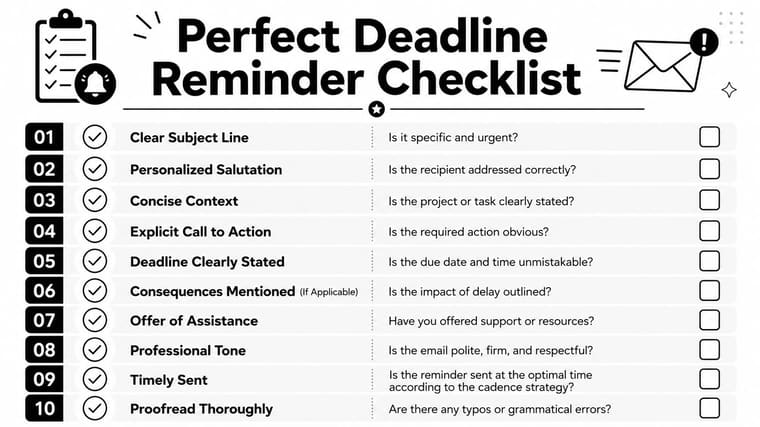
The send checklist
Before you send a deadline reminder email, check these points:
- The subject is specific and names the task.
- The recipient is addressed correctly so the message feels meant for them.
- The task is stated plainly in the first line.
- The deadline includes date and time if precision matters.
- There is one clear call to action instead of several options.
- The submission method is obvious, whether that’s reply, upload, approval, or attachment.
- The tone fits the relationship, whether peer, manager, client, or student teammate.
- A blocker path exists so the recipient can ask for help or flag risk.
- The message is short enough to scan quickly on desktop or mobile.
- You’ve proofread names, links, and times before sending.
The judgment call behind the checklist
The best reminder emails do two things at once. They protect the deadline, and they protect the working relationship.
If you’re unsure how firm to be, ask one practical question: what does the recipient need in order to act now? Usually the answer isn’t more wording. It’s less clutter, more specificity, and a visible next step.
That’s what separates a reminder people ignore from one people answer.
If you’re tired of sending the same reminder twice, it helps to move some of the deadline burden out of email altogether. Pretty Progress lets you keep important dates visible with countdown and progress bar widgets, so deadlines stay in sight without adding more notification noise.





