May 11, 2026
10 Time Management Best Practices for 2026
Master your schedule with these 10 time management best practices. Learn actionable techniques for prioritization and focus to achieve your goals in 2026.
Stop Juggling Time, Start Owning It
You tap your phone to check one detail before starting focused work. A notification pulls you into email, Slack adds two more questions, and by noon your day looks busy without producing anything that mattered.
That pattern usually is not a motivation problem. It is a visibility problem.
Priorities lose because they disappear. The task list lives in one app, the calendar in another, and your actual attention gets pulled by whatever is loudest on the screen. The methods in this guide solve that, but only if they stay visible while the day is happening. That is the core idea here. Good time management works better when your priorities become glanceable cues on your phone, through widgets that show a timer, a countdown, a progress bar, or the one task you decided to protect.
Planning still matters. Researchers at the University of California, Irvine found that interruptions leave a measurable attention residue, making it harder to return to the original task with full focus. Systems such as Pomodoro, time blocking, and the Eisenhower Matrix help reduce that switching cost because they give your day structure. Visual widgets make that structure harder to ignore.
I have seen the same trade-off repeatedly. Detailed systems look smart in a notebook, but they fail if they stay hidden until you remember to open the app. A simple visual prompt on your Home Screen often works better because it meets you at the moment you are about to drift. If you want a practical example, a timer interval app for focused work sessions can turn a plan into a visible work sprint before distractions pile up.
The 10 practices ahead are proven, but the point is not to collect productivity theory. The point is to install each method in a way you can consistently follow, with visual widgets that keep the right next action in front of you all day.
Table of Contents
- 1. The Pomodoro Technique
- 2. The Eisenhower Matrix
- 3. Time Blocking
- 4. The Getting Things Done System
- 5. The 80/20 Rule
- 6. Eat the Frog
- 7. The Two-Minute Rule
- 8. Goal Setting with SMART Criteria
- 9. Energy Management Over Time Management
- 10. The No Decision Framework
- Top 10 Time Management Strategies Comparison
- Your System for Sustained Productivity
1. The Pomodoro Technique
You sit down to start one important task, glance at your inbox, answer two messages, check Slack, and lose the next half hour before real work begins. Pomodoro solves that specific problem. It gives the task a clear start time, a visible finish line, and a break before attention starts to fray.
The standard version is simple: 25 minutes of focused work, then a 5-minute break. The core benefit is psychological. A short sprint feels manageable, so resistance drops and starting gets easier. I’ve found that many people do better once they stop asking, “Do I have enough time to finish this?” and start asking, “Can I stay with this for one focused block?”
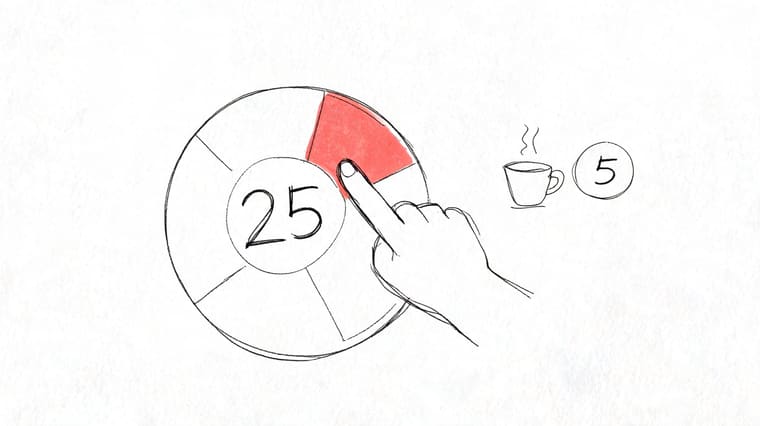
Set a visible work sprint
Pomodoro works best when the sprint is visible, not buried in an app tab you forget to check. Put the timer on your phone screen or desktop so the current block stays in view. That small change matters because it turns an abstract intention into a live constraint you can see at a glance.
A developer might run one sprint for code review, one for implementation, and one for documentation cleanup. A student might use two blocks for active recall before switching to practice problems. A remote worker might use a single sprint to finish a report before opening chat tools.
If you want a cleaner setup, this guide to a timer interval app workflow shows how to make focus blocks visible enough to support the habit instead of relying on memory.
Use Pomodoro with a few practical adjustments:
- Match the interval to the task: Start with 25 minutes, but use 40 or 45 for work that needs a longer runway. If the block feels so long that you avoid starting, shorten it.
- Define the task before the timer starts: “Work on project” is too vague. “Draft the intro,” “review 10 slides,” or “clear three comments” gives the sprint a target.
- Protect the break: Stand up, refill water, stretch, or look away from the screen. Scrolling during the break keeps your attention half-engaged.
- Stop after four rounds and reassess: Longer stretches need a bigger reset. Take a real break, then decide whether the next block should continue the same task.
Practical rule: Use Pomodoro for tasks that benefit from boundaries and momentum. Skip it for meetings, collaborative conversations, and deep creative work that is already flowing well.
2. The Eisenhower Matrix
You open your task list at 9:00 AM and see twelve items marked urgent. A client email needs a reply, an invoice is overdue, your quarterly plan is still rough notes, and the workout you promised yourself keeps sliding to tomorrow. The fundamental problem is priority drift. Small, loud tasks keep taking space from work that effectively changes outcomes.
The Eisenhower Matrix gives you a practical filter. Every task goes into one of four buckets: do, schedule, delegate, or delete. That sounds simple because it is simple. The value comes from forcing a decision before the day gets crowded.
Sort before you schedule
Teams already use parts of this method in practice. They answer urgent requests, they postpone strategic work, and they keep low-value tasks around longer than they should. The full matrix works better because it makes those trade-offs visible instead of leaving them to mood or inbox pressure.
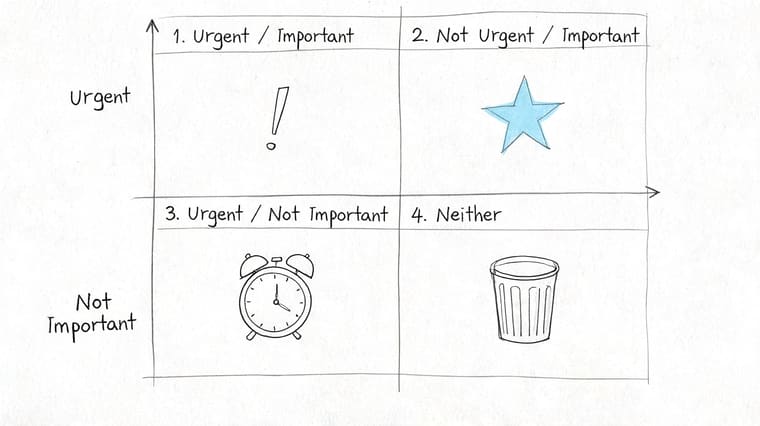
Here is what that looks like in real life. A founder puts payroll issues in do, product roadmap work in schedule, inbox triage in delegate, and a speculative networking event in delete. A student puts an exam this week in do, long-term revision in schedule, group project coordination in delegate when possible, and optional admin in delete. The hard part is not understanding the quadrants. The hard part is admitting that an urgent task is sometimes low-value.
Quadrant 2 deserves special protection. That is the important but not urgent category, where planning, relationship building, health, skill development, and prevention work usually live. Ignore it for long enough and it turns into Quadrant 1, with worse timing and higher stress.
Use Pretty Progress to keep Quadrant 2 visible on your phone instead of buried in a task app. A widget for “Finish proposal draft by Thursday” or “Study chapters 4 to 6 by Sunday” turns a distant intention into something you see every time you access your screen. That visual pressure helps because strategic work rarely shouts for attention on its own.
What is important is seldom urgent and what is urgent is seldom important.
- Sort tasks by consequence, not noise: Ask what happens if this waits 24 hours. If the answer is “not much,” it probably does not belong in the do quadrant.
- Keep Quadrant 2 on-screen: Create separate widgets for one strategic project, one deadline, and one personal commitment so long-term work stays visible.
- Delegate complete outcomes: Assign “send the updated contract by 3 PM,” not “help with contracts.”
- Delete with a clear rule: If a task is neither important nor urgent, remove it instead of rewriting it in a cleaner list.
- Review once a week: Reclassify tasks before the next week starts. Priorities change, but drift is not the same as change.
3. Time Blocking
A to-do list tells you what matters. A calendar tells you whether it will happen. That’s why time blocking is one of the most useful time management best practices for people who know their priorities but still end the day wondering where the time went.
The method is simple. Assign work to blocks on your calendar instead of leaving it as a floating intention. That small shift creates boundaries around deep work, meetings, admin, and recovery time.
Put tasks on the calendar
Timewatch research found that time blocking is the most adopted specialized time management method at 5%, still far behind to-do lists at 48% and calendars at 23%, according to Timewatch’s time management research. Adoption is low, but the value is high because blocked time forces you to confront capacity.
A consultant might reserve the morning for client strategy, midday for calls, and late afternoon for proposals. A content creator can block one period for recording and another for admin. A manager can batch one block for approvals instead of scattering them across the day.
Use Pretty Progress to create visual reminders for block start times. A countdown to “Deep Work 9:00 AM” is often more useful than another giant task list because it tells you exactly when the work begins.
- Start small: Try 3 or 4 blocks a day, not a color-coded masterpiece.
- Match block type to theme: A different widget style for deep work versus personal admin makes the day easier to scan.
- Leave room between blocks: A short transition buffer keeps late meetings from wrecking the rest of the schedule.
Time blocking breaks down when people schedule every minute and then feel like failures the first time reality interrupts. The better approach is structured flexibility. Protect key blocks, then let the rest breathe.
4. The Getting Things Done System
GTD is less about doing more and more about trusting your system. If your brain is trying to remember errands, project steps, follow-ups, and random ideas at the same time, you’ll feel overloaded before you’ve done any real work.
That’s why GTD still holds up. Capture everything. Clarify what each item means. Decide the next action. Review often enough that the system stays believable.
Here’s a helpful overview for the visual side of project tracking:
Build a trusted capture system
A product lead juggling launches, bug reviews, hiring, and stakeholder updates needs a place where every commitment lands. A parent balancing work deadlines and family logistics needs the same thing. GTD works best when nothing important stays trapped in memory.
Start with only two buckets if you’re new to it: Projects and Next Actions. That’s enough to reduce mental clutter without creating a system you resent maintaining. If you manage several moving parts at once, this guide on how to keep track of multiple projects pairs well with GTD.
After you’ve defined a major project, turn it into a visible milestone. Pretty Progress is useful here because a project becomes more real when it has a countdown or progress bar on your phone, watch, or desktop. For client-heavy work, that kind of visibility also supports improving workflow for consultants and agencies where context switching is constant.
- Capture immediately: If a thought matters, get it out of your head and into your system.
- Review weekly: The method only works if you revisit and clean it up.
- Visualize project milestones: Don’t just store a project. Put its key date somewhere you’ll readily see it.
A trusted system beats a heroic memory every time.
5. The 80/20 Rule
The 80/20 Rule is one of the most misunderstood time management best practices because people use it as a slogan instead of a decision tool. The point isn’t to say “some things matter more.” The point is to identify which few actions create most of your meaningful results, then build your schedule around those.
For a salesperson, that might be renewal calls and high-fit prospects. For a developer, it might be the small set of code areas tied to recurring issues. For a student, it might be practice problems and review sessions instead of endless passive rereading.
Protect the few things that matter most
Run a simple review. Look at last week’s work and ask which actions moved projects forward, improved revenue, reduced risk, or created an advantage. Then ask which tasks felt productive but mostly kept you comfortable and occupied.
Pretty Progress is especially effective here because it forces selectivity. If a goal or milestone deserves widget space, it probably belongs in your top tier. If it doesn’t, that’s a clue that it may not deserve prime hours either.
- Track impact, not activity: Finishing ten small tasks can still be a weak day.
- Create widgets only for the critical few: Visual prominence should be earned.
- Reassess regularly: The high-impact tasks this quarter may not be the same next quarter.
This method gets uncomfortable fast because it exposes busywork you may secretly enjoy. That’s useful. If you’re always polishing low-risk tasks, the 80/20 Rule calls that out.
6. Eat the Frog
You sit down at 8:30 with a clear intention to handle the one task that would move the day forward. By 9:15, you have answered three emails, checked Slack twice, and adjusted your to-do list. The hard task is still waiting.
That pattern usually comes from avoidance, not poor intentions. Eat the Frog works because it assigns your best attention to the task you are most likely to delay, before other people’s priorities flood your morning.
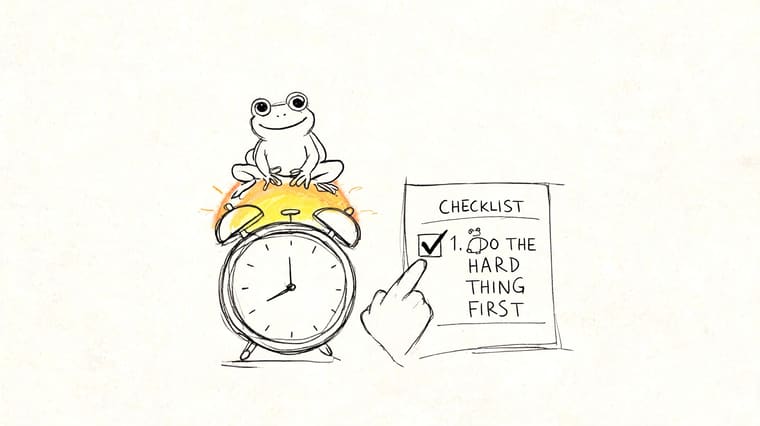
Decide the night before
Morning is a bad time to choose your hardest task. Decision fatigue starts early, and vague plans make procrastination easy. Pick the frog the night before, define what “done” means, and put it in the first workable slot of the day.
The trade-off is real. If you always start with the hardest thing, you will sometimes delay easy wins and quick replies. That is usually the right call when the task affects revenue, deadlines, grades, or a project that has been stalled for days.
An author might draft 500 words before opening messages. A founder might make the unresolved hiring or pricing decision before the first meeting. A student might start with the problem set that requires full concentration, not the reading that feels easier.
Pretty Progress makes this method easier to follow because the frog does not stay buried in an app. Put it on your Home Screen as a countdown, checklist, or milestone widget so the priority is visible before you open email or social apps. That turns an abstract intention into a concrete prompt. If you need extra motivation, this guide to tackling tough tasks pairs well with the method.
- Choose one frog: One meaningful task creates clarity. A list of five creates escape routes.
- Define the finish line: “Send the proposal” works better than “work on proposal.”
- Protect the first hour: Keep messages, news, and low-value admin out of that window.
- Cut the task into a starting chunk: If the frog feels too big, begin with 20 minutes of real progress.
I have seen people fail with this method for one simple reason. They pick a category instead of a task. “Work on business” and “make progress on project” sound serious, but they give your brain too much room to stall. Specific frogs get done. Vague frogs stay on the list.
7. The Two-Minute Rule
The Two-Minute Rule is powerful because it kills friction. If something is tiny, finishing it now can be easier than tracking it, rewriting it, and seeing it on tomorrow’s list.
That said, it’s also easy to misuse. If you apply it all day long, your focus gets shredded by small requests and constant switching.
Use it without wrecking focus
The practical version is selective. Reply to the simple email, file the document, confirm the appointment, send the approval. Then stop. During deep work, protect your attention and collect those quick tasks for later.
Microsoft data summarized in the provided research notes that each context switch can cost 23 minutes of productivity. That’s why the Two-Minute Rule should support your day, not fracture it. Quick tasks belong in designated windows when possible, especially for people who do cognitively heavy work.
Handle the tiny task now only if it won’t interrupt something more valuable.
A manager can batch small approvals after a team check-in. A freelancer can reserve a short admin window between client sessions. A student can clear several tiny tasks after class instead of during a study block.
- Use a quick-task block: Put short admin work into a defined slot.
- Time yourself once: Many “two-minute” tasks are longer.
- Keep deep work sacred: Don’t let tiny tasks steal prime attention.
Pretty Progress fits well here when you create a small widget for admin windows. That visual cue helps you contain the small stuff instead of letting it spread through the day.
8. Goal Setting with SMART Criteria
A vague goal creates vague effort. “Get healthier,” “finish the project,” and “be more organized” sound fine until you try to act on them. SMART criteria fix that by forcing specificity and a deadline.
This framework works best when paired with visible milestones. Once a goal is defined clearly, you can track it in a way that keeps it present instead of buried in notes.
Make goals visible and measurable
A student might change “study biology” into “complete three review sessions before the exam date.” A professional might turn “launch the proposal” into “finish the draft, get stakeholder review, and submit by the deadline.” A habit builder might define a walking goal with a schedule and an end date.
Pretty Progress is a natural fit because SMART goals have dates and measurable progress built in. That means you can create countdowns for milestones and progress bars for completion, rather than relying on memory. If you want examples of how to structure them, this article on SMART objectives and goals is useful.
- Specify the outcome: Name the exact result, not just the intention.
- Set milestone dates: One final deadline is often too far away to drive action.
- Track visible progress: A progress bar reinforces momentum better than a hidden note.
The weakness of SMART goals is that people make them precise but lifeless. A good goal is specific and connected to something you care about. Otherwise, the structure is clean and the motivation is weak.
9. Energy Management Over Time Management
Not every hour has the same value. One focused hour at your best can beat three sluggish hours spent forcing yourself through the wrong kind of work.
That’s why smart scheduling looks at energy, not just time. The emerging discussion around energy-aware planning is growing because wearable data and health tracking make those patterns easier to notice, even if most standard productivity advice still treats every hour as equal.
Match work to your real capacity
The provided research highlights an underexplored shift toward energy-aware time management and notes productivity variance tied to circadian rhythms in 2025 wearable aggregates, according to the University of Georgia resource referenced in the research brief. Even without relying on exact live adjustments, the practical lesson is clear. Important work should go where your attention is strongest.
A designer might do concept work in the morning and admin in the afternoon. A manager might reserve one strong mental window for planning and feedback, then use lower-energy periods for approvals. Someone with ADHD may find that visual prompts help them start during a narrow window when motivation is available.
Pretty Progress supports this well because widgets can act as cues for protected energy windows, not just final deadlines. A countdown to “Creative Block” or “Study Window” helps you respect the time when your brain is most ready for that kind of work.
- Track your energy for a week: Notice when you think clearly and when you don’t.
- Assign work by demand: Put deep work in high-energy periods and admin in lower ones.
- Build in recovery: Walks, meals, and short pauses protect output better than grinding through fatigue.
Rigid systems often fail at this point. If your schedule ignores your actual capacity, it won’t feel disciplined. It will feel punishing.
10. The No Decision Framework
Monday starts with three requests before 9 a.m. A meeting invite with no agenda. A favor that will take “just 20 minutes.” A new project that sounds interesting but cuts across work you already promised to finish. If you decide case by case, in the moment, your calendar fills with other people’s urgency.
The no decision framework fixes that by setting your rules before requests arrive. You do not weigh every invite from scratch. You filter it against a small set of standards, then respond quickly and consistently.
As noted earlier, feeling busy does not equal feeling in control. Lists help capture work. They do not protect your time from low-value commitments.
Filter new commitments hard
Start with criteria you can use under pressure. Which meetings earn a yes? What kind of work fits this quarter’s priorities? How much discretionary time is still available after your existing obligations, recovery time, and personal commitments are accounted for?
Good filters create trade-offs on purpose. A consultant might decline a low-fit project to protect stronger client relationships. A team lead might reject any meeting without a clear owner, goal, and pre-read. A student in exam season might pause club work for two weeks because a home-screen countdown to finals keeps the cost visible every time the phone lights up.
Your calendar shows your commitments. Your attention shows the price you paid for them.
I have found that people say yes too easily when priorities live in a document they never see. Put current priorities somewhere visible. A Pretty Progress widget for one quarterly goal, one deadline, or one protected project turns a vague intention into a daily constraint. That changes the decision at the moment it matters.
- Write your yes criteria: Use 3 to 5 rules, such as “no meeting without an agenda” or “no new project unless another project is paused.”
- Add a visible priority cue: Put your top focus on your phone screen so every new request has to compete with something concrete.
- Use a delay script: “Let me check current commitments and get back to you today” buys enough space to choose well.
- Review commitments every quarter: End stale obligations, reduce recurring meetings, and remove roles that no longer fit.
Top 10 Time Management Strategies Comparison
| Method | Implementation Complexity 🔄 | Resource Requirements ⚡ | Expected Outcomes 📊 | Ideal Use Cases 💡 | Key Advantages ⭐ |
|---|---|---|---|---|---|
| The Pomodoro Technique | Low, easy to adopt, minor tuning | Minimal, timer/app or widget | Improved short-term focus; reduced procrastination | Task-driven work, studying, remote work | Simple to use; builds momentum; regular recovery |
| Eisenhower Matrix (Urgent vs. Important) | Moderate, requires honest prioritization | Low, paper/app and review time | Clearer prioritization; fewer low-value tasks | Strategic planning, executives, long-term projects | Helps delegate/eliminate; highlights true priorities |
| Time Blocking (Calendar Batching) | Moderate–High, planning and discipline needed | Calendar tools, planning time, coordination | Protected deep work; reduced context switching | Deep work, busy schedules, creators, ADHD support | Guarantees time for priorities; reduces interruptions |
| Getting Things Done (GTD) | High, setup and regular maintenance | Task manager, capture tools, weekly review time | Comprehensive task coverage; lower anxiety | Knowledge workers, multi-project managers, entrepreneurs | Reliable external system; scalable and adaptive |
| The 80/20 Rule (Pareto Principle) | Moderate, requires analysis of impact | Data/time tracking or review sessions | Fewer tasks with higher impact; time savings | Sales, product focus, overloaded professionals | Focuses effort on highest-leverage activities |
| Eat the Frog (Most Important Task First) | Low, nightly selection, morning execution | Minimal, planning night before | Ensures critical task completion; early momentum | Individuals with morning peak energy, writers, execs | Guarantees priority done; boosts confidence early |
| The Two-Minute Rule | Low, instant decision threshold | None significant; habit formation | Shrinks task lists; frequent quick wins (risk of interruptions) | Email triage, small chores, quick admin | Reduces bloat; preserves focus for larger tasks |
| SMART Goal Setting | Moderate, requires clear specification | Reflection time, tracking/progress tools | Measurable progress; improved accountability | Project planning, personal development, milestones | Translates ambitions into actionable, time-bound plans |
| Energy Management Over Time Management | Moderate, self-tracking and adjustment | Monitoring (logs) and lifestyle inputs (sleep, nutrition) | Higher-quality output; reduced burnout | Creative work, variable-energy roles, ADHD | Matches work to peak energy; sustainable productivity |
| The “No” Decision Framework | Moderate, define criteria and communicate | Criteria documentation, regular reviews | Fewer commitments; clearer focus and boundaries | Leaders, overloaded professionals, people-pleasers | Prevents overcommitment; preserves bandwidth for top priorities |
Your System for Sustained Productivity
At 9:00 a.m., the day can still look under control. By 11:30, Slack is full, email has set your agenda, and the task you said mattered most is still untouched. Sustained productivity fixes that drift with a system you can see and trust.
The strongest setup is usually a small stack of methods that cover different failure points. Daily planning gives the day a shape. Eat the Frog forces an early priority decision. Time blocking protects space for real work. Pomodoro lowers the friction to start. The Eisenhower Matrix keeps urgent noise from taking over.
That combination works because each part carries a different load. One method helps you choose. Another helps you begin. Another helps you stay with the work long enough to finish something meaningful. In practice, I have found that people rarely need a more complicated framework. They need fewer decisions during the day and clearer cues about what deserves attention now.
Visibility matters because memory is unreliable under pressure. If priorities live in a notes app you never reopen, reactive work wins. Put the next deep work block on your home screen. Show a countdown to a deadline. Keep a progress bar for a weekly target where you will notice it without opening three apps first.
That is where visual widgets become useful, not decorative. They turn abstract plans into concrete prompts. A phone lock screen can remind you that your writing block starts in 20 minutes. A watch widget can show how much of a project window is gone. A tablet or desktop panel can keep one goal in sight all week. Those small signals reduce the odds that your system disappears the moment the day gets busy.
The University of Pennsylvania resource included in the brief supports the broader point that effective time management depends on practical systems and consistent scheduling habits, not just good intentions, as discussed in this Penn overview of time management strategies. For people who lose momentum between planning and execution, always-visible cues can close that gap.
Start smaller than you think.
Run one system for two weeks, then adjust. If your days feel scattered, begin with daily planning plus time blocking. If you avoid high-value work, pair Eat the Frog with Pomodoro. If everything feels urgent, use the Eisenhower Matrix and a simple no-decision framework to protect your calendar.
Then make the system visible enough to survive a real week. Pretty Progress is useful because it puts deadlines, routines, and goals in front of you at a glance instead of hiding them inside a planning tool. That trade-off matters. The easier it is to see what matters, the more likely you are to act on it before the day gets away from you.
Pretty Progress turns your deadlines, goals, and routines into always-on visual reminders across iPhone, iPad, Apple Watch, Mac, and Android. If you want a cleaner way to support your time management best practices with customizable countdowns and progress bars, explore Pretty Progress and put your most important commitments where you will see them.