

September 4, 2026
How Many Days Until Valentines Day and How to Track It
Find out how many days until Valentines Day and set up a persistent countdown widget on your iPhone or Android with Pretty Progress for daily reminders.
As of September 4, 2026, there are 163 days until Valentine’s Day on February 14, 2027. That number matters because it gives you a practical planning window for gifts, reservations, shipping, and a celebration that doesn’t depend on last-minute decisions.
You might be checking your calendar after seeing a Valentine’s display, hearing a friend mention dinner plans, or realizing that a custom gift needs more lead time than expected. The date can feel distant until you connect it to real tasks. Once you do, the countdown becomes useful.
Valentine’s Day is observed on February 14 every year in Western Christianity, and the date has remained a dependable annual marker for romance, friendship, gifting, and shared experiences. Historical references to Valentine’s Day help explain why a countdown can support more than curiosity. It can tell you when to decide, when to order, and when to stop postponing.
Table of Contents
- The Exact Countdown to Valentine’s Day
- Why Valentine’s Day Falls on the Same Date Every Year
- When to Start Shopping and Planning Based on the Countdown
- How to Set Up a Valentine’s Day Countdown Widget
- Creative Ways to Use Your Countdown Beyond Romance
- Keep Your Countdown Active for Every Milestone
The Exact Countdown to Valentine’s Day
If you’re asking how many days until Valentine’s Day, the next date is February 14, 2027, and from September 4, 2026, the countdown is 163 days. The number assumes a standard Gregorian-calendar calculation and counts the days between the current date and the upcoming February 14.
That’s enough time to plan carefully, but not a reason to ignore the date. A person who waits until the final stretch may face fewer gift choices, limited restaurant availability, and tighter delivery schedules. A person who starts with a simple decision now can spread the work across manageable steps.
Practical rule: Use the countdown as a deadline for decisions, not as entertainment.
Start by choosing the kind of occasion you want. Is it a restaurant meal, a homemade dinner, a small gift, a day with friends, or time set aside for yourself? You don’t need a complete itinerary yet. You need a direction, because every later choice depends on it.
For a second opinion on the date difference, use this date countdown calculator. It can help when you’re checking a different time zone, comparing dates, or planning a recurring event.
The strongest approach is simple:
- Choose the experience first: Decide what should feel meaningful before browsing products.
- Set a spending boundary: Pick an amount that fits your finances, then shop inside it.
- Record time-sensitive tasks: Note booking, personalization, shipping, and preparation deadlines.
- Leave room for changes: A flexible plan is easier to enjoy than an elaborate plan that creates pressure.
The raw day count answers the search query. Your next action turns it into a useful plan.
Why Valentine’s Day Falls on the Same Date Every Year
Valentine’s Day has a fixed annual date because the observance is tied to February 14, rather than to a movable calendar event. Historical accounts connect the holiday to late Roman and early Christian traditions. Some accounts also connect it with Lupercalia, a Roman festival held in mid-February and, in certain descriptions, on February 15. History of Valentine’s Day describes the later association with St. Valentine and the holiday’s development into a celebration centered on love and courtship.
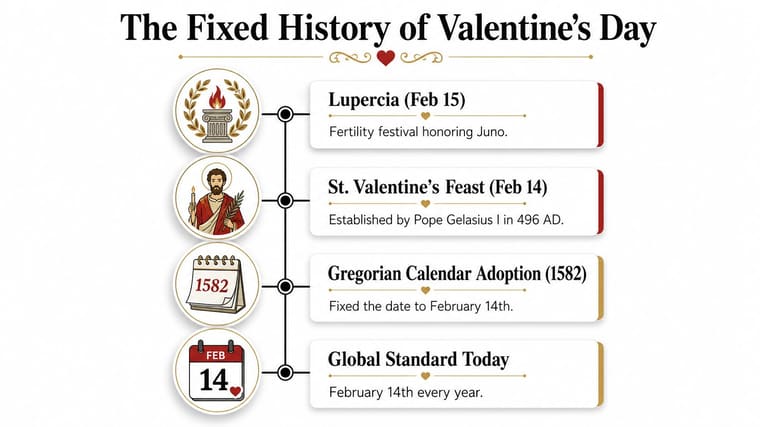
One historical tradition places the martyrdom of Valentine of Terni on February 14, 269 AD. Later sources associate Pope Gelasius I with formally designating February 14 as St. Valentine’s Day in 496 AD. Valentine-themed cards appeared much later, in the 16th century, showing how the date developed over a long period rather than appearing as a modern retail invention.
The calendar detail that affects your count
The date stays fixed, but the number of days between two dates can change. Gregorian leap-year rules make a year a leap year when it’s divisible by four, except for century years unless those years are also divisible by 400. This guide to date differences explains why a countdown crossing February 29 can include one extra day.
That means a span from February 28 in one year to February 28 in the following year can contain 366 days instead of 365 when a leap day falls within the interval. You don’t need to calculate this manually for an ordinary Valentine’s reminder, but it matters when you build a long-running countdown, compare dates across years, or create automated calendar rules.
Why this reliability helps
A fixed date gives you a stable planning anchor. You can create an annual reminder, reserve time for a recurring tradition, or maintain a widget that resets to the next February 14 after the event passes.
The holiday’s meaning has broadened beyond romantic couples. Modern observances can include partners, friends, families, colleagues, and people marking the day privately. The reliable date supports all of those choices without requiring you to follow one prescribed format.
When to Start Shopping and Planning Based on the Countdown
The right time to act depends on what you’re arranging. A dinner reservation and a handmade gift don’t follow the same schedule. Use the remaining days to handle the least flexible tasks first, then leave easy purchases and personal touches for later.
Valentine’s Day spending is expected to reach $29.1 billion in 2026, with average spending reported at $199.78, according to the National Retail Federation’s Valentine’s Day spending outlook. Those figures are a planning signal, not a personal budget. Decide what you can comfortably spend before seasonal demand influences your choices.
A practical planning timeline
| Days Until Feb 14 | Action to Take | Why It Matters |
|---|---|---|
| 60 or more | Choose the type of celebration and set a budget. Research restaurants, travel, custom gifts, or group plans. | Early decisions give you more options and prevent vague intentions from turning into rushed purchases. |
| 30 | Book the restaurant or event. Order personalized, handmade, or hard-to-replace gifts. | Providers may need preparation time, and popular time slots can disappear before the date feels close. |
| 14 | Confirm reservations, check delivery estimates, and buy standard gifts or supplies. | Two weeks gives you time to correct an address, replace an unsuitable item, or change plans. |
| 7 | Finalize cards, flowers, food, clothing, and transportation. | Small details become manageable when you handle them before the final few days. |
| 1 to 2 | Reconfirm the plan and prepare the items you already bought. | A short check prevents avoidable surprises without inviting more unnecessary shopping. |
The most important threshold is the one attached to your least flexible task. A custom item deserves attention before a standard purchase. A restaurant booking deserves attention before choosing a card. If you’re coordinating a group, collect availability early and use an event calendar to keep dates and activities visible in one place.
You can also use this event planning timeline to turn the occasion into smaller deadlines. Put each task on a calendar with an owner, especially if another person needs to confirm a reservation, send an address, or contribute to the plan.
Don’t shop simply because the countdown feels urgent. Shop because a specific task has a lead time. That distinction protects your budget and keeps the celebration focused on the people involved.
How to Set Up a Valentine’s Day Countdown Widget
A persistent widget works better than a browser search when you want the remaining time visible during ordinary routines. Instead of opening a countdown page, you can glance at your Home Screen, Lock Screen, desktop, or supported wearable device and immediately see whether you should be deciding, ordering, confirming, or preparing.
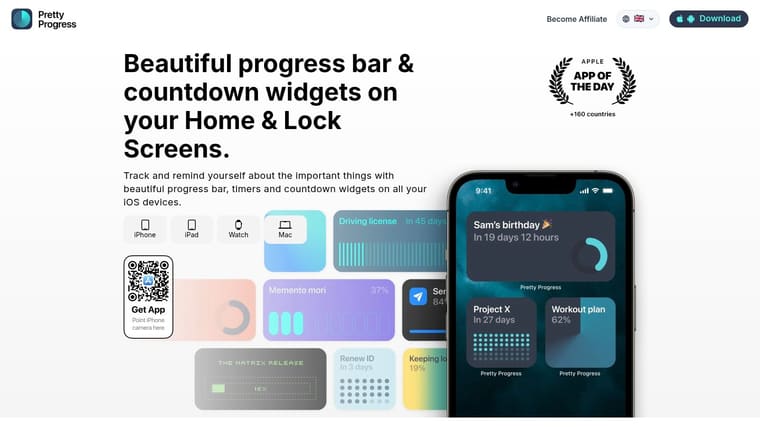
Pretty Progress lets you create a countdown or progress display for a chosen end date, including February 14. The setup is straightforward, but the date and display choices deserve care.
Set the event correctly
- Install the app: Download Pretty Progress on the device you use most often. Choose the platform that matches your planning habit, whether that’s a phone, tablet, computer, watch, or Android device.
- Create the event: Name the countdown something specific, such as “Valentine’s dinner” or “February 14 celebration.” A clear label is more useful than a generic title.
- Set the end date: Enter February 14, 2027, and check the year before saving. If you’re setting up the countdown after the event has passed, select the next upcoming February 14.
- Choose the unit: Use days when you want a simple planning view. A days-only display keeps the question “how many days until Valentine’s Day” visible without adding distracting detail.
- Add the widget: Place it on your Home Screen or Lock Screen so the reminder appears where you already look.
For a device-specific walkthrough, follow this guide to add a countdown widget on your iPhone.
Make the reminder fit your routine
A widget should be noticeable without becoming visual clutter. Start with a clean theme such as Swiss Style, Minimal, or Retro OS, then adjust the colors, gradients, bar shape, size, layout, and icon if those controls suit your screen.
Use the design to reinforce the action. A compact days display works well for a phone Lock Screen. A larger progress bar can suit a desktop where you want the countdown to stay visible while you work. If your partner or friends share the planning, use the same event name across devices so everyone refers to the same milestone.
Don’t create several competing countdowns for one occasion. One visible reminder is enough. Pair it with calendar alerts for tasks that require action, such as booking, ordering, or confirming delivery.
The widget won’t make decisions for you. It will keep the date present, which is often the missing link between good intentions and timely preparation.
Creative Ways to Use Your Countdown Beyond Romance
Valentine’s Day can support several kinds of connection, and the countdown should reflect your actual plans rather than assume you’re part of a couple. A romantic dinner, a friendship gathering, and a solo ritual can all deserve the same deliberate preparation.

Choose the celebration that fits
Galentine’s brunch: Pick a restaurant, reserve a table, and ask friends to confirm early. The countdown becomes a shared prompt to protect the date instead of allowing busy schedules to erase it.
Friendship appreciation: Send a thoughtful note, plan a walk, or organize a meal where everyone contributes something. You don’t need a romantic theme to make a person feel remembered.
Self-love day: Reserve time for a favorite meal, a class, a quiet morning, or an activity you routinely postpone. Put the plan on your calendar before other commitments fill the space.
A considerate gift: If jewelry fits the relationship and budget, browse a clearly defined option such as this 0.21 carat diamond love ring, then compare the purchase with your spending limit and delivery needs.
Search behavior also shows that Valentine’s Day prompts relationship questions beyond proposals and gifts. Google-reported trends include rising interest in Galentine’s captions and heart-shaped foods, while “when to break up” has drawn three times more searches than “when to propose,” according to Google-related Valentine’s search trend coverage. The practical lesson is clear. You don’t have to force a celebration that doesn’t match your life.
Use the countdown to create space for an honest choice. Celebrate someone, celebrate your wider circle, schedule restorative time alone, or use the date as a decision point for a conversation that needs attention. Meaning comes from intention, not from copying a commercial script.
Keep Your Countdown Active for Every Milestone
February 14 can be the first event you track, not the last. After Valentine’s Day passes, change the end date for an anniversary, birthday, project deadline, exam, trip, fasting window, or the end of the year. The same glanceable format can support both personal occasions and practical responsibilities.
A useful countdown answers two questions: what matters, and what should I do next? Keep the widget only when it points toward a real action. If the date is important, connect it to a small task list. If the date no longer matters, remove it instead of filling your screen with reminders you’ve stopped using.
Review your active milestones occasionally. Give each event a clear name, a correct date, and a display style that remains easy to read. That keeps the device working as a quiet planning surface rather than another source of noise.
Start today by setting the February 14 countdown, choosing the celebration you want, and assigning your first planning task. Then leave the widget active so the date stays visible while you turn good intentions into a calm, meaningful occasion.
Pretty Progress offers customizable countdown and progress widgets for dates, deadlines, and personal milestones across supported devices. Visit Pretty Progress to set up your Valentine’s Day countdown and keep one simple visual reminder for the next moment that matters.





