

September 7, 2026
How Many Days Until Retirement Guide for Accurate Countdown
Learn how many days until retirement with exact formulas. Handle leap years, time zones, and business days. Track progress using Pretty Progress.
You wake up, glance at the calendar, and wonder: how many days until retirement? A quick date search gives you a number, but it may not match the time you have left to work. Leap days, daylight-saving changes, time zones, weekends, holidays, and partial days can all make a simple subtraction misleading.
The answer also depends on what you mean by “retirement.” You might want calendar days until an eligibility date, business days until your final working day, pay periods remaining, or a practical timeline for building retirement income. In OECD countries, a projected normal retirement age of 66.3 years for men entering the labour market at age 22 today implies roughly 16,170 days of work before full retirement eligibility, according to the OECD Pensions at a Glance 2023 report.
This guide shows how to calculate the countdown accurately, compare phone tools with spreadsheets, handle edge cases, and create a motivating Pretty Progress widget. It also connects the date to practical planning, including the broader ideas covered in Toya AI’s financial planning strategies, so your countdown becomes more than a number on a screen.
Table of Contents
- Understanding key calculation challenges
- Step by step calculation methods
- Using phone spreadsheet and app calculators
- Building a retirement countdown widget in Pretty Progress
- Tips for motivation and accuracy
- Conclusion and next steps
Understanding key calculation challenges
A retirement countdown can answer different questions, and each question needs a different count. Calendar days measure every day between today and the target date. Business days exclude regular non-working weekdays and may also exclude holidays. Financial days are more personal. They can represent paychecks remaining, working days needed to fund a savings target, or the time available to create an income bridge.
That distinction matters because a large calendar total can feel reassuring while the workday total tells a different story. A person planning a final day at work may care about weekdays, scheduled leave, pay frequency, and the date benefits begin. Someone checking pension eligibility may care about the official date rather than the last day physically spent at work.
Practical rule: Decide what the countdown is measuring before choosing the calculator.
Why dates drift
Time zones create one of the most common technical errors. If software compares local timestamps, a daylight-saving change can make the elapsed time differ from a clean multiple of 24 hours. The same issue appears when a retirement date is entered in one time zone and interpreted in another.
Leap years create a second problem. A long countdown crosses different calendar patterns, so dividing a total by a fixed year length can produce an approximation rather than an exact calendar breakdown. A year estimate can be useful for planning, but it shouldn’t replace the underlying day count.
Partial days require a decision, too. If retirement begins at midnight, counting complete dates is straightforward. If a final workday ends in the afternoon, you can calculate hours and minutes, but displaying a fraction of a day may create false precision. For most personal countdowns, a clearly defined date boundary is more useful than a constantly changing timer.
The planning gap behind the number
A simple countdown can also conceal a broader preparation problem. Research cited by Morningstar reports that 50% of workers lack a recently updated written retirement plan, which makes a date-only answer easy to misread (Morningstar’s summary of LIMRA retirement planning research).
Use the days between two dates calculator to establish the basic interval, then decide whether you also need business days, pay periods, or scenario dates. The tool is only as useful as the definition behind the date.
Step by step calculation methods
Start with two clear inputs: the date you’re using as “today” and the date you consider retirement. Don’t mix a local date with a timestamp that includes an unintended time zone. For a reliable technical calculation, represent both dates at UTC midnight.
Calculate total calendar days
The core method is simple:
- Convert today’s date to a UTC timestamp.
- Convert the retirement date to a UTC timestamp.
- Subtract today from retirement.
- Divide the difference by the number of milliseconds in a day.
- Round according to your display rule.
The calculation is:
round((retireDateUTC - todayUTC) / 86,400,000)
This UTC-based approach avoids treating a daylight-saving transition as a missing or extra day. The retirement countdown calculation method also recommends deriving workdays and other views from the same date anchor rather than running separate calculations that can drift apart.
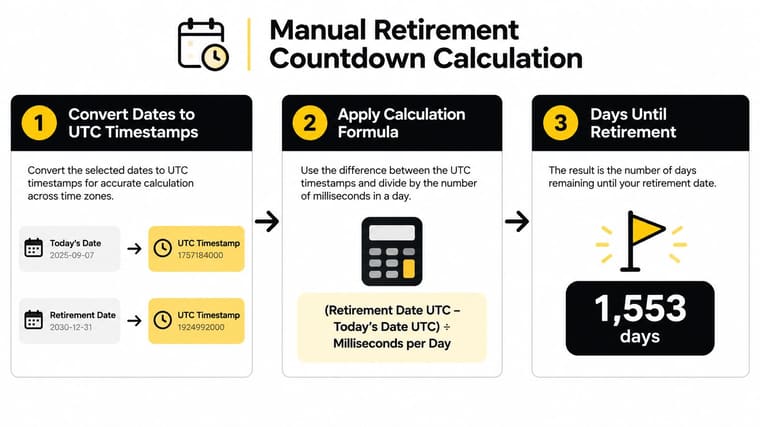
In JavaScript, the important detail is to construct dates consistently. A date-only input should be interpreted deliberately, then normalized to UTC before subtraction. In Python, use timezone-aware datetime values and convert both inputs to UTC. In Excel or Google Sheets, date subtraction works well when both cells contain genuine date values rather than text strings.
Convert the result into useful views
Once you have total days, derive other displays from that same result. You can show:
- Weeks, by dividing the day count by seven.
- Decimal years, using 365.25 as a common leap-year adjustment.
- Workdays, by checking each date and excluding non-working weekdays.
- Paychecks, based on the chosen weekly, biweekly, semi-monthly, or monthly schedule.
- Calendar years, months, and days, using borrow logic when the day or month subtraction becomes negative.
Business-day counting needs more care than multiplying weeks by five. Iterate through each date, test whether it falls on an eligible weekday, and then apply your holiday list if your workplace observes holidays. Your employer’s leave calendar may differ from a national calendar, so keep the holiday rules separate from the basic date formula.
Handle retirement-date edge cases
A retirement date on February 29 needs an explicit rule in years when that date doesn’t exist. You might use the final day of February, the first day of March, or the official eligibility date supplied by your pension administrator. Don’t let the spreadsheet arbitrarily determine the date.
Also decide whether the end date is included. “Days until retirement” usually means the number of full date intervals before the target date, while “working days remaining” may include the final workday. Label the convention next to the result so you can audit it later.
Using phone spreadsheet and app calculators
The fastest method depends on whether you need a one-time answer or a countdown you’ll revisit. A phone date calculator is convenient for a quick check. A spreadsheet gives you control over formulas, holiday lists, and alternative retirement dates. A dedicated visual app adds a persistent reminder that you can see without opening a file.
| Method | Ease of Use | Precision | Visual Feedback |
|---|---|---|---|
| Phone date calculator | Very easy for a single calculation | Depends on date and time-zone handling | Usually limited |
| Spreadsheet template | Requires setup and formula care | Strong when dates and exclusions are configured correctly | Customizable, but not always glanceable |
| Pretty Progress calculators and widgets | Quick after initial setup | Provides date and business-day views for practical tracking | Home and Lock Screen countdown display |
For a spreadsheet, keep the structure small. Put today’s date in one cell, the target retirement date in another, and calculate the interval in a separate result cell. Add a holiday range only if you need business-day accuracy. A useful template can include separate rows for calendar days, business days, weeks, and alternative dates, such as a planned retirement date and a later contingency date.
Common errors include entering dates as text, reversing the subtraction order, counting the end date inconsistently, and applying a generic holiday list to a workplace with different closures. Test the sheet with dates you already understand before trusting it for a long-range plan.
If you’re preparing in Australia, combine a countdown with the essential tools for Australian pre-retirees, especially when your official retirement age, pension assumptions, or income sources require local context. For a visual, glanceable version, use the date countdown calculator before placing the result on your device.
Building a retirement countdown widget in Pretty Progress
A retirement widget works best when it stays visible without becoming visual noise. Set it up as a daily cue, not as a pressure device. The retirement countdown widget for iPhone gives you a practical starting point for placing the target on an iPhone or iPad.
Begin by downloading Pretty Progress and creating a new countdown. Enter a clear start date, usually the date you began tracking the goal, and an end date that matches your chosen retirement milestone. If your retirement plan has multiple possibilities, create separate milestones for full retirement, part-time work, and a later fallback date rather than forcing every scenario into one number.

Choose a design you’ll keep noticing
Pick a theme that matches how you use your device. Minimal suits a quiet reminder with little distraction. Retro OS makes the countdown feel like a visible system status. Swiss Style offers a structured, information-first appearance.
Then adjust the elements that affect glanceability:
- Label: Use a direct phrase such as “Final workday” or “Retirement target.”
- Color: Choose strong contrast so the number remains readable on your Home Screen.
- Gradient: Use one only when it improves separation between the progress bar and its background.
- Icon: Select a symbol that reinforces the milestone without crowding the number.
- Bar shape: Use a form that makes progress easy to read at the widget size you prefer.
A small widget works for a single number. A larger widget is more useful when you want the label, progress bar, and supporting note visible together. Place it on the Home Screen where you naturally check tasks, or on the Lock Screen if you want the reminder to appear before you open another app.
The design should answer two questions immediately: What am I counting down to? and How much progress has passed? Avoid decorative choices that make either answer harder to see.
Add meaningful milestones
Retirement can be far enough away that the final date feels abstract. Add smaller milestones such as a review of your savings plan, a benefits check, or a personal preparation task. Keep each milestone concrete. “Review income sources” is more actionable than “prepare for retirement.”
You can also add a motivational note that connects the countdown to the life you’re building. Keep it short enough to read at a glance. The point isn’t to create another task list. It’s to give the number emotional context.
Use this walkthrough before finalizing your layout:
Check the widget after adding it to both iPhone and iPad if you use both devices. Confirm that the label, date, progress direction, and display size remain clear. If the app supports synchronization for your setup, verify that the same retirement target appears consistently rather than assuming every device has inherited the latest edit.
Tips for motivation and accuracy
A countdown becomes stale when you only look at the final number. Give it a rhythm. Review the date monthly, refresh the visual style occasionally, and connect each review to one practical action, such as checking your plan, updating a beneficiary, or reviewing an income assumption.
Create milestone targets that feel reachable. A long countdown can be divided into repeated day-based checkpoints, including a milestone at every 1,000 days if that scale suits your plan. Pair each checkpoint with a small personal reward, not a new financial obligation.
The widget should remind you that progress is happening, not imply that every day must be optimized.
Accuracy deserves its own routine. Recheck the target after changing time zones, moving between devices, or passing a daylight-saving transition. If your workplace schedule matters, compare the calendar-day view with the business-day view and confirm that your holiday list still matches your employer.
Keep the retirement date flexible when reality requires it. A date can motivate you, but it isn’t a guarantee of financial readiness. Treat the countdown as a living planning instrument, not a promise that the calendar alone can fulfill.
Conclusion and next steps
The answer to how many days until retirement starts with a date difference, but a useful answer goes further. Define whether you need calendar days, business days, weeks, paychecks, or a year-and-month breakdown. Normalize dates to UTC, handle leap-year and end-date rules explicitly, and derive every display from the same underlying calculation.
Then turn the result into a habit. Run the first calculation today, record the target date, and add a widget where you’ll see it naturally. Use milestone dates for the actions that make retirement more achievable, such as reviewing income assumptions or checking whether a later retirement scenario changes your plan.
Your countdown can also support broader income planning. OECD benchmarks show that replacement rates differ by country and are not determined by retirement age alone, so pair the date with assumptions that fit your jurisdiction rather than relying on a universal target (OECD gross pension replacement rate data).
Pretty Progress lets you turn a retirement date into a customizable countdown and progress widget for your everyday screens, with date and business-day tools for more practical tracking. Visit Pretty Progress, set your target, and make the next day of progress visible.





