
November 8, 2026
100 Day Challenge Tracker: Setup and Daily Consistency
Set up a 100 day challenge tracker in minutes, log the metrics that matter, check milestones, and recover from missed days without losing your momentum.
You’re three days into a challenge, the streak is alive, and then work runs late. You miss a day, the counter drops to zero, and the whole plan suddenly feels pointless. That’s a tracker problem, not a discipline problem.
A good 100 day challenge tracker should work as a recovery system, not a streak counter. It should measure completed days against scheduled days, keep the original end date, and show you what to change when life interrupts. One missed day becomes data. It doesn’t erase the challenge.
Table of Contents
- Set Up Your Tracker Fields Before Day One
- How to Build and Start Your Tracker Step by Step
- Logging Completion Without Fooling Yourself
- Milestones That Show Where You Stand
- Recovering from Missed Days and Disruptions
- Start Day One of Your Challenge Tomorrow
Set Up Your Tracker Fields Before Day One
| Field | What to Enter | Example |
|---|---|---|
| Behavior | One specific action you can measure | Walk 20 minutes after lunch |
| Start date | Day 1, the day you begin | March 1, 2026 |
| End date | Day 100, counted inclusively | June 8, 2026 |
| Cue | The if-then trigger for the action | If it is 12:30 p.m. on a weekday, then I put on my shoes |
| Minimum action | The smallest version you will do on a bad day | 5-minute walk around the block |
| Scheduled days | The days the behavior applies, which sets the completion denominator | Monday to Friday, 5 per week |
Start with the behavior. Don’t write “get fit.” Write an action you can finish and measure, such as walk 20 minutes after lunch. If you can’t tell whether you did it, it’s still too vague.
The dates are simple but easy to get wrong. Start date is day 1 and end date is day 100, counted inclusively. A challenge starting March 1, 2026 therefore ends on June 8, 2026. Those 100 days are fixed by the calendar, even if your behavior only runs on weekdays.
The Fields That Prevent Guessing
Your cue connects the action to a moment that already happens. “If it is 12:30 p.m. on a weekday, then I put on my shoes” is stronger than “walk later” because later has no trigger.
Your minimum action is the bad day version you’ll still do, such as a 5-minute walk around the block. It preserves the routine when energy, weather, or time turns against you.
Scheduled days matter more than many people expect because they set the denominator for your completion rate. A Monday to Friday plan gives you 5 scheduled days per week, not 7. Days you never planned to act shouldn’t count as misses.
For daily metrics, I’ve found three are enough. Log yes or no completion, minutes, and a 1 to 5 difficulty rating. A filled row might read: March 2, yes, 20 minutes, difficulty 2.
Quick check: Can you write the cue in one sentence and name the minimum action in under ten words? If yes, your setup is complete.
How to Build and Start Your Tracker Step by Step

Build the tracker in an order that removes daily decisions. You want the cue, dates, and review routine settled before motivation has a chance to fluctuate.
- Write the behavior and cue: Use this format, “if it is [time or place], then I will [action] right after [existing routine].” For example, “If it is 7:00 a.m. on weekdays, then I will walk for 20 minutes before checking email.” The cue ties action to a situation, so you’re not relying on how motivated you feel.
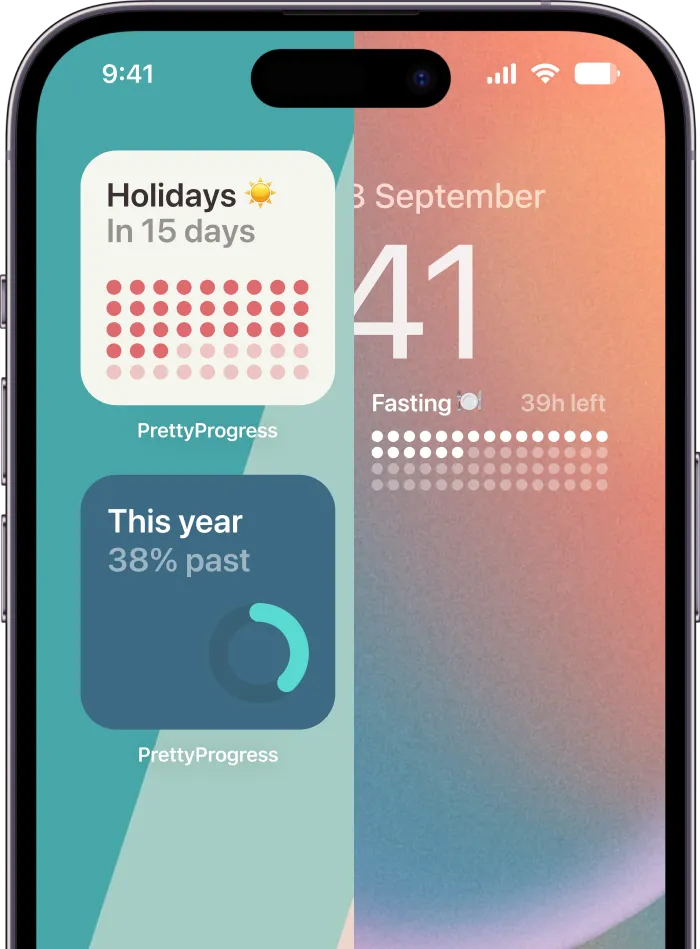
- Create the countdown: Enter your start and end dates in Pretty Progress and pick a progress bar theme you’ll want to see daily. A clear visual works better than a theme you ignore.
- Add the widget: Long tap the Home Screen, tap the (+) button, select Pretty Progress, and add the widget. This puts progress where you’ll see it without opening anything.
- Log day 1 that evening: Record completion the same day instead of batching entries later. Retrospective entries are easy to soften, skip, or misremember.
- Review for five minutes each Sunday: Count completed days against scheduled days and note the reason for each miss. That weekly review tells you whether the problem is the cue, the timing, or the size of the action.
- Fix a stuck widget: If the widget stops updating, open and close Pretty Progress or restart your phone. Widgets don’t show seconds, so judge this tracker in days, not hours.
What the Tracker Should Store
Keep one usable record, not scattered notes. Store the intended start and end dates, recurrence rule, cue, minimum action, completion status, and weekly review result. That’s enough to diagnose a bad week without turning tracking into a second job.
The if-then format isn’t just neat wording. A meta-analysis of 94 independent studies involving more than 8,000 participants found that implementation intentions produced a medium-to-large improvement in goal attainment (d = 0.65). In plain terms, deciding when and where you’ll act helps you start.
If you’re comparing ways to organize the schedule around work, this guide to structuring a habit schedule is useful for matching frequency to your week. Broader context on planning systems is also covered in KeenVerdict’s productivity coverage, which looks at tools beyond a single app.
On day 2, a working setup is easy to recognize. The widget shows how much time remains, and your log has one honest entry for day 1.
Logging Completion Without Fooling Yourself
Honest logging matters more than an attractive progress bar. If the record is biased, every percentage built on it will mislead you.

Log four things each day:
- Completion: Mark yes or no for the planned action or its minimum version.
- Amount: Enter the quantity or duration, such as 20 minutes or 12 pages.
- Difficulty: Rate the day from 1 to 5, so repeated hard days become visible.
- Miss reason: Write a short explanation, such as travel, illness, forgotten, or no time.
How Each Day Counts
| Entry type | Counts in denominator | Example |
|---|---|---|
| Planned rest | No, excluded | Scheduled off day |
| Unavailable | No, excluded | Day you could not act on for a reason outside your control |
| Failed attempt | Yes, counts as a miss | Scheduled weekday skipped with no outside reason |
Planned rest is excluded because you never scheduled the behavior. An unavailable day is also excluded when something outside your control made action unreasonable. A failed attempt stays in the denominator because it was scheduled and you didn’t complete it.
Use a simple weekly formula:
Completion rate: Completed scheduled days ÷ scheduled days.
If you complete 4 of 5 scheduled weekdays, your rate is 80%. Add a rolling 7-day average as a second view, since it smooths out one unusually bad day without hiding a downward trend.
Avoid all-or-nothing streak counters and bulk entry at month end. The first makes one miss feel like total failure. The second creates biased data because you’ll remember the good days more clearly than the skipped ones. Those are among the common mistakes in goal setting that subtly distort a challenge.
Keep the limit in perspective. A 2023 systematic review of self-monitoring and feedback reported that self-monitoring may improve adherence in some physical-activity populations, yet rated the evidence low certainty. Visibility helps some people, but it isn’t a guaranteed success rate.
Treat the tracker as a diagnostic loop. It shows where the plan breaks, so you can change the cue, time, or dose instead of blaming your character.
Milestones That Show Where You Stand
| Milestone | Day | Time Elapsed | What to Check |
|---|---|---|---|
| Quarter | Day 25 | 25% | Whether the cue and minimum action are realistic |
| Half | Day 50 | 50% | Weekly completion trend and difficulty ratings |
| Three quarters | Day 75 | 75% | How the habit will continue after day 100 |
| Finish | Day 100 | 100% | Completion rate compared with your starting target |
A countdown makes time elapsed visible at a glance, while your log shows whether behavior is keeping pace. You need both numbers. Time passing isn’t the same as progress.
Say you’re at day 50 with 80% completion. You’re probably on track and mainly need to protect the routine. At day 50 with 40% completion, don’t wait for day 100. Change the cue or shrink the minimum action now, while half the challenge remains.
Why 100 Days Is a Horizon Not a Deadline
The length is useful, but it doesn’t prove a habit will be complete on a fixed date. A 2024 systematic review and meta-analysis of 20 studies involving 2,601 participants found reported median habit-formation times of 59 to 66 days, reported means of 106 to 154 days, and individual estimates from 4 to 335 days.
That spread changes how you should read the bar. You might feel a behavior becoming automatic before day 100. Another person, or a harder behavior, may need longer. Day 100 is a structured checkpoint, not a biological finish line.
Use each milestone for one job. At day 25, test whether the cue and minimum action fit real life. At day 50, look at the weekly trend and difficulty ratings, not just the total.
At day 75, decide how the behavior will continue after the challenge. At day 100, compare your completion rate with the target you set at the start. A progress bar at 75% elapsed with 30% completion isn’t a verdict. It’s a signal to adjust before the remaining days disappear.
Set a calendar reminder for each milestone date now. Reviews you have to remember are reviews you’ll eventually skip.
Recovering from Missed Days and Disruptions
| Situation | Keep | Change |
|---|---|---|
| One missed day | End date and original target | Resume at the next scheduled opportunity |
| Illness or travel for several days | End date and target | Log as unavailable, then use the minimum action when possible |
| Completion below 70% for two weeks | Behavior and end date | Change the cue, shrink the minimum action, or add an accountability partner |
| Changed priorities | Core behavior you still value | Reduce the dose only after repeated misses, and log the reason |

The most common case is one missed day. Don’t restart the count. Keep the original end date and target, log the miss transparently, and resume at the next scheduled opportunity. Your completion rate absorbs the miss without erasing earlier work.
A three-day illness needs a different entry. Mark those days unavailable, use the minimum action only when you’re well enough, and return to the normal routine without adding punishment sessions. Catching up by doubling the dose usually creates another disruption.
When a Miss Becomes a Pattern
Use one clear threshold. When completion falls below 70% for two consecutive weeks, change one specific thing. Move the cue, shrink the minimum action, or add a shared check-in. Changing all three at once leaves you unable to tell what helped.
Accountability doesn’t need a public audience. A partner can check in asynchronously, which works across time zones and different schedules. You can also share milestone dates while keeping daily notes private, so the partner sees progress but not every reason or difficulty rating.
That flexible approach suits people who want structure without extreme rules. If you’re weighing stricter programs, you can compare alternatives to 75 Hard to see how different challenges handle missed days and daily requirements. A daily view also helps, and using a habit tracker daily fits that routine without forcing a perfect streak.
A missed stretch doesn’t prove the challenge failed. A summary of the University College London habit study describes 96 adults repeating a selected health behavior once per day for 84 days, with a median estimated time of 66 days to reach 95% of their eventual automaticity level among participants whose data supported the model, while the modeled range extended from 18 to 254 days.
Timing varies by person and behavior. The tracker records consistency over time. It doesn’t prove the habit should be finished on one fixed day.
Start Day One of Your Challenge Tomorrow
Set the tracker up today and start tomorrow on a fixed date. Waiting for a perfect Monday, a quieter month, or renewed motivation usually turns the plan into another note you’ll revisit later.
Pair the goal with self-monitoring and feedback from the beginning. A 2025 randomized study of a digital intervention for university and college students found no strong, consistent effect from goal setting alone across alcohol use, diet, physical activity, or smoking, while combining goals with self-monitoring produced only limited improvements that did not persist at later follow-ups. That is a warning against expecting a countdown to do the work by itself.
Your Next Four Steps
- Enter the setup: Add the start and end dates, specific behavior, cue, scheduled days, and minimum action.
- Add the widget: Put the countdown on your Home Screen so remaining days stay visible.
- Log day 1 tonight: Record completion, minutes, and difficulty before you sleep.
- Book the reviews: Schedule the Sunday review and calendar reminders for days 25, 50, 75, and 100.
I would protect the review dates before I made the behavior harder. They’re what turn a missed day into an adjustment instead of an excuse to quit.
A single miss doesn’t end the challenge because this system supports restarting without resetting. You resume at the next scheduled opportunity, keep the target, and let the completion rate show the full picture.
Your first checkpoint is day 25. Reach it with honest entries, including the imperfect days. That’s enough information to judge whether the cue fits your life and what your 100 day challenge tracker needs next.
Download Pretty Progress for free and turn your start and end dates into a clear progress bar or countdown for iPhone, iPad, Apple Watch, and Mac. Put it on your Home Screen, log day 1 tomorrow, and use each milestone to recover fast instead of restarting. Start today at Pretty Progress.