

September 21, 2026
What Time Does a Business Day Start Explained Simply
Wondering what time does a business day start? Learn typical 9 a.m. starts, banking cutoffs, market hours and how to set business-day countdowns correctly.
Most offices treat the business day as starting at 9:00 a.m. local time on Monday through Friday, but banks and markets use their own opening and cutoff times. In U.S. securities markets, regular trading starts at 9:30 a.m. Eastern Time, and some banks use deposit cutoffs as early as 2:00 p.m., so the answer depends on what kind of deadline you’re dealing with.
You’re usually not asking this question for fun. You’re asking because something is due, something hasn’t posted yet, or you’re trying to avoid the sinking feeling of learning that “today” means “next business day.”
That confusion happens because people use one phrase for three different clocks. Your office may think in opening hours. A stock market thinks in trading sessions. A bank often cares most about its processing window and daily cutoff. If you mix those up, your deadline math goes sideways fast.
Table of Contents
- Why the Start of a Business Day Matters for Your Deadline
- What a Business Day Really Means
- The Most Common Business Day Start Times by Context
- How Start Times and Cutoffs Change Your Deadline Math
- Setting an Accurate Business Day Countdown in Pretty Progress
- Common Mistakes With Time Zones Holidays and Remote Work
- Choosing the Right Start Time for Your Next Deadline
Why the Start of a Business Day Matters for Your Deadline
A new teammate once asked me a simple question: “If I send this late tonight, does it count for tomorrow?” That’s the moment when what time does a business day start stops being a vocabulary question and becomes a risk question.
If you submit paperwork after your team has gone home, the office may not touch it until morning. If you place a trade before the regular market session begins, you may be in pre-market territory instead of the main trading day. If you send a bank instruction after cutoff, the bank may push it to the next business day even though the calendar still says today.
What people usually mean when they ask
Many aren’t really asking for a dictionary definition. They’re asking one of these:
- “Will this count today?” You want to know if a task lands inside the current operational window.
- “When should I start counting?” You’re trying to calculate a due date correctly.
- “Why didn’t this process yet?” You assumed midnight or first thing in the morning meant the same thing everywhere.
That’s why deadline mistakes feel so unfair. You can act on Friday night and still get Monday treatment. You can submit at what feels like the start of the day in your city, while the governing office is already near closing time somewhere else.
Practical rule: Before you ask when a business day starts, ask which system controls the deadline.
This matters even more if deadlines already feel slippery. If that’s a recurring struggle, this guide on ADHD deadline help gives practical ways to reduce last-minute misses without turning your whole week into a stress drill.
A visual countdown also helps because it turns a fuzzy deadline into something you can see. If you’ve ever needed to track a filing date or payment window more clearly, this tax deadline countdown guide shows how a deadline becomes easier to manage when it’s visible every day.
The three clocks that change the answer
When people say “business day,” they often blend together three separate ideas:
-
Office hours
The everyday workday picture. -
Market open
The point when a trading day officially starts for regular exchange activity. -
Bank cutoff
The processing threshold that decides whether a transaction counts today or tomorrow.
Keep those three clocks separate, and most deadline confusion disappears.
What a Business Day Really Means
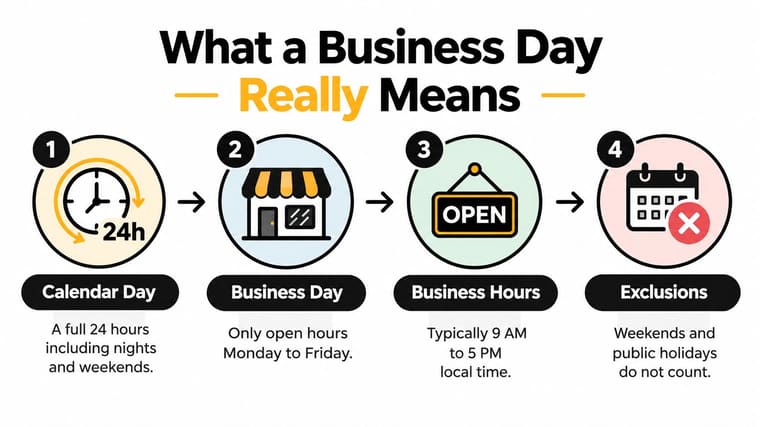
A calendar day is easy. It starts at midnight and runs for a full 24 hours.
A business day is different. It’s more like a store being open. The building exists all night, but you can’t buy anything until the doors open. In legal and banking usage, a business day often depends on whether a bank or office is open to the public for substantially all business functions, rather than on a universal fixed clock time, as explained by DebtBook’s banking day overview.
Think of it like a storefront
If you walk up to a shop at midnight, the date may have changed, but the shop still isn’t open. The same idea applies to many business-day questions.
Here’s the mental model that helps:
- Calendar day means the date on the clock.
- Business day means a qualifying workday under a rule, policy, or contract.
- Business hours means the active window inside that day.
- Excluded days often include weekends and public holidays.
In many Western business settings, the default office pattern is Monday through Friday, commonly 9:00 a.m. to 5:00 p.m. local time, excluding weekends and public holidays, as summarized by Legal Clarity’s explanation of what counts as a business day.
Why midnight causes so much confusion
People get tripped up because some rules count days, while others care about open hours.
A consumer might hear “allow two business days” and imagine two weekdays on the calendar. A bank employee might hear the same phrase and think about whether the transaction arrived before that institution’s processing cutoff. A contract might define the term its own way.
A business day isn’t one universal stopwatch. It’s a local rule attached to a real office, bank, exchange, or contract.
That’s why the right question is often not “What does business day mean?” but “Who defines it here?” Once you know that, the start time becomes much easier to pin down.
The Most Common Business Day Start Times by Context
A missed deadline often starts with a simple assumption. Someone hears “business day” and pictures one universal start time, then learns too late that the bank, the exchange, and the office were all using different clocks.
The safer way to read the phrase is to sort it into three clocks: the office-hours clock, the market-open clock, and the bank-or-contract clock. Each one answers a different operational question.
The three-clock model
A business day works more like a staffed counter than a date on a wall calendar. What matters is when the relevant system starts accepting, reviewing, or processing work.
For routine office work, the default answer is often the familiar workday. Many organizations treat the business day as starting around 9:00 a.m. local time and running through standard weekday office hours, as noted in Climb the Ladder’s discussion of banking and finance business-day timing. If a teammate says, “I’ll handle it next business day,” they may mean the next weekday morning when staff are back online.
For securities markets, the clock shifts to the exchange. The New York Stock Exchange lists its regular trading session as beginning at 9:30 a.m. Eastern Time, with separate pre-market and after-hours windows on its official trading-hours page. If your deadline depends on order execution, price movement, or trade timing, the market-open clock matters more than office hours.
Banking and contracts use the strictest clock of the three. A bank may tie its business day to when it is open for substantially all banking functions, while a contract may define the term in its own language, sometimes by location, operating window, or whether certain institutions are open, as described by Bankers Online’s discussion of banking versus business days. That is why two agreements can use the same words and still produce different deadlines.
Business Day Start Times Compared by Context
| Context | Typical Start Time | What Counts as Business Day | Example |
|---|---|---|---|
| Office work | Often 9:00 a.m. local time | Weekdays during standard office operations | A team reviews invoices when staff arrive in the morning |
| U.S. securities markets | 9:30 a.m. ET for regular trading | Days when the exchange is open for regular session trading | A trade placed early may still wait for the regular session to begin |
| Banking | Institution-specific | Days when the bank is open for substantially all banking functions | A transfer request may wait until the bank’s operating day begins |
| Contracts and regulations | Defined by the document or rule | Whatever the governing language says | A contract may treat only a set local-hour window as the business day |
How to choose the right clock
Start with the owner of the deadline. If the task belongs to a bank, broker, exchange, or regulator, use that institution’s clock first.
Then read the exact wording. Contract language beats habit.
Use standard office hours only when no stricter rule is controlling the timeline. If you plan to set this up in Pretty Progress later, this is the decision point that matters most. You are not choosing one generic business day. You are choosing which of the three clocks your countdown should follow.
How Start Times and Cutoffs Change Your Deadline Math
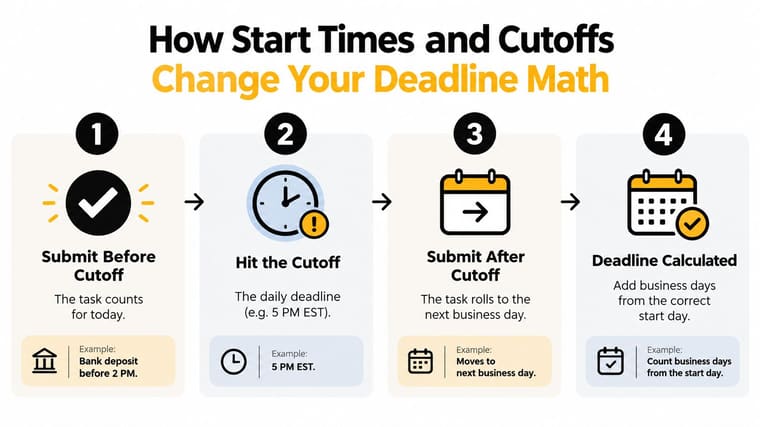
You send a payment at 4:45 p.m. on Friday, place a trade before dinner, and email a signed contract at 9:00 p.m. All three happened on the same calendar day. They may still start three different deadline clocks.
That is the trap. Calendar dates feel simple, but deadline math usually runs on one of three clocks: office hours, market open, or bank cutoff. If you use the wrong one, a task that looks on time can slip by a full business day.
Example one with a bank cutoff
Bank deadlines work a lot like the last pickup for outgoing mail. Once that pickup passes, your envelope is still dropped off today, but processing starts tomorrow.
Banks often publish daily processing cutoffs, and a transfer sent after that line may be treated as received on the next business day, as explained in Online Banking Help’s guide to bank processing times. So a Friday submission after cutoff can become a Monday start, assuming Monday is a valid business day.
That one shift changes everything. A one-business-day window may no longer end Friday. A two-business-day window may no longer end Tuesday.
Example two with a market or holiday calendar
Market-related deadlines add a second layer. The clock is tied to the exchange session, and the exchange holiday calendar decides whether a day counts at all.
Say a document or trade instruction must be completed within two business days of execution. If the exchange is closed the next day for a holiday, your countdown does not move just because the wall calendar does. One skipped day can push settlement, reporting, or review into a later date than a teammate expects.
People get tripped up. They count weekdays. The institution counts open sessions.
Example three with a contract window
Contract language can be even narrower. Some agreements define a business day as a specific local-time window, such as stated hours in a named time zone, rather than any time between midnight and midnight. Under many legal drafting standards, the document’s own definition controls the counting method. Cornell Law School’s Wex entry on business day is a useful reference point for that principle.
If the contract says notices received after the stated window count on the next business day, a 9:00 p.m. send is not just “late in the day.” It starts the clock later.
Cross-time-zone math changes the result
Remote work adds a third source of mistakes. The sender watches one clock. The receiving institution uses another.
A New York bank cutoff can fall in the evening for London and after midnight for Singapore. A West Coast employee may still feel comfortably within Friday, while the governing clock has already rolled into the next business day.
A simple routine prevents expensive misses:
- Name the controlling clock first. Office hours, market open, or bank cutoff.
- Anchor the timezone to the receiver. Use the bank’s, exchange’s, agency’s, or contract’s stated location.
- Check whether the event happened before or after cutoff. That answer decides which day gets counted as day one.
- Count only valid business days after that. Holidays and closed-market days pause the countdown.
- Test the date in a business days calculator when the deadline has money, compliance, or client impact attached.
If you plan deadlines with a distributed team, Pretty Progress works best when you build the countdown around the right clock first and the reminder second. For team habits that reduce last-minute misses, Madeira Remote’s deadline tips pair well with that setup because they focus on leaving room before the cutoff, not racing it.
Setting an Accurate Business Day Countdown in Pretty Progress
Once you know which clock applies, the next job is turning that rule into a reminder you’ll notice. A generic calendar alert often assumes a date boundary. Your real deadline may depend on office hours, holidays, or a bank’s processing schedule instead.
That’s where a visible countdown helps. Instead of holding the rule in your head, you build it into the way you track the date.
Start with the governing definition
Before you enter anything, decide what the countdown is measuring.
Ask yourself:
- Is this an office deadline? Then your working assumption may be a weekday schedule tied to local business hours.
- Is this market-related? Then use the exchange calendar and relevant trading session.
- Is this a bank or payment deadline? Then the daily cutoff matters more than a simple calendar date.
If the source document gives a definition, use that wording. If the institution publishes a processing window, use that.
Build the countdown so it matches reality
When setting up a countdown, keep the setup literal:
- Choose the correct start date. If a submission after cutoff counts on the next business day, start from that next valid day, not from when you clicked send.
- Choose the end date carefully. Use the due date that the governing office, bank, or market would recognize.
- Exclude non-working days if needed. If your timeline uses business days, account for weekends and the relevant holidays.
- Name the countdown clearly. “Wire cutoff” is better than “Payment,” because it tells you what rule you’re tracking.
A tool like Pretty Progress can help here because it lets you create date-based countdowns and visual progress widgets for iPhone, iPad, Apple Watch, Mac, and Android. The main benefit in this context is simple: you can make the deadline visible in a format that reflects business-day thinking rather than relying on memory.
Make it easy to read at a glance
A countdown works best when you don’t have to interpret it every time you see it.
Try this setup:
- Use a plain label. “Contract response due” beats a vague project name.
- Pick a high-contrast theme. You want fast recognition from your Home Screen or Lock Screen.
- Show progress, not just the end date. Seeing time shrink changes behavior faster than a static date.
- Create separate widgets for separate clocks. One for market events, another for payment deadlines, another for office submissions.
The best deadline reminder is the one that matches the real rule and sits where you’ll actually see it.
That’s what prevents the classic mistake of treating midnight as the important moment when the trigger is the next opening window or the cutoff before it.
Common Mistakes With Time Zones Holidays and Remote Work
Most timing errors don’t come from hard math. They come from hidden assumptions.
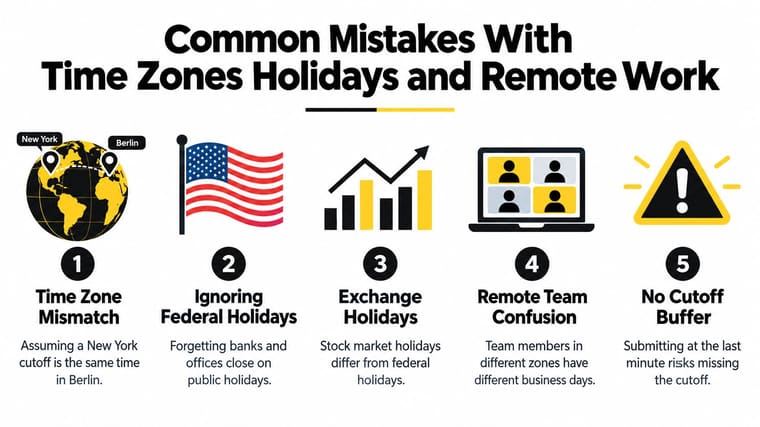
A teammate sees “end of business day” and reads it in their own timezone. A bank follows one holiday calendar. An exchange follows another. A remote team assumes everyone is talking about the same Friday, when for one person it’s already Saturday.
The short checklist I use with teams
When a deadline matters, run through these checks:
- Check the governing timezone. If the rule is tied to New York, London, or your bank’s local office, that’s the clock that matters.
- Verify the holiday calendar. Public holidays, federal holidays, and exchange holidays don’t always line up.
- Confirm whether the rule uses hours or dates. Some rules behave like calendar weekdays. Others depend on when the office opens.
- Add a buffer before cutoff. Last-minute submissions leave no room for approval delays, website issues, or posting lag.
If your team often coordinates internationally, this guide on mastering scheduling across time zones is worth keeping handy because it focuses on the human side of cross-zone planning, not just the clock conversion.
One hidden source of confusion
Authoritative U.S. examples don’t even agree on one universal “start.” Some finance-related rules can treat a day as beginning at midnight Eastern Time, while another federal rule defines business hours as 8:15 a.m. to 4:45 p.m. Eastern Time, as shown in FindLaw’s cited regulatory example.
That’s exactly why remote work magnifies business-day mistakes. If the underlying rule itself changes by context, your shared team calendar won’t save you unless everyone is looking at the same definition. For a related issue that catches a lot of teams off guard, this note on daylight saving time adjustment is useful because even a correct deadline can drift in practice when clocks change.
Choosing the Right Start Time for Your Next Deadline
When you need the simplest usable rule, think in this order.
Use 9:00 a.m. local time on a weekday when you’re dealing with normal office activity and no special rule says otherwise. Use 9:30 a.m. Eastern Time when the question is about regular U.S. stock market trading. Use the bank’s or institution’s own operating hours and cutoff when money movement, deposits, or payment processing are involved.
If a contract, policy, or regulation defines business day, follow that definition even when it feels unnatural. That document is the clock.
A good habit is to ask three questions before you count anything:
- Who owns the deadline
- Which timezone controls it
- Is the trigger the opening time or the cutoff
That small pause prevents most expensive timing mistakes. You stop treating “business day” like one fixed thing and start treating it like an operating rule tied to a real system.
And that’s the cleanest answer to what time does a business day start. It starts at the time the relevant office, market, bank, or rule says it starts.
If you want a deadline to stay visible instead of living in your notes app or your head, Pretty Progress lets you turn dates into clear countdowns and progress widgets across your devices. It’s especially useful when a business-day deadline needs a real visual reminder, so you can keep the right date in front of you and build in buffer before the cutoff.





