May 6, 2026
10 Workplace Productivity Hacks to Master Your Day
Discover 10 workplace productivity hacks to manage time, focus better, and hit deadlines. Transform your workflow with actionable tips and visual tools.
Your day probably starts with good intentions. You open your laptop, list the top priorities, and tell yourself you’ll finally get ahead. Then Slack lights up, email piles in, someone asks for a quick update, and by lunch you’re busy but not moving the work that matters.
That pattern isn’t a personal failure. It’s the default shape of modern work. People get pulled in too many directions, too often, and most productivity advice still assumes the answer is more discipline. It usually isn’t. The better answer is a system that makes priorities visible all day, not just for five minutes in a planning app.
This guide pulls together 10 practical workplace productivity hacks that hold up under real workloads. Each one gets stronger when you pair it with a glanceable visual system, especially a home screen or lock screen widget that keeps the next deadline, timer, or progress bar in view. If you’re also thinking about how AI transforms daily productivity, this article takes the complementary angle: less tool-hopping, more visible execution.
Table of Contents
- 1. Pomodoro Technique
- 2. Time Blocking
- 3. Eisenhower Matrix
- 4. Getting Things Done GTD
- 5. Kanban Board
- 6. Task Batching
- 7. SMART Goals
- 8. Pareto Principle 80 20 Rule
- 9. Deep Work
- 10. Habit Stacking
- Top 10 Workplace Productivity Hacks Comparison
- From Hacks to Habits Make Productivity Stick
1. Pomodoro Technique
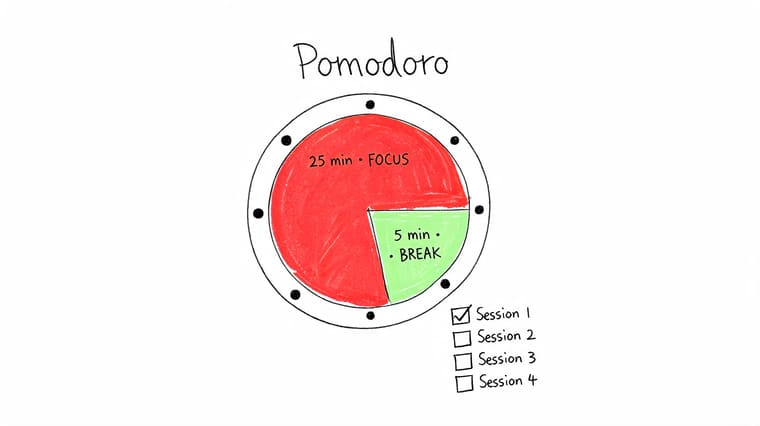
You sit down to finish one important task, answer a message, check one tab, and 20 minutes disappears. Pomodoro is useful in that exact moment because it shrinks the job to a single focused interval. Instead of wrestling with the full project, you give the next 25 minutes a clear purpose and a stopping point.
That structure works well for writing, coding, admin cleanup, reviews, and any task that gets delayed because the scope feels larger than your available attention. I have found that Pomodoro is less about squeezing more output from every hour and more about getting clean starts, repeatedly. That is a practical advantage in real workplaces, where concentration is rarely perfect and interruptions are part of the day.
Use short sprints when starting feels hard
The method is simple. Pick one task, set a timer, work until it ends, then take a short break. After a few rounds, take a longer break.
The visual tracking piece is what turns Pomodoro from a nice idea into a habit people keep. Gloria Mark’s research on workplace attention, summarized by the American Psychological Association, notes that interruptions and attention shifts carry a real recovery cost. If your timer is buried in a tab, you create one more opportunity to drift.
Put the countdown where you can see it at a glance. A Pretty Progress widget on your lock screen or home screen works well because it keeps the current sprint visible without asking you to reopen an app or switch context. That visible timer also gives each session a shape. You are no longer vaguely trying to “make progress.” You are finishing one defined interval tied to one defined outcome.
Use it with a few rules:
- Match one Pomodoro to one outcome: “Draft the intro,” “clear five approvals,” or “review one pull request” works better than “work on project.”
- Use separate visual states: Set one color for focus and another for breaks so you can tell your mode instantly.
- Stack your best intervals first: Put two or three Pomodoros on your highest-value task before opening email or chat.
- Adjust the length when needed: Twenty-five minutes is a solid default, but dense analytical work may need longer intervals, while tedious admin often benefits from shorter ones.
Practical rule: If a task keeps slipping, stop estimating the whole project. Start one visible timer and complete the first sprint.
If you want a more flexible timer setup than a standard kitchen-timer approach, this guide to a timer interval app for structured focus sessions is a useful next step.
2. Time Blocking
At 9:00, the day looks manageable. By 11:30, Slack has filled up, two meetings have shifted, and the report you meant to start is still sitting on a to-do list. Time blocking fixes that by deciding in advance what gets your attention, when it gets it, and how long it can take.
The practical benefit is simple. A calendar block removes the constant choice about what to do next. That matters more than people admit. Re-deciding your priorities six or seven times a day burns attention you should be spending on the work itself.
Good blocks need range, not perfection. If every hour is packed tight, one late call can throw off the rest of the day. Build slack into the plan so the plan survives contact with real work.
Block time by energy, not just task type
Start with your strongest hours. Put analysis, writing, planning, and other high-judgment work there. Save approvals, inbox cleanup, and routine follow-up for periods when your concentration drops. The schedule should fit your actual capacity, not an ideal version of it.
The visual layer holds significance. A Pretty Progress widget turns each block into something you can see without opening your calendar again. If you have 47 minutes left in a strategy block, that remaining time is visible on your phone. The block stops being an intention and becomes a boundary.
That matters even more if you manage several streams of work at once. If you need a better system for keeping track of multiple projects without losing your schedule, pair each major project with its own visual progress cue and reserve calendar space for the next concrete step.
Use a rhythm that reflects how work moves:
- Focus block: One high-value task that needs uninterrupted thought.
- Collaboration block: Meetings, reviews, decisions, and shared work.
- Admin block: Email, status updates, documentation, and cleanup.
- Buffer block: Spillover, urgent requests, and the work that always appears between plans.
Practical rule: If your blocks keep failing, the problem usually is not discipline. The problem is overpacking. Shorten the block, narrow the task, or add buffer time.
Review the next day before you log off. Five minutes is enough. Tighten oversized blocks, move low-value work out of prime hours, and make sure the most important task has a visible place both on your calendar and on your screen.
3. Eisenhower Matrix
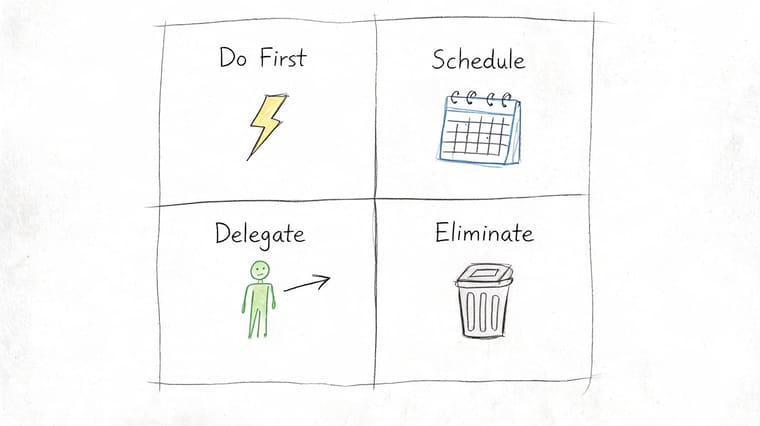
Some people don’t have a time problem. They have a sorting problem. The Eisenhower Matrix fixes that by forcing each task into one of four buckets: do first, schedule, delegate, or eliminate.
This method gets especially useful when your task list is full of items that all feel urgent. They aren’t. A client deadline, a recurring report, a calendar invite, and an internal request may all land on the same day, but they don’t deserve equal treatment.
Sort tasks before you schedule them
The trade-off here is honesty. This matrix exposes how much low-value work survives because nobody explicitly rejects it. That’s uncomfortable, but useful. If you skip the eliminate quadrant, the whole framework turns into a prettier to-do list.
Visible tracking helps in a specific way. Instead of treating every project like a flat list, create one Pretty Progress widget for the deadline that sits in your Do First quadrant. That gives the highest-priority work a permanent place on your screen.
Try this weekly reset:
- Do First: High impact, time-sensitive work. Give it the most visible widget.
- Schedule: Important work without immediate urgency. Put it on the calendar before it becomes urgent.
- Delegate: Work someone else can complete with clear instructions.
- Eliminate: Tasks that create motion without value.
The visual cue matters because many people already know what matters most. They just lose sight of it once the day gets noisy. A countdown on your home screen is much harder to ignore than a buried note in a project app.
The matrix works best when you use it as a filter, not as a filing cabinet.
Leadership teams often use quadrant thinking during planning sessions because it sharpens trade-offs fast. You can use the same logic at your desk on a Tuesday morning.
4. Getting Things Done GTD
By 10:30 a.m., the day can already feel hijacked. Slack messages need replies, a meeting creates three follow-ups, someone asks for a “quick” update, and the task you meant to finish is still sitting in your head instead of in a system. GTD helps because it gives every open loop a place to go, then turns that pile into clear next actions.
That shift matters.
GTD works best for knowledge work with constant inputs and frequent context switching. The method is straightforward: capture what has your attention, decide what each item means, sort it into the right list, review those lists regularly, and work from a system you trust instead of from memory.
Capture first, decide later
A common mistake is trying to organize everything the moment it appears. That slows capture down and usually leads to abandoned lists. A better approach is to collect quickly, then process in batches. If something lands on your desk, in your inbox, or in your head, put it in one reliable place first.
The stress reduction is immediate because your brain stops acting like a storage device. As noted earlier, digital distractions and attention fragmentation cost a substantial amount of work time. GTD addresses that problem from a different angle. It reduces the background mental load created by unfinished, undefined tasks.
The system does not need to be fancy. It needs to be easy to maintain on a busy week, not just satisfying to set up on a quiet Friday.
A practical GTD setup usually includes:
- Capture tool: One inbox for loose tasks, ideas, requests, and reminders.
- Project list: Any outcome that takes more than one action.
- Next actions list: The next visible step for each active project.
- Waiting for list: Items delegated or pending from other people.
- Weekly review: A scheduled reset to clean up, reconnect priorities, and rebuild trust in the system.
Pretty Progress adds a useful layer here because GTD often fails at the review stage, not the capture stage. A widget for your weekly review keeps that maintenance task visible on your phone instead of buried in a task manager. You can also set a widget for one key project deadline so the system tracks both commitment and time.
For people juggling several streams of work, this guide on how to keep track of multiple projects lines up closely with how GTD works in practice.
A GTD system earns trust when it answers one question fast: what should I do next?
5. Kanban Board
Kanban is one of the most practical workplace productivity hacks because it answers a question often overlooked: where exactly is work getting stuck? A board with columns like To Do, In Progress, and Done makes flow visible. Once the flow is visible, bottlenecks stop hiding.
That visibility is useful for solo workers too. A personal Kanban board can show whether you’re starting too much, stalling in review, or finishing less than you think.
Make bottlenecks visible
The most important Kanban rule isn’t the columns. It’s the work-in-progress limit. If everything is “in progress,” nothing is. Limiting active items forces completion and exposes blocked work faster.
Toyota inspired the modern method, and digital tools like Trello and Jira made it accessible to desk work. The same principle still applies: don’t just track tasks. Track movement.
A Pretty Progress widget adds a deadline layer that many boards lack. The board shows stage. The widget shows time. Together, they answer both “where is this?” and “how long do we have?”
Watch this overview if you want a quick visual refresher on how the method works in practice.
A strong personal setup often includes:
- Board columns: Keep them simple enough to use every day.
- WIP limit: Cap active work so new tasks don’t crowd out old ones.
- Deadline widget: Put the current priority project’s countdown where you’ll see it often.
Many teams love Kanban because it reduces status-meeting guesswork. Instead of asking everyone what they’re working on, the board already shows it.
6. Task Batching
Checking email less often is not about demonizing email. It is about the cost of context switching. Task batching solves that problem by giving similar work a defined home instead of letting it interrupt the entire day.
Use it for shallow but necessary work that tends to scatter attention. Inbox cleanup, approvals, expense reports, scheduling, CRM updates, and routine follow-ups all fit well inside a batch. The goal is simple. Keep low-value switching from breaking apart high-value work.
Batch the shallow work before it spreads
A batch works best when the tasks share the same tool, mindset, or energy level. Email and Slack usually belong together. Approvals, filing, and scheduling often belong together. Calls deserve their own block because they run on a different pace and usually create follow-up work.
The mistake I see most often is oversized batches. A two-hour email block turns into reactive drift because every reply creates another thread. Keep each batch short enough to finish with attention intact and clear enough that you know when it is done.
Try a structure like this:
- Communication batch: Email, Slack replies, follow-ups
- Admin batch: Filing, approvals, expense checks, scheduling
- Calls batch: Back-to-back phone calls or voice notes
Pretty Progress is what turns batching from a good idea into a visible habit. Set a widget for each batch type and make the distinction obvious at a glance. One color for communication, one for admin, one for focused project work. Your phone stops being another source of interruption and starts acting like a mode indicator.
That visual layer matters more than it sounds. Batching fails when people forget what kind of work the current hour is for. A widget on your home screen removes that ambiguity. If you want a practical system for keeping these routines alive, this guide on staying consistent with goals using visible cues pairs well with batching.
Batch work that is similar in tool, mindset, or energy. Do not group tasks just because they all feel annoying.
This pattern scales across roles. Marketing teams batch content production. Recruiters batch interviews and follow-ups. Finance teams batch approvals and reconciliations. The same discipline shows up outside work too. The psychology behind batching overlaps with effective goal setting for weight loss, where clear constraints and visible progress make repetition easier.
Done well, task batching lowers friction, protects focus, and makes the day easier to steer.
7. SMART Goals
SMART Goals are basic, but they stay useful because vague goals still waste time. “Improve reporting,” “be more organized,” and “make progress on the project” sound responsible and produce very little. Specific, measurable, achievable, relevant, and time-bound goals force clarity.
That clarity matters most when a goal spans weeks or months. Daily urgency can crowd out longer projects unless the outcome stays visible.
Turn vague intent into visible progress
Visual tracking becomes more than decoration. Research summarized in a Sesloc article on productivity gaps and progress visibility notes a major blind spot in mainstream advice: progress visibility is rarely treated as a core productivity lever, even though frictionless visual feedback can support follow-through. In practice, that means a goal with a visible progress bar often stays alive longer than a goal trapped inside a forgotten note.
A SMART goal should translate cleanly into a widget. If the goal has a deadline, use a countdown. If it has milestones, use a progress bar. If it has both, track the end date on your lock screen and the milestone bar on your home screen.
Examples work better than theory here:
- Sales example: Replace “sell more this quarter” with a concrete target and a visible quarter-end countdown.
- Student example: Replace “study for exam” with a subject-specific study goal and milestone tracker.
- Health crossover: The same structure also helps with personal goals, such as effective goal setting for weight loss.
If consistency is the challenge, this guide on how to stay consistent with goals pairs well with SMART planning.
The rule is simple. If a goal can’t be translated into something visible, it probably isn’t defined well enough yet.
8. Pareto Principle 80 20 Rule
The Pareto Principle is popular because it’s directionally useful, even when life isn’t mathematically neat. A small share of tasks usually drives a large share of results. The practical move is to identify those few tasks early and protect them before the day fills with noise.
People misuse this rule by assuming they already know their highest-value work. Often they don’t. What feels urgent isn’t always what generates the most value.
Protect the few tasks that matter most
A good weekly review asks blunt questions. Which client relationships move revenue? Which recurring deliverables create the most downstream value? Which project, if completed, would make the rest of the week easier?
Once you’ve identified that top layer, give it visible priority. A Pretty Progress widget works well here because it keeps the most important deadline or milestone on-screen even while lower-value requests compete for attention.
This principle also helps with tool overload. Workplace AI adoption has grown quickly, but the value isn’t automatic. According to OpenAI’s report on workplace usage and adoption patterns, 28% of U.S. workers now use generative AI at work, up from 8% two years ago, yet 74% of companies have failed to achieve tangible value from AI initiatives. That’s a good reminder to focus on the few workflows that produce real payoff, not just the newest tools.
A practical 80/20 workflow looks like this:
- Find the high-impact tasks: Pick the work that changes outcomes, not just appearances.
- Schedule them first: Don’t leave your most important work for leftover time.
- Track them visually: One widget for the high-impact project beats ten reminders for low-value busywork.
You don’t need perfect precision here. You need enough clarity to stop treating all tasks as equal.
9. Deep Work
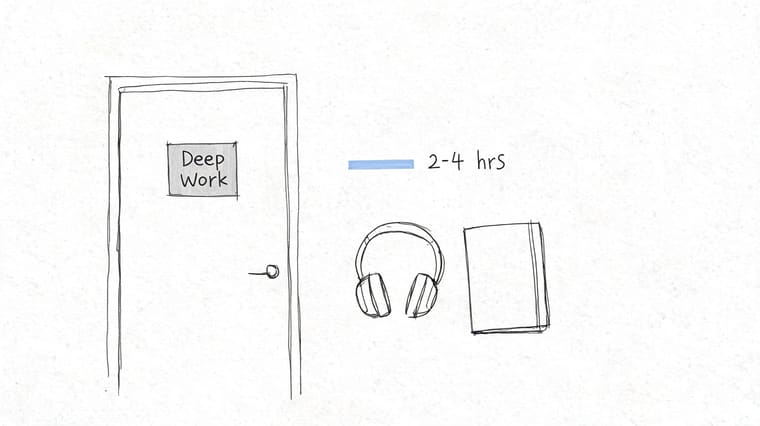
At 9:00 a.m., the calendar says “focus block.” By 9:17, Slack has fired twice, email is open in another tab, and the document still has a blinking cursor at the top. That is the gap deep work is meant to close.
Deep work is time reserved for tasks that need sustained concentration. Strategy writing, financial analysis, technical design, difficult editing, and problem solving all fit. The point is not just to be busy in silence. The point is to stay with one demanding task long enough to produce work that would not happen in fragments.
Remote and hybrid work can make that harder. Microsoft researchers found in their study on the effects of meetings on attention that digital communication patterns often increase fragmentation and reduce uninterrupted focus time. For many teams, that matches daily experience. The issue is not motivation alone. It is an environment built for reaction.
A Pretty Progress widget gives deep work something many focus methods miss: a visible boundary. Put the block on your phone’s screen with a start time, end time, and one concrete outcome. That turns a vague intention into a commitment you can see at a glance without reopening your task app and getting pulled sideways.
For neurodivergent workers, interruption costs can be even higher. A discussion of context-switching costs for neurodivergent workers points to a practical problem with generic productivity advice. It often treats distraction as a discipline failure instead of a costly reset. A persistent visual cue helps because it reduces re-entry friction. You can see the active priority immediately and get back to it faster.
Use a simple setup:
- Set a real window: Reserve enough time to get past startup friction. For demanding work, that usually means more than a quick 30-minute gap.
- Define the finish line: Write the exact output before you begin, such as “draft intro and outline” or “review three contract clauses.”
- Close shallow channels: Mute chat, shut inbox tabs, and remove anything that invites a fast response.
- Track the block visually: Use a Pretty Progress widget to show the session and the deliverable on-screen.
Tell coworkers when your focus block starts and when you’ll be available again. Clear expectations prevent more interruptions than silent status icons.
The trade-off is real. Deep work reduces immediate responsiveness. It also improves the quality and speed of high-value work that reactive schedules keep delaying. If your role depends on judgment, analysis, or original output, protected focus time is not optional decoration. It is part of doing the job well.
10. Habit Stacking
Habit stacking makes productivity more automatic by attaching a new action to one you already do consistently. The formula is simple: after an existing routine, do the next small productive action immediately. You don’t rely on memory or motivation as much because the previous habit acts as the trigger.
This works especially well for review behaviors, planning rituals, and small resets that improve the rest of the day. After coffee, check priorities. After lunch, update the board. After shutting your laptop, plan tomorrow’s first task.
Attach productivity to routines you already keep
The biggest mistake is starting too large. People attach a heavy new system to a stable routine and then wonder why it breaks. Keep the added action tiny enough that you can do it even on a rushed day.
For visual productivity systems, this method is almost unfairly effective. A Pretty Progress widget can be both the cue and the reward. You wake your phone after breakfast, see the day’s top countdown, and spend one minute confirming the first task. That small action reduces drift before the day starts scattering your attention.
AI adoption data also hints at why simpler cues matter. The NBER digest on workplace adoption of generative AI shows strong segmentation by age, education, occupation, and gender, which suggests not every productivity tool spreads evenly or sticks easily. A glanceable widget avoids much of that friction because it asks for less setup, less training, and less active re-engagement.
Good stacks are boring on purpose:
- After morning coffee: Review the top widget and start the first task.
- After lunch: Update your Kanban board before reopening messages.
- Before logging off: Check tomorrow’s deadline widget and set the first block.
The system becomes reliable when the cue is stable and the action is small. That’s how hacks turn into routine behavior.
Top 10 Workplace Productivity Hacks Comparison
| Method | 🔄 Implementation complexity | ⚡ Resource requirements | 📊 Expected outcomes | 💡 Ideal use cases | ⭐ Key advantages |
|---|---|---|---|---|---|
| Pomodoro Technique | Low, fixed 25/5 cycles, easy to learn | Minimal, timer or app | Steadier focus, reduced procrastination | Solo tasks needing short bursts (writing, coding sprints) | Enhances sustained focus and prevents burnout |
| Time Blocking | Medium, upfront planning and discipline | Calendar tool + daily planning time | Structured day, less decision fatigue | Schedule-driven roles, balancing deep and shallow work | Clarifies priorities and improves work–life balance |
| Eisenhower Matrix | Low, simple quadrant classification | Minimal, list or chart | Faster prioritization, fewer low-value tasks | High-volume inboxes, daily triage | Quick visual priority sorting; encourages delegation |
| Getting Things Done (GTD) | High, setup and regular reviews required | Tools for capture/organize + weekly review time | Reduced mental clutter, clearer next actions | Complex projects, knowledge workers with many inputs | Scalable system for managing complexity and execution |
| Kanban Board | Medium, board setup and WIP rules | Board software or physical board; team alignment | Improved workflow visibility; fewer bottlenecks | Team projects, continuous delivery, process workflows | Visual tracking of status and limits to smooth flow |
| Task Batching | Low, group similar tasks into sessions | Scheduling blocks; modest planning | Lower context-switching; higher throughput on repetitive work | Email, admin tasks, content creation | Boosts efficiency for repetitive or similar tasks |
| SMART Goals | Medium, requires clear metrics and timelines | Measurement tools and goal-setting time | Measurable progress and accountability | KPI-driven teams, project planning, performance reviews | Creates clarity, measurable targets and alignment |
| Pareto Principle (80/20) | Low, analysis to identify top contributors | Data or observation time for impact analysis | Higher ROI by focusing on top tasks | Optimization efforts, prioritizing scarce resources | Maximizes return on effort by concentrating on vital few |
| Deep Work | High, needs long uninterrupted blocks and discipline | Reserved time, distraction-free environment | High-quality output, faster skill development | Complex cognitive tasks (research, coding, writing) | Produces deep-value results and improves concentration |
| Habit Stacking | Low, attach small habits to existing routines | Consistency and small habit cues | Easier habit adoption and cumulative improvement | Daily routines, behavior change, onboarding new habits | Leverages existing habits to scale new behaviors |
From Hacks to Habits Make Productivity Stick
The hard truth about workplace productivity hacks is that most of them fail for a predictable reason. People adopt a method intellectually, but they don’t build an environment that supports it. They know they should time block, batch tasks, or work from a Kanban board, yet the system disappears the moment a busy week hits. Good intentions lose to whatever is most visible and easiest to react to.
That’s why glanceable tracking matters so much. It closes the gap between planning and doing. A well-chosen widget on your phone, tablet, watch, or desktop keeps one important timer, deadline, or progress bar in front of you all day. You don’t have to remember the system. The system keeps reminding you.
This isn’t about turning your screen into a productivity dashboard for its own sake. It’s about reducing friction. Standard advice often assumes you’ll keep opening the right app, checking the right list, and reviewing the right plan at the right moment. Real work doesn’t happen that neatly. Meetings run long. Messages interrupt. Energy drops. Visible progress cues help you re-enter the right task faster.
They also make trade-offs clearer. If you’ve got a deep work block scheduled, a countdown makes the boundary real. If you’re using SMART goals, a visible progress bar shows whether the project is moving or just being discussed. If you’re relying on habit stacking, the widget becomes the trigger that keeps the behavior alive.
Start smaller than you think you need to. Pick one method from this list that matches your current bottleneck. If you struggle to start, use Pomodoro. If your day gets hijacked, use time blocking. If everything feels urgent, use the Eisenhower Matrix. If work keeps piling up in your head, use GTD. If you start too much and finish too little, use Kanban or task batching. Then make that method visible with one persistent countdown or progress widget.
Consistency beats complexity. A simple system you can see every day will outperform an elaborate system you only revisit when you’re already overwhelmed. That’s the fundamental shift from hacks to habits. You stop treating productivity like a burst of motivation and start treating it like an environment you can design.
Your most productive self isn’t waiting for a perfect app, a calmer quarter, or a better Monday. It shows up when the right priorities stay visible long enough for you to act on them.
Pretty Progress turns these workplace productivity hacks into something you can stick with. You can create customizable countdowns and progress bar widgets for iPhone, iPad, Apple Watch, Mac, and Android, then place them on your Home or Lock Screen so your deadlines, focus sessions, and goals stay visible without extra app-switching. If you want a cleaner, more motivating way to track work that matters, try Pretty Progress.