

May 22, 2026
Boost Productivity: Time Management for Professionals
Ditch burnout. Learn a complete time management for professionals system: goal setting, deep work, delegation, and visual tracking.
You finish a long workday and feel wrung out. You answered email, sat through meetings, replied in Slack, approved documents, chased updates, and handled a dozen “quick” requests. Then you look at your real priorities and realize they barely moved.
That’s the trap a lot of professionals live in. You stay active all day but make little progress on the work that changes outcomes. Busy work wins because it arrives loudly. Important work loses because it usually asks for uninterrupted thought, and modern work rarely gives it to you by default.
Good time management for professionals isn’t about squeezing more tasks into the day. It’s about building a system that connects goals, priorities, calendar decisions, communication rules, and review habits. Without that system, you end up reacting to whoever asked last.
Its importance is often underestimated. Research shows that time management has measurable links to performance and wellbeing. A 2021 meta-analysis found a moderate relationship between time management and job performance, r = .25, and noted that this relationship has strengthened over time in modern work environments (meta-analysis on time management and job performance). If your role involves deadlines, cross-functional work, writing, or decision-making, this isn’t a soft skill. It’s a critical operational factor.
In practice, the best systems are boring in a good way. They reduce friction. They make priorities visible. They help you protect focus when everyone wants access to your day. If part of your workload includes heavy writing, such as reports, updates, or client documents, tools that accelerate financial writing can also reduce administrative drag. And if you want a broader view of how personal systems connect to output, these workplace productivity hacks are a useful companion.
Table of Contents
- Introduction The End of Being Busy
- Foundation Define Your Professional Goals
- Prioritization Decide What Matters Most Each Day
- Execution Structure Your Day for Deep Work
- Defense Control Your Calendar and Inbox
- Momentum Review Your System and Visualize Progress
Introduction The End of Being Busy
Being busy has become a professional identity. That’s part of the problem.
A packed day can look impressive while producing very little. If your calendar is full and your inbox is active, people assume you’re engaged. But output doesn’t come from motion. It comes from finishing high-value work on time, with enough attention left to do it well.
Start with outcomes not tasks
Most professionals try to manage time at the task level first. They make lists, color-code calendars, and download another app. Those tools can help, but they won’t fix a deeper issue. If you haven’t defined what matters this quarter, your day gets filled by whatever feels urgent.
A better approach starts one level higher. Ask: what outcomes matter most in your role right now? Not “reply to stakeholders” or “prepare notes.” Those are activities. Outcomes are things like shipping a project, improving a process, reducing review cycles, or preparing a promotion case.
Busy people often protect tasks. Effective people protect outcomes.
Use a simple goal filter
If you need a practical framework, keep it simple and make each goal pass five tests:
- Specific: Name the result clearly.
- Measurable: Decide how you’ll know it’s done.
- Achievable: Keep it challenging but realistic.
- Relevant: Tie it to your actual role or business need.
- Time-bound: Give it a deadline.
A weak goal says, “Improve team reporting.”
A strong goal says, “Standardize the weekly reporting process and have the new format in use by the end of the quarter.”
That level of clarity changes everything downstream. It makes prioritization easier. It helps you say no. It also reveals when a task doesn’t deserve your best hours.
Foundation Define Your Professional Goals
Professionals usually don’t fail because they have too little to do. They fail because too many tasks compete for the same attention. Goals solve that by acting as a filter.
If your week is driven by requests alone, you’ll look productive and still drift. Clear goals stop that drift. They tell you what deserves planning time and what should stay secondary.
Start with outcomes not tasks
A useful rule is to keep only a small number of active professional goals at once. You need enough focus to make trade-offs. When everything is a priority, your calendar becomes a storage unit for obligations.
Write your goals in plain language. Then ask whether each one requires your direct involvement, or whether part of it can be delegated, standardized, or deferred.
For professionals who struggle to make goals concrete, a SMART template helps. If you need examples of how to phrase goals clearly, this guide to SMART objectives and goals is a practical reference.
Use a simple goal filter
I use three filters when stress is high:
| Question | What it reveals |
|---|---|
| Does this move a key outcome? | If no, it shouldn’t dominate the week |
| Does this require my level of judgment? | If no, it may be delegated or standardized |
| Does this have a real deadline? | If no, schedule it instead of treating it as urgent |
Many professionals improve fast by stopping the treatment of all open loops as equal.
A good goal also needs a next milestone. Not just the final result. If your objective is to launch a new internal process, the next milestone might be drafting the workflow, getting stakeholder sign-off, or piloting the change with one team. Milestones convert ambition into calendarable work.
Use this sequence:
- Choose one core outcome for your role over the next stretch of work.
- Break it into milestones you can complete in order.
- List the supporting tasks under each milestone.
- Identify blockers early so they don’t surprise you in the middle of the week.
Practical rule: If a goal can’t be turned into a calendar block, it’s still too vague.
One more point matters here. Goals shouldn’t only reflect what other people ask from you. They should also include the work that keeps your role sustainable, such as process improvements, documentation, and strategic thinking. Those rarely show up as emergencies, but they pay off over time.
That’s why effective time management for professionals starts with ownership. You don’t just inherit a workload. You define what progress looks like, then build your schedule around it.
Prioritization Decide What Matters Most Each Day
Professionals don’t need more tasks. They need a way to decide what deserves attention first.
A Timewatch summary of a 2024 survey shows why formal prioritization still matters. Only 18% of people said they have a dedicated time-management system, which means 82% rely on ad hoc methods. The same survey found that 92% use parts of prioritization, but only 1% formally use the Eisenhower Matrix (Timewatch survey on time management systems and prioritization).
That gap explains a lot. Many professionals understand prioritization in theory. Far fewer apply it consistently when the day gets noisy.
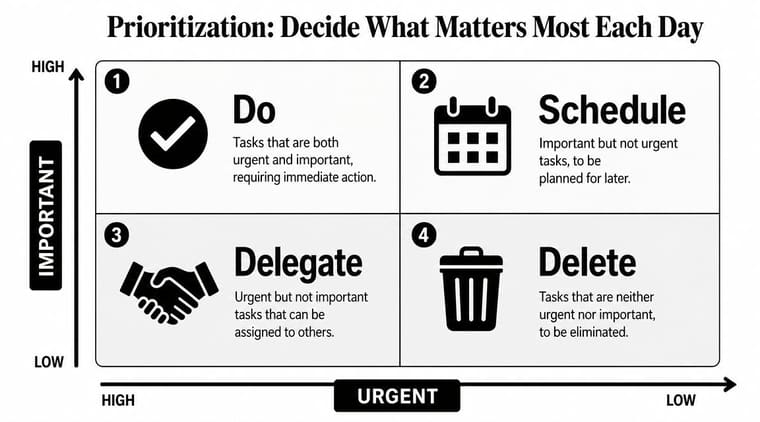
Use the matrix as a triage tool
The Eisenhower Matrix works because it forces a decision. Not everything belongs on your personal plate today.
Use four categories:
- Do: Urgent and important. A client issue, deadline risk, or critical decision.
- Schedule: Important but not urgent. Planning, strategy, documentation, process design, professional development.
- Delegate: Urgent but not important for you personally. Status collection, routine follow-ups, first-pass formatting.
- Delete: Neither urgent nor important. Low-value browsing, optional meetings with no clear purpose, reactive checking.
Here’s the mistake people make. They live in “Do” and “Delegate,” then wonder why strategic work never gets done. The “Schedule” quadrant is where most career-defining work sits.
A helpful companion if you work heavily inside Google tools is this guide to prioritization strategies for Google Workspace, especially when your tasks, files, and communication are spread across several apps.
After you’ve seen one version of the matrix, it helps to watch it applied in practice:
Choose daily MITs
Once you triage your list, choose your Most Important Tasks, or MITs. These are the few tasks that, if completed, would make the day count even if the rest goes sideways.
Keep the list short. For most professionals, that means one to three MITs.
A realistic example:
- MIT 1: Finalize the proposal for Friday’s client review
- MIT 2: Resolve the blocker preventing the engineering handoff
- MIT 3: Prepare the decision memo for the leadership meeting
That list is useful because it’s concrete. It also reflects outcomes, not vague effort.
A simple daily sort
When you open your task list each morning, sort fast:
| Task | Decision |
|---|---|
| Client escalation | Do now |
| Team report review | Schedule |
| Random chat question | Delegate or answer later in batch |
| Social scrolling | Delete |
Don’t overcomplicate this. Prioritization is less about creating a perfect system and more about refusing false urgency. The best professionals I’ve worked with are not the ones who respond fastest to everything. They’re the ones who know what can wait without damage.
Execution Structure Your Day for Deep Work
A good priority list still fails if it never reaches the calendar.
Most systems experience a common breakdown. People identify important work, then leave it floating in a task manager while meetings and messages claim every open hour. If the work matters, it needs a block on your calendar, not just a spot on a list.
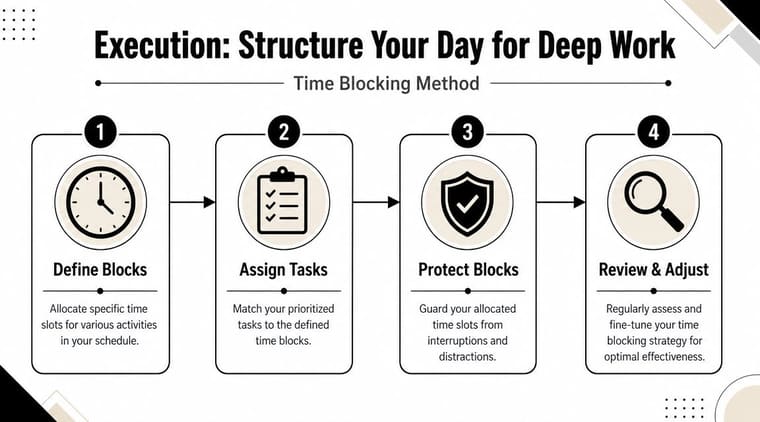
Build a calendar that can survive reality
A practical scheduling rule comes from IONOS. Time-block only about 60% of available work hours and reserve the remaining 40% as buffer capacity for interruptions, unexpected work, and recovery (IONOS guidance on the 60/40 planning ratio).
That rule fixes a common professional mistake. Overpacked calendars look efficient and fail early. One overrun meeting, one urgent issue, one delayed dependency, and the whole day cascades.
A stronger calendar has three layers:
- Anchor blocks for your MITs
- Admin blocks for routine tasks like approvals, inbox processing, and updates
- Buffer space for spillover, requests, and recovery between heavier work
Here’s the difference:
- Fragile day: back-to-back meetings, no thinking time, task list handled “between calls”
- Stable day: protected focus block in the morning, admin block later, meeting clusters, space for surprises
Use short focus cycles inside blocks
Once your deep-work block starts, don’t rely on willpower. Use a fixed work rhythm.
Slack’s productivity guidance recommends Pomodoro-style cycles of 25 minutes of uninterrupted work followed by a 5-minute break, repeated four times, then a 20 to 30 minute break after four sprints (Slack time management tips at work). That cadence works well because it gives structure without requiring you to feel motivated first.
Inside a two-hour focus block, that might look like:
- Sprint 1: Draft the difficult section
- Sprint 2: Resolve open comments
- Sprint 3: Refine the argument or structure
- Sprint 4: Final pass and send for review
Don’t use deep-work time to “get organized.” Use it to move the hardest task toward done.
Protect the environment around the work
Execution also depends on setup. If you work remotely, your physical environment affects how easily you stay with a task. Better lighting, a proper chair, a screen at the right height, and fewer visual distractions all reduce friction. This guide on improving your home office setup is useful if your focus drops because your workspace keeps fighting you.
For day-to-day execution, a timer helps more than people expect. A visible session boundary reduces drift and makes it easier to start. If you want a simple method for structuring intervals, this timer interval app guide shows how to use timed work sessions without overengineering the process.
The rule is simple. Don’t wait until you “find time” for important work. Put it on the calendar, defend the block, and make the session finite enough to start.
Defense Control Your Calendar and Inbox
Most time-management advice breaks down because it treats your day like private property. It isn’t. Other people are trying to use it too.
Communication overload is the hidden tax on professional work. Microsoft’s Work Trend Index is cited as showing that employees spend a massive portion of the workday in meetings, email, and chat, which fragments attention and prevents deep work (discussion of communication overload and fragmented workdays).

Fix meetings before they consume the week
You don’t need to attend every meeting you’re invited to. You need a rule.
Use these standards:
- Require a purpose: If the invite has no goal or decision, ask for one.
- Ask for an agenda: No agenda often means no structure.
- Check your role: If you’re not deciding, presenting, or unblocking, async may be enough.
- Shrink the duration: Many meetings can be shorter if the owner prepares properly.
Useful responses sound like this:
“Happy to join if a decision is needed from me. If not, send me the notes and I’ll review async.”
Or this:
“Can we handle this in a shared doc first and meet only if the open questions remain?”
That doesn’t make you difficult. It makes you responsible with your attention.
Handle email and chat on purpose
Inboxes expand to fill every idle minute if you let them. Don’t process communication continuously. Batch it.
A practical operating model looks like this:
| Channel | Better rule |
|---|---|
| Check in planned windows, not all day | |
| Chat | Turn off nonessential notifications during focus blocks |
| Meetings | Cluster where possible |
| Status updates | Move recurring updates to shared docs or async threads |
Set expectations as well. If your team assumes instant replies, your calendar will never stay intact. A simple note in your status, team norms, or kickoff docs can clarify response windows for routine requests.
Decide what to delegate and what to automate
Professionals often leave time on the table. They either keep too much because they think it’s faster to do it themselves, or they automate prematurely and create more review work.
Use this split:
- Delegate tasks that require human context but not your level of judgment. Examples include collecting updates, scheduling, first-pass formatting, or compiling routine inputs.
- Automate tasks that are repeatable, rules-based, and easy to check. Examples include reminder flows, transcript summaries, meeting notes drafts, and basic triage.
The wrong approach is handing off a messy process. The better approach is cleaning the process first, then deciding whether a person or a tool should own the next step.
Momentum Review Your System and Visualize Progress
A time-management system only works if it learns. If you never review it, you keep repeating the same planning mistakes with nicer formatting.
Most professionals don’t need a complicated retrospective. They need a short review that closes the loop between intention and reality.

Run a short weekly review
Use one review at the end of the week and a brief reset at the end of each day.
Your weekly review should answer:
- What moved forward? Identify completed milestones, not just cleared tasks.
- What slipped? Look for root causes such as unclear scope, overbooking, or too much reactive work.
- What needs protection next week? Decide which work deserves calendar blocks before meetings take the space.
- What should be removed? Some commitments survive only because nobody questions them.
A short daily reset helps too. Review what got done, move unfinished tasks intentionally, and prepare tomorrow’s first work block. That last step matters. Starting cold costs more than people admit.
If your calendar keeps breaking in the same place, the issue usually isn’t discipline. It’s design.
Use visual cues to stay engaged
There’s another problem most systems ignore. Even when your plan is solid, motivation fades when progress is invisible.
That’s why visual tracking helps. A visible countdown to a project deadline or a progress bar for a quarterly objective makes work feel concrete. Instead of carrying priorities only in your head, you can see them at a glance. In the publisher’s ecosystem, Pretty Progress does this through customizable countdown and progress widgets on iPhone, iPad, Apple Watch, Mac, and Android, which can help keep deadlines and milestones visible throughout the day.
For professionals, the value isn’t aesthetic. It’s operational. Visual cues reduce the chance that important work disappears behind routine activity.
Apply AI where judgment is low and review is clear
Emerging time-management guidance also highlights AI’s role in reducing administrative load. AI assistants can draft emails, summarize meetings, and triage tasks, which changes the professional question from “How do I work faster?” to “What should I still do myself?” (Any.do discussion of AI assistants and administrative load).
Use AI carefully:
- Good use cases: first drafts, summaries, routine sorting, meeting recap templates
- Bad use cases: high-stakes judgment, sensitive communication without review, ambiguous decisions
- Best practice: define a review standard before you automate anything
The same logic applies to the whole system. Review first. Improve second. Automate third.
A strong time-management practice for professionals isn’t a collection of hacks. It’s a loop. Goals shape priorities. Priorities shape calendar blocks. Boundaries protect those blocks. Reviews improve the design. Visual progress keeps the system alive long enough to matter.
If you want your deadlines and goals to stay visible without adding another noisy tool, Pretty Progress gives you a simple way to keep them on your Home Screen, Lock Screen, Apple Watch, Mac, or Android device. Use it to track project deadlines, quarterly goals, recurring milestones, or any date that needs steady attention.





