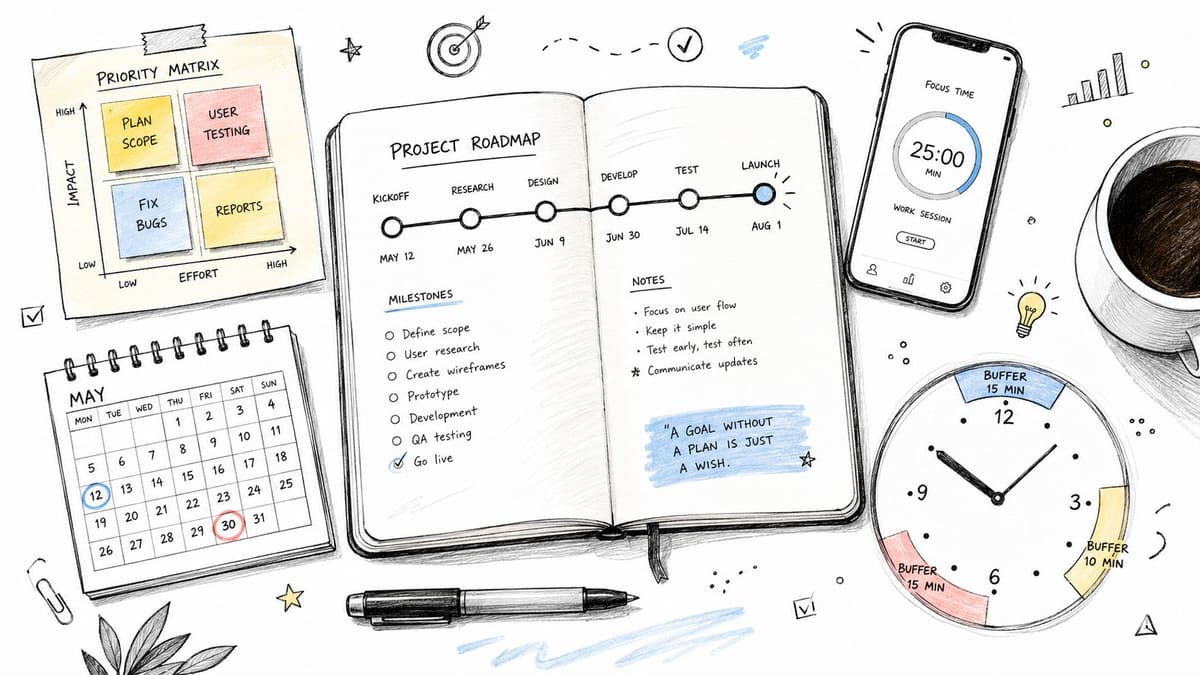
August 16, 2026
Project Deadline Management: Practical Tips for 2026
Master project deadline management with actionable steps to keep your team on track and deliver on time in 2026
You’re three days from a launch, the task board looks busy, and everyone keeps saying the project is “nearly there.” Then a reviewer finds an unresolved dependency, a stakeholder asks for one more change, and the date suddenly feels less like a plan and more like a wish. That situation rarely begins during the final week. It usually starts when the team accepts unclear scope, optimistic estimates, hidden handoffs, and no visible way to spot slippage early.
Project deadline management works better when you treat the deadline as the result of connected decisions, not as a date you can protect through pressure alone. The practical system is straightforward: define the work, set meaningful milestones, estimate with uncertainty included, schedule around dependencies, monitor leading signals, communicate before surprises, and protect the capacity required to finish well.
Table of Contents
- Why Most Deadlines Slip Before the Work Even Starts
- Estimate Duration and Build Buffers You Can Trust
- Schedule Tasks and Prioritize What Actually Moves the Deadline
- Monitor Progress with a Weekly Checkpoint That Actually Catches Slips
- Communicate With Stakeholders Before They Ask
- Handle Risks and Recover From Slippage Without Burning the Team Out
- Putting It All Together Into a Repeatable Deadline Workflow
Why Most Deadlines Slip Before the Work Even Starts
Deadline failure rarely comes from one terrible day. It usually follows a chain of upstream decisions that looked harmless when the project was starting. A team accepts a broad goal, assigns a date before understanding the work, leaves approvals implicit, and assumes that people will resolve ambiguity while delivery is underway.
The global pattern supports treating this as an operational discipline rather than a personal productivity problem. A Project Management Institute review reported that 52% of projects worldwide were completed on time in 2018, with on-time completion staying near half of projects since 2011, as discussed in the construction project scheduling study. The same source points to inadequate upfront planning, weak contract management, and ineffective execution control as recurring causes of delay.
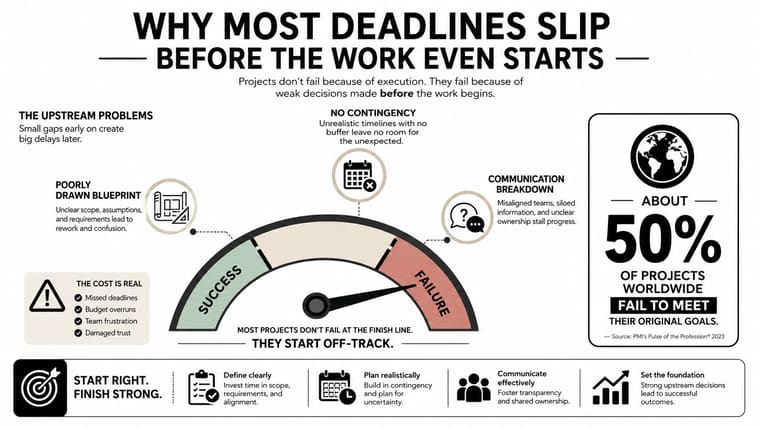
Construction and infrastructure make the consequences especially visible. A 2024 analysis of 180 project schedules found that roughly 75% of construction projects experienced delays, with a median delay equal to 20% to 40% of total project duration (ScienceDirect research). A separate review of 480 infrastructure projects reported that 43% had documented delays, while 39% lacked enough information to verify performance. After missing data was excluded, about 70% still faced delays, and the average project ran 73% longer than planned (the same infrastructure review). The lesson is uncomfortable but useful: incomplete records can hide schedule risk until recovery options become expensive.
Turn a vague goal into a finishable scope
Most missed deadlines are really missed scope conversations. Before building a task list, write a scope statement that answers three questions:
- Included work: What will the team deliver?
- Excluded work: What won’t the team deliver in this project?
- Acceptance: What must be true for the sponsor or customer to approve the result?
“Launch the new onboarding flow” isn’t a sufficient scope statement. A tighter version might say: “Release the approved onboarding screens, connect the existing account-creation service, instrument the agreed events, complete accessibility review, and publish release notes. New account features, pricing changes, and post-launch experimentation are outside this release.”
That boundary gives the team something to defend when requests arrive. It also makes trade-offs visible. If a stakeholder adds a new integration, the question becomes whether to extend the date, remove another deliverable, or provide additional capacity.
A useful guide to common mistakes in goal setting can help teams identify vague outcomes before they become vague schedules.
Use milestones as the unit of control
Tasks describe activity. Deliverables describe outputs. Milestones mark evidence that an important part of the project is complete. A milestone shouldn’t be “write copy” or “attend review.” It should be something a stakeholder can inspect and accept.
For the onboarding example, four readable milestones might be:
- Flow approved: Product, design, and compliance approve the final screens.
- Build complete: The implementation works in the agreed test environment.
- Validation complete: Accessibility, analytics, and quality checks meet the acceptance criteria.
- Release complete: The flow is live, monitored, and handed over to its owner.
Give each milestone an owner, a target date, and acceptance evidence. Keep the milestone list short enough that a stakeholder can understand it without opening the project tool. The deadline is downstream of these milestones. If the milestone sequence can’t support the requested finish date, changing the final date alone won’t solve the problem.
Estimate Duration and Build Buffers You Can Trust
Optimism enters a schedule. Someone estimates the time for focused work, another person assumes the reviewer will respond immediately, and the project plan treats every dependency as if it will cooperate. The result looks efficient in a steering deck and collapses under normal operating conditions.
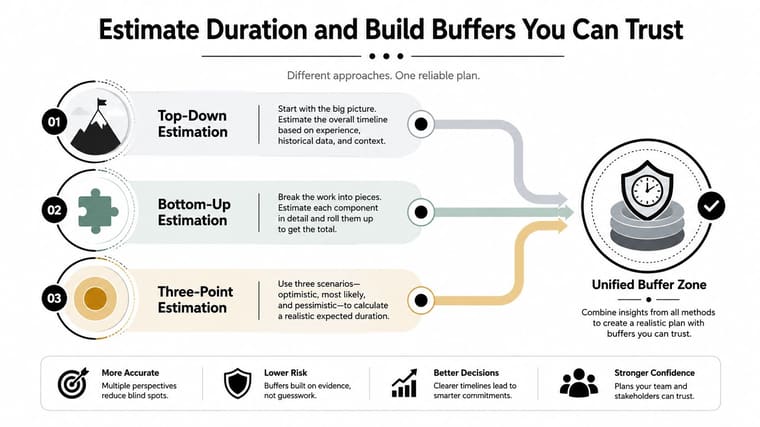
Use different estimation methods for different levels of certainty:
- Top-down estimation: At the concept stage, compare the project with similar work and estimate the overall duration. This gives leaders a planning range before the task breakdown exists.
- Bottom-up estimation: Once the scope is clearer, ask the people doing the work to estimate the activities and dependencies. Add the estimates together only after checking what can run in parallel.
- Three-point estimation: For uncertain tasks, record optimistic, most likely, and pessimistic durations. A PERT-style weighted average can turn those views into a more defensible planning estimate.
Don’t hide uncertainty by padding every task. That makes the schedule hard to read and can encourage each owner to consume their private allowance even when their work goes smoothly. Consolidated buffers, including a project buffer informed by Critical Chain thinking, make risk visible in one place.
A project with unfamiliar technology, external approvals, or many handoffs needs more protection than routine work with a stable team and known inputs. The exact buffer depends on uncertainty, not on a universal formula. If an estimate has been rounded down to fit a promised date, treat that as a warning, not as a commitment.
For a broader view of capacity and utilization, teams can use guidance on resource planning KPIs for SMEs to connect schedule assumptions with available people and constrained inputs. A visual timeline can also make dependencies easier to challenge, especially when a plan is being reviewed by people who won’t open the underlying task list. Project timeline visualization is useful context for that planning conversation.
Before you approve the schedule, check that:
- Owners estimated the work: The people closest to delivery contributed to task durations.
- Dependencies are explicit: Reviews, data, vendors, and decisions appear in the plan.
- Risk has a home: Uncertainty is represented by a visible buffer rather than hidden padding.
- The date survives scrutiny: The schedule still works when normal interruptions occur.
Schedule Tasks and Prioritize What Actually Moves the Deadline
A schedule that lists every task can still fail to tell the team what matters today. Start by mapping dependencies with simple questions: what must finish first, what can happen in parallel, and what cannot start until an external person makes a decision?
Then identify the critical path, the chain of dependent work that determines the earliest possible finish. A task on that path deserves faster escalation when it slips. A task with available float may still matter, but it shouldn’t receive the same urgency as a blocked critical-path activity.
Prioritization needs to change with the project. Early in planning, an urgent-versus-important lens helps separate immediate risks from useful but nonessential work. During execution, effort versus impact is often clearer. A low-effort, high-impact decision can unblock several people, while a high-effort, low-impact refinement can wait.
| Lens | Best For | Watch Out For |
|---|---|---|
| Urgent versus important | Separating immediate threats from worthwhile work | Treating every stakeholder request as urgent |
| Effort versus impact | Choosing the next action when capacity is tight | Ignoring dependencies and approval timing |
| Critical-path position | Protecting the finish date | Neglecting quality or work outside the path |
| Risk and reversibility | Deciding which uncertain choices need attention first | Delaying a decision until options disappear |
Practical rule: When the day goes sideways, protect the next decision or handoff that controls the finish date. Don’t simply choose the task with the loudest notification.
The visual layer matters because a plan hidden in a project tool competes with every other demand on the team. A project lead might set the start and end dates for a release, choose a restrained theme, and place a countdown or progress widget on a phone or Mac Home Screen. A student managing an exam project could use the same setup, with the final date visible alongside the day’s other commitments. The point isn’t decoration. A persistent visual cue turns an abstract milestone into a daily signal.
Use a glanceable tracker as a reminder, not as the schedule itself. The source of truth should still contain owners, dependencies, acceptance criteria, and decisions. The widget keeps the date psychologically present so the team doesn’t rediscover it only during a weekly meeting.
Monitor Progress with a Weekly Checkpoint That Actually Catches Slips
A Gantt chart can show that a task is late, but it won’t necessarily explain why or what decision would prevent the delay from spreading. A useful checkpoint takes little time and forces the team to discuss evidence rather than impressions.
Run the review around four questions:
- What is done? Name completed deliverables and accepted milestones, not hours spent.
- What slipped? Record the original expectation, the current forecast, and the reason.
- What is at risk? Surface open blockers, missing inputs, unavailable reviewers, and decisions without owners.
- What single decision matters most this week? Assign a decision-maker and a date.
The distinction between lagging and leading indicators is important. “We missed the deadline” is a lagging indicator. “The test environment is unavailable, the approval has no owner, and the critical-path task has no remaining buffer” gives you leading signals while recovery is still possible.
Use a short status format that can live in the project tool:
Schedule: Green, amber, or red, with the current forecast
Scope: Any approved, proposed, or unreviewed change
Risk: The most serious unresolved threat
Decision: Named owner and decision date
Next checkpoint: What evidence the team will bring
End every checkpoint with an owner and a date. A meeting that produces discussion but no accountable decision has not improved the schedule.
A one-page dashboard can combine milestone dates, completion evidence, current risks, and the project lead’s visible countdown. A project deadline tracker can support the glanceable part of that system, while the project platform remains responsible for detail and auditability. The combination helps the lead see the remaining time without replacing the facts needed to manage it.
Communicate With Stakeholders Before They Ask
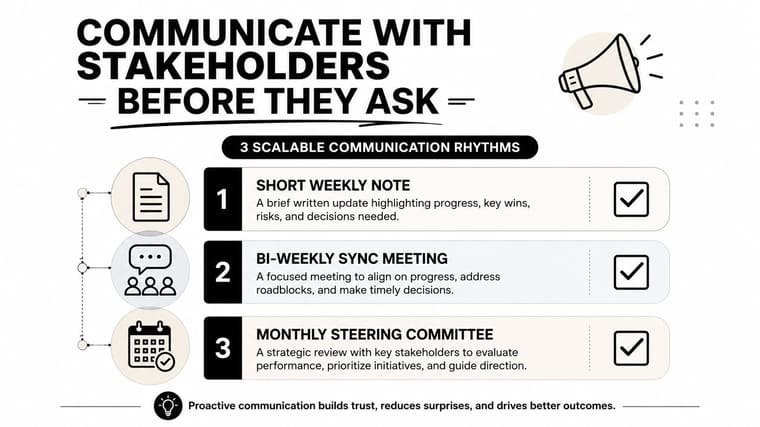
Stakeholders usually tolerate bad news better than late bad news. The trust damage begins when the team knows a date is at risk but waits for certainty that arrives only after recovery options have disappeared.
Choose a communication rhythm that matches the project’s coordination load. A small project may need a concise weekly note. A medium project may need written status followed by a short call for decisions. A large or highly governed project needs structured review material that separates schedule, scope, risk, and budget.
Keep the update consistent:
- Schedule: Green if the forecast is stable, amber if recovery action is needed, red if the committed date requires a decision.
- Scope: State what is changing, what remains protected, and what is being deferred.
- Risk: Name the cause, its likely effect, and the response owner.
- Decision: Ask for one specific action by one specific date.
No-surprises rule: If the date is at risk, the stakeholder should hear it from you with a recovery plan before they hear it from a failed delivery.
Avoid vague language such as “we’re experiencing some challenges.” Say what happened and what choice is available: “The external approval moved beyond the planned review window. The release can stay on the fixed date if the reporting enhancement moves to the next release. Otherwise, the launch date needs to move.”
For a fixed-deadline project, that message protects trust because it connects the problem to a trade-off. PMI guidance for fixed-deadline work recommends analyzing the critical path, working with domain experts to shorten duration by changing dependencies, limiting scope explicitly, and defining the latest safe decision point for the project manager (PMI guidance on fixed-deadline projects). Stakeholders don’t need a perfect forecast. They need enough notice to make the decision while choices still exist.
Handle Risks and Recover From Slippage Without Burning the Team Out
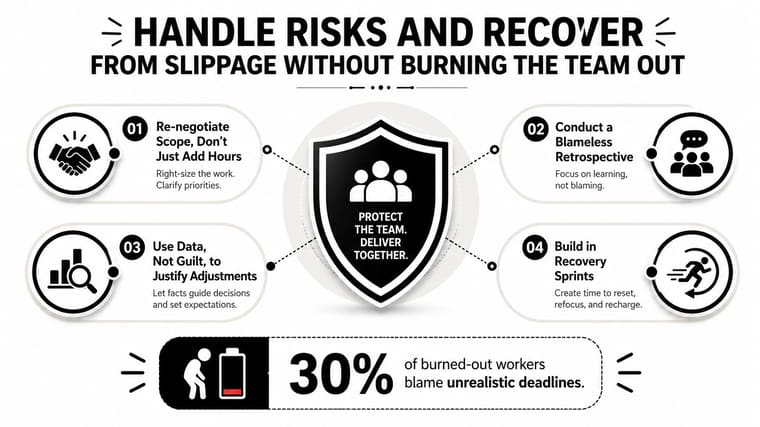
The usual response to slippage is to ask people to work harder. That can help with a short, isolated interruption, but it isn’t a recovery strategy when the plan is structurally wrong. In a 2025 agency report, 30% of burned-out workers attributed burnout to unrealistic deadlines and 41% to high workloads (Spanish Property Insight coverage). The same report described workers sacrificing sleep, meals, exercise, and medical appointments to deliver on time.
That trade-off can make the date look protected while reducing judgment, quality, and future capacity. Renegotiate instead of pushing harder when:
- A dependency moved without your team’s control: Rebuild the sequence around the new availability.
- Scope expanded: Remove, defer, or separately approve the added work.
- Recovery costs exceed the date’s value: If sustained overtime creates a larger operational risk, escalate the date or scope decision.
Use a recovery sequence
Start with scope, not hours. Separate essential acceptance criteria from useful enhancements, then confirm what the sponsor will accept. Next, examine whether additional capacity can remove a constraint, but don’t assume that adding people will help work that requires scarce expertise or lengthy onboarding.
Recalculate the critical path after the change. A task that wasn’t controlling the finish before may now become the constraint. Then reset the buffer, document the new forecast, and tell stakeholders what changed.
If you need specialist capacity across time zones, an external recruiting partner such as LatHire’s guide to the best place to hire LATAM talent may be relevant to the staffing discussion. Hiring support can expand options, but it won’t replace scope control or dependency management.
Use a blameless retrospective after recovery. Ask which assumption failed, which signal appeared first, and which decision was delayed. Don’t ask who “owned” the delay as a substitute for fixing the system.
Audit your deadline culture with three questions: Can people raise a risk without being punished? Do leaders accept scope and date trade-offs? Does the plan include recovery time after an intense delivery? If the answer is no, the team may be meeting dates by borrowing from its future capacity.
Putting It All Together Into a Repeatable Deadline Workflow
Run the workflow as a loop, not as a one-time planning exercise. On Monday morning, choose one upcoming deadline and put the following on a single page:
- Define scope: Write what is included, excluded, and required for acceptance.
- Set milestones: Choose a short sequence of outcome-based checkpoints with owners and dates.
- Estimate duration: Combine early top-down judgment with bottom-up detail and three-point estimates where uncertainty is high.
- Protect the schedule: Map dependencies, identify the critical path, and place a visible project buffer.
- Prioritize execution: Work first on the decision, dependency, or handoff that controls the finish.
- Review weekly: Track completed evidence, slips, risks, and the most important decision.
- Communicate early: Send stakeholders the forecast, trade-off, owner, and decision date before the risk becomes a surprise.
- Recover intelligently: Re-cut scope, add capacity only where it helps, resequence the work, and protect team recovery.
The starter stack doesn’t need to be complicated. Use a written scope and milestone sheet, a dependency map or Gantt view, a risk and decision log, a weekly status template, and one glanceable countdown or progress display. A visual reminder can sit on a Home Screen or Lock Screen, while the project system holds the detail that teammates need to act.
Project deadline management isn’t a personality trait. It comes from repeating a small set of habits until unclear work becomes visible early, trade-offs become discussable, and the team can make decisions before the final week turns into an emergency.
Pretty Progress offers customizable countdown and progress widgets for iPhone, iPad, Apple Watch, Mac, and Android, allowing you to display a project’s remaining time or progress on a Home Screen or Lock Screen. Set up one upcoming deadline with its start and end dates, place the widget where you’ll see it daily, and visit Pretty Progress to make the date a visible part of your working routine.