

May 26, 2026
Master Your Monthly Progress Report: 2026 Guide
Learn to create a monthly progress report that gets results. Our 2026 guide offers sections, templates & tips for professionals, students & habit trackers.
You send the monthly update. It’s organized, accurate, and full of effort. Then nothing happens.
No reply. No decisions. No course correction. The document gets filed, skimmed, or ignored.
That usually isn’t a writing problem. It’s a usefulness problem. A monthly progress report only matters when it helps someone decide what to keep doing, what to change, and where to pay attention next. If it reads like a list of activity, people stop caring. If it answers the right questions for the right reader, it becomes one of the most practical management tools you have.
That’s why the monthly cadence has lasted so long. In many workflows, teams break work into daily, weekly, and monthly milestones, and the monthly check-in works because it’s long enough to show meaningful movement while still catching issues before they become larger delays or budget problems, as noted in Planview’s discussion of daily, weekly, and monthly progress reports. If you’re trying to build consistency around goals between reports, this guide on staying consistent with goals is a useful companion mindset.
Table of Contents
- Beyond the Checklist Why Your Report Matters
- First Principle Tailor the Report to the Reader
- Anatomy of an Effective Progress Report
- Templates for Professionals Students and Personal Goals
- Use Pretty Progress to Visualize Your Data
- Pro Tips for Reports That Drive Action
Beyond the Checklist Why Your Report Matters
A weak monthly progress report tells people what happened. A strong one tells them what the update means.
That sounds obvious, but many reports still read like a cleaned-up task list. “Completed review.” “Met with vendor.” “Updated draft.” None of that is wrong. It’s just incomplete. Stakeholders don’t only need activity. They need context, implications, and a clear read on whether the work is moving as planned.
A report is a decision tool
A useful report answers questions before the reader has to ask them.
- What changed this month
- What’s on track
- What’s drifting
- What needs attention now
- What decision or support is needed
When those answers are missing, people either ignore the report or schedule another meeting to decode it. That defeats the point.
A monthly progress report should reduce uncertainty, not create a follow-up thread.
The monthly rhythm works well because it cuts through daily noise. Day-to-day work can look busy without showing whether the project is advancing. A month creates enough distance to compare plan versus reality in a meaningful way, especially when the report includes completion status, expected obstacles, and whether progress still matches the original plan.
What people actually want from it
Most readers don’t want more detail. They want less ambiguity.
A manager wants to know if the schedule still holds. A sponsor wants to know whether a risk is forming. A team lead wants to know where dependencies are blocking progress. The report matters because it creates a time-bounded checkpoint instead of a vague running narrative.
Use that checkpoint well and the report becomes part of operational control. Use it badly and it turns into status theater.
First Principle Tailor the Report to the Reader

The most common mistake isn’t missing a section. It’s writing one report as if every reader needs the same thing.
That gap shows up in a lot of guidance. Much of the advice around monthly progress reports focuses on sections and templates, but says far less about how to make a report decision-useful for different audiences, especially executives versus project teams, as discussed in MASTT’s review of what to include in a monthly progress report. The template should follow the audience, not the other way around.
What changes by audience
Here’s the simplest way to think about it.
| Reader | What they care about | What to keep short | What to expand |
|---|---|---|---|
| Executive | risk, timing, impact, decisions needed | task-by-task detail | summary, exceptions, trade-offs |
| Project team member | blockers, ownership, dependencies, next actions | broad narrative | operational detail |
| Client or external stakeholder | progress, confidence, milestones, open issues | internal process noise | deliverables, dates, approvals |
| Advisor or mentor | evidence of work, quality of progress, next milestone | corporate language | reflection, obstacles, planned work |
An executive often reads your report in under a minute. That reader needs a headline view. If the schedule slipped, say so plainly. If no decision is needed, say that too. Don’t make them search.
A team member needs the opposite. They already know the headline. They need enough detail to act.
A practical filter before you write
Before drafting, answer these questions:
- Who will read this first
- What decision can they make after reading it
- What detail would waste their time
- What detail would prevent confusion later
This is the same logic teachers and reviewers use when they evaluate evidence. Charter Homeschool Help’s work sample advice is a helpful example outside project management. It shows that the right sample depends on what the reviewer is trying to verify. Progress reports work the same way. Evidence only helps if it matches the reader’s question.
Practical rule: If two audiences need different decisions, they need different versions of the report, even if the underlying facts are the same.
That doesn’t mean writing from scratch every time. It means keeping one source of truth and changing the summary, depth, and framing for each audience.
Anatomy of an Effective Progress Report
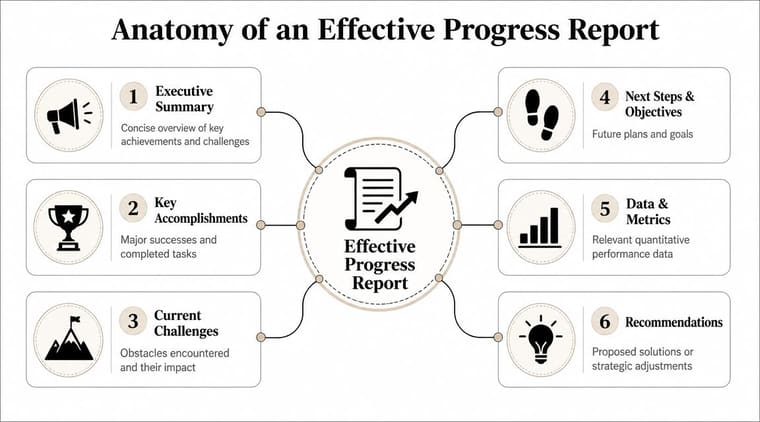
A report becomes easier to read when the reader knows where to find the answer they need. The structure below works because each part has a job.
Start with the summary people actually read
The first section should be an executive summary, even if your audience isn’t executive. Keep it brief and useful. State overall status, biggest achievement, biggest risk, and the main next step.
Then move into goals versus actuals. This is the heart of the monthly progress report. Show what was planned for the month, what was completed, what moved, and what didn’t. If something changed, explain why in one or two sentences.
A strong middle section usually includes:
- Key accomplishments that show movement, not just effort
- Current blockers or risks with impact and owner
- Next steps for the coming month
- Requests or decisions needed if the reader must do something
This infographic shows the core layout at a glance.
Use a small set of metrics and keep them stable
A technically sound report uses a fixed cadence and a small KPI set. For teams, monthly reporting is usually sufficient, and the report should compare current status against the prior period while covering status, scope, schedule, cost, and risk, as explained in Perdoo’s guidance on progress reporting. Consistency matters more than volume.
If you change the metrics every month, readers can’t see a trend. Keep the same core questions each cycle.
| Section | Question it answers |
|---|---|
| Executive summary | What should I know in under a minute? |
| Goals vs actuals | Did we do what we said we’d do? |
| KPI snapshot | What changed from the prior period? |
| Blockers and risks | What may prevent progress next month? |
| Next steps | What happens now? |
For timeline-heavy work, a visual can do more than a paragraph. A simple roadmap or milestone view helps readers orient quickly. If you need ideas for that presentation layer, project timeline visualization examples are useful references.
Good structure doesn’t make a report longer. It makes it skimmable.
The final test is simple. If someone opens your document and can’t identify status, risk, and next action within a short scan, the anatomy needs work.
Templates for Professionals Students and Personal Goals
Blank pages slow people down. Examples don’t. The same reporting logic can work for a manager, an advisor, or yourself. What changes is tone, evidence, and the kind of next step you highlight.
Professional example for a manager
Monthly progress report for website redesign project
Summary
The project moved forward this month. Design revisions were completed for the core pages, but content approval remains the main dependency.
Progress this month
Completed homepage and product page revisions. Consolidated feedback from marketing and sales. Aligned navigation changes with the development handoff.
Blockers
Content for two sections is still under review. That may affect handoff timing if approval slips further.
Next month
Finalize content, complete design QA, and prepare developer-ready files.
This version works because it tells the manager what changed, what’s at risk, and what comes next without drowning them in internal detail.
Student example for an advisor
Monthly progress report for dissertation work
Summary
Literature review notes are now organized by theme, and the research question is narrower than it was last month. The main challenge was sorting overlapping sources.
Work completed
Read and annotated assigned papers. Reworked the outline to reflect the refined argument. Drafted a new methods section outline.
Issue needing guidance
I need feedback on whether the narrowed scope is still broad enough for the full dissertation.
Next step
Revise the proposal draft based on advisor comments and prepare a cleaner source matrix.
For tutoring or academic programs, systems that track student progress and scores efficiently can support this kind of reporting by keeping performance evidence in one place instead of scattered across notes and spreadsheets.
Personal goal example for self accountability
Monthly progress report for learning a new language
Summary
Practice stayed consistent on weekdays but dropped on weekends. Listening improved more than speaking because the routine favored passive practice.
What worked
Short daily sessions were easier to maintain than long catch-up sessions. Reviewing the same vocabulary in small batches helped retention.
What didn’t
Weekend practice had no fixed trigger, so it was easy to skip.
Next month
Add a dedicated weekend review block and record a short speaking exercise at the end of each week.
The best self-report is honest enough to change your behavior, not flattering enough to protect your ego.
Notice what all three examples share. Each one says what happened, what it means, and what happens next. That’s the pattern to keep.
Use Pretty Progress to Visualize Your Data
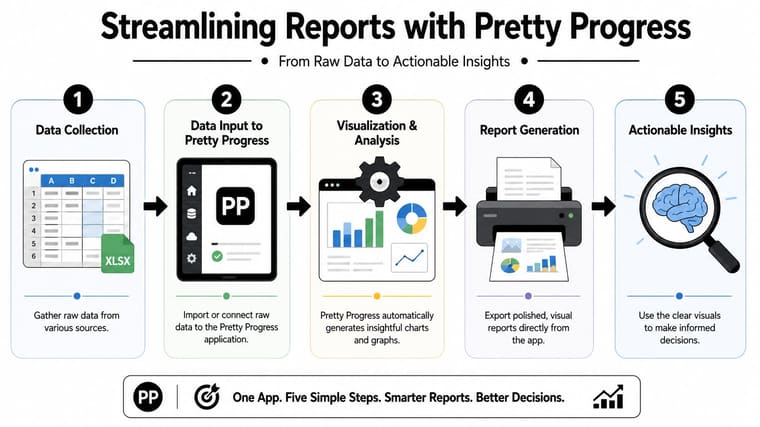
The hardest part of a monthly progress report usually isn’t writing. It’s gathering clean evidence. Many people still pull updates from calendars, notes apps, spreadsheets, chats, and memory. That’s why visual tracking tools help. They reduce the amount of reconstruction you have to do at month-end.
Build the report from counts and visible movement
In formal settings, monthly progress reporting can be much more rigorous than a simple internal update. The U.S. Consumer Product Safety Commission’s Monthly Progress Report system requires tracking recall progress through items such as the total number of units involved and the corrections made during a specific period, which shows why hard counts matter in high-stakes reporting, as described on the CPSC monthly progress report system page. Most business reports aren’t regulatory, but the lesson holds. Use numbers when the reader needs accountability, not decoration.
That’s where a tool like Pretty Progress’s goal progress tracker app can fit. It lets users track progress visually through widgets and time-based progress views, which is useful when your report needs a clean snapshot of movement across the month.
Turn widgets into report evidence
A practical setup looks like this:
- Choose one metric per goal: For a project, that might be milestone completion. For a student, study sessions completed. For a personal goal, consistency across the month.
- Track it in the same place all month: Don’t split the signal across three apps unless you have to.
- Take screenshots near month-end: A widget or progress view can become a visual insert in the report.
- Add one sentence of interpretation: Never paste a visual without explaining what the reader should notice.
Here are examples of what that can look like:
- Professional use: A product manager captures a progress widget tied to a launch deadline and places it beside the month’s milestone summary.
- Student use: A study tracker screenshot sits next to notes on completed reading and remaining gaps.
- Personal use: A monthly consistency view supports a short reflection on habits that held and habits that slipped.
A clean visual does two jobs at once. It makes the report easier to scan, and it gives the writer a more stable reporting routine because the evidence is already visible before the month ends.
Pro Tips for Reports That Drive Action
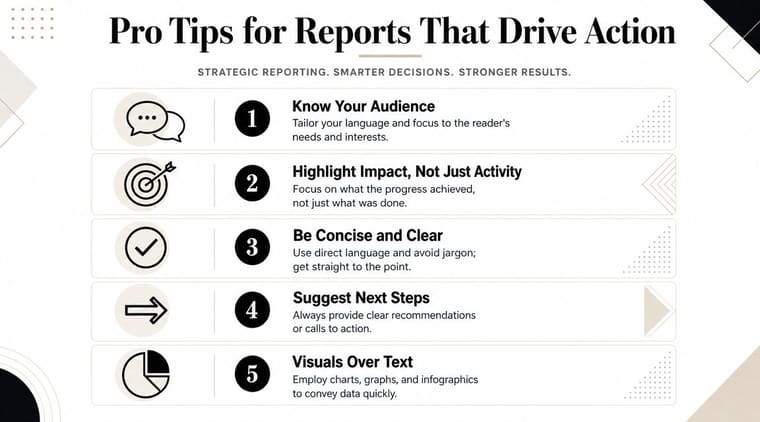
Most reporting advice assumes your data is ready, your systems agree, and your month was tidy. Real work rarely looks like that.
A common challenge is building a report when data is imperfect or manually assembled. Teams often have to reconcile schedule, budget, and scope information from multiple systems, which is why reporting needs a focus on data quality and auditability, not just formatting, as noted in the acquisition.gov monthly progress report reference. If your inputs are messy, your job is to be transparent about confidence, not to pretend the numbers are cleaner than they are.
What to do when your data is messy
Start by separating confirmed facts, reasonable estimates, and open questions. Don’t blend them into one confident-looking paragraph.
Use this approach:
- State the source of the update: Say whether the status came from a system export, team lead confirmation, or manual reconciliation.
- Flag uncertainty directly: If a number may change after validation, say so.
- Keep a simple audit trail: Save the file, screenshot, or note that supports the statement.
- Standardize your reporting date: Everyone should know what period the report covers.
A credible report with minor uncertainty is more useful than a polished report that hides weak inputs.
How to report bad news without losing trust
Readers don’t lose trust because a project has problems. They lose trust when the report softens the problem until it becomes impossible to act on.
Bad news should be framed in three parts:
| Part | What to say |
|---|---|
| Issue | What changed or slipped |
| Impact | What it affects now |
| Response | What you’re doing next |
That keeps the tone accountable without sounding defensive.
If a deadline moved, say what moved, what depends on it, and what support would help. Don’t bury the sentence under five lines of context.
Keep the report short enough to read in one sitting. If background detail matters, move it to an appendix or linked doc. The monthly progress report should carry the decisions, not every scrap of history.
If you want a simpler way to turn ongoing work into something visible, Pretty Progress gives you a practical option. You can track deadlines, goals, and monthly movement with customizable widgets, then use those visuals as lightweight evidence inside your report. That won’t fix weak thinking, but it does make consistent reporting easier when you need a clear snapshot at the end of each month.





