
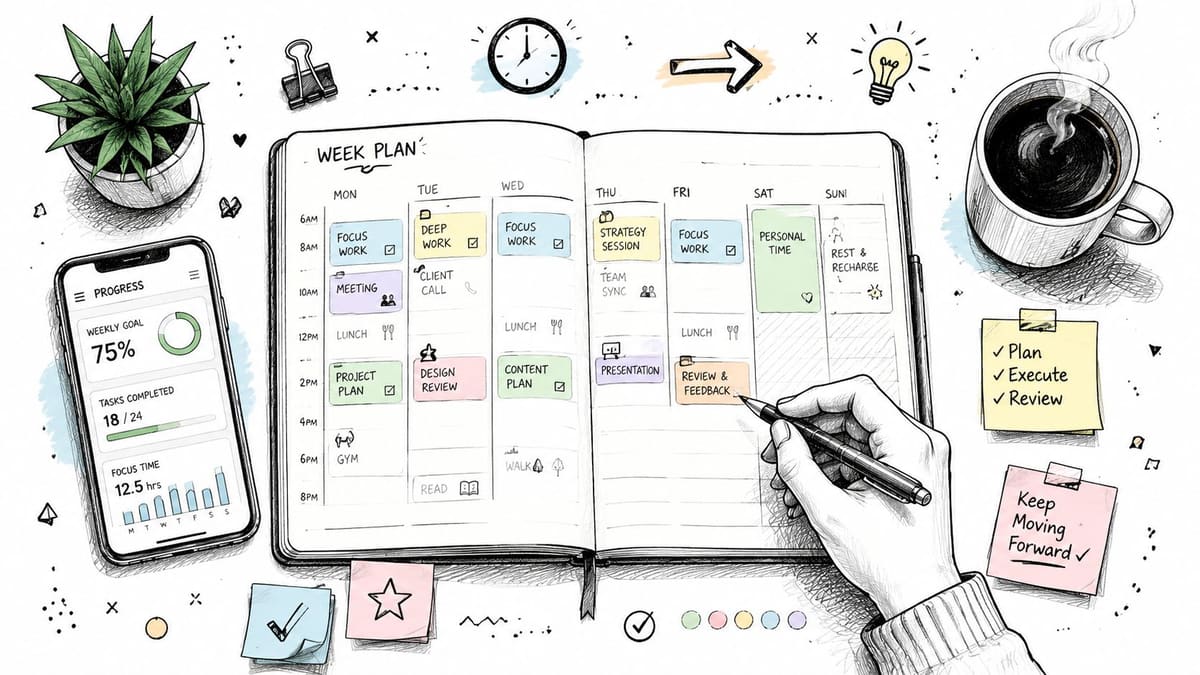
June 29, 2026
How to Plan Your Week to Actually Get Things Done
Learn how to plan your week with a simple system that works. This guide covers weekly reviews, time blocking, and tools to keep you on track and reduce stress.
You open your calendar on Sunday night with good intentions. You map out every hour, color-code the week, promise yourself this time will be different, then by Tuesday morning one late meeting, one urgent message, and one low-energy afternoon blow the whole thing apart.
That isn’t a character flaw. It’s usually a planning flaw.
Most advice about how to plan your week assumes you live in a clean, predictable system. Real life doesn’t work like that. Work expands. Kids get sick. Your brain refuses to cooperate. A task that looked simple on Sunday suddenly turns into three hidden tasks by Wednesday. A resilient weekly plan has to survive all of that.
The goal isn’t to build a perfect schedule. It’s to build a week that can bend without breaking.
Table of Contents
- Why Your Weekly Plan Keeps Failing
- The Sunday Reset Your Weekly Foundation
- From Chaos to Clarity Setting Your Weekly Priorities
- Building Your Week With Time Blocking and Task Batching
- Making Your Plan Stick Adapting for Real Life and ADHD
- Visualize Your Progress and Stay Motivated
Why Your Weekly Plan Keeps Failing
Monday starts with a packed calendar and a strong coffee. By noon, your inbox is louder than your actual priorities. By Tuesday, the plan feels useless, so you stop looking at it. Then the rest of the week becomes reactive.
That pattern is common because most weekly plans are built too tightly. People schedule the week like every task will take exactly as long as expected, energy will stay consistent, and nobody else will interrupt them. Then normal life shows up and the whole structure collapses.
Another problem is that many people treat the plan like a contract instead of a dashboard. A good weekly plan should help you decide what matters next. It shouldn’t punish you for being human. If your planning system creates guilt the moment something moves, you won’t trust it for long.
A lot of readers also build their system around the wrong tool. They pick whatever looks polished, then spend more time maintaining the planner than doing the work. If you’re sorting through digital options, it helps to compare real setups instead of downloading random apps. A roundup like top planner apps for 2026 can help you choose something that fits your working style.
A weekly plan fails when it assumes ideal conditions. A resilient plan assumes interruptions.
There’s also a quieter failure point. Many people don’t know what counts as a successful week. They write down twenty tasks, finish eight, and feel behind. Often the core issue is weak prioritization, which shows up in the same patterns discussed in common mistakes in goal setting. If everything is important, nothing is protected.
What works better is simpler. Leave room. Pick fewer meaningful outcomes. Revisit the plan daily. Expect the week to change. When you plan that way, Tuesday stops being the point where everything falls apart.
The Sunday Reset Your Weekly Foundation
A solid week usually starts before Monday. Not with a marathon planning session, but with a short reset that clears mental clutter and gives the next few days a shape you can trust.
Research summarized by Timestripe recommends scheduling about 70% of your available time and leaving 30% as buffer, and it also recommends starting the process on Sunday evening around 8:00 PM to create a steady weekly rhythm (weekly planning guidance from Timestripe). That buffer’s importance is greater than often realized. Without it, one surprise turns into a chain reaction.
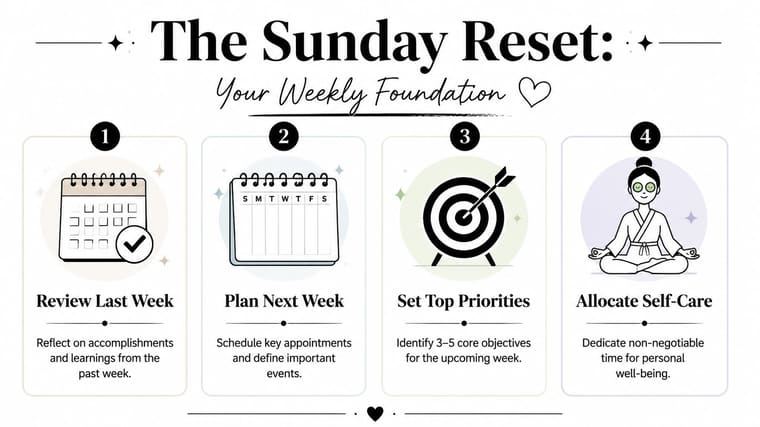
Start with a review, not a fantasy
Don’t begin by filling in a fresh week. Begin by looking backward.
Ask simple questions:
- What got finished: not what was started, touched, or discussed.
- What stayed stuck: especially tasks you rolled over more than once.
- What drained energy: meetings, contexts, people, or times of day.
- What helped: quiet blocks, coworking sessions, a morning walk, a shorter task list.
This review keeps you honest. It stops you from pretending next week will somehow contain more time, more focus, and fewer interruptions than the one you just lived through.
Get everything out of your head
Once you’ve reviewed the past week, do a full brain dump. Put everything in one place. That can be Apple Notes, Notion, Todoist, Google Keep, a paper notebook, or a plain text file. The tool matters less than the capture.
Include:
- Hard commitments: appointments, meetings, deadlines, pickups, calls.
- Open loops: things you said you’d reply to, decide, send, or fix.
- Personal tasks: errands, meal planning, life admin, health tasks.
- Mental clutter: ideas, worries, reminders, “don’t forget” items.
For neurodivergent minds, this step is often the difference between clarity and freeze. A brain dump reduces the pressure to keep everything active in working memory. If you have ADHD, it also lowers the chance that an unspoken task keeps hijacking your attention all week.
Practical rule: your planning session should make the week feel lighter, not more crowded.
Build the week with space, not just ambition
Now put the week on a calendar, prioritizing fixed appointments. Meetings go in first. Fixed personal commitments go in next. Then protect the time you need to recover, eat, transition, and think.
After that, choose your main outcomes for the week. Keep them small enough that you can still win if the week gets noisy. A short list is often more effective than a heroic one.
A simple Sunday Reset can look like this:
- Review last week for wins, misses, and bottlenecks.
- Capture every task and obligation in one trusted place.
- Block fixed commitments on the calendar.
- Add focused work blocks only into the space that remains.
- Stop before the week looks full.
If you finish planning and your reaction is “I hope nothing goes wrong,” the week is overbuilt. If your reaction is “I can adjust this if needed,” you’re much closer.
From Chaos to Clarity Setting Your Weekly Priorities
Monday usually starts with good intentions. By Tuesday afternoon, the week is already being run by Slack pings, email replies, missed transitions, and one urgent request that blew up the plan.
That failure rarely comes from laziness. It usually comes from treating every task as equally important.
A long list feels organized because it captures everything. It does not help you decide what deserves your limited focus, especially if your attention is already getting pulled in six directions. For people with ADHD, that kind of list can be worse than useless. It creates visual noise, decision fatigue, and the constant feeling that you are behind before the actual work even begins.
Priority-setting needs to reduce friction. It also needs to survive interruption.
Busy work gets equal billing unless you force separation
Weekly priorities work best when they answer one question: what has to move for this week to count?
That is different from asking what needs attention. Plenty of things need attention. Messages need replies. Admin needs handling. Other people need updates. But if those tasks sit beside strategic work, health appointments, recovery time, and personal obligations with the same visual weight, the urgent usually wins.
I use a simple rule with clients. Separate maintenance from momentum.
Maintenance keeps life and work from falling apart. Momentum moves something meaningful forward. A resilient weekly plan includes both, but it does not confuse them.
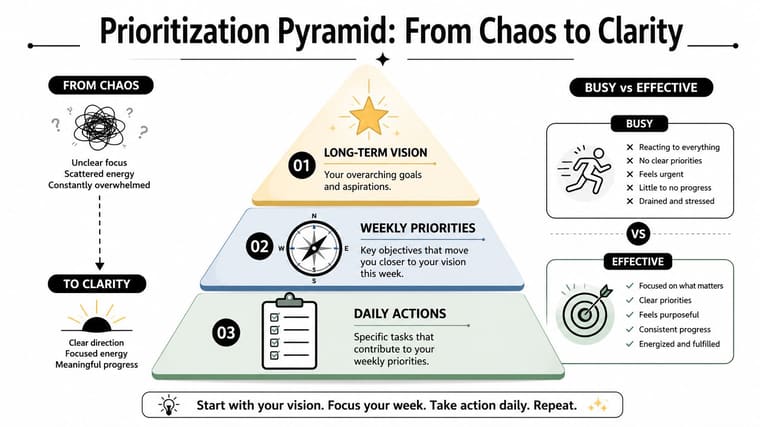
A practical weekly filter looks like this:
- Must move this week: work with a deadline, clear consequence, or outsized payoff
- Needs maintenance: admin, communication, chores, recurring responsibilities
- Can wait: tasks that feel productive but do not change much if they slip
That third category matters more than people expect. Many weekly plans collapse because low-stakes tasks sneak in wearing urgent clothes.
Choose fewer weekly wins than you want
The old Ivy Lee method still holds up because it forces a limit. The original approach, described by James Clear in his summary of the method, was simple: decide the most important tasks, rank them, and work through them in order instead of scattering your effort across everything at once (Ivy Lee Method overview). The value is not the exact number. The value is constraint.
For weekly planning, choose 3 to 5 priorities that define success.
Not 12. Not every area of life at once.
If your week includes a product deadline, a medical appointment, and school paperwork for your kid, those may be the priorities. A realistic system has to account for real life. People do not plan in a vacuum, and executives often need a stricter filter because their calendars fill with other people’s demands. If that is your situation, this guide on time management for executives is a useful companion.
A good test is blunt. If Friday arrived and you finished only these few things, would the week still feel solid?
If the answer is no, your priorities are probably too shallow or too scattered.
Use a filter your brain can scan fast
Complicated frameworks often fail in the moment. A weekly plan needs a filter you can read quickly, especially if you are prone to task switching or overwhelm.
| Question | If yes | If no |
|---|---|---|
| Does this move a current goal forward? | keep it in priority review | cut it or park it |
| Will delaying it create a real problem this week? | schedule it soon | defer it |
| Does it need focus, not just time? | protect your best hours for it | batch it with lighter tasks |
This works well in digital task managers because you can mirror the same logic with tags, flags, or widgets. A home screen widget that shows only this week’s top priorities is often more useful than opening a full task app and staring at 47 items. For ADHD brains, that smaller visual field can lower resistance and make it easier to restart after interruption.
If you want a stronger system behind that view, these time management best practices help you connect priorities to a week you can follow.
Personal priorities belong on this list too. Recovery, exercise, therapy, family logistics, and basic life admin are not bonus tasks. Ignore them, and they come back later as stress, missed appointments, decision fatigue, or burnout.
If your priorities only reflect incoming requests, your week is being assigned to you in real time.
Pick the few outcomes that matter. Let the rest compete for leftover time. That is how a weekly plan stays clear enough to follow on Tuesday, not just optimistic on Sunday.
Building Your Week With Time Blocking and Task Batching
By Tuesday afternoon, a lot of weekly plans are already breaking. Meetings ran long. A task took twice as long as expected. You lost an hour to email and another to context switching. The problem usually is not ambition. It is that the plan had no structure for friction.
Time blocking and task batching give your priorities a real place to happen. They also make the week more resilient because you stop rebuilding your day every time you sit down to work.
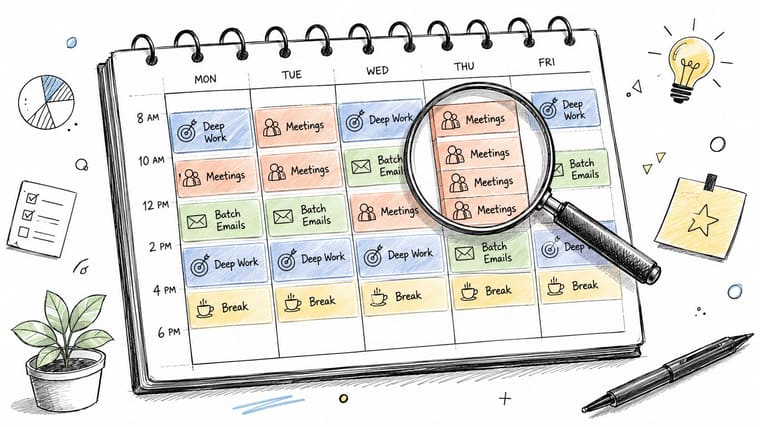
Give each type of work a home
Start with work types, not a long task list. A calendar built only from individual tasks gets brittle fast. A calendar built around modes of work holds up better when the details change.
Useful categories often include:
- Deep work: writing, analysis, coding, design, strategy
- Communication: email, Slack, calls, approvals
- Admin: forms, scheduling, expenses, updates
- Maintenance: recurring tasks that keep work and life moving
- Recovery: lunch, breaks, transitions, exercise, commute
Batching matters because context switching is expensive. If you answer messages all day in scattered pockets, you stay mentally half-open to everyone else’s priorities. If you group communication into one or two blocks, focus work has a chance to become actual focus work.
A workable pattern might look like this:
- Monday morning for project work
- Tuesday afternoon for meetings and follow-up
- Wednesday for creative production
- One or two email windows instead of constant checking
That pattern does not need to be pretty. It needs to be repeatable.
If you lead a team or manage a packed calendar, stronger boundaries help. Resources on time management for executives can be useful because they treat attention like a finite resource with real trade-offs.
For a wider set of habits that support this structure, pair your calendar with these time management best practices.
Build blocks that can survive real life
A block should match the kind of attention the task needs. A budget review and an inbox sweep do not belong in identical containers.
Use three block sizes:
- 90 to 120 minutes for deep work that has setup cost
- 30 to 60 minutes for admin, follow-up, or small deliverables
- 15 to 30 minutes for resets, breaks, and transition time
Many plans frequently collapse. People schedule six straight hours of high-focus work, then blame themselves when their brain refuses to cooperate. I have seen the opposite work better. Protect one or two serious focus blocks a day, then assume the rest of the day will include noise, recovery, and loose ends.
That is even more important for ADHD brains. Attention often comes in waves, not in tidy calendar-shaped units. A useful block can be shorter, more specific, and easier to start. “Draft intro for report” works better than “work on report.” A visual timer, a calendar widget, or a home screen view that shows only the next block can reduce the friction of re-entry after interruption.
Sample Time-Blocked Weekly Template
Here’s a simple example of how a week can look when themes and blocks work together.
| Time | Monday (Focus Work) | Tuesday (Meetings & Comms) | Wednesday (Creative/Project) |
|---|---|---|---|
| 8:00 to 9:00 | Weekly review, prep, inbox sweep | Meeting prep and admin | Outline and planning |
| 9:00 to 11:00 | Deep work block | Team meetings | Creative deep work |
| 11:00 to 12:00 | Break, notes, follow-up | Follow-up messages | Research and asset gathering |
| 1:00 to 3:00 | Project execution | Client calls and collaboration | Build, draft, or design |
| 3:00 to 4:00 | Admin and next steps | Email and decisions | Review and revisions |
This kind of template works because it sets expectations. If Tuesday carries more communication work by design, meetings stop feeling like they stole the day.
Breaks belong on the calendar too. The common 52/17 rhythm, 52 minutes of focus followed by 17 minutes of rest, is one option mentioned in a productivity discussion on Reddit (productivity discussion on realistic planning and focus rhythms). You do not need to follow that exact interval. The practical point is simpler. Plan recovery before your brain forces it.
A short walkthrough can help if you’ve never built a calendar this way:
Make the system easier to repeat
A weekly plan only helps if you can rebuild it without much resistance.
Use a few low-friction rules:
- Color by context: one color for meetings, one for deep work, one for personal commitments
- Repeat what already works: if writing usually goes well on Wednesday morning, make it recurring
- Name blocks by outcome: “send proposal draft” is clearer than “client work”
- Keep white space visible: open time is protection against spillover, not wasted space
- Show the week in plain sight: a calendar or task widget on your phone can act as a restart cue when attention drifts
For ADHD minds, visibility is not a nice extra. It is part of the system. If the plan disappears inside an app you never open, it may as well not exist. Put the next block where you can see it quickly, reduce the number of choices, and make it easy to begin again after the day gets interrupted.
Making Your Plan Stick Adapting for Real Life and ADHD
A strong weekly plan doesn’t require the week to go well. It still works when the day starts late, your energy crashes, or an urgent problem eats half the afternoon.
That’s the true test. Not whether you followed the plan exactly, but whether the plan helped you recover when things changed.
When the day goes sideways
One common reason plans fail is bad time estimation. A field experiment on weekly planning found that people often underestimate task duration by 30 to 40%, which contributes to 68% of plans failing mid-week. The same research found that structured planning increases work engagement by 23% and reduces burnout by 17% when people review and adjust their plans daily (field experiment on structured weekly planning).
That daily adjustment matters.
If a block gets missed, don’t cram it into the nearest open slot without thinking. Use a triage approach:
- Move it forward: reschedule it to the next realistic block.
- Shrink it: turn “finish draft” into “write opening and outline.”
- Drop it: if it no longer matters, let it go on purpose.
- Delegate it: if someone else can do it, stop carrying it.
What doesn’t work is treating one missed block like proof the week is lost. That reaction causes more damage than the interruption itself.
Missed a block? Protect the priority, not the original timestamp.
ADHD-friendly adjustments that actually help
Many standard planning systems assume stable attention, easy task initiation, and smooth transitions. ADHD often doesn’t work that way. A good plan needs to reduce friction at the exact points where executive function tends to stall.
Useful adjustments include:
- Make tasks tiny enough to start: “work on report” is too vague. “Open doc and write first three bullet points” is more usable.
- Add novelty on purpose: change locations, use a timer, switch formats, or pair a boring task with a different environment.
- Use body doubling: work alongside another person in person or on video while each of you does your own task.
- Externalize reminders: don’t rely on memory for task switching, appointments, or follow-ups.
- Plan transitions: leave a short gap after meetings so your brain can reset before the next block.
For some adults, productivity strategies work best alongside clinical support. If that’s relevant for you, a practical overview of 2026 ADHD treatment options for adults can help you think through broader support options without treating planning as the only answer.
A resilient week for ADHD is usually less about discipline and more about design. Fewer hidden steps. More visual cues. Clearer starts. More permission to revise the plan without shame.
Visualize Your Progress and Stay Motivated
Weekly plans usually fall apart when the work disappears from view.
By Wednesday, many people can only see what is still unfinished. That creates a false sense of failure, especially in busy weeks with context switching, interruptions, and half-finished tasks that still took real effort. Visible progress fixes part of that problem. It gives your brain proof that the week is moving, even when the day did not go to plan.
This matters even more for ADHD minds. If a task list only shows leftovers, it can trigger avoidance fast. A better system makes progress easy to spot at a glance.
Turn progress into something you can see
Plans hidden inside apps you have to remember to open tend to vanish during the day. Put the week where your eyes already go.
That might mean Apple Calendar widgets, Google Calendar, a Notion dashboard, Todoist boards, or a visual countdown on your phone home screen, lock screen, watch face, tablet, or desktop. The tool matters less than the placement. If your plan is visible without effort, you are more likely to re-enter it after distractions, missed blocks, or rough mornings.
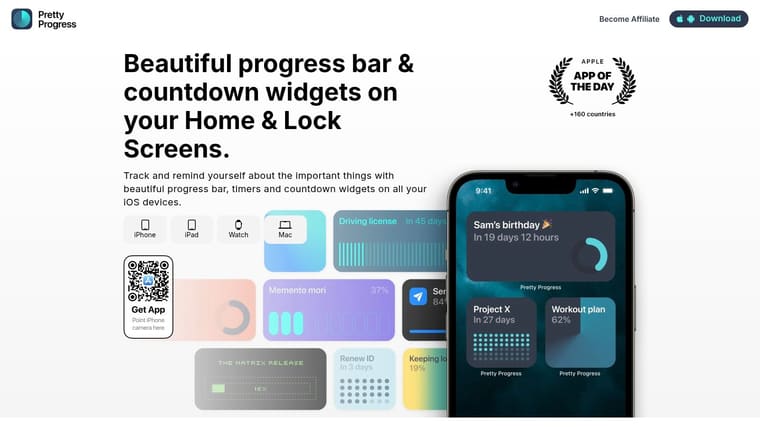
A visible progress cue changes the job of your planning system. It stops being a document you need to check and becomes part of your environment. That is why approaches like progress scheduling that keeps movement visible during the week tend to hold up better than systems built around occasional big milestones.
For example, if you are tracking a project deadline, exam date, launch week, or habit streak, a persistent widget can do two useful things at once. It reminds you what matters, and it lowers the friction of restarting. That second part is where many weekly plans fail.
Close the week without guilt
A short end-of-week review helps motivation last longer than one productive day. Keep it simple so you will repeat it.
Use prompts like:
- What moved forward this week
- What stayed open and why
- What needs an easier start next week
- What helped me keep going
- What I handled well under imperfect conditions
That review matters because motivation grows from evidence, not pressure. If the week only shows loose ends, planning starts to feel like self-criticism. If the week shows movement, the system feels trustworthy enough to use again.
A good weekly plan should show that the week was shaped, not wasted. You made choices. You adjusted. You kept something important moving.
If visible progress is the missing piece, Pretty Progress fits that exact job. It gives you customizable countdowns and progress widgets for your Home and Lock Screens, Apple Watch, Mac, iPhone, iPad, and Android, so your goals stay in sight without adding more mental clutter.





