July 4, 2026
How to Manage Multiple Deadlines Without Overwhelm
Feeling buried by tasks? Learn how to manage multiple deadlines with a step-by-step system for prioritization, scheduling, and visual tracking.
You’re probably in the middle of it right now. One deadline is in your inbox, another lives in a Slack thread, a third came up in a meeting, and two more are sitting in your head because you’re sure you’ll remember them.
That’s the point where managing deadlines gives way to reacting to them.
The fix isn’t working longer hours or trying harder to “stay on top of things.” It’s building a system that gets deadlines out of your head, puts real priorities in front of you, and keeps the important work visible enough that you don’t drift. That’s how to manage multiple deadlines without feeling like every day is triage.
Table of Contents
- Create Your Master Deadline List
- Prioritize Your Tasks with a Framework
- Schedule Your Work with Time Blocking
- Keep Deadlines Visible and Motivating
- Communicate Proactively and Manage Expectations
- Build a Review Cadence to Stay on Track
Create Your Master Deadline List
Stop relying on memory
Scattered deadlines create fake confidence. You think you know what’s due, right up until you realize one date was buried in email, another changed in a team chat, and a third never made it onto your calendar.
That approach fails because your brain is a poor storage system for active commitments. Cognitive psychology research shows that attempting to track more than 3-4 active deadlines mentally can increase error rates by up to 40% and significantly raises cortisol levels, contributing to burnout (cognitive load findings).
Practical rule: if a deadline exists, it should live in one trusted system within minutes of you hearing about it.
Your first job is to create a single source of truth. Not a mix of notes apps, starred emails, sticky notes, and memory. One place.
For some people, that’s a task manager. For others, it’s a spreadsheet or project board. The format matters less than consistency. What matters is that every deadline, deliverable, and dependency ends up in the same list.
Build one place for every deadline
Start with a quick sweep across the places where deadlines hide:
- Email: scan for due dates, approvals, requested revisions, and follow-ups.
- Chat tools: check Slack, Teams, and direct messages for “can you get this to me by…”
- Meeting notes: pull out action items and convert them into dated tasks.
- Personal notes: capture anything you’ve been mentally carrying.
For each item, record only what you need to act:
- Task name
- Owner
- Deadline
- Current status
- Next step
That last field matters. “Finish presentation” is vague. “Draft slide outline” is actionable.
If your deadlines span multiple calendars, it helps to tighten that layer too. Good scheduling falls apart when dates are split across work and personal systems, so these tips for efficient calendar management are useful if your visibility problem starts with your calendar setup.
A simple list is enough to begin. A visual dashboard is better once your workload grows. Tools that show progress, countdowns, and grouped deadlines reduce the effort of figuring out where things stand. If you want an example of that approach, this project deadline tracker guide shows how a centralized tracker can make deadlines easier to scan.
A strong master list doesn’t need to be complicated. It needs to be complete. Once you trust that everything is captured, your attention shifts from remembering to deciding.
Prioritize Your Tasks with a Framework
A full deadline list can still feel overwhelming because due dates alone don’t tell you what deserves your best time. Some work is urgent but low value. Some work is important but easy to postpone until it becomes a problem.
That’s why I don’t sort only by nearest due date. I use a framework that forces a better question: what matters most right now, and what can wait?
Use Eisenhower when everything feels urgent
The Eisenhower Matrix works well when your list is noisy and other people keep adding requests. It sorts work into four buckets based on urgency and importance.
Here’s how that usually looks in practice:
- Urgent and important: today’s client deliverable, a proposal due this afternoon, a critical issue blocking someone else
- Important but not urgent: project planning, deep work, preparation, quality checks
- Urgent but less important: interruptions, status requests, minor admin with a near-term date
- Neither: tasks that feel productive but don’t move anything meaningful forward
The value of the matrix is that it gives you permission to stop treating every incoming request as equally important.
Urgent work makes noise. Important work creates results.
When someone keeps procrastinating on meaningful work, the problem often isn’t laziness. It’s avoidance, ambiguity, or emotional friction. These mental health insights on procrastination are useful if you’re trying to understand why “I know what to do” still turns into delay.
Use MoSCoW for large projects
The MoSCoW method is better for multi-part deliverables where the risk isn’t distraction. It’s scope creep.
MoSCoW stands for:
- Must-have
- Should-have
- Could-have
- Won’t-have for now
Say you’re managing a product launch, exam prep plan, or client report. The Must-haves are the parts that make the deadline real. Without them, the project fails. Should-haves improve quality. Could-haves are nice if time allows. Won’t-haves protect the timeline by explicitly removing lower-value work.
That classification is especially helpful when a project feels too large to start. Instead of “finish project,” you can define the essential core and move.
If your work spans several initiatives at once, this guide on how to keep track of multiple projects complements the framework by helping you separate project-level visibility from task-level priority.
Prioritization Frameworks at a Glance
| Framework | Best For | Core Concept |
|---|---|---|
| Eisenhower Matrix | Busy weeks with competing requests | Sort tasks by urgency and importance |
| MoSCoW | Large projects with many moving parts | Separate must-do work from optional scope |
Use Eisenhower when the problem is too many incoming demands.
Use MoSCoW when the problem is a big deadline with too much packed into it.
Both are necessary. One protects your day. The other protects your project.
Schedule Your Work with Time Blocking
A prioritized list is still just intent until time is assigned to it. That’s where many deadline systems break. People identify the right work, then leave it floating in a to-do list and hope motivation shows up.
Time blocking fixes that by giving work an appointment.
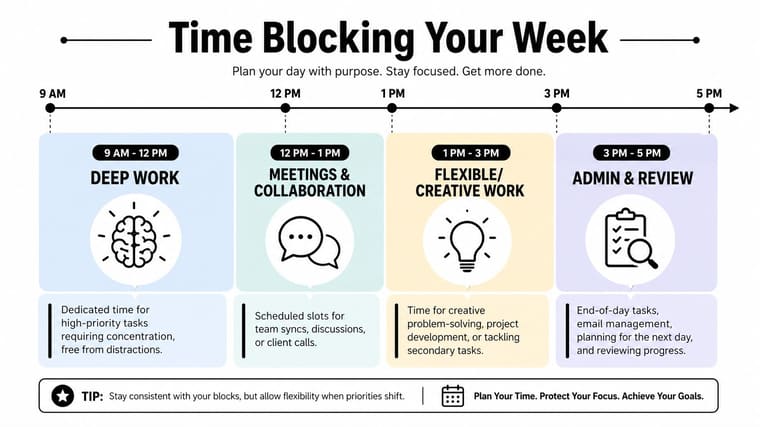
Early in the week, it helps to sketch your blocks visually before you start moving meetings around.
Turn priorities into calendar commitments
When you time block, you decide in advance when the work will happen, how long it gets, and what type of attention it needs.
A practical weekly setup looks like this:
- Deep work blocks: reserve uninterrupted time for the highest-stakes tasks
- Collaboration blocks: group meetings, reviews, and messages together
- Admin blocks: handle email, approvals, small updates, and routine follow-through
- Planning blocks: prepare the next day or next work session before you stop
Deadlines rarely get missed from lack of awareness. They get missed because urgent interruptions consume the hours that important work needed.
I’ve found that a calendar full of meetings and a to-do list full of “critical tasks” is a contradiction. If the work matters, it needs protected time, not good intentions.
A simple daily structure often works better than an elaborate system. Focus first on where your best concentration belongs, then place lower-energy work later.
For a visual walkthrough of the method, this short video is useful:
Protect buffer time
The biggest mistake in time blocking is filling the calendar edge to edge. That schedule looks efficient and fails almost immediately.
Buffer time is what absorbs reality. A meeting runs long. A file needs revision. Someone asks for context before they can proceed. You hit a hard part of the work and need another pass.
Leave open space on purpose. A packed calendar turns one delay into a full-day collapse.
I recommend two kinds of buffers:
- Daily buffer: a small block for spillover, fixes, or unexpected requests.
- Weekly buffer: one larger block for work that took longer than planned or deadlines that moved.
If nothing breaks, use the buffer for prep, review, or early progress on next week’s work. That’s still productive. The point is that your plan can survive contact with real life.
Keep Deadlines Visible and Motivating
People don’t ignore deadlines because they don’t care. They ignore them because hidden deadlines lose force. If the only reminder lives inside a crowded app or a calendar view you check twice a day, the work becomes abstract.
Visibility changes that. When a deadline is always in sight, you don’t need to keep rediscovering it.
Why visibility changes behavior
A visible countdown or progress bar does two things at once. It keeps urgency in front of you, and it shows movement. That combination is more useful than a static due date buried in a list.
A plain to-do manager often tells you what exists. A visual tracker tells you what’s approaching and whether progress matches the time left. That’s a very different cue.
I’ve seen people stay far more consistent when the project is glanceable. Not because the tool is magical, but because the friction drops. You stop asking, “What should I be worried about right now?” The answer is already on screen.
Set up a deadline widget that you’ll actually notice
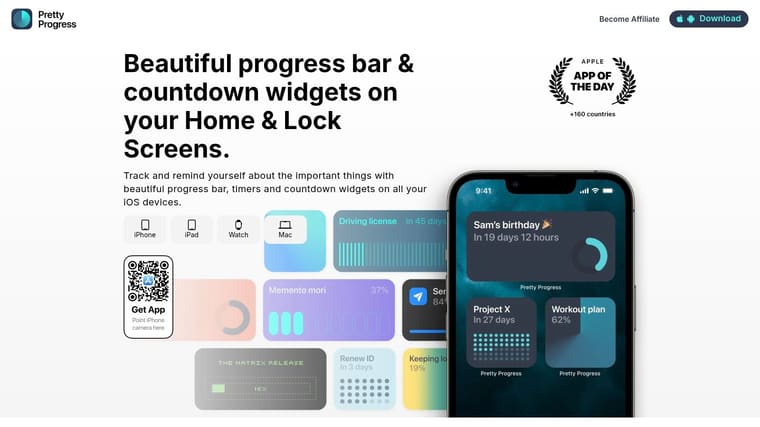
Pretty Progress is an excellent fit for a classic deadline system. It lets you create countdowns or progress bars for specific deadlines and place them on your phone or desktop so they stay visible throughout the day.
The setup is straightforward:
- Choose one active deadline: don’t start with ten. Pick the project most likely to slip.
- Set start and end dates: this turns the deadline into a live progress view rather than a static reminder.
- Name the milestone clearly: “Submit client draft” works better than “Project work.”
- Add the widget where you already look: Home Screen, Lock Screen, or desktop.
- Review it during planning: if the time left and the actual progress don’t match, adjust your schedule.
That last step is the core value. A visual tracker isn’t decoration. It’s an early warning system.
A deadline becomes easier to manage when you can see it without opening anything.
For students, that might be an exam date on the lock screen. For project managers, it might be a launch countdown on the desktop. For anyone juggling multiple commitments, visible progress reduces the mental overhead of keeping everything alive in memory.
Communicate Proactively and Manage Expectations
Missed deadlines often start as a communication problem before they become a delivery problem. The work is slipping, but nobody says anything because they hope they can recover discreetly.
That usually makes things worse.
What to say before a deadline slips
A better move is to raise the issue while options still exist.
Say you’re handling three active deliverables and a manager adds one more with a short turnaround. Don’t answer with “Sure” and then scramble in private. Say: “I can take this on, but I’m currently working toward Friday’s report and the client revisions due before that. Which one should move if this becomes the priority?”
That response does two things. It shows willingness, and it makes capacity visible.
Another common case is when the work is larger than expected. In that situation, send a short update early: “Quick update. I’m on track with the core deliverable, but the review cycle is taking longer than expected. I can still deliver the draft on Thursday, and the final version would move to Monday unless we reduce scope.”
That’s much easier for a stakeholder to work with than silence.
If you need help wording those updates, this deadline reminder email guide is useful for shaping clear, low-drama communication.
Simple scripts that lower friction
Keep these in your back pocket:
- To negotiate scope: “I can meet the date for the essential version. If you want the extra pieces included, I’ll need more time.”
- To push back on low-priority work: “I can do this after the current deadline passes, unless you want me to pause something already in progress.”
- To ask for help: “I’m at capacity on the current timeline. Can we reassign part of this or adjust the due date?”
- To confirm trade-offs: “Just to confirm, I’m prioritizing X first, which means Y will move.”
Clear communication builds trust because people know what’s happening before they have to ask. That matters more than sounding endlessly available.
Build a Review Cadence to Stay on Track
Most deadline systems don’t fail at setup. They fail a week later, when the list is outdated, the calendar no longer reflects reality, and the priorities haven’t been revisited.
A review cadence prevents that drift.
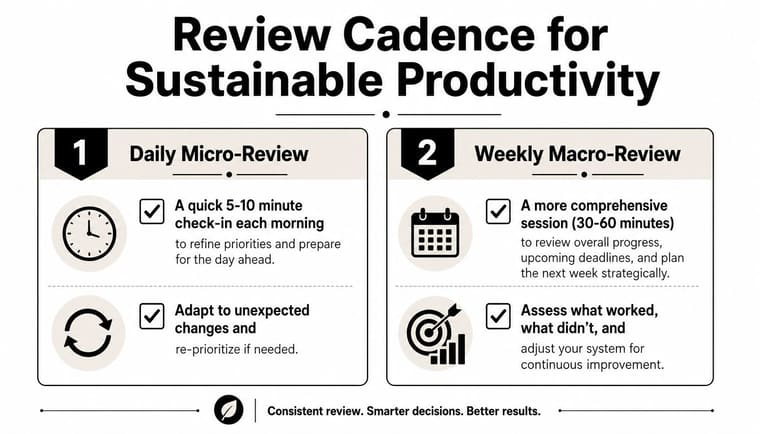
Run a daily micro-review
Keep this short. The purpose isn’t analysis. It’s alignment.
Each morning, look at your deadlines, your calendar, and your top priorities for the day. Then adjust for reality. A meeting may have moved. A task may be blocked. Something urgent may need to replace what you planned yesterday.
My daily check looks something like this:
- Check what’s due soon: identify what can’t drift.
- Compare plan to capacity: cut work before the day overloads.
- Reset next actions: make sure each priority has a clear starting point.
That small habit keeps the day from being hijacked by stale plans.
Use a weekly macro-review
The weekly review is where you manage the whole system instead of just surviving the next few hours.
Block dedicated time and ask a few plain questions:
- What got finished?
- What slipped?
- Which deadlines changed?
- Where do I need to renegotiate, reassign, or simplify?
- Which trackers or reminders need updating?
This is also a good time to strengthen accountability. If you’re trying to make progress visible to yourself or someone else, these ideas on how to track progress with accountability fit well with a weekly review habit.
Review isn’t extra work. Review is what keeps the rest of the work honest.
When people ask me how to manage multiple deadlines without constant stress, this is the part I come back to. Capture everything. Prioritize it. Schedule it. Keep it visible. Then review it before the system goes stale.
If you want a simple way to keep one important deadline in front of you every day, Pretty Progress can help by turning that date into a visible countdown or progress widget on your screen. It works well as the visual layer on top of a solid planning system, especially when you’re trying to reduce mental clutter and stay consistent.