
July 5, 2026
A Habit Tracker for ADHD That Actually Works
Find a habit tracker for ADHD that sticks. Learn ADHD-specific strategies for setup, habit stacking, and using visual widgets to build routines that last.
You’ve probably done this already. You download a habit app at night, set up a whole new life in one burst of motivation, pick colors, categories, reminders, maybe even a perfect morning routine. For a few days it feels possible.
Then the app disappears into the same place your reusable water bottle, gym plan, and unread tabs went. Not because you don’t care. Because remembering the system became its own task.
That’s the part most advice misses. A habit tracker for ADHD can’t just store intentions. It has to stay visible enough to act like an external brain. If it hides behind an icon, expects flawless daily check-ins, or punishes you for missing a day, it stops helping right when you need help most.
Table of Contents
- Why Most Habit Trackers Fail for ADHD Brains
- Choosing Your ADHD-Friendly Habit Tracking System
- Setting Up for Success Your First Three Habits
- The Art of the Visual Cue and Smart Notifications
- Troubleshooting When You Fall Off Track
- Frequently Asked Questions About ADHD Habit Tracking
Why Most Habit Trackers Fail for ADHD Brains
The usual pattern looks like this. You pick a tracker that was clearly designed for a very organized version of humanity. It asks you to set goals, fill in categories, schedule reminders, maybe write little reflections. You do all of it because setup feels productive.
A week later, opening the app feels weirdly heavy. You missed a few checkmarks. The streak is broken. Now the tracker feels less like support and more like evidence.
That isn’t a character flaw. It’s a design mismatch.
Research on ADHD habit formation points to a major difference in timeline. Neurotypical people take an average of 66 days to form an automatic habit, while people with ADHD need 106 to 154 days, which is nearly double, according to Sprout’s review of ADHD habit formation timelines. If the support system fades after the exciting first few weeks, the habit often hasn’t stabilized yet.
The hidden problem is remembering the habit exists
A lot of standard trackers assume you’ll think to open them. That’s a bad assumption for an ADHD brain. If something isn’t visible, it can fall out of awareness fast. If you want a deeper explanation of why that happens in everyday life, this piece on the link between object permanence and ADHD is useful.
That’s why a tracker can be technically good and still fail in real life. If it lives behind a folder, depends on internal motivation, and only works when you remember to check it, it’s asking your weakest skill to power the whole system.
Standard habit tracking often measures memory and consistency more than the habit itself.
Streaks are motivating until they turn into shame
“Don’t break the chain” sounds nice when you’re in a motivated phase. Then life happens. You get sick, sleep badly, lose track of time, or forget once. For a lot of ADHD users, the broken visual chain doesn’t create urgency. It creates avoidance.
A better frame is this: the tracker’s job is not to judge you. It’s to keep the habit visible long enough for repetition to happen.
If your current system keeps disappearing from your mind, it helps to build the rest of your focus setup around external cues too. This guide on how to focus with ADHD fits that same idea.
Choosing Your ADHD-Friendly Habit Tracking System
You pick a tracker on a high-motivation day, customize the colors, set six habits, and feel sorted. Three days later, the app is buried on page two of your phone and your brain acts like it no longer exists.
That’s the true test. The right system still works when you are rushed, foggy, overstimulated, or running on half a battery.
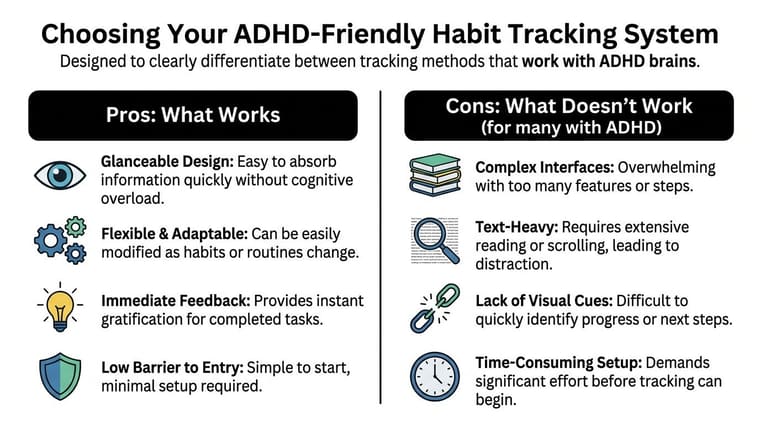
An ADHD-friendly habit tracker should function like an external brain, not another task to manage. Glanceable progress matters more than detailed logs. A visible cue you see ten times a day will usually beat a powerful app you have to remember to open.
What the system must do
The best systems reduce friction in three places: noticing, starting, and recording. If any one of those takes too much effort, the habit falls apart.
Use this quick filter:
- Can I read it in one glance? Progress should be obvious without tapping through menus or decoding charts.
- Can I mark it done in a second or two? If logging feels like admin, it will get skipped on low-capacity days.
- Does the reminder show up in real life? The cue needs to appear where the habit happens, not just sit inside an app.
What usually works better than a feature-packed app
In practice, the strongest setup is often the one that stays in your line of sight. Home screen widgets, lock screen prompts, a whiteboard by the kettle, a sticky note on the bathroom mirror. All of these work for the same reason. They reduce the need to remember.
Visible beats buried.
Here’s how common options stack up:
| System | Good fit for | Trade-off |
|---|---|---|
| Home screen widget | Habits tied to phone use | Easy to tune out if your screen is crowded |
| Lock screen reminder | Time-based routines | Good for prompts, weak for anything detailed |
| Whiteboard | Shared spaces, morning or evening routines | Stays at home |
| Sticky note cue | One-step habits | Fades into the background if you use too many |
| App with visual widgets | Ongoing progress tracking | Needs a few minutes of setup upfront |
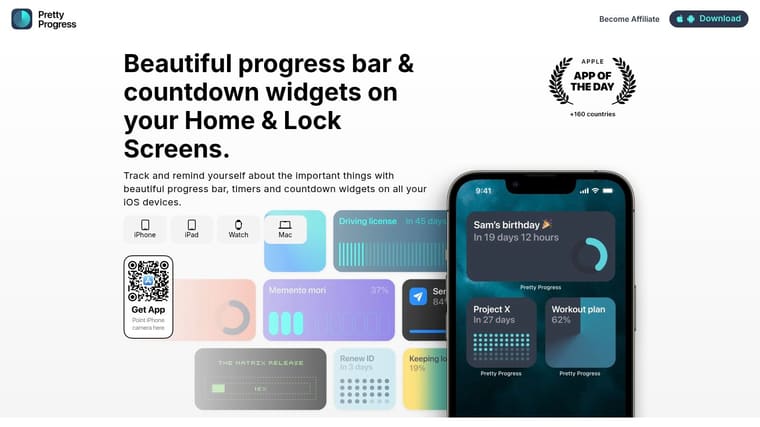
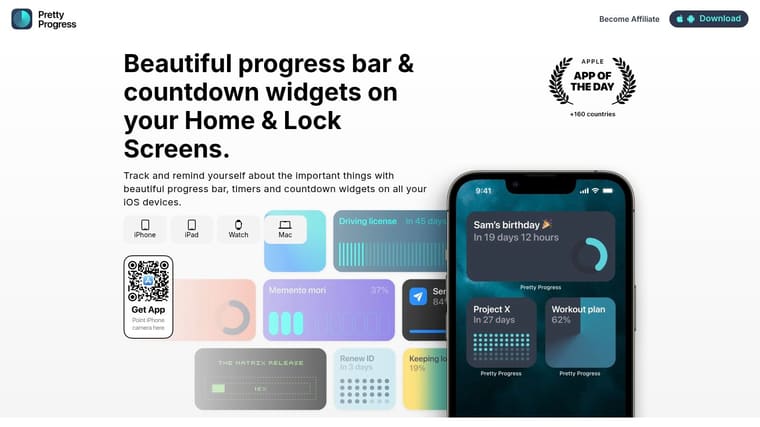
One digital example is Pretty Progress, which lets you place customizable countdown and progress widgets on home or lock screens so the cue stays visible without opening an app. That setup fits ADHD better than a tracker hidden behind folders and tabs.
Systems that create more friction than they remove
Some tools fail even if they look polished.
I’d be cautious with:
- Text-heavy dashboards that feel like work before you even begin
- Setup-heavy apps that ask you to build a system before you can use it
- Streak-first trackers that turn one missed day into a reason to avoid the app
- All-in-one tools where habits get buried under tasks, notes, journals, and goals
The trade-off is simple. More features can give you more control, but they also increase the number of steps between intention and action. For ADHD brains, that cost is often what kills follow-through.
Practical rule: if tracking takes more effort than doing a tiny version of the habit, the system is upside down.
If you want to compare a few broader categories first, this guide to productivity apps is a useful starting point. If getting started is the bigger problem, not planning, this piece on an ADHD motivation app is worth reading.
Setting Up for Success Your First Three Habits
You set up a habit tracker on Sunday with good intentions. By Wednesday, the list already feels heavy. By Friday, you stop opening it because every unchecked box looks like proof that the system failed.
That usually happens because the first habits were too big, too vague, or too dependent on motivation. ADHD tracking works better when the habit is tiny, anchored to something that already happens, and visible enough that you do not have to keep it in your head.
Start with habits that enable other actions
The best first habits reduce friction for the rest of the day. I look for habits that make the next step easier, not habits that sound ambitious on paper.
Good starter habits usually fall into three categories:
- Morning launch habits that help you get moving
- Transition habits that make it easier to switch contexts
- Shutdown habits that make tomorrow easier to start
Attach each one to a cue that already exists. Coffee brewing. Sitting at your desk. Plugging in your phone. Existing actions are more reliable than trying to obey a specific clock time.
“After” works better than “at” for many ADHD brains. “After I pour coffee” is easier to follow than “at 8:00.”
Copy these first three habit templates
Start with one to three habits. That is enough to test the system without turning it into another project.
1. Morning launch
Habit: Drink water after making coffee or tea.
Why it works: The cue is already built into your routine. No extra remembering.
Track it as: “Water after coffee.”
Keep it concrete. One glass counts. A habit should be clear enough that tired-you can do it without negotiating.
2. Workday starter
Habit: Open the task you have been avoiding and do five minutes.
Why it works: Starting is often the hardest part. A five-minute entry point lowers the activation cost and gets you past the freeze.
Track it as: “Five-minute start.”
This works well for admin, email, studying, or writing. The goal is not a huge output. The goal is getting your brain into motion.
3. End-of-day shutdown
Habit: Set out tomorrow’s first step where you will see it.
Why it works: You remove the morning fog from re-entry.
Track it as: “Set up tomorrow.”
That might mean laying out gym clothes, putting medication by your toothbrush, leaving a notebook open, or writing one sticky note with the first task. Small setup, big payoff.
Build the tracker around glancing, not checking in
This is the part many people miss. The tracker should not depend on you remembering to open it every day. For ADHD, the system gets much better when progress stays in view and acts like an external brain.
Use short habit names. Put only your top habits on screen. Make each one readable in a split second.
A simple setup looks like this:
- Choose only the habits that support the day. Three is plenty.
- Use short labels. “Water.” “Start.” “Shutdown.”
- Place each habit near the moment it matters. Morning cues on the first screen. Evening cues near your charging routine.
- Show progress visually. A progress bar, icon, or completion state works better than a hidden log.
If you want examples of how to make habits harder to ignore, this guide to visual reminders for ADHD gives useful ideas you can copy.
Later in the setup, it helps to see the idea in motion:
A visual widget changes the job of the phone. It stops being only a place where attention disappears and starts serving as a glanceable prompt. That trade-off matters. You are not chasing perfect streaks. You are making the next right action easier to notice.
The Art of the Visual Cue and Smart Notifications
A habit tracker for ADHD only works if it keeps re-entering your field of attention. That’s why visual cues beat good intentions almost every time.
The strongest cue is the one you don’t have to remember to check.
Why widgets beat buried lists
A standard app list asks for a sequence. Remember the habit. Remember the app. Open it. Find today. Log it. Return to life. That’s a lot of tiny executive steps.
A widget cuts out most of that. It places the information where your eyes already go. That’s the whole advantage. You’re not trying to become more internally consistent. You’re making the environment do more of the remembering.
Visual prompts outside apps can work just as well. Whiteboards, sticky notes, and fridge magnets often outperform digital systems because they externalize the task without needing a daily box-checking ritual. That idea is part of the recent shift toward visual prompts and away from strict daily pressure, discussed in this advice on visual reminders for ADHD.
When to use countdowns and when to use progress bars
Not all habits need the same visual format.
Use a countdown when urgency matters. Examples:
- finish a report before the workday ends
- leave the house before an appointment
- start winding down before bed
A countdown helps when the question is, “How much time is left?”
Use a progress bar when accumulation matters. Examples:
- pages read this month
- practice sessions completed
- days you took medication this week
- number of walks toward a routine goal
A progress bar helps when the question is, “How far along am I?”
Different visuals solve different ADHD problems. Countdowns fight time blindness. Progress bars fight the feeling that nothing is happening.
A good visual cue doesn’t just remind you. It answers the next question your brain asks.
A sane reminder setup
Notifications can help, but they are often overdone. Then the brain learns to ignore the whole app.
Keep reminders quiet and specific:
- Use one reminder per habit trigger. If the habit is after lunch, remind after lunch.
- Prefer persistent cues over repeated alarms. A visible widget can do more than a noisy phone.
- Reserve stronger reminders for time-critical habits. Medication, leaving for an appointment, bills, deadlines.
- Drop reminders that create instant annoyance. If you resent the alert, you’ll mute it.
The aim isn’t maximum alert volume. It’s gentle interruption of forgetting.
Troubleshooting When You Fall Off Track
You open your tracker after six missed days, and the first thought is usually, “Well, I blew it.”
That moment matters more than the missed days.
For ADHD brains, falling off rarely means laziness or lack of care. It usually means the system stopped being visible, got too annoying, or asked for one step too many. A good habit tracker is an external brain. If you stopped using it, treat that as a design problem first.
Review the breakdown once a week
Daily check-ins can turn habit tracking into paperwork. A weekly review is often easier to return to because it asks a simpler question. What happened?
That lines up with this discussion of permission-based planning and weekly check-ins. The goal is not to defend your streak. It is to spot friction before you quit the habit entirely.
Use one short review each week:
- What happened easily: Which habit showed up with the least effort?
- What got skipped: Which one kept disappearing?
- What made the difference: A person, place, object, time, or visible prompt?
- What needs one change: Smaller step, better placement, different time, or remove it for now?
Keep it brief. Two minutes is enough if you answer candidly.
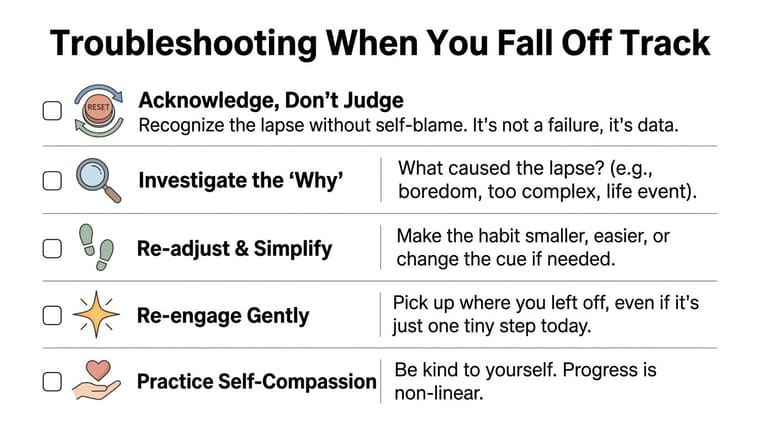
Use a reset that lowers re-entry friction
After a lapse, many people try to restart by fixing everything at once. That usually creates another abandoned setup.
Use a smaller reset:
- Open the tracker, widget, or paper sheet. Just re-establish contact.
- Choose one habit. Ignore the rest for today.
- Shrink the action hard. Read one page. Take one pill. Put on shoes.
- Put the cue back in sight. Home screen, desk, bathroom mirror, fridge.
- Mark one win now. Immediate action rebuilds momentum faster than planning does.
I have found that the restart point needs to feel almost laughably easy. If it feels reasonable, it may still be too big for a low-capacity day.
Figure out what failed
A missed habit gives useful information if you name the failure clearly.
Sometimes the habit is oversized. “Work out” is vague and heavy. “Do five squats after coffee” has a clear start.
Sometimes the tracker is too hidden. If the app lives in a folder and the habit has no physical cue, it disappears from working memory. For many ADHD users, a glanceable widget or object in the environment does more work than a perfect logging screen.
Sometimes the reward comes too late. Brains that struggle with initiation often need immediate proof that progress is happening. A visible check mark, filling bar, or growing history can keep the habit alive long enough to become familiar.
Sometimes the habit no longer fits your real life. A morning routine built for an ideal week often collapses during busy weeks, bad sleep, illness, travel, or stress. Adjust the habit to your actual capacity.
The problem is usually not “I have no discipline.” The problem is “my cue vanished, and the task asked too much.”
Change one variable at a time
If three habits fell apart, resist the urge to redesign the whole system on Sunday night.
Change one thing and test it for a week:
- make the habit smaller
- move the cue into eyesight
- attach it to something you already do
- switch from daily logging to a simpler visual check
- drop the habit that keeps creating resentment
This is slower than a full reset fantasy. It works better.
Use restart rules, not streak rules
Streaks can be motivating for some people. They can also make one missed day feel like a total wipeout, which is a terrible bargain for an ADHD brain.
A better rule is simple. Miss once, restart at the next available chance. Miss for a week, restart with the smallest version. Miss for a month, return to the cue first and the habit second.
Progress that stays visible beats perfect consistency that disappears.
Frequently Asked Questions About ADHD Habit Tracking
How many habits should I track at once
Fewer than you want to. Typically, for individuals with ADHD, one to three is the sweet spot when starting. If you add too many, the tracker becomes another management task.
Does missing a day ruin progress
No. It gives you data. One missed day usually means the cue failed, the habit was too big, or life got loud. Restart the next chance you get. Don’t spend energy mourning a streak.
What if I stop opening the app
That usually means the system is too hidden or too effortful. Move the habit into a widget, a lock screen, a whiteboard, or a physical cue in the environment. Make the prompt harder to forget than the app icon.
Are paper trackers better than apps
Sometimes, yes. A whiteboard on the fridge can beat an advanced app because it stays visible. The better tool is the one that stays in your line of sight and asks the least from you.
Do gamified apps help
They can. Some ADHD users respond well to rewards, social accountability, or game mechanics. Others find the extra layer distracting. If the game helps you return to the habit, keep it. If it becomes its own hobby, simplify.
What should I do when the novelty wears off
Expect it. Novelty is not a stable fuel source. Replace it with better cues, smaller habits, and easier wins. If needed, refresh the environment rather than reinventing your whole routine.
What counts as success
For ADHD habit tracking, success isn’t perfect daily compliance. It’s this: the habit stays visible, the system stays usable, and restarting doesn’t feel dramatic.
If you want a simple way to keep habits and deadlines in sight, Pretty Progress is built around customizable progress and countdown widgets for home and lock screens. That makes it useful when your biggest challenge isn’t motivation in theory, but remembering the habit at the right moment in real life.





