May 7, 2026
Event Planning Timeline: A Guide to Flawless Execution
Master your event planning timeline with our step-by-step guide. Learn key phases, avoid common pitfalls, and use Pretty Progress widgets to track everything.
You’ve got a date on the calendar, a venue shortlist in one tab, vendor emails piling up in another, and a growing fear that you’re already late on something important.
That feeling is normal. Event work starts as a simple idea, then turns into a chain of deadlines, dependencies, approvals, and people who all need different things at different times. The trouble isn’t usually effort. It’s visibility. If the timeline lives in one spreadsheet, the budget in another, and the run of show in someone’s inbox, small misses become expensive problems fast.
A solid event planning timeline fixes that. It gives the team one sequence, one cadence, and one shared view of what has to happen first, what can happen in parallel, and what absolutely cannot slip.
Table of Contents
- Your Starting Point from Chaos to Control
- The Core Phases of Event Planning
- How to Build Your Custom Event Timeline
- Common Timeline Pitfalls and How to Sidestep Them
- Visualize Your Timeline with Pretty Progress
- From Plan to Reality Your Post-Event Blueprint
Your Starting Point from Chaos to Control
Most planners hit the same moment. The event is approved, everyone is excited, and then the actual list appears. Venue. Budget. Contracts. Registration. Speaker outreach. Catering counts. Seating. Signage. Rehearsals. Follow-up.
That pressure isn’t in your head. The U.S. event planning industry is a $6.4 billion market, and 73% of conflicts arise from miscommunication, while 47% of planners still rely on spreadsheets even though 78% identify timeline management as their most critical operational skill, according to event planning industry statistics compiled by Scheduling Kit.
When I see a team struggling, the problem is rarely that they don’t care or don’t know how to work. It’s that they’re managing the event as a pile of tasks instead of a sequence. A to-do list tells you what exists. A timeline tells you when a decision becomes dangerous to delay.
Practical rule: If a task affects contracts, guest experience, or event-day operations, it belongs on the timeline, not just on someone’s personal checklist.
A good event planning timeline does three jobs at once:
- It creates order: The team can see what needs to happen now, next, and later.
- It reduces noise: People stop asking for updates that the plan already answers.
- It protects budget: Late decisions trigger rush fees, weaker vendor options, and preventable change orders.
Chaos usually comes from treating every task as equally urgent. They’re not. Venue selection has a different level of urgency than floral mockups. Registration launch has a different deadline logic than post-event thank-you emails.
Control starts when you stop asking, “What should we work on today?” and start asking, “What must be true by this date for the event to succeed?”
The Core Phases of Event Planning
An event planning timeline works best when it’s divided into phases. That keeps the team focused on the right kind of work at the right time instead of jumping between strategy decisions and day-of details too early.
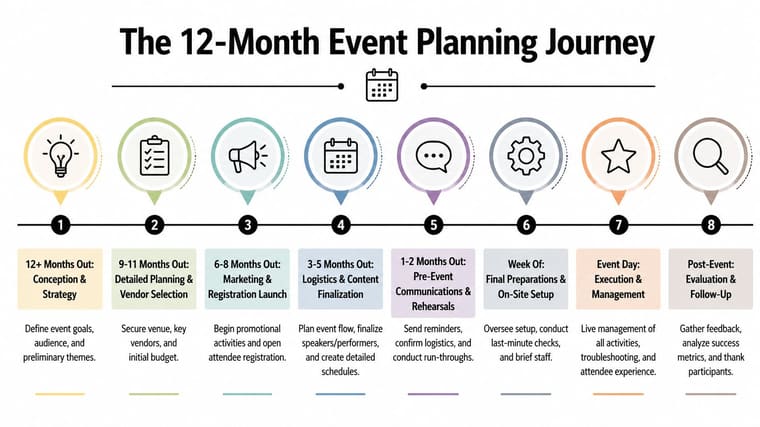
Large events usually need a long runway. Ticmint’s event planning timeline guide notes that extensive large-scale events require a 6 to 12 month timeline, with initial strategy starting 12+ months in advance. It also notes that 61% of marketers synchronize marketing and attendee engagement with the schedule, usually starting 6 to 9 months prior.
Start with strategy, not shopping
The first phase starts before you contact vendors. That surprises newer planners, but it matters.
At 12+ months out, the main work is strategic. You define the event’s purpose, who it’s for, what success looks like, and what constraints already exist. Budget ranges, risk questions, internal approvals, and format decisions all belong here. If the team skips this phase, they usually spend the next few months fixing expensive misunderstandings.
For weddings, the structure is different but the logic is the same. A practical example is this 12-month wedding checklist, which shows how early decisions shape every later booking and guest-facing detail.
The fastest way to lose time is to start booking before the decision-makers agree on what the event is supposed to accomplish.
Move into commitments and promotion
At 9 to 12 months, you’re finalizing critical elements. Venue, core vendors, production direction, and key contract terms get decided here. This phase is about reducing uncertainty. Once those pieces are in place, the rest of the timeline becomes much more realistic.
At 6 to 9 months, marketing and attendee engagement move to the front. That’s when registration pages, promotional messaging, sponsor visibility, content teasers, and outreach calendars need to be active. If promotion starts too late, the team spends the final stretch chasing attendance instead of refining delivery.
This is also the point where planners juggling several active projects need a cleaner operating view. A useful companion read is how to keep track of multiple projects, especially if your event timeline is competing with other launches, campaigns, or client deadlines.
Finish with execution details and follow-up
The last stretch, usually 3 to 6 months out, is where the event stops being conceptual and becomes operational. Final agenda structure, staffing plans, attendee communications, signage lists, seating logic, rehearsal plans, and compliance checks all tighten up here.
The week of the event is not for major decisions. It’s for confirmation, setup, troubleshooting, and team clarity.
After the event, the timeline still matters. Follow-up emails, invoice reconciliation, survey review, and team debriefs should already be scheduled before doors open. If they’re not, they often get delayed or skipped, and the next event loses the benefit of what this one taught you.
How to Build Your Custom Event Timeline
The strongest event planning timeline is built backward, not forward. You don’t start with today and keep adding tasks. You start with the event date, mark the immovable milestones, and work back from there.
That approach matters because timing in events is not flexible in the way people imagine. Momentus notes in its event planning guide that 70% of top venues book 9+ months ahead. It also reports that contacting speakers 4 to 6 months early yields an 80% confirmation rate, compared with 40% if contacted later. And events with detailed timelines achieve 92% on-time delivery versus 65% without.
Work backward from the fixed date
Start with the event date and mark the milestones that cannot move. These are usually:
- Venue commitments: Holds, deposits, and contract deadlines
- Audience-facing deadlines: Registration launch, invitation sends, reminder campaigns
- Content deadlines: Agenda lock, speaker confirmations, presentation collection
- Operational deadlines: Final guest counts, seating charts, production rehearsals, shipping cutoffs
Once those are placed, everything else falls around them.
Here’s the sequence I use in practice:
- Fix the event date and format. In-person, hybrid, virtual, or social event changes nearly every downstream task.
- Mark external deadlines first. Venue deposits, vendor payment dates, sponsor commitments, platform setup windows.
- Add dependency tasks behind each milestone. A registration launch depends on approved copy, pricing, landing page setup, and internal sign-off.
- Set review points. Not just due dates. Review dates. A task due Friday often needs a decision by Tuesday.
- Build a day-of timeline separately. The master plan and the operational run sheet are related, but they are not the same document.
Map dependencies before tasks
A common mistake is listing tasks without showing what each one depends on. That creates false confidence. “Send speaker promo” sounds simple until you realize you still need bios, headshots, approvals, and session titles.
Many planners benefit from using date math instead of guesswork. If your contract says a final count is due on business days rather than calendar days, use a tool like this business days calculator so your dates match reality.
Field note: Every late task isn’t equal. Late copy can be annoying. Late venue paperwork can force every other team to replan around it.
Another practical move is to draft the agenda early, even if it’s rough. Good structure exposes missing pieces and shows how session flow changes staffing, AV, signage, and communication needs.
Sample Event Timeline Milestones
| Milestone | Wedding (150 guests) | Corporate Conference (500 attendees) | Product Launch (Virtual) |
|---|---|---|---|
| Event purpose and goals | Define style, guest experience, and budget priorities early | Align stakeholders on audience, outcomes, and budget before vendor outreach | Clarify launch objective, audience, and conversion path before platform setup |
| Venue selection | Choose ceremony and reception locations early enough to secure preferred date | Prioritize venue search early because availability shapes everything else | Confirm platform, streaming setup, and hosting format before promotion |
| Core vendor booking | Lock planner, caterer, photographer, and entertainment after venue | Secure venue, AV, production, and key support partners once scope is approved | Confirm streaming, design, moderation, and technical support partners |
| Speaker or participant outreach | Confirm officiant and special participants after schedule is sketched | Contact speakers early in the planning cycle to improve confirmation odds | Confirm presenters, demo leads, and moderator roles before launch messaging |
| Registration or guest communication | Save-the-dates and guest list management start once venue is set | Registration and attendee communications begin once pricing and agenda direction are ready | Registration or signup page goes live once messaging and event flow are approved |
| Agenda and flow | Ceremony timing, dinner flow, and reception sequence get refined closer to event | Session structure, breaks, and room flow are finalized in the middle phase | Demo order, live segments, Q&A flow, and contingency scripts are finalized before rehearsal |
| Final logistics | Seating charts, final counts, transport, and vendor confirmations happen late | Final attendee counts, rooming, signage, staffing, and rehearsals happen near event date | Tech checks, speaker rehearsals, backup links, and final scripts happen in the last stretch |
| Post-event follow-up | Thank-you notes, photo collection, vendor closeout | Survey review, invoice reconciliation, stakeholder recap | Recording distribution, lead follow-up, analytics review |
The exact dates will vary, but the pattern holds. Define the event, secure the hard dependencies, launch audience communication, tighten logistics, then run the show.
Common Timeline Pitfalls and How to Sidestep Them
Most event failures don’t come from one dramatic mistake. They come from ordinary delays that stack on top of each other until the team runs out of room to recover.
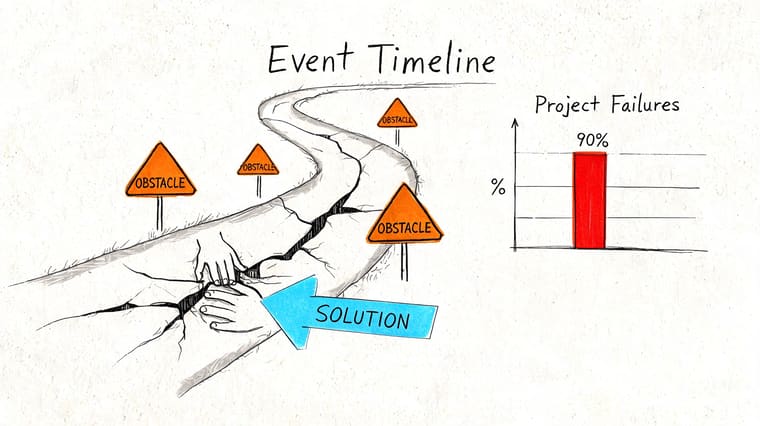
Jumialuko’s analysis of event planning pitfalls highlights three that matter most: inadequate early goal alignment is responsible for 52% of failures, vendor delays carry a 45% overrun risk, and scope creep causes 38% budget inflation. The same analysis notes that securing primary vendors 6 months out can reduce no-shows from 25% to 8%.
Misaligned goals break the plan early
This one shows up before any visible crisis. One stakeholder wants lead generation. Another wants brand positioning. Another wants a polished internal celebration. The team starts planning without resolving the conflict, and the timeline becomes unstable from day one.
The fix is blunt. Force alignment early. Get approval on purpose, audience, budget range, and essential requirements before booking anything major.
Use a short decision record that covers:
- Primary goal: What the event must achieve
- Target audience: Who the event is for
- Success measures: What stakeholders will judge afterward
- Boundaries: Budget, format, approvals, and brand constraints
Vendor slippage spreads everywhere
A late caterer doesn’t just affect catering. It affects room layout, rental counts, staffing, timing, and often guest communication. That’s why vendor delays create so much downstream damage.
The practical response is to book critical vendors early and track their deliverables separately from your internal tasks. Don’t write “AV confirmed” and move on. Track proposal received, scope approved, deposit paid, run-of-show reviewed, and rehearsal confirmed as separate moments.
Book the vendors that affect other vendors first. Venue, AV, production, and catering usually shape the rest of the operating plan.
A backup list helps too, but only if it’s realistic. Keep alternates for the categories most likely to disrupt the whole event.
Scope creep usually looks harmless at first
Nobody announces scope creep. It arrives as “one more lounge area,” “one extra speaker,” or “a slightly larger gift experience.” Each addition sounds manageable on its own. Together they change budget, labor, and timeline.
Protect the plan with change discipline:
- Lock the brief: Once strategy is approved, changes should be visible, not casual.
- Price every addition: Even small adds affect setup, staffing, or timeline pressure.
- Tie changes to trade-offs: If something new comes in, ask what moves out or what deadline tightens.
- Use buffers intentionally: Leave breathing room in each phase so the team can absorb friction without panic.
A timeline doesn’t prevent problems. It shows you where the damage will land soon enough to do something about it.
Visualize Your Timeline with Pretty Progress
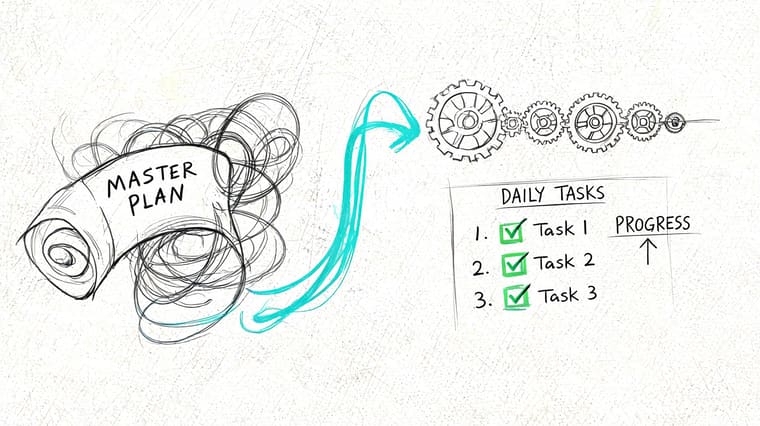
A master plan can be accurate and still fail in practice if nobody sees it often enough to act on it.
Why static timelines stop working in real life
This is the gap most planning advice ignores. The event may have a strong macro timeline, but the person handling speaker outreach, sponsor follow-up, or signage proofs still has to survive the day-to-day mess of email, meetings, approvals, and interruptions.
Run Sheets points to that gap directly, noting a lack of integration between macro timelines and daily productivity tools, with failures from miscommunication in 75% of cases. The same source argues that visual cues help by turning abstract deadlines into glanceable anchors that support task completion.
That matches what planners already know from experience. A buried project file doesn’t change behavior. A visible countdown does.
A timeline works best when people can check it without opening a full project system.
That’s where visual widgets are useful. Instead of asking team members to remember every due date, you move the most important milestones into places they already look. Lock Screen. Home Screen. Desktop. Watch face.
How to turn milestones into daily visual cues
The smart way to do this is not to mirror your entire project plan. That becomes visual clutter fast. Pull out the deadlines that drive everything else.
For example:
- Venue deposit due: Put this on a Lock Screen countdown so it stays visible every day until payment is sent.
- Speaker confirmation deadline: Use a desktop progress bar so anyone handling content sees the time remaining at a glance.
- Catering final count: Put it on a watch complication for fast checks during site visits or vendor calls.
If you want the visual itself to feel clearer, a good reference is this guide to a countdown clock graphic, which shows how a deadline display can be simpler and easier to scan than a crowded planning board.
The setup is straightforward in practice. Create one countdown or progress bar per milestone, label it in plain language, choose the start and end date, then place it where you’ll see it. Keep the label specific. “Venue deposit” is better than “finance.” “Final signage proof” is better than “design.”
A few rules keep this system useful:
- Track only critical dates visually. Too many widgets and you’ll ignore all of them.
- Use milestone names, not department names. The point is immediate understanding.
- Separate personal cues from master planning. The project plan stays detailed. The widget stays glanceable.
- Refresh after each phase. When venue is locked, replace that visual with the next pressure point.
Video helps if you want to see this kind of visual tracking in action:
This doesn’t replace a planning platform, a run sheet, or a shared production document. It closes the last mile between the official timeline and the planner’s actual day. That’s usually where deadlines get missed.
From Plan to Reality Your Post-Event Blueprint
A strong event planning timeline doesn’t end when the room clears out. It ends when the event is fully closed, reviewed, and translated into a better process for next time.
Close the event properly
The first post-event window should already be scheduled before event day. Thank-you messages, survey sends, invoice checks, team debriefs, and content delivery all need owners and dates.
For weddings and social events, guest-generated content is often part of that closeout. If you need a clean way to Collect wedding photos from guests, it helps to decide that system before the event so the follow-up is simple rather than improvised.
A clean wrap-up usually includes:
- Financial closeout: Confirm final invoices, balances, and change orders
- Relationship follow-up: Thank sponsors, vendors, speakers, and guests
- Content capture: Store photos, recordings, presentations, and approved assets
- Team notes: Write down what caused stress while it’s still fresh
Review the timeline, not just the event
This is the part too many teams skip. They evaluate attendance or guest feedback, but not the timeline itself.
Ask practical questions. Which deadlines were realistic? Which ones were too tight? Where did approvals stall? Which milestone needed more buffer? Did the team have visibility at the right moments, or only after things became urgent?
The next event gets easier when you audit the planning process with the same honesty you apply to the event outcome.
That review turns one finished event into a better operating system. Over time, your event planning timeline stops being a template and starts becoming a proven method.
If you want your deadlines to stay visible instead of buried in notes, Pretty Progress makes that easy with customizable countdowns and progress widgets for iPhone, iPad, Apple Watch, Mac, and Android. It’s a simple way to keep key event milestones in view every day, from venue deposits to final guest counts, so the plan stays active instead of theoretical.