May 20, 2026
10 Event Planning Best practices for 2026 Success
Master event planning best practices with our top 10 tips. Get actionable checklists for timelines, budgets, vendors, and more to ensure flawless execution.
From Chaos to Control: A Modern Blueprint for Flawless Events
Event day chaos usually starts long before event day. It starts when nobody agreed on what success looks like, when timelines live in five different places, when a vendor promise stayed verbal, and when registration asks for too much too early. By the time the doors open, the cracks are already there.
Successful events don’t happen because a team worked hard at the last minute. They happen because somebody built a system that carries the team from first brief to final report. That’s the difference between scrambling and running a clean operation.
Modern event planning best practices are less about heroic coordination and more about disciplined visibility. You need goals you can measure, a timeline people follow, a communication structure that stops confusion, and a post-event process that proves what the event delivered. That’s also why simple visual tools matter more than many planners admit. A countdown to a venue deadline or a progress bar for sponsor deliverables can keep a whole team moving without another status meeting.
If you’re in the middle of planning right now, juggling approvals, vendors, promo timelines, and attendee questions, this framework will help you regain control. For a complementary perspective, it’s also worth reviewing 1021 Events’ top practices.
Table of Contents
- 1. Define Clear Event Objectives and Key Metrics
- 2. Create a Comprehensive Master Timeline and Checklist
- 3. Implement a Centralized Communication and Project Management System
- 4. Secure Vendors and Venues Early with Detailed Contracts
- 5. Develop a Multi-Channel Marketing and Promotion Strategy
- 6. Build and Brief a Coordinated Event Day Team with Clear Roles
- 7. Establish Clear Budget Management and Expense Tracking
- 8. Implement Risk Management and Contingency Planning
- 9. Design Comprehensive Attendee Experience and Registration Process
- 10. Measure Success with Post-Event Evaluation and Reporting
- 10-Point Event Planning Best Practices Comparison
- Your Next Event Starts Now Turning Practice into Perfection
1. Define Clear Event Objectives and Key Metrics
Events go sideways when teams confuse activity with progress. A packed planning calendar means nothing if nobody has decided whether the event is supposed to drive pipeline, deepen customer relationships, launch a product, or create sponsor value.
Set the objective before you book anything. The venue, run of show, registration flow, speaker mix, and follow-up plan should all trace back to one or two primary outcomes. If they don’t, you’re building an expensive guessing machine.
Start with the business outcome
A useful planning document starts with a short list of KPIs. Industry guidance recommends defining clear KPIs before the event and managing with data from registration through attendance and engagement, commonly including registration conversion rate, check-in rate, and session engagement metrics, as outlined in this event data planning framework.
That same guidance matters for a practical reason. Real attendance and engagement tell you more than registration counts alone. Plenty of events look healthy on paper until the room is half full and breakout sessions are empty.
Make progress visible
A visual system helps significantly. A written target gets ignored. A visible countdown to registration close, sponsor asset deadlines, or final attendee communications gets noticed. A progress bar for confirmed speakers or approved session abstracts helps the team see slippage early.
If your goals still feel vague, use a simple framework like SMART event objectives and goals to tighten them up before the plan expands.
Practical rule: If a stakeholder can’t explain the event goal in one sentence, the team won’t execute consistently.
A few examples from real planning work:
- Product launch event: Prioritize registrations, live attendance, demo engagement, and follow-up actions.
- Association conference: Prioritize check-ins, session participation, sponsor lead quality, and attendee feedback.
- Fundraiser: Prioritize donor attendance, auction participation, pledge follow-through, and sponsor retention.
The best event planning best practices always start here. Clear goals make every later trade-off easier.
2. Create a Comprehensive Master Timeline and Checklist
A timeline isn’t admin work. It’s operational control.
I’ve seen skilled teams fail because the plan lived as a loose list of tasks with no dates, no dependencies, and no owner. Everyone was busy. Nobody knew what was late until it was urgent.
Build backward from the event date
Start with the event day, then work in reverse. Load-in, stage build, speaker briefing, catering confirmation, signage print deadlines, attendee reminders, sponsor approvals, content lock, registration launch. Put all of it on one master timeline.
The timeline should reflect how event work breaks. Promotion starts early. Venue and vendors need lead time. Registration assets can’t wait for every other decision to be perfect. If you need a model, this event planning timeline guide gives a clean starting structure.
What a usable timeline includes
A good master timeline has four things many teams skip:
- Task ownership: Every deadline needs one accountable person.
- Dependencies: You can’t brief signage before the floor plan is final.
- Buffers: Printing, shipping, approvals, and venue responses all slip.
- Weekly review: If nobody reviews the timeline, it’s decoration.
For larger events, I break the plan into phases: strategy, sourcing, promotion, content, production, attendee communications, on-site execution, and closeout. That lets each workstream move without losing the whole picture.
A checklist is still useful, but only when tied to dates. If you want a practical companion resource, this guide can help simplify your event workflow.
Most late-stage event stress is just early-stage ambiguity showing up with a deadline attached.
3. Implement a Centralized Communication and Project Management System
The fastest way to lose control of an event is to let information scatter across email threads, chat apps, personal notes, shared drives, and somebody’s memory. That’s how teams miss version changes, duplicate work, and brief vendors with outdated files.
One source of truth beats ten fast chats
Every event needs a single operating hub. Asana, Monday.com, ClickUp, Notion, Airtable. The specific tool matters less than the discipline behind it. One place for tasks, one place for files, one place for key decisions, one place for the current version of the truth.
This isn’t just a workflow preference. Best-practice guidance for event analytics stresses centralizing data storage, standardizing definitions, and creating an auditable reporting structure, including a practical benchmark of defining 8–12 KPIs across the event lifecycle. The same logic applies to project management. If the inputs are fragmented, the decisions will be messy.
What to centralize first
Start with the materials people constantly ask for:
- Master timeline: One version, updated live.
- Vendor documents: Contracts, COIs, payment status, key contacts.
- Run of show: Current production sequence, not an old PDF.
- Decision log: What changed, who approved it, when it changed.
For teams managing several moving parts at once, this guide on keeping track of multiple projects is useful because events rarely happen in isolation. You’re often managing the event, the campaign, the speakers, and the sponsor program at the same time.
What doesn’t work is using chat as your system of record. Slack is great for speed. It’s terrible for permanence.
4. Secure Vendors and Venues Early with Detailed Contracts
Good vendors save events. Poorly managed vendor agreements create most of the fires people blame on “bad luck.”
The best time to negotiate with an advantage is before you need the vendor badly. Once your date is close and your options narrow, you’ll accept terms you should have challenged weeks earlier.
Early booking buys options
Major planning guidance consistently recommends starting early so attendees can plan and organizers can secure venues and vendors well ahead of time. That same guidance also ties early, data-driven planning to stronger performance and notes that leveraging event data can increase attendance by up to 20%.
That’s the strategic side. The practical side is simpler. Early booking gives you better dates, better partners, and more room to recover if someone drops out.
If you’re venue scouting in Western Australia, this list of conference venues in Perth can help you compare options quickly.
Contracts should answer the ugly questions
A clean contract doesn’t just describe the happy path. It defines setup windows, breakdown windows, payment dates, overtime, staffing minimums, technical inclusions, cancellation terms, substitutions, and what happens when deliverables aren’t met.
I always look for these trouble spots first:
- Scope drift: What exactly is included, and what triggers added cost?
- Timing risk: When can they access the space, and what happens if they’re late?
- Fallback terms: Can they substitute staff or equipment without approval?
- Cancellation language: Who pays what if plans change?
Verbal reassurance feels fast in a planning call. Written clarity is what protects you on event week.
A vendor comparison matrix also helps. Price matters, but responsiveness, detail quality, and operational discipline often tell you more than the quote.
5. Develop a Multi-Channel Marketing and Promotion Strategy
Marketing usually breaks down in one of two ways. Teams start too late, or they promote everywhere without knowing which channel is driving the right attendees.
Promotion starts earlier than most teams want
For most events, promotion should begin months in advance so attendees have time to plan, RSVP, and fit the event into their schedules. That’s not theory. It’s standard guidance from event planning best practices, and it matters even more for conferences, fundraising events, and anything that needs travel approval or sponsor activation.
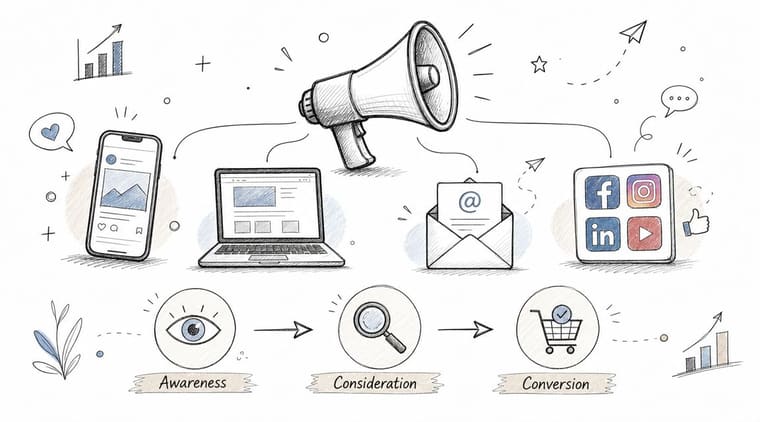
The strongest campaigns build in layers. Email handles direct conversion. Social builds familiarity. Partner outreach expands trust. Speaker promotion adds borrowed audience. PR works best when there’s a story worth covering.
Here’s the funnel I use in practice:
- Awareness: Announce the event, frame the value, and seed key messages.
- Consideration: Release agenda detail, speakers, use cases, and social proof.
- Conversion: Push deadlines, availability, logistics clarity, and urgency.
Track channel quality, not just volume
Modern teams outperform old-school promotion by leveraging data-driven event management. This approach relies on tracking channel performance before the event, on-site behavior during it, and post-event sentiment after it, using inputs such as registration forms, social media, event systems, RFID badges, QR codes, and surveys. That broader shift is one reason the event-management software market is estimated at USD 15.5 billion in 2024 and projected to reach USD 34.7 billion by 2029 at a 17.4% CAGR.
In practical terms, tag your links, track registration source, and compare who shows up and engages. A channel that drives lots of cheap sign-ups but weak attendance can waste more time than it saves.
6. Build and Brief a Coordinated Event Day Team with Clear Roles
A detailed plan can still collapse on-site if nobody knows who owns what. Event day doesn’t reward talented generalists nearly as much as it rewards clear operators with defined authority.
Role clarity prevents event-day drift
Every event needs named owners for registration, speaker handling, venue liaison, AV, attendee support, sponsor care, and issue escalation. On smaller teams, one person may wear multiple hats. That’s fine. Unclear ownership is not.
A one-page role card works better than a long operations manual. People need immediate answers under pressure. Who approves room resets? Who handles a missing speaker? Who talks to the caterer? Who can spend money without calling finance?
“If everybody is watching the room, nobody is watching the problem.”
That’s why I like assigning one event-day operations lead with final call authority. It keeps decisions moving when there’s no time for committee discussion.
How to brief for real conditions
Do at least one team briefing before the event and one venue walk-through with key leads. The briefing should cover the run of show, guest profile, known risks, communication channel, escalation path, and what “good” looks like for each zone.
A short visual reference also helps morale. A countdown widget on a shared iPad at the operations desk, or progress bars showing pre-open readiness, can keep everyone focused without another verbal update.
Use this walkthrough as a briefing reset before the doors open:
The teams that look calm on event day usually aren’t less busy. They’re just less surprised.
7. Establish Clear Budget Management and Expense Tracking
Most event budgets don’t blow up from one dramatic mistake. They bleed out through unapproved upgrades, rushed fixes, duplicate orders, unclear inclusions, and small decisions nobody logged.
Budgets fail in the small decisions
A working event budget needs line items, owners, approval logic, and regular review. Venue, catering, production, staffing, décor, transportation, marketing, registration tech, speaker travel, printing, contingency. If spend isn’t categorized clearly, you won’t know where pressure is building until it’s too late.
I prefer a live shared budget over a static exported file. Finance may want the final spreadsheet. The event team needs a living document with quote status, committed spend, actual spend, and payment dates.
The key habits are basic, but they work:
- Track commitments early: A signed quote is already budget pressure, even before payment.
- Separate wants from needs: Nice upgrades multiply fast near event week.
- Log every change: “We’ll sort it later” usually means “We’ll forget it until invoicing.”
Use budget reviews to force trade-offs
The budget meeting should answer one question: what are we choosing to protect? Sometimes that’s attendee experience. Sometimes it’s sponsor commitments. Sometimes it’s content quality. You rarely get to protect everything.
A visible progress bar can help here more than people expect. Showing how much of the budget is committed versus still flexible changes the tone of approval conversations. It turns abstract caution into something everyone can see.
What doesn’t work is treating contingency as spare money. It’s not. It’s protection against reality.
8. Implement Risk Management and Contingency Planning
Experienced planners don’t assume things will fail. They assume some things can fail, then decide in advance which failures matter most.
That mindset changes everything. Instead of reacting emotionally, the team responds operationally.
Plan the failure paths in advance
Start with a pre-mortem. Ask the team to imagine the event went badly. Then list the reasons. Speaker cancellation. Wi-Fi outage. Weather issue. Delayed load-in. Thin attendance. Catering miss. Power problem. Staff no-show. Registration bottleneck.
You don’t need a giant risk file nobody reads. You need a shortlist of high-impact scenarios with a named owner and a response path.
I usually separate risks into three buckets:
- Critical: Event can’t run normally without a backup.
- Major: Event can run, but experience or reputation suffers.
- Minor: Annoying, but manageable on-site.
Keep the crisis playbook short
A useful crisis playbook fits on one page. Key contacts. Decision authority. Backup vendors. Venue escalation path. Public-facing message owners. Tech fallback steps. Medical or security procedures. Anything longer tends to stay unread when it’s needed most.
One post-event challenge many teams miss is proving value after the fact. Industry commentary notes that event guidance often covers goals, budgets, and debriefs but still falls short on quantifying ROI beyond basic attendance and feedback, especially when teams need to tie results to pipeline, retention, or behavior change across formats, as discussed in this post-event ROI gap analysis. That’s another reason contingency planning matters. If you can’t protect the experience, it gets even harder to defend the spend.
Risk work isn’t pessimistic. It’s respectful of how events behave.
9. Design Comprehensive Attendee Experience and Registration Process
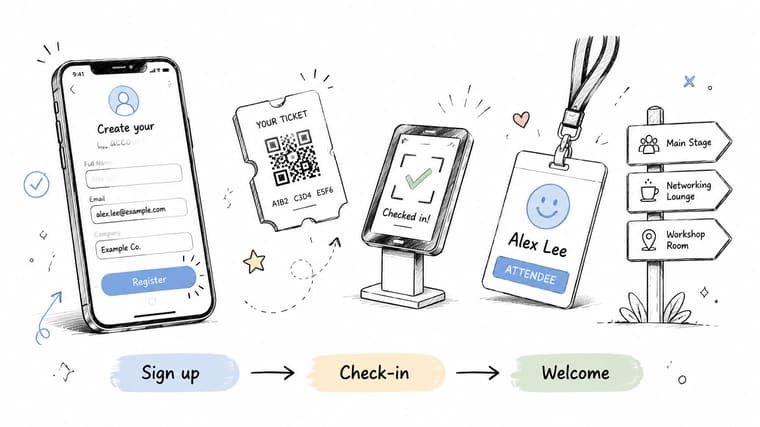
A guest hits your registration page on a phone between meetings. If the form is slow, confusing, or asks for too much, you lose them before your event has a chance to impress them.
That early experience shapes the whole day. Registration, confirmation emails, calendar holds, reminder messages, check-in flow, signage, and session access all need to feel connected. Attendees notice the gaps fast.
Registration should feel easy
A strong registration flow removes friction at the point of commitment. Ask for the minimum needed to secure the booking, such as name, email, and payment details if the event is paid. Save secondary questions for later once the attendee has said yes.
I use a simple test here. If a field does not change pricing, access, capacity planning, or legal compliance, it usually does not belong on the first form.
That matters because teams often try to collect everything up front. Dietary requests, breakout preferences, travel details, company size, interest areas, and networking profiles all have value. They just do more damage than good when they appear before the attendee is committed.
A clean registration flow should do three jobs:
- Capture commitment fast: Keep required fields to a minimum.
- Set expectations clearly: Confirm what attendees will get, where to go, and what happens next.
- Support later segmentation: Collect richer profile data after sign-up through follow-up emails or attendee portals.
The attendee experience starts before check-in
Good event operations feel coordinated from the attendee side, even when the backend is busy. The confirmation email should answer the first practical questions. The reminder should reduce no-shows. Check-in instructions should be easy to find on a phone. On-site signage should tell people where to go without making them stop and ask.
This is also a good place to use Pretty Progress. A visible countdown to registration close, speaker announcements, mobile app launch, or VIP briefing deadlines helps internal teams stay on pace and helps stakeholders see what is coming without chasing updates. I have found that visual progress markers cut down on last-minute confusion because everyone can see whether the registration build, badge print deadline, or attendee email sequence is on track.
The registration form is your first line of hospitality. If it feels clumsy, attendees assume the event will too.
Different attendee groups also need different arrival paths. Sponsors, speakers, press, and VIP guests should not stand in the same line as general admission if their schedule or access needs are different. That takes more setup and staffing, but it prevents avoidable friction at the front door and gives high-value guests a better first impression.
10. Measure Success with Post-Event Evaluation and Reporting
The room is empty, the trucks are loaded, and someone in leadership asks the question every planner should be ready for. Was it worth it?
Post-event evaluation answers that in operational terms, not in vibes. A strong report shows what the event achieved, where execution held up, where it slipped, and what the team should change before the next date goes on the calendar.
Report against the goals you set at the start
Good reporting starts long before show day. If the event goal was qualified attendance, measure qualified attendance. If the goal was sponsor retention, show sponsor results. If the goal was audience engagement, report the sessions, activations, or touchpoints that drew attention.
That discipline matters because post-event reports often fail in a predictable way. Teams collect everything they can get, then struggle to separate interesting information from decision-making information. I have seen polished decks miss the one thing an executive wanted to know, whether the event advanced a business objective enough to justify doing it again.
Use a simple review structure:
- Goal performance: What happened against the original targets
- Operational performance: Check-in flow, schedule adherence, staffing coverage, vendor delivery
- Audience response: Attendance patterns, session engagement, survey themes, drop-off points
- Commercial results: Sponsor outcomes, pipeline signals, upsell opportunities, partner feedback
- Next actions: What to repeat, fix, remove, or test
Build two versions of the report
One version is for decision-makers. The other is for the delivery team.
Executives usually need a one-page summary with clear conclusions, risks, and recommendations. The event team needs the detail behind those conclusions, including timing issues, communication gaps, budget variances, and notes on what caused them. If both groups get the same report, one of them gets too much detail or not enough.
This is also where Pretty Progress earns its place after the event, not just before it. Teams can compare planned milestones against actual completion, show where approvals slowed production, and visualize how timeline pressure affected outcomes. That makes the debrief more honest. It is easier to fix a recurring delay when everyone can see exactly where the schedule started slipping.
Standardize definitions before you compare events
Comparison falls apart fast if every event measures success differently.
Set the definitions early and keep them consistent. Decide what counts as an attendee, a qualified lead, a sponsor interaction, a no-show, or an engaged participant. Then use those definitions every time. Otherwise, reporting turns into interpretation, and interpretation turns into internal debate.
The best post-event reviews are blunt in the right places. They do not protect weak processes. They document them. That is how a one-off event becomes a stronger operating system for the next one.
10-Point Event Planning Best Practices Comparison
A good planning framework should help a team make decisions under pressure, not just list best practices on paper. Use this comparison to judge where each practice pays off, where it takes more effort than teams expect, and where tools like Pretty Progress help keep work visible across the full event lifecycle.
| Practice | 🔄 Implementation complexity | ⚡ Resource requirements | ⭐ Expected outcomes | 💡 Ideal use cases | 📊 Key advantages |
|---|---|---|---|---|---|
| Define Clear Event Objectives and Key Metrics | Low to Medium: requires early alignment and regular review | Low: stakeholder time, basic KPI tracking, reporting discipline | Clear targets, sharper decision-making, easier ROI reporting | Strategic launches, board-visible events, sponsor-led programs | Tighter scope control, better budget choices, shared priorities |
| Create a Detailed Master Timeline and Checklist | Medium to High: takes real effort to build, maintain, and update | Moderate: planning software, owners for each milestone, calendar integration | Fewer last-minute misses, cleaner handoffs, clearer dependencies | Conferences, weddings, multi-phase productions, events with long lead times | Better pacing, stronger accountability, less reactive firefighting |
| Implement a Centralized Communication & PM System | Medium: setup is straightforward, adoption takes management | Moderate: project platform, team templates, onboarding time | Faster coordination, searchable decisions, less duplicated work | Distributed teams, agency-client workflows, multi-vendor event builds | Fewer silos, cleaner approvals, easier status tracking |
| Secure Vendors and Venues Early with Detailed Contracts | Medium: requires negotiation, version control, and legal review | High: deposits, contract drafting, legal input, staff time | Locked availability, clearer deliverables, fewer disputes on event week | Premium venues, peak dates, large productions, sponsor-heavy events | Better protection, firmer pricing, stronger vendor accountability |
| Develop a Multi-Channel Marketing & Promotion Strategy | High: content, timing, and channel coordination all need active management | High: creative production, paid media, email tools, analytics | Stronger awareness, higher registration volume, better conversion quality | Public events, ticketed programs, community growth, branded launches | Broader reach, repeated audience touchpoints, stronger partner promotion |
| Build and Brief a Coordinated Event Day Team with Clear Roles | Medium: needs staffing plans, clear role assignment, and rehearsal time | Moderate: staffing budget, training, radios or chat tools, run-of-show documents | Faster issue resolution, steadier operations, fewer on-site bottlenecks | Large attendance events, multi-room agendas, productions with live changes | Clear ownership, faster decisions, better team confidence |
| Establish Clear Budget Management and Expense Tracking | Medium: requires regular review and approval discipline | Moderate to High: finance tools, quote tracking, approval workflows | Controlled spending, visible trade-offs, more reliable forecasting | Fundraisers, client events, fixed-budget programs, finance-sensitive teams | Fewer overruns, cleaner reporting, better planning for the next event |
| Implement Risk Management and Contingency Planning | Medium to High: requires scenario planning and backup options | Moderate: contingency funds, backup suppliers, insurance, response plans | Less disruption, faster recovery, calmer event-day decision-making | Outdoor events, hybrid formats, weather-sensitive schedules, executive events | Business continuity, reduced exposure, stronger team readiness |
| Design a Detailed Attendee Experience & Registration Process | Medium: requires UX decisions, message timing, and operational follow-through | Moderate to High: registration software, confirmation flows, support staff, content | Higher registration completion, better attendee satisfaction, stronger retention | Customer conferences, donor events, VIP programs, multi-touch attendee journeys | Lower drop-off, better communication, smoother arrival and participation |
| Measure Success with Post-Event Evaluation and Reporting | Low to Medium: collection is easy, analysis takes discipline | Low to Moderate: survey tools, reporting time, analytics cleanup | Clear performance review, usable lessons, stronger planning for future events | Recurring events, executive reporting, programs built to improve over time | Better decisions, repeatable process gains, clearer proof of value |
Your Next Event Starts Now Turning Practice into Perfection
The best event planning best practices aren’t glamorous. They’re repeatable. Clear goals. Strong timelines. Tight communication. Early vendor control. Disciplined promotion. Sharp team roles. Real budget visibility. Practical contingency planning. Thoughtful attendee design. Honest reporting. That’s what makes events feel smooth from the outside.
Most event teams already know some of this. The gap usually isn’t knowledge. It’s consistency. People set goals but stop checking them. They build timelines but don’t review them weekly. They collect data but don’t connect it to decisions. They hold debriefs but never turn those notes into a better operating model.
That’s why a full-lifecycle system matters more than isolated tips. Every event creates pressure in stages. Early on, the pressure is ambiguity. Midway through, it’s coordination. Near event day, it’s timing. After the event, it’s proof. If your process only gets strong at one stage, the weakness just moves somewhere else.
I’ve found that teams improve fastest when they make progress visible. Not just documented. Visible. A countdown to registration launch changes behavior. A progress bar for confirmed sponsor assets changes follow-up quality. A deadline widget on a lock screen keeps a milestone present in a way a buried spreadsheet never will. That matters more than it sounds. Event work gets crowded by meetings, side requests, and last-minute changes. Visual accountability cuts through that noise.
Pretty Progress fits naturally into a modern planning workflow. It isn’t an event platform, and it doesn’t need to be. Its value is in keeping critical milestones impossible to ignore. Use it to track the days until your venue deposit is due, the window left for speaker submissions, the progress toward final registration targets, or the completion status of vendor confirmations. On a shared team device, it can reinforce focus. On a planner’s own phone, watch, tablet, or desktop, it keeps the next important deadline in view all day.
That kind of persistent visibility helps with morale too. Event planning can feel endless when the work is all hidden in back-end systems. Progress bars give the team evidence that the event is moving forward. Countdowns create urgency without another manager message. Small signals can steady a busy team.
If you’re planning your next event now, don’t wait for a perfect reset. Start with one operating improvement. Define the goal. Build the reverse timeline. Centralize the files. Tighten the registration form. Draft the one-page crisis playbook. Then put the key milestones somewhere people will see them every day.
Flawless events rarely come from one brilliant decision. They come from dozens of ordinary decisions made early, tracked visibly, and reviewed often. That’s the habit worth building for 2026 and beyond.
If you want a simple way to keep event deadlines visible, try Pretty Progress. It lets you create polished countdowns and progress bars for milestones like registration close, venue deposit dates, speaker confirmations, launch day, and post-event reporting deadlines, right on your Home Screen, Lock Screen, Apple Watch, Mac, iPad, or Android device. For planners managing a lot of moving parts, that kind of always-on visual reminder can make the difference between “we meant to follow up” and “it got done on time.”