

June 28, 2026
Bill Payment Reminder: Avoid Late Fees in 2026
Stop panic & late fees. Set up a smart bill payment reminder system with visual widgets & alerts to conquer due dates easily.
You glance at your phone, swipe away a few notifications, and move on. Later that night, a bill pops back into your head. Was it due today, tomorrow, or already late?
That’s the trap. Billpayers don’t miss bills because they don’t care. They miss them because the reminder system disappears the second life gets busy. A single alert is easy to dismiss. A buried banking notification is easy to forget. A recurring calendar event blends into everything else.
A better bill payment reminder system stays visible without being noisy. It reduces mental load instead of adding more pings. That’s where visual countdowns help. When the due date lives on your Home Screen, Lock Screen, or watch face, you don’t have to keep re-remembering it.
Table of Contents
- Why Calendar Alerts for Bills Are Not Enough
- Choosing Your Ideal Reminder Style
- How to Build a Visual Bill Countdown with Pretty Progress
- Integrate Your Reminders Across Multiple Apps
- Best Practices for a Bulletproof Bill Payment System
- Frequently Asked Questions
Why Calendar Alerts for Bills Are Not Enough
Calendar alerts fail for a simple reason. They’re built to interrupt you once, not support you every day until the task is done.
If you’re in the middle of work, commuting, or answering messages, you’ll often clear the alert with every intention of paying later. Then later never gets a fresh cue. The reminder is gone, and now the bill depends on memory.
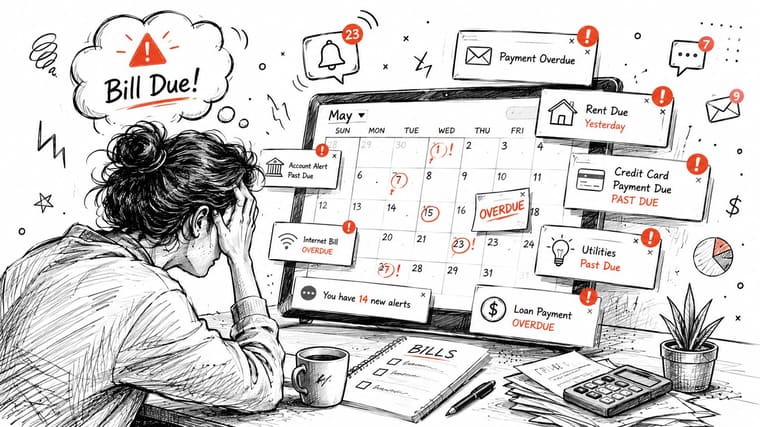
The deeper problem isn’t laziness. It’s visibility. 68% of consumers miss bills because they lack a clear, visual grasp of upcoming cash flow timing, and 45% prefer visual countdown widgets over traditional calendar alerts to reduce deadline anxiety, according to Buffalo Grove Bank’s overview of staying on top of bill payments.
That lines up with what many people already feel. Bills are rarely hard to understand one by one. They become stressful when several are floating around in your head at once.
The problem is cognitive load
A normal alert asks your brain to do too much:
- Remember context: What bill was that for?
- Estimate urgency: Is this due soon enough to handle now?
- Plan action: Should you open your bank app, wait for payday, or check the amount first?
That’s a lot for one tiny notification banner.
A good bill payment reminder doesn’t just tell you something is due. It keeps the deadline visible until you act on it.
Persistent beats interruptive
A visual reminder works differently. It doesn’t depend on catching you at the perfect moment. It sits there, unobtrusively, every time you access your phone.
That’s especially useful if you manage rent, utilities, subscriptions, or household expenses with uneven timing. If you also manage property-related finances, VerticalRent’s management software guide is a practical reference for seeing how structured systems reduce overlooked tasks in the first place.
For people who struggle with reminder blindness, visual systems also map well to attention challenges. The ideas in this guide to visual reminders for ADHD are useful because they focus on reducing friction instead of piling on more alerts.
Choosing Your Ideal Reminder Style
Not every reminder method is bad. The issue is fit. Some tools are fine for occasional due dates. Others work better when bills are recurring, easy to postpone, and mentally annoying.
Why standard alerts fade into the background
Text reminders work because they’re direct. In a field experiment, customers who received SMS reminders increased their credit card payments by 28% compared with a control group, as described in the OECD report on reminder experiments.
That doesn’t mean SMS is the perfect personal system. It means timely prompts matter. The trade-off is that texts, like calendar alerts, are still interruptive. They arrive, you react, and then they disappear.
If your real problem is forgetting after the first prompt, you need a method that stays in view.
Comparison of Bill Reminder Methods
| Method | Pros | Cons | Best For |
|---|---|---|---|
| Calendar events | Built into iPhone, easy to repeat monthly, can add alerts | Easy to dismiss, blends in with appointments, poor visibility between alerts | People with few bills and strong calendar habits |
| Banking app notifications | Tied to the account, useful when your bank supports bill features | Buried inside one app, limited customization, often easy to ignore | Users who already open their banking app daily |
| Basic reminder apps | Flexible lists, recurring tasks, sometimes location or time triggers | Still notification-heavy, often hidden after completion or snooze | People who like checklist-based systems |
| Visual Home or Lock Screen widgets | Persistent, glanceable, low mental effort, visible without opening apps | Requires a small setup step, works best when paired with one backup alert | Anyone who struggles with reminder blindness or deadline anxiety |
Here’s the practical breakdown I’d use.
- Choose calendar events if your bill routine is already stable and you pay as soon as an alert appears.
- Choose banking notifications if you want account-specific prompts and you reliably check that app.
- Choose a reminder app if you like tapping through task lists and marking items complete.
- Choose visual widgets if the main issue is that you stop seeing reminders after the first interruption.
Decision rule: If you’ve ever said, “I saw the reminder, I just didn’t act then forgot,” you don’t need more alerts. You need more visibility.
The strongest systems often combine methods. Use the widget for passive awareness. Use one final notification close to the due date for action.
How to Build a Visual Bill Countdown with Pretty Progress
A visual countdown works best when it’s simple enough to maintain every month. Don’t build a complicated automation first. Start with one bill you’re most likely to forget, such as rent, a credit card, or a utility payment.

Set up the countdown first
Create a new countdown and name it something plain and obvious. “Rent Due” is better than “Monthly admin.” “Visa Payment” is better than “Finance.”
Then set the due date and make it recurring if the bill repeats every month.
A clean setup usually includes:
- A specific title such as “Electric Bill” or “Internet Due”
- The actual due date so the timer reflects the deadline
- A monthly repeat schedule for recurring bills
- A simple design that’s easy to read at a glance
Avoid overdesigning it. High contrast and short labels win.
Add it where you’ll actually see it
The biggest advantage of a visual bill payment reminder is placement. Put the countdown somewhere that already intersects with your daily routine.
On iPhone, that usually means:
- Home Screen widget: Best for bills you need to keep in sight all month
- Lock Screen widget: Best for fast deadline checks without opening anything
- Apple Watch complication: Best for quick awareness during the day
The system sets itself apart from a normal reminder app. You’re no longer relying on a future interruption. You’re creating a persistent cue.
Text messaging is widely used because it’s efficient, with automated SMS averaging €0.14 per contact versus €0.90 for a manual call, according to Dialog Health’s reminder cost summary. A widget has a similar automation advantage for personal use, but once it’s on your screen, it keeps working as a visual cue without a new per-reminder action.
Make recurring bills low maintenance
After the first one works, build out the rest of your monthly list. Keep the naming consistent so scanning feels effortless.
A setup like this is easy to manage:
- Rent Due
- Water Bill
- Phone Bill
- Credit Card Payment
- Insurance Renewal
If you want an example of using repeating countdowns for monthly routines, this monthly countdown timer guide shows the same principle in a broader way.
The best reminder system is boring to maintain. If it takes too many taps every month, you’ll stop updating it.
One more practical point. Don’t put every bill on your screen at once if that creates clutter. Start with the one or two payments that create the most stress when they slip. Then expand only if the layout still feels calm.
Integrate Your Reminders Across Multiple Apps
A single visual reminder is strong. A layered system is stronger.
You don’t need a complicated stack of automations. You need one primary cue and one backup action path. That’s enough to catch forgetfulness without turning your phone into a siren.
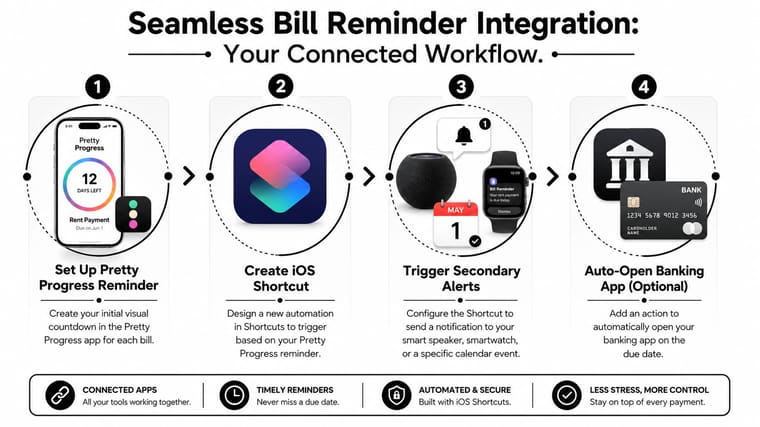
Use the widget as the primary cue
The widget handles awareness. It keeps the bill visible while you go through your normal day. That matters because best practice for payment reminders is to use multiple channels to increase visibility, and automated systems that do this can reduce severe payment delinquency by 21%, as explained in PayNearMe’s guide to automatic bill pay reminders.
For personal finance, “multiple channels” doesn’t have to mean corporate billing software. It can mean one visual countdown plus one traditional alert.
Add one action prompt near the due date
Set a calendar alert for roughly 24 hours before the deadline. Keep it short and specific.
Good examples:
- Pay electric bill tonight
- Submit rent before noon tomorrow
- Credit card due, pay full balance if ready
This alert has one job. It shouldn’t explain the whole situation. The widget has already done the ongoing memory work.
Use visibility for remembering and alerts for acting. Don’t ask one tool to do both jobs.
Connect to your banking flow
If you use iPhone, iOS Shortcuts can shave off friction. You can create a shortcut that opens your banking app, opens a note with account details, or launches a calendar event tied to the bill.
A useful flow looks like this:
- See the countdown on your Home or Lock Screen
- Tap your prepared shortcut
- Open the right banking or payment app
- Pay or schedule the payment immediately
You can also build a shortcut that opens a checklist with the exact steps for manual payments. That helps if some bills require logging in, checking the amount, and confirming the account.
If you want another simple example of how countdowns fit into daily workflows, this simple countdown app article gives good ideas for keeping reminders visible without overcomplicating them.
The main trade-off is this. More integration can reduce friction, but too much setup can make the system fragile. Start with one shortcut tied to one frustrating bill. If you use it, keep it. If you don’t, simplify.
Best Practices for a Bulletproof Bill Payment System
The difference between a decent bill payment reminder and a reliable one usually comes down to margin. Tiny adjustments make the whole system feel safer.
Build in a small safety margin
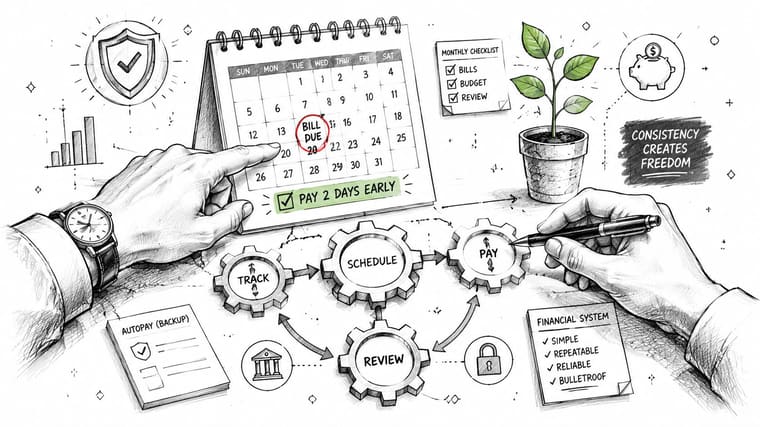
My favorite rule is simple. Set your visual deadline earlier than the actual deadline.
If a bill is due on the 15th, set the countdown to end on the 13th. That gives you breathing room for weekends, bank processing delays, low-energy days, or the classic “I’ll do it after dinner” mistake.
This pairs well with a proven reminder rhythm. Automated reminder workflows can improve collection rates by 20 to 30%, with an effective cadence starting 7 days before the due date, reinforcing on the due date, and escalating 3 days after, based on Paystand’s write-up on automated payment collection reminders. For personal use, you can copy the spirit of that cadence without making it feel aggressive: visible a week out, active reminder near the due date, cleanup if you still haven’t paid.
Use categories so your brain works less
Color and grouping matter more than people think. If every widget looks the same, your brain has to read each one from scratch.
Try a category system like this:
- Housing bills: One consistent color
- Utilities: A second color
- Debt payments: A third color
- Shared household bills: A fourth color
You can also reserve autopay for fixed, predictable charges and use manual reminders for bills that vary. That keeps your attention focused where it’s needed.
If you manage bills with a partner, roommate, or family, it also helps to standardize who owns what. For broader ideas on how households coordinate family expenses, that guide is a useful companion read.
The less interpretation your system requires, the more likely you are to trust it when life gets noisy.
Frequently Asked Questions
How do I handle bills with changing due dates
Use a two-part approach. Keep a recurring reminder to review the bill, then update the countdown when the statement posts.
For example, if a credit card due date shifts slightly or the amount changes, set a repeating “Check card statement” reminder earlier in the cycle. Once the exact date is available, adjust the visual countdown. Variable bills usually fail when people try to automate everything too early.
What if I share bills with a partner or roommate
Assign clear ownership. One person should be responsible for triggering payment, even if both contribute money.
A shared notes app or household checklist helps, but the rule matters more than the app. If both people assume the other handled it, reminders won’t save you. If one person owns the task and the other can see the visual deadline, the system stays clear.
Why does this work especially well for ADHD
Visual reminders reduce the need to hold deadlines in working memory. That’s the practical advantage.
A standard alert appears at one moment and asks for immediate task switching. A persistent widget supports repeated re-orientation throughout the day. You don’t have to remember the bill from scratch each time. You just notice it again. For many people with ADHD, that difference is huge because it lowers activation friction.
Short labels also help. “Pay gas bill” works better than “Review monthly household utility obligations.” The more direct the wording, the easier it is to act.
Is it safe to link reminders to a banking app
It can be, as long as you keep the reminder layer separate from sensitive account details when possible.
A good baseline approach looks like this:
- Use app shortcuts, not stored credentials: Let the shortcut open the bank app, then authenticate inside the bank’s own security flow.
- Avoid putting account numbers in widget names: Keep labels simple and non-sensitive.
- Use the official banking app: Don’t rely on random third-party login tools for core payments.
- Lock your phone properly: Face ID, Touch ID, or a strong passcode matters if bill shortcuts live on your device.
In most setups, the reminder system doesn’t need direct financial access. It only needs to point you toward the next action.
If you want a calmer way to stay ahead of bills, Pretty Progress is worth trying. It turns due dates into visual countdowns you can keep on your Home Screen, Lock Screen, Apple Watch, and more, so your reminders stay visible without becoming one more stream of notifications.





